
Уводзіны
This manual provides instructions for the proper use and maintenance of your Wireless Gear True Wireless Bluetooth 5.0 Mini Earbuds. Please read this manual thoroughly before using the product to ensure optimal performance and longevity.
Што ў скрынцы:
- True Wireless Mini Earbuds (Left and Right)
- Зарадная база USB
Інфармацыя па бяспецы
- Do not expose the earbuds or charging base to extreme temperatures, moisture, or corrosive materials.
- Не кідайце прыладу і не падвяргайце яе моцным ударам.
- Не спрабуйце разбіраць або мадыфікаваць выраб. Гэта прывядзе да анулявання гарантыі і можа прывесці да пашкоджанняў.
- Захоўваць у месцах, недаступных дзецям.
- Use only the provided charging base.
- Працяглае праслухоўванне на высокім узроўні гучнасці можа пашкодзіць слых. Адрэгулюйце гучнасць да бяспечнага ўзроўню.
Прадукт скончаныview
Familiarize yourself with the components of your True Wireless Mini Earbuds.

Выява: Крупны план view of a single Wireless Gear earbud, highlighting the touch control button on its outer surface.
- Навушнікі: Left and Right earbuds with built-in microphones and touch controls.
- Зарадная база USB: Compact base for charging the earbuds, featuring an integrated USB plug.
Настройка
1. Зарадка навушнікаў
Before first use, fully charge the earbuds. The charging base provides additional hours of playback.
- Insert both earbuds into the charging base. Ensure they are seated correctly.
- Plug the integrated USB connector of the charging base into any standard USB power source (e.g., computer USB port, USB wall adapter).
- The indicator lights on the earbuds will show charging status (refer to product packaging for specific light behavior if available).
- A full charge provides approximately 1.5 hours of playtime from the earbuds, with the charging base offering an additional 8 hours.
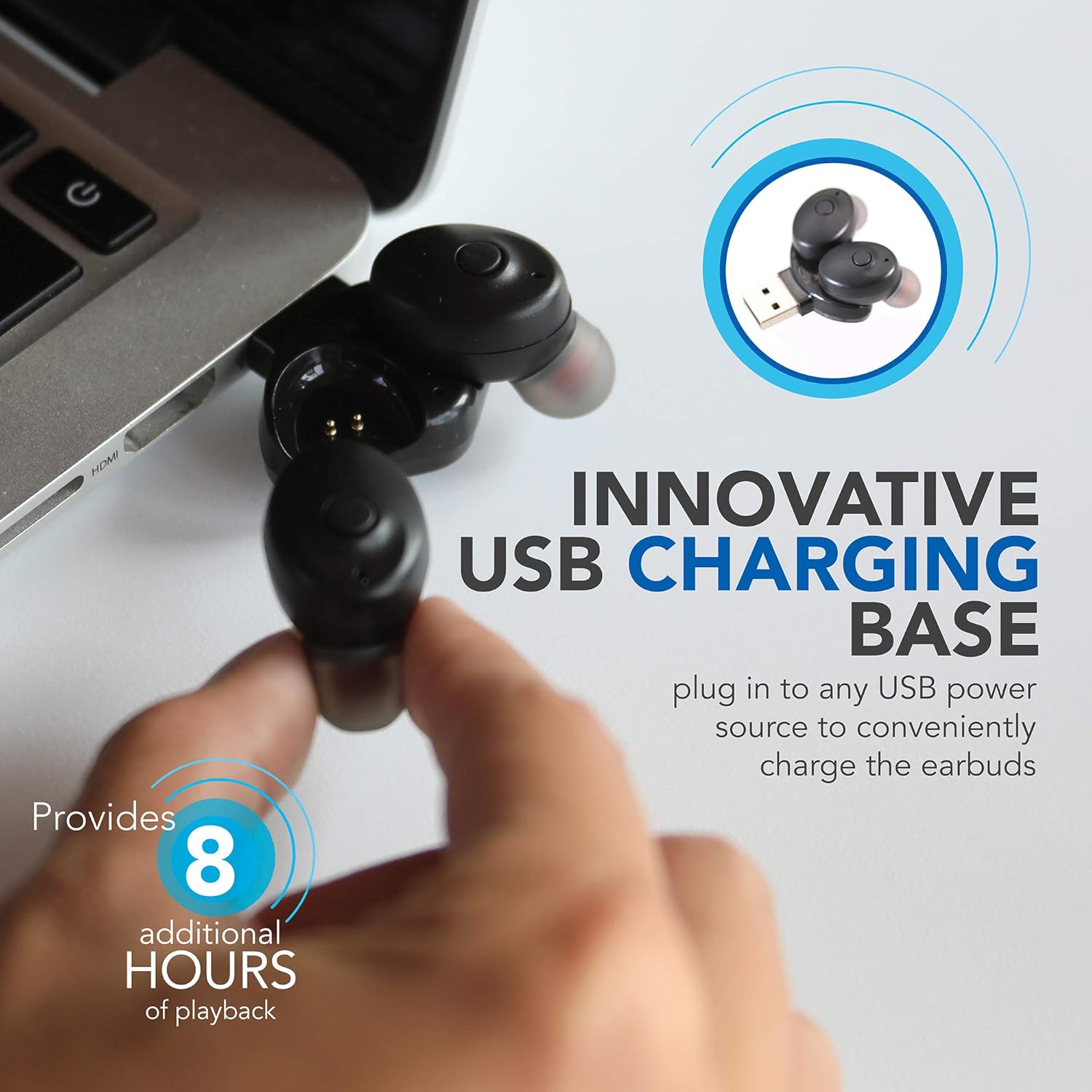
Image: Wireless Gear earbuds placed in their USB charging base, which is plugged into a laptop's USB port.
2. Спалучэнне з прыладай
The earbuds feature auto-pair and auto-power on functionality for seamless connection.
- Пераканайцеся, што навушнікі зараджаны.
- Remove both earbuds from the charging base. They will automatically power on and enter pairing mode.
- On your smartphone, MP3 player, tablet, or laptop, navigate to the Bluetooth settings.
- Пошук available devices and select "Wireless Gear Earbuds" (or similar name) from the list.
- Once connected, you will hear an audible confirmation, and the indicator lights on the earbuds will change (refer to product packaging for specific light behavior if available).
- The earbuds will automatically reconnect to the last paired device when removed from the charging base, if Bluetooth is enabled on the device.

Image: Wireless Gear earbuds positioned next to a smartphone, illustrating the pairing process.
Інструкцыя па эксплуатацыі
Уключэнне/выключэнне харчавання
- Уключэнне: Remove the earbuds from the charging base. They will automatically power on.
- Выключэнне: Place the earbuds back into the charging base. They will automatically power off and begin charging.
Сэнсарныя элементы кіравання
Each earbud features a touch-sensitive area for controlling various functions. The specific functions may vary slightly between left and right earbuds or depend on the operating system of your connected device.
- Прайграванне/прыпыненне музыкі: Адзін націск на любы навушнік.
- Наступная песня: Double tap on the right earbud (or specific earbud as per device).
- Папярэдняя песня: Double tap on the left earbud (or specific earbud as per device).
- Адказ/завяршэнне выкліку: Адно націсканне на любы навушнік падчас уваходнага або актыўнага званка.
- Адхіліць выклік: Падчас уваходнага званка націсніце і ўтрымлівайце любы навушнік.
- Activate Voice Assistant (Siri for iOS): Тройчы націсніце на любы навушнік.

Image: A woman smiling while wearing a Wireless Gear earbud, demonstrating comfortable fit and discreet design.
Здзяйсненне і прыём званкоў
The built-in microphone allows for hands-free calling. Intelligent noise reduction ensures clear communication.
- Калі паступае званок, націсніце на любы з навушнікаў адзін раз, каб адказаць.
- Каб завяршыць званок, адзін раз дакраніцеся да любога навушніка.
- Каб адхіліць уваходны званок, націсніце і ўтрымлівайце любы з навушнікаў.
Тэхнічнае абслугоўванне
Уборка
Рэгулярная ўборка дапамагае падтрымліваць якасць гуку і гігіену.
- Gently wipe the earbuds and charging base with a soft, dry, lint-free cloth.
- Не выкарыстоўвайце абразіўныя ачышчальнікі, спірт або хімічныя растваральнікі.
- Periodically check the speaker mesh for debris. Use a soft brush or cotton swab to carefully remove any buildup.

Выява: Крупны план view of the speaker mesh on a Wireless Gear earbud, showing fine details.
Захоўванне
- When not in use, store the earbuds in their charging base to protect them and keep them charged.
- Захоўвайце ў прахалодным, сухім месцы, удалечыні ад прамых сонечных прамянёў і экстрэмальных тэмператур.
Ліквідацыю непаладак
Калі ў вас узніклі праблемы з навушнікамі-ўкладышамі, звярніцеся да наступных распаўсюджаных рашэнняў:
| праблема | Магчымае рашэнне |
|---|---|
| Навушнікі не ўключаюцься. | Ensure earbuds are charged. Place them in the charging base and connect to a USB power source for at least 30 minutes. |
| Навушнікі не спалучаюцца з прыладай. |
|
| Працуе толькі адзін навушнік. |
|
| Дрэнная якасць гуку або перабоі ў падключэнні. |
|
Тэхнічныя характарыстыкі
| Асаблівасць | Дэталь |
|---|---|
| Тэхналогія падлучэння | Bluetooth 5.0 |
| Тэхналогія бесправадной сувязі | Bluetooth |
| Уключаныя кампаненты | Навушнікі, зарадная прылада |
| Канкрэтнае выкарыстанне прадукту | Home, Sports and Exercise, Travel |
| Сумяшчальныя прылады | Phones, MP3 players, Tablets, Laptops |
| Тып кіравання | Сэнсарнае кіраванне |
| Функцыя кабеля | Без кабеля |
| Тэрмін службы батарэі (навушнікі) | Да 1.5 гадзін |
| Additional Battery Life (Charging Base) | 8 гадзіны |
| Агульны тэрмін службы батарэі | 9.5 Hours (Earbuds + Charging Base) |
| Дыяпазон Bluetooth | 10 метра (33 футаў) |
| Форма навушніка | Закруглены кончык |
| Вага прадмета | 1.44 унцыі |
| Вытворца | ESI Wireless Accessories |
| ASIN | B08FF73J9X |
| GTIN/UPC | 680988106811 |
Інфармацыя аб гарантыі
No specific warranty information is provided in the product details. Please refer to the product packaging or contact the retailer/manufacturer directly for warranty terms and conditions.
Падтрымка
For further assistance or technical support, please contact Wireless Gear customer service. Contact details are typically found on the product packaging or the manufacturer's official webсайт.