
Beatfoxx SDH-340/32
Beatfoxx SDH-340/32 Silent Disco V2 Set
Кіраўніцтва карыстальніка
1. Уводзіны
Thank you for choosing the Beatfoxx SDH-340/32 Silent Disco V2 Set. This manual provides essential information for the proper setup, operation, and maintenance of your wireless stereo headphones and charging system. Please read this manual thoroughly before use to ensure optimal performance and longevity of your product.
Важная заўвага па сумяшчальнасці: The Silent Disco V2 series is designed for exclusive compatibility with other Beatfoxx Silent Disco V2 devices. It is not compatible with first-generation Silent Disco products or the Silent Guide series. When purchasing additional components, ensure they explicitly carry the "V2" designation.
2. Змесціва ўпакоўкі
Your Beatfoxx SDH-340/32 Silent Disco V2 Set includes the following components:
- 32 x Beatfoxx SDH-340 V2 Wireless Stereo Headphones
- 2 x Multi-Headphone Charging System (consisting of 1 power supply and 4 distribution cables each)

Image: The Beatfoxx SDH-340 V2 wireless stereo headphones shown with the included charging cables and power adapter.
3. Прадукт скончыўсяview
3.1 Асаблівасці навушнікаў
- Wireless stereo headphones with 3 selectable channels.
- LED lighting indicates the currently selected channel (blue, red, green).
- Tactile channel selection switch.
- Рэгулятар гучнасці.
- Перамыкач уключэння/выключэння.
- LED lighting can be switched off.
- 3.5 mm stereo jack input for wired audio sources.
- Adjustable, elastic headband for comfortable fit.
- Very soft, rotatable ear pads for high wearing comfort.
- Integrated lithium-polymer battery (600 mAh).
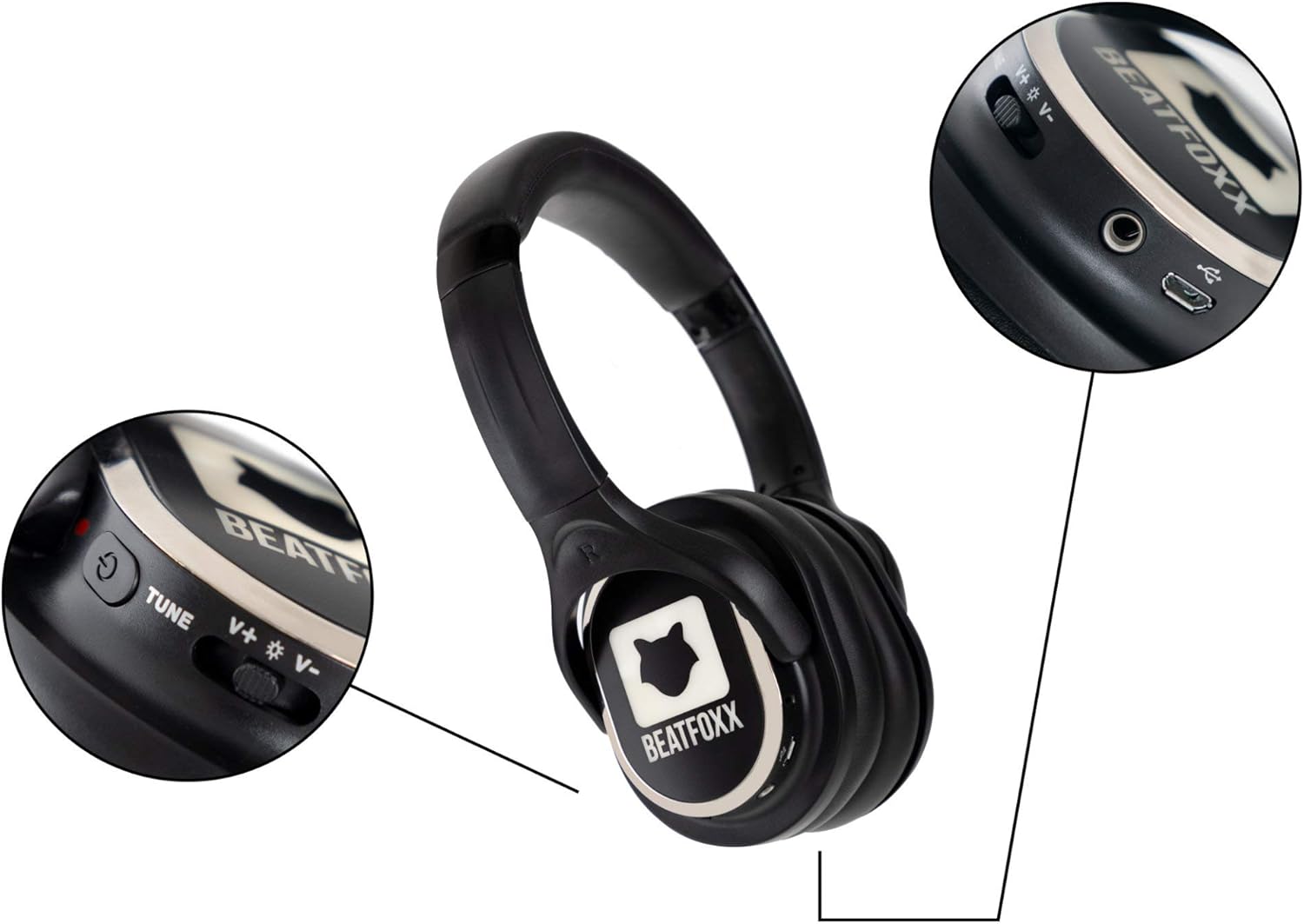
Выява: Падрабязны view of the Beatfoxx SDH-340 V2 headphone's right earcup, highlighting the power switch, volume controls, channel tune button, and charging port.
3.2 Charging System Features
- Charging system includes 1 power supply and 4 distribution cables.
- Allows simultaneous charging of up to 16 headphones with a single power outlet.
- USB connection enables charging via PC or laptop.

Image: The components of the Beatfoxx charging system, including the power adapter and various charging cables, demonstrating its versatility.
4. Настройка
4.1 Зарадка навушнікаў
Before first use, fully charge all headphones. The integrated lithium-polymer battery provides an operating time of 8 to 10 hours, depending on usage and volume level. Charging takes approximately 4 hours.
- Падключыце блок харчавання да насценнай разеткі.
- Connect the distribution cables to the power supply.
- Plug the micro-USB connectors from the distribution cables into the charging port on each headphone.
- During charging, red and green LEDs on the headphones will indicate the charging status. Refer to the headphone's LED indicators for full charge status.

Image: A visual representation of the Beatfoxx headphones connected to various power sources (PC, power bank, wall adapter) for charging via USB cables.

Image: A diagram showing how multiple Beatfoxx headphones can be charged simultaneously using the provided charging system, connecting up to 16 headphones to a single power source.
4.2 Падключэнне да перадатчыка
The headphones receive a clear audio signal from any Beatfoxx SDT-40 Silent Disco V2 transmitter within a range of approximately 150 meters. UHF technology ensures clear, noise-free transmission.
- Ensure your Beatfoxx Silent Disco V2 transmitter is powered on and transmitting audio.
- Power on the headphones using the On/Off switch.
- Select the desired channel directly on the headphones using the channel selection switch. The headphone's LED lighting will indicate the currently selected channel (blue, red, or green) to match the transmitter's channel.

Image: Individuals at an outdoor event wearing Beatfoxx Silent Disco headphones, demonstrating their use in a group setting with a DJ.
5. Інструкцыя па эксплуатацыі
5.1 Уключэнне/выключэнне
Locate the On/Off switch on the headphone. Slide the switch to the "On" position to power on the headphones. Slide it to the "Off" position to power them off.
5.2 Выбар канала
The headphones support up to 3 distinct channels. Use the tactile channel selection switch on the headphone to cycle through the available channels. The LED lighting on the headphones will change color (blue, red, or green) to indicate the active channel, corresponding to the transmitter's channel.
5.3 Рэгуляванне гучнасці
Adjust the listening volume using the dedicated volume control located on the headphone. Rotate the control to increase or decrease the volume to your preferred level.
5.4 Правадное падключэнне (неабавязкова)
The headphones feature a 3.5 mm stereo jack input, allowing them to be used with cable-bound audio sources such as smartphones, tablets, or laptops, even without a wireless transmitter.
- Connect one end of a 3.5mm audio cable (not included) to the headphone's 3.5mm jack.
- Connect the other end of the cable to the audio output of your device.
- Ensure the headphones are powered on for optimal sound, though passive listening may be possible.

Image: A woman wearing Beatfoxx headphones, connected via a cable to a smartphone, illustrating the wired connection capability.
6. Тэхнічнае абслугоўванне і догляд
- Уборка: Use a soft, dry cloth to clean the headphones and charging system. Do not use abrasive cleaners or solvents.
- захоўванне: Store the headphones and charging system in a cool, dry place when not in use. Avoid extreme temperatures and direct sunlight.
- Сыход за батарэяй: Каб падоўжыць тэрмін службы батарэі, пазбягайце частай поўнай разрадкі навушнікаў. Пры працяглым захоўванні зараджайце батарэю прыкладна да 50% кожныя некалькі месяцаў.
- Воданепранікальнасць: The product is water-resistant, but not waterproof. Avoid submerging the headphones in water or exposing them to heavy rain.
7. Выпраўленне непаладак
- Няма гуку:
- Пераканайцеся, што навушнікі ўключаны і зараджаны.
- Verify the selected channel on the headphones matches the transmitter's channel.
- Check the volume level on both the headphones and the audio source/transmitter.
- Ensure the transmitter is powered on and receiving an audio signal.
- Poor Signal/Interference:
- Ensure headphones are within the 150m range of the transmitter.
- Minimize obstacles between the headphones and the transmitter.
- Check for other strong RF signals in the area that might cause interference.
- Навушнікі не зараджаюцца:
- Verify the charging cables are securely connected to both the headphones and the power source.
- Ensure the power adapter is properly plugged into a working outlet.
- Check if the charging indicator LEDs on the headphones are active.
8. Тэхнічныя характарыстыкі
| Асаблівасць | Спецыфікацыя |
|---|---|
| мадэль | SDH-340 V2 |
| Тэхналогія падлучэння | Wireless (RF), Wired (3.5 mm jack) |
| Тэхналогія цюнэра | УВЧ |
| Колькасць каналаў | 3 |
| Дыяпазон частот | 20 - 15,000 Гц |
| Суадносіны сігнал/шум (SNR) | >80 дБ |
| Агульныя гарманічныя скажэнні (THD) | <1% |
| Дыяметр дынаміка | 38mm mylar diaphragm |
| Тып батарэі | Integrated Lithium-Polymer (600 mAh) |
| Час працы ад батарэі | 8 - 10 hours (usage dependent) |
| Час зарадкі акумулятара | Прыбл. 4 гадзіны |
| Вага навушнікаў | 225 г |
| Матэрыял | Штучная скура |
| Узровень воданепранікальнасці | Водатрывалы |
9. Гарантыя і падтрымка
Beatfoxx products are designed for reliability and performance. For information regarding warranty coverage, technical support, or service, please refer to the warranty card included with your product or visit the official Beatfoxx webсайт. Захоўвайце чэк аб куплі як пацвярджэнне пакупкі ў выпадку любых гарантыйных прэтэнзій.
Ask a question about this manual
Ask about setup, troubleshooting, compatibility, parts, safety, or missing instructions. Manuals+ will review the question and use this page’s manual context to help answer it.