
CalDigit 500933
Кіраўніцтва карыстальніка CalDigit Thunderbolt 4 Element Hub
Model: 500933 | Brand: CalDigit
1. паview
The CalDigit Thunderbolt 4 Element Hub is a versatile and powerful connectivity solution designed to expand the capabilities of your Thunderbolt 4, Thunderbolt 3, USB4, and USB-C enabled computers and tablets. It provides multiple high-speed ports for data transfer, display connectivity, and charging, streamlining your workspace and enhancing productivity.
This hub is engineered to deliver full Thunderbolt capabilities, ensuring seamless integration and optimal performance with a wide range of devices, including Apple Mac and Windows PC systems.
2. Асноўныя магчымасці
- Універсальная сумяшчальнасць: Works with Thunderbolt 4, Thunderbolt 3, USB4, and USB-C computers, including Apple M-series Macs, Intel-based Macs, Windows PCs, Chrome OS devices, iPhone 15 Pro, and compatible tablets.
- 4x Thunderbolt 4 (40Gb/s) Ports: Ideal for high-resolution displays and high-speed NVMe SSD storage devices.
- 60W Host Charging: Provides up to 60W of power to charge your host device (laptop, tablet).
- 15W Downstream Thunderbolt 4 Power: Each downstream Thunderbolt 4 port provides 15W of power for peripheral devices.
- High-Resolution Display Support: Supports single 8K 60Hz, dual 4K 60Hz, or 1440p 240Hz extended displays.
- 4x USB 3.2 Gen 2 (10Gb/s) Type-A Ports: Perfect for connecting accessories like keyboards, mice, and external storage devices, each providing 7.5W of power.
- Offline Charging: All 8 ports can be used simultaneously for offline charging, even when not connected to a computer.
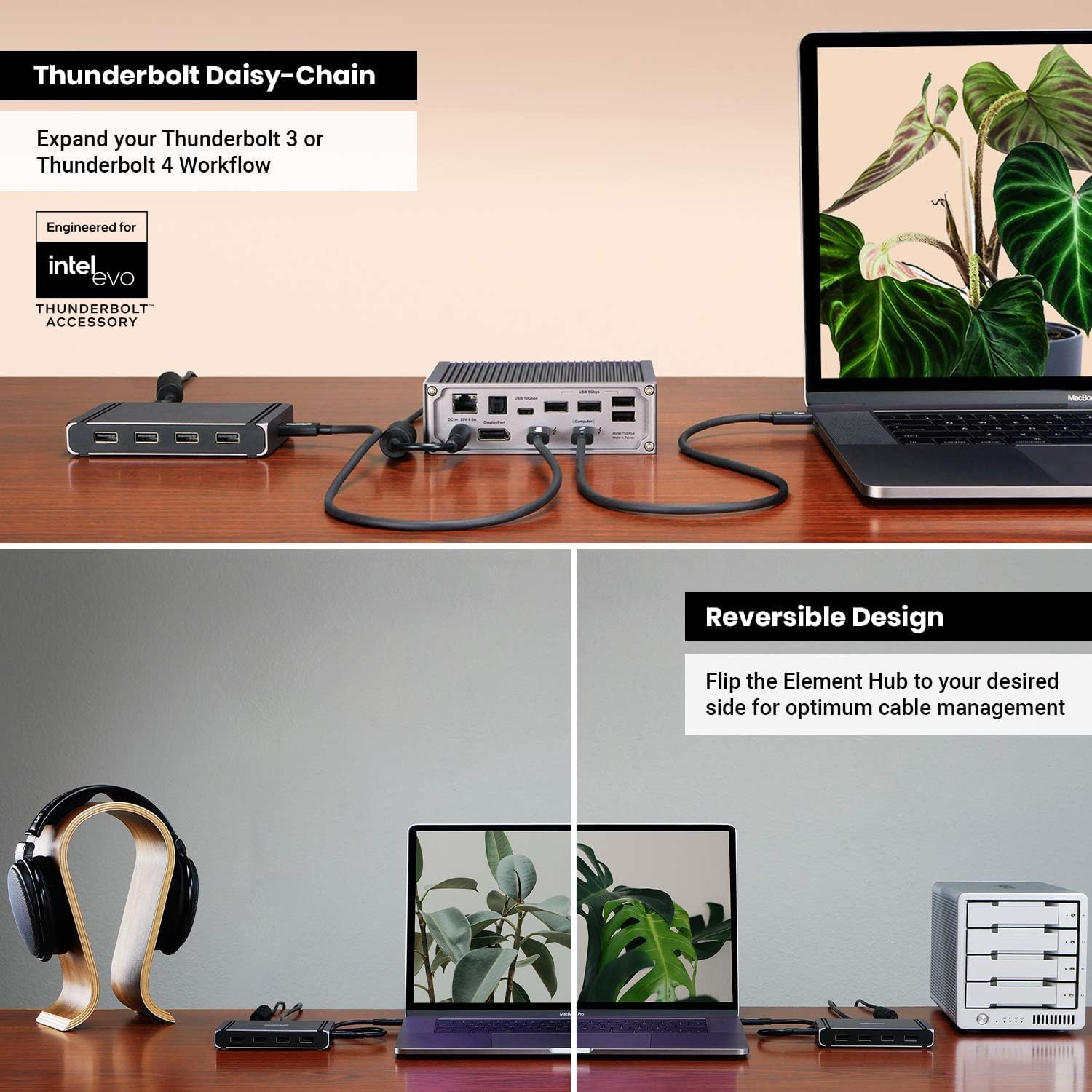
- Thunderbolt Daisy-Chain: Allows for daisy-chaining of Thunderbolt, USB4, and USB-C devices.
- Compact and Reversible Design: Small footprint with a reversible design for optimal cable management.
Малюнак 1: Закончанаview of CalDigit Element Hub's key features including port count, data speeds, and display capabilities.
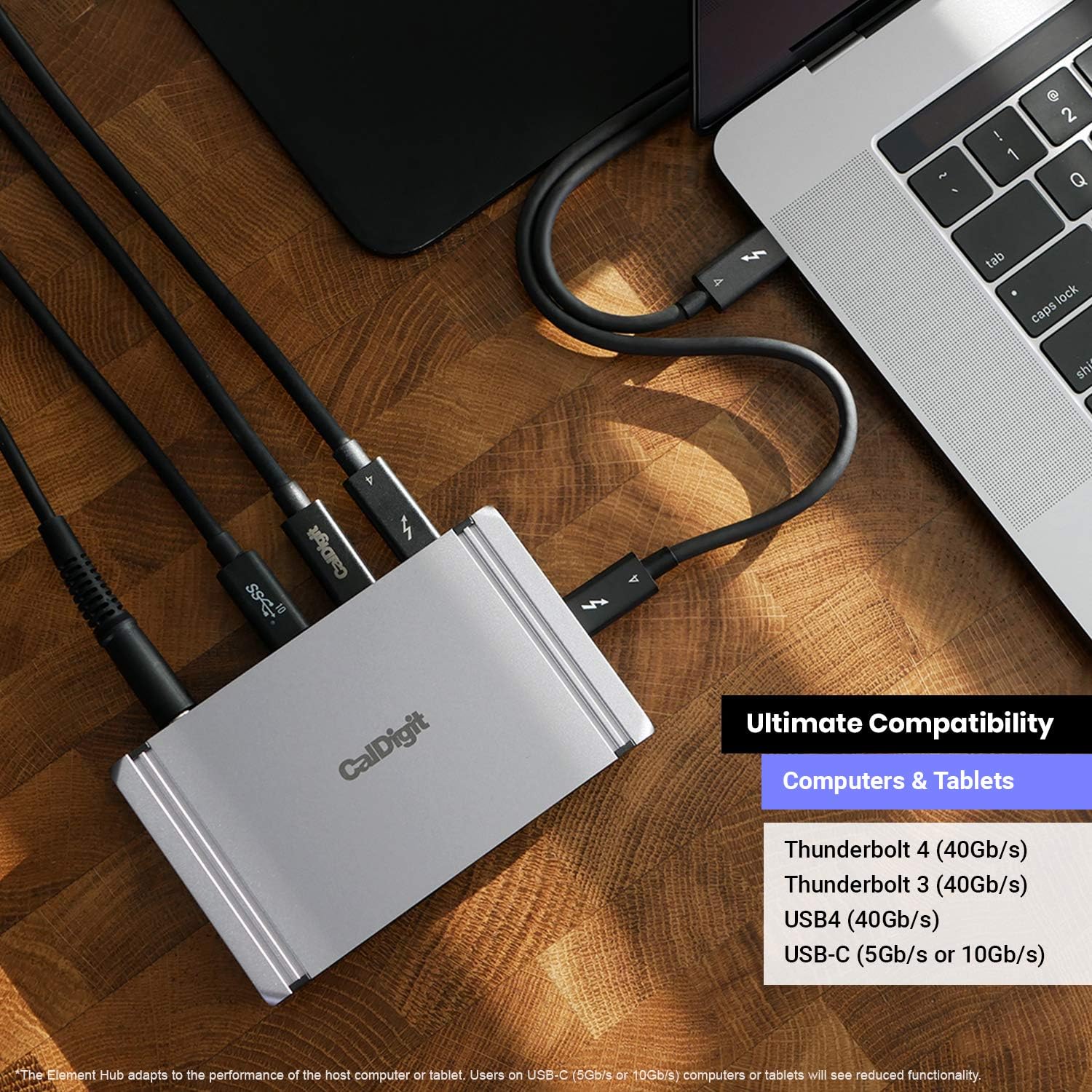
Figure 2: The compact size of the CalDigit Element Hub, ideal for any desk setup.
3. Кіраўніцтва па наладцы
3.1. Змесціва ўпакоўкі
- 1 х канцэнтратар Thunderbolt 4 Element
- 1 х кабель Thunderbolt 4 0.8 м (пасіўны)
- 2 х гумовыя паласы для ног
- 1 х блок харчавання (150 Вт)
- 1 х Шнур харчавання
3.2. Мінімальныя сістэмныя патрабаванні
- macOS 11 (Big Sur) or above
- Windows 10 або вышэй
- Планшэт Windows
- Thunderbolt 4 or Thunderbolt 3 Computer
- USB-C (USB 4) Computer or USB-C (USB 3.1) Computer
- iPadOS, iPad Pro, iPad Air (4th Gen)
- Chrome OS, USB-C ChromeBook
3.3. Падключэнне канцэнтратара
- Connect the provided 150W power supply to the 'DC in' port on the CalDigit Element Hub and plug it into a wall outlet.
- Using the included 0.8m Thunderbolt 4 cable, connect one end to the Thunderbolt 4 port on the Element Hub and the other end to a Thunderbolt 4, Thunderbolt 3, USB4, or USB-C port on your host computer or tablet.
- The hub is now ready for use. You can begin connecting your peripherals, displays, and storage devices to the available ports.

Figure 3: Demonstrating the ultimate compatibility of the Element Hub with various devices and adapters.

Малюнак 4: падрабязна view of the CalDigit Element Hub's ports and included cables for connection.
4. Інструкцыя па эксплуатацыі
4.1. Энергазабеспячэнне
The Element Hub provides up to 60W of power to charge your connected host device. Each downstream Thunderbolt 4 / USB4 port delivers 15W (5V/3A), and each USB-A port provides 7.5W (5V/1.5A) for your peripherals. The hub can also charge devices even when not connected to a computer, utilizing all 8 ports for offline charging.

Figure 5: The Element Hub functions as a powerful offline charging station for multiple devices.
4.2. Display Connectivity
The Element Hub supports high-resolution displays, including single 8K 60Hz, dual 4K 60Hz, or 1440p 240Hz extended displays. USB-C video adapters can be used with the downstream Thunderbolt 4 ports to convert to HDMI or DisplayPort. Note that monitor compatibility and maximum resolution depend on your host computer or tablet's capabilities.

Figure 6: The Element Hub supports connecting dual 4K 60Hz monitors for an expanded workspace.

Figure 7: The Element Hub extends connectivity for iPad Pro, iPad Air (4th Gen), and Windows Tablets.
4.3. Перадача дадзеных
With four Thunderbolt 4 (40Gb/s) ports and four USB 3.2 Gen 2 (10Gb/s) Type-A ports, the Element Hub facilitates blazing-fast data transfer speeds. This is ideal for connecting high-speed NVMe SSDs, external hard drives, and other data-intensive peripherals.

Figure 8: Connect blazing fast SSDs to the Element Hub for rapid data access.
4.4. Thunderbolt Daisy-Chaining
Thunderbolt and USB4 laptop users can daisy-chain additional Thunderbolt, USB4, and USB-C devices to the Element Hub. Users on non-Thunderbolt and USB4 hosts (e.g., USB-C computers with USB 3.2, USB 3.1) are able to daisy-chain USB-C devices only. A Thunderbolt or USB4 connection is required to daisy-chain Thunderbolt devices.

Figure 9: Expand your Thunderbolt 3 or Thunderbolt 4 workflow with daisy-chaining.
5. Тэхнічнае абслугоўванне і догляд
- Keep the hub in a clean, dry environment away from direct sunlight and extreme temperatures.
- Пазбягайце кантакту прылады з вадкасцямі або празмернай вільгаццю.
- Працірайце вонкавыя паверхні мяккай сухой тканінай. Не выкарыстоўвайце агрэсіўныя хімікаты або абразіўныя матэрыялы.
- Забяспечце належную вентыляцыю вакол ступіцы, каб прадухіліць перагрэў.
6. Выпраўленне непаладак
6.1. Распаўсюджаныя праблемы і рашэнні
- Няма харчавання/Індыкатар не гарыць: Ensure the power adapter is securely connected to both the hub and a working power outlet.
- Прылада не распазнана: Try disconnecting and reconnecting the Thunderbolt cable to your host computer. Ensure your computer's operating system is up to date.
- Display Issues (No Signal/Incorrect Resolution): Verify that your display cables are securely connected. Check your computer's display settings. Ensure your host computer supports the desired display configuration (e.g., dual 4K). Some Windows PC manufacturers may limit display functionality over Thunderbolt 3/USB-C.
- Павольная хуткасць перадачы дадзеных: Ensure you are using the provided Thunderbolt 4 cable. Verify that your connected devices (e.g., SSDs) support the expected speeds. Performance may vary based on host bandwidth.
- Перарывістае падключэнне: Check all cable connections. Ensure no excessive strain is placed on the cables or ports.
For further assistance, please refer to the CalDigit support webсайт або звярніцеся ў службу падтрымкі кліентаў.
7. Тэхнічныя характарыстыкі
| Атрыбут | Каштоўнасць |
|---|---|
| Марка | CalDigit |
| Нумар мадэлі тавару | 500933 |
| Апаратная платформа | Мак, ПК |
| Аперацыйная сістэма | Chrome OS, Windows 10, iPad OS |
| Вага прадмета | 1.91 фунта (0.87 кг) |
| Памеры прадукту | 4.48 х 2.75 х 0.7 цалі (114 х 70 х 18 мм) |
| Колер | Чорны, серабрысты |
| Абсталяванне інтэрфейсу | Thunderbolt, USB, USB тыпу C |
| Асаблівасць | 4x performance of traditional USB-C hubs, Thunderbolt 4 technology |
| Сумяшчальныя прылады | Keyboards, Tablets |
7.1. Display Compatibility Matrix

Figure 10: Detailed display compatibility matrix for different host systems and resolutions.
8. Гарантыя і падтрымка
CalDigit products typically come with a limited warranty. For specific warranty terms, registration, and technical support, please visit the official CalDigit website. You can find detailed FAQs, driver downloads, and contact information for customer service there.
For the most up-to-date information and assistance, please refer to the manufacturer's official support channels.