
DTVANE DMB 8800A
DMB-8800A Premium H.264 High Profile HDMI AV with WiFi RTSP Video Streaming Encoder IPTV Live Streaming
Марка: DTVANE | мадэль: DMB 8800A
1. Уводзіны
The DTVANE DMB-8800A is a high-performance H.264/AVC video streaming encoder designed for professional IPTV and live streaming applications. It supports multiple video inputs including HDMI and CVBS, and outputs streams over IP using various protocols such as RTSP, HTTP, UDP, and RTMP. This device is ideal for broadcasting, surveillance, and other scenarios requiring reliable and high-quality video encoding and distribution.
This manual provides detailed instructions for setting up, operating, and maintaining your DMB-8800A encoder, ensuring optimal performance and longevity.
2. Асноўныя магчымасці
- Універсальнасць уваходу: Equipped with 1 HDMI input and 2 CVBS inputs for diverse source compatibility.
- Robust IP Output: Supports TS over IP output (1000M) with HTTP, UDP, RTSP, RTMP, and ONVIF protocols.
- Падтрымка HDCP: Compatible with High-bandwidth Digital Content Protection for secure content transmission.
- Multi-Stream Capability: Capable of outputting up to 4 TS over IP streams from each HDMI/CVBS input simultaneously.
- Optimized Streaming: Delivers low bitrate streams with high-quality image retention.
- Бесправаднае падключэнне: Integrated Wi-Fi support for flexible network deployment.
- Кросплатформенная сумяшчальнасць: Supports simultaneous display on multiple devices and is compatible with Windows XP/VISTA/SERVER2003/SERVER2008/WIN7 (32/64-bit) and LINUX operating systems.
3. Кампаненты і інтэрфейсы прадукту
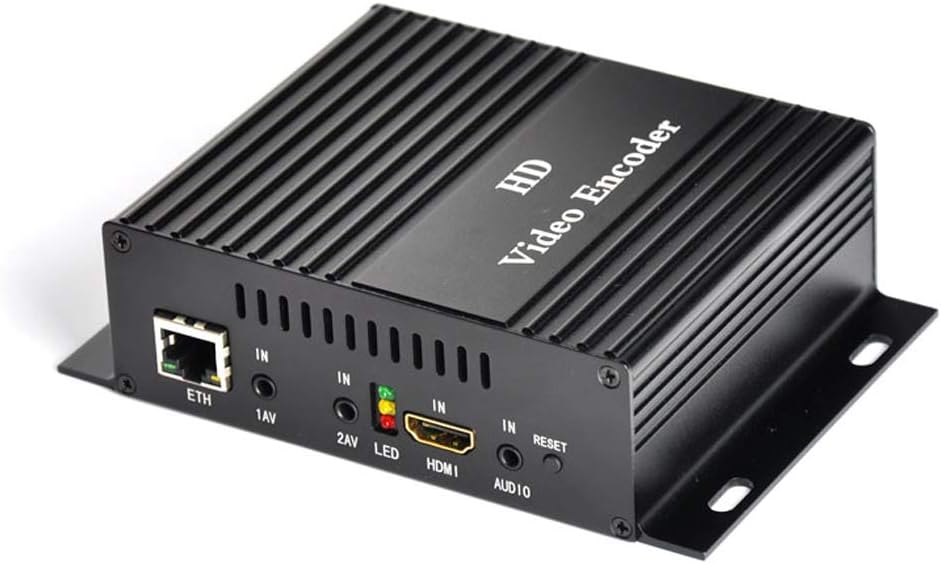
Малюнак 3.1: Фронт view of the DMB-8800A Video Encoder. This image displays the compact design and the primary input/output ports on the front panel, including Ethernet, AV inputs, HDMI, and audio input.
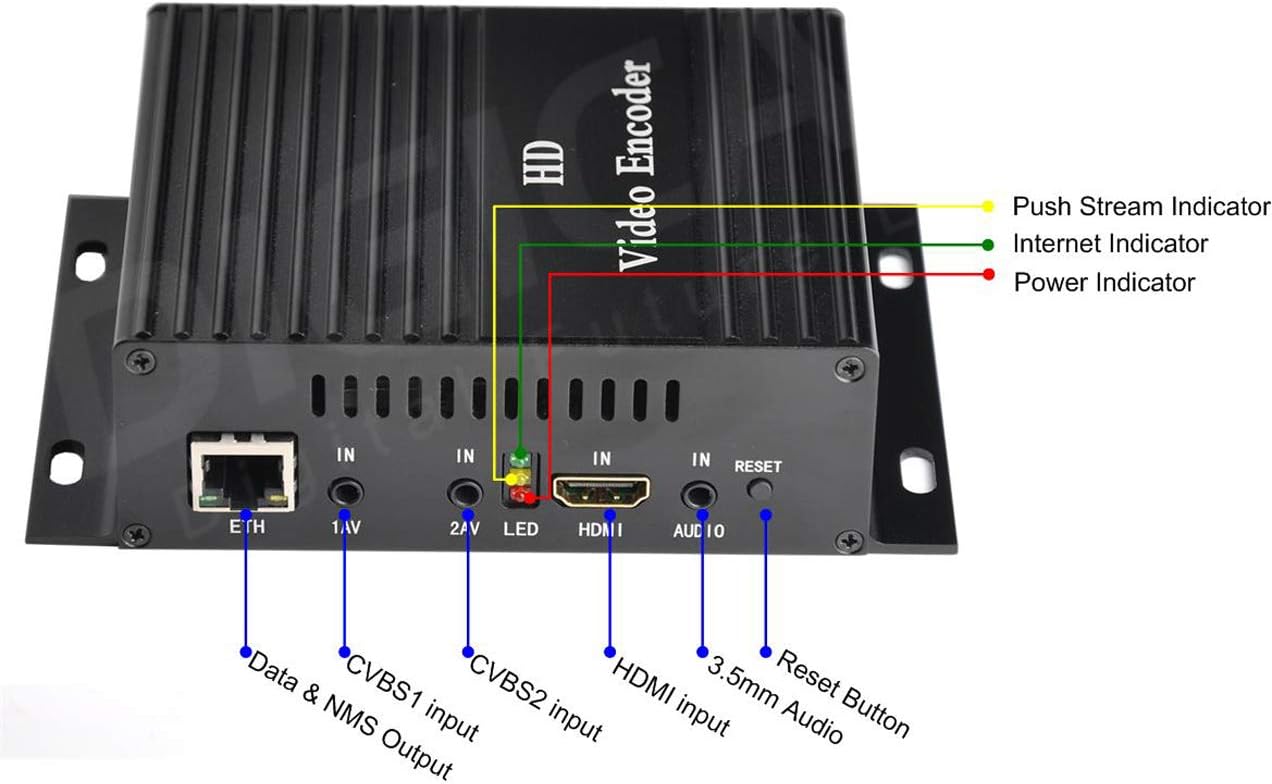
Малюнак 3.2: Падрабязны view of the DMB-8800A encoder's front panel with labeled ports and indicators. This image highlights the Ethernet (ETH) port, CVBS1 input (1AV), CVBS2 input (2AV), LED indicators (Power, Internet, Push Stream), HDMI input, 3.5mm Audio input, and Reset button.
- ETH: Ethernet port for network connection and NMS (Network Management System) output.
- 1AV / 2AV: CVBS (Composite Video Broadcast Signal) inputs for analog video sources.
- святлодыёд: Indicator lights for Power (Red), Internet (Green), and Push Stream (Yellow).
- HDMI: High-Definition Multimedia Interface input for digital video and audio sources.
- АЎДЫЯ: 3.5-мм аўдыёўваходны раз'ём.
- Скінуць: Кнопка для скіду прылады да заводскіх налад.

Малюнак 3.3: Various perspectives of the DMB-8800A encoder, showcasing its compact form factor and heat dissipation design. This provides a comprehensive view of the device's physical attributes.

Малюнак 3.4: Internal block diagram illustrating the video and audio processing flow within the DMB-8800A encoder. It shows the path from HDMI and CVBS inputs through H.264, AAC, and MP3 encoding, synchronization, encapsulation, and finally to IP output via various protocols.

Малюнак 3.5: Typical application diagram for the DMB-8800A encoder. This diagram demonstrates how the encoder integrates into a streaming ecosystem, showing signal sources (PC, DVD player, CCTV camera), the encoder, WAN connection to servers (Wowza, FMS, Youtube, Facebook, Ustream, ISS-9000 IPTV), and various receiving devices (PC, IPTV & OTT box, Smart Phone, Smart TV).
4. Інструкцыі па ўсталёўцы
Follow these steps to set up your DMB-8800A encoder:
- Падключыць крыніцу відэа: Connect your HDMI or CVBS video source(s) to the corresponding input ports (HDMI, 1AV, 2AV) on the front panel of the encoder.
- Падключэнне крыніцы гуку: If using an external audio source, connect it to the 3.5mm AUDIO input jack. If using HDMI, audio will be embedded with the video signal.
- Падключэнне да сеткі: Connect an Ethernet cable from the ETH port on the encoder to your network router or switch. For Wi-Fi setup, refer to the web-based configuration interface after initial power-up.
- Уключэнне: Connect the 12V DC power adapter to the encoder's power input and then plug it into a power outlet. The Power LED (Red) should illuminate.
- Доступ Web інтэрфейс: Once powered on and connected to the network, use a web browser on a computer connected to the same network to access the encoder's web-based configuration interface. The default IP address can usually be found in the quick start guide or by using a network scanning tool.
Перад уключэннем прылады пераканайцеся, што ўсе злучэнні надзейныя.
5. Кіраўніцтва па эксплуатацыі
The DMB-8800A encoder is primarily configured and operated via its web-based interface. Below are key operational aspects:
5.1. Канфігурацыя відэа
- Сціск відэа: H.264/AVC High Profile Узровень 4.0.
- Рэжым уводу: Supports PAL and NTSC for CVBS inputs.
- Налады дазволу:
- HD Main Stream: 1920x1080, 1680x1056, 1280x720, 1024x576, 850x480, 720x576, 720x540, 720x480, 720x404, 704x576, 640x480, 640x360, auto.
- HD Sub-Stream: 1280x720, 800x450, 720x576, 720x540, 720x480, 720x404, 704x576, 640x480, 640x300, 352x288, 320x240, 320x180, auto.
- CVBS Main Stream (NTSC): 720x480, 640x480.
- CVBS Main Stream (PAL): 720x576, 704x576.
- CVBS Sub-Stream (NTSC): 320x240.
- CVBS Sub-Stream (PAL): 352x288.
- Бітрэйт: Configurable from 16kbps to 12Mbps, supporting CBR (Constant Bit Rate) and VBR (Variable Bit Rate) modes.
- Video Pre-processing: Features include Noise reduction, Sharpening, and Filtering for enhanced video quality.
5.2. Канфігурацыя гуку
- Аўдыё: Supports AAC and MP3 formats.
- SampЛінг -курс: Adaptive, with selectable re-sample варыянты.
- SampДакладнасць: 24-бітны.
- Бітрэйт: Selectable options including 48000, 64000, 96000, 128000, 160000, 192000, 256000.
- ПаўторнаampЛе тарыфы: 32000, 44100.
5.3. IP Output and Protocols
- Транспартны пратакол: TS over IP output, supporting RTSP, HTTP, UDP, and RTMP protocols.
- Multi-Stream Output:
- HD to IP Output: 4*TS over IP streams (HTTP/RTSP/UDP or RTMP protocol). Typically, 2 channels with higher resolution (up to 1080P) for large screen applications and 2 channels with lower resolution (up to 720P) for small screen applications.
- CVBS to IP Output: 4*TS over IP streams (HTTP/RTSP/UDP or RTMP protocol). Typically, 2 channels with higher resolution (D1) for large screen applications and 2 channels with lower resolution (CIF) for small screen applications.
- раз'ём: RJ45, 100M Ethernet.
Detailed configuration of these parameters, including network settings, stream destinations, and advanced features, is performed through the intuitive web-based management interface. Refer to the on-screen help within the interface for specific parameter definitions and recommended settings.
6. Тэхнічныя характарыстыкі
| Катэгорыя | Спецыфікацыя | Дэталі |
|---|---|---|
| Відэа | Кампрэсія | H.264/AVC High Profile Узровень 4.0 |
| Уваходы | HD (supports HDCP protocol), CVBS | |
| Analog Video Input Mode | PAL, NTSC | |
| HD Main Stream Resolution | 1920x1080, 1680x1056, 1280x720, 1024x576, 850x480, 720x576, 720x540, 720x480, 720x404, 704x576, 640x480, 640x360, auto | |
| HD Sub-Stream Resolution | 1280x720, 800x450, 720x576, 720x540, 720x480, 720x404, 704x576, 640x480, 640x300, 352x288, 320x240, 320x180, auto | |
| CVBS Main Stream Resolution | NTSC: 720x480, 640x480; PAL: 720x576, 704x576 | |
| Бітрэйт | 16kbps~12Mbps, CBR/VBR | |
| Аўдыё | Кампрэсія | AAC, MP3 |
| Sampлінг -стаўка | Адаптыўны, выбар паўторныхample | |
| SampЛінг Дакладнасць | 24-бітны | |
| Бітрэйт | 48000, 64000, 96000, 128000, 160000, 192000, 256000 | |
| Выхады | Транспартны пратакол | TS over IP output, RTSP/HTTP/UDP or RTMP protocol |
| IP Stream Output | 4*TS over IP stream out per input (HD/CVBS) | |
| Злучальнік | RJ45, 100M Ethernet | |
| сістэма | Інтэрфейс канфігурацыі | Web-на аснове |
| Мадэрнізаваны | Via network | |
| Злучальнік | RJ45, 100M Ethernet interface | |
| Physical & Power | тtage | 12 В пастаяннага току |
| Спажыванне | 5W | |
| Працоўная тэмпература | 0~50°C | |
| Памеры і вага | 200mm(W) x 100mm(D) x 150mm(H), 1kg/pc | |
| Генерал | Сумяшчальныя прылады | Тэлебачанне |
| Генерал | Тып раздыма | Ethernet, HDMI, Wi-Fi |
7. Тэхнічнае абслугоўванне
Proper maintenance ensures the longevity and reliable operation of your DMB-8800A encoder:
- Уборка: Regularly clean the exterior of the device with a soft, dry cloth. Avoid using liquid cleaners or aerosols directly on the unit.
- Вентыляцыя: Ensure the encoder is placed in a well-ventilated area. Do not block the ventilation slots to prevent overheating.
- Умовы навакольнага асяроддзя: Operate the device within the specified temperature range (0~50°C) and avoid environments with high humidity or excessive dust.
- Абнаўленні прашыўкі: Перыядычна правярайце інфармацыю вытворцы website for firmware updates. Updating the firmware via network can improve performance, add features, or resolve issues.
8. Выпраўленне непаладак
If you encounter issues with your DMB-8800A encoder, refer to the following common troubleshooting steps:
- Няма харчавання:
- Ensure the power adapter is securely connected to the encoder and a working power outlet.
- Пераканайцеся, што разетка актыўная.
- Няма ўваходнага відэасігналу:
- Check if the video source (e.g., camera, DVD player) is powered on and outputting a signal.
- Ensure the HDMI or CVBS cables are securely connected to the correct input ports on the encoder.
- Verify the input resolution and format are supported by the encoder (refer to Section 6: Technical Specifications).
- Няма падключэння да сеткі:
- Check the Ethernet cable connection to the ETH port and your router/switch.
- Verify your network settings (IP address, subnet mask, gateway) in the encoder's web інтэрфейс.
- Ensure your router/switch is functioning correctly.
- For Wi-Fi, ensure the Wi-Fi module is enabled and correctly configured with your network credentials.
- Streaming Issues (Buffering, Disconnections):
- Праверце хуткасць і стабільнасць вашага інтэрнэт-злучэння.
- Reduce the video bitrate or resolution in the encoder's settings if your network bandwidth is limited.
- Verify the streaming server (e.g., RTMP server) is online and correctly configured.
- Ensure firewall settings on your network or computer are not blocking the streaming protocols.
- Web Інтэрфейс недаступны:
- Ensure your computer is on the same network segment as the encoder.
- Verify the encoder's IP address. If unknown, you may need to use a network scanning tool or reset the device to factory defaults (using the RESET button) to revert to a known default IP.
For persistent issues, consult the manufacturer's support resources or contact technical support.
9. Гарантыя і падтрымка
The DTVANE DMB-8800A Video Streaming Encoder comes with a comprehensive warranty and support package:
- Гарантыя вытворцы: A five-year manufacturer warranty covers defects in materials and workmanship from the date of purchase.
- Пажыццёвая тэхнічная падтрымка: Enjoy free lifetime technical support for your product. This includes assistance with setup, configuration, troubleshooting, and general inquiries.
- Customization Services: The manufacturer also provides various customization options, such as logo printing, function adjustments, or firmware modifications.
For warranty claims, technical assistance, or customization inquiries, please refer to the contact information provided on the official DTVANE webсайт або дакументы аб куплі.
Звязаныя дакументы - DMB 8800A
 |
Wireless Lavalier Microphone User Manual and Guide Comprehensive user manual for the dtvane wireless lavalier microphone, covering product introduction, scope of application, component identification, usage steps, precautions, cleaning, maintenance, and troubleshooting. |
 |
Midea Dehumidifier Report: Technical Specifications and Model Differences Comprehensive report detailing Midea dehumidifier models, including product specifications, model variations, safety markings, and installation guidelines. Covers US and Canadian requirements. |
 |
MIXPAC DMA/DMB 50/75 ML Cartridge Dispenser - Product Overview Detailed information on the MIXPAC DMA/DMB manual lightweight and sturdy 2-component cartridge dispenser for 50/75 mL cartridges. Features, benefits, applications, specifications, dimensions, and product range for A- and B-systems. |
 |
Лічбавая пакаёвая антэна Clear TV Key X-70B HDTV: кіраўніцтва па ўсталёўцы і выкарыстанні Падрабязнае кіраўніцтва па лічбавай пакаёвай антэне Clear TV Key X-70B HDTV, якое ахоплівае ўстаноўку, функцыі, тэхнічныя дадзеныя, ліквідацыю непаладак і інфармацыю аб гарантыі. |
 |
Лічбавая пакаёвая антэна Clear TV Key X-70B HDTV: кіраўніцтва па ўсталёўцы і выкарыстанні Падрабязнае кіраўніцтва па ўсталёўцы і выкарыстанні лічбавай пакаёвай антэны Clear TV Key X-70B HDTV. Даведайцеся, як падключаць, шукаць каналы і аптымізаваць прыём бясплатных лічбавых тэлевізійных сігналаў. |
 |
EVOLVEO Xany 4: Aktívna izbová anténa pre digitálny a analógový TV signál Kompletný návod na použitie a inštaláciu pre izbovú anténu EVOLVEO Xany 4. Získajte optimálny príjem digitálneho a analógového televízneho vysielania vo vašej domácnosti. |
Ask a question about this manual
Ask about setup, troubleshooting, compatibility, parts, safety, or missing instructions. Manuals+ will review the question and use this page’s manual context to help answer it.