
1. Уводзіны
The Tramex Concrete Moisture Encounter CMEX5 is a versatile digital multi-moisture meter designed for accurate and non-destructive measurement of moisture content and relative humidity in various building materials. It is suitable for professionals in flooring, water damage restoration, inspection, surveying, and indoor air quality industries. The device features Bluetooth connectivity for seamless integration with the Tramex Meters App on iOS and Android devices, enabling advanced data logging, moisture mapping, and reporting capabilities.

Малюнак 1: Спераду view of the Tramex CMEX5, showing the digital display and control buttons.

Figure 2: Visual representation of the key benefits of the Tramex CMEX5, including instant non-destructive tests, accurate results, ASTM F2659 compliance, and app connectivity.
2. Інфармацыя па бяспецы
Please read and understand all safety instructions before operating the Tramex CMEX5. Failure to follow these instructions may result in injury or damage to the device.
- Трымайце прыладу сухім. Не падвяргайце яе ўздзеянню вільгаці або экстрэмальных тэмператур.
- Не спрабуйце адкрываць або мадыфікаваць прыладу. Звяртайцеся па ўсё абслугоўванне да кваліфікаванага персаналу.
- Use only specified batteries (2 AA batteries). Ensure correct polarity when installing.
- Захоўваць у месцах, недаступных дзецям.
- Не кідайце прыладу і не падвяргайце яе моцным ударам.
- When using external probes, ensure they are securely connected to prevent inaccurate readings or damage.
3. Кампаненты
The Tramex CMEX5 includes the following main components:
- Асноўны блок: The handheld meter with a digital display and control buttons.
- Built-in Ambient Sensor: Located at the top of the device, measures ambient relative humidity, temperature, dew point, and humidity ratio.
- Non-Destructive Electrodes: Located on the base of the unit for non-invasive moisture measurements.
- External Probe Port: For connecting optional external probes such as the Concrete Moisture Probe or Pin Probe.
- Батарэйны адсек: Размешчаны на задняй панэлі прылады.

Малюнак 3: бок view of the Tramex CMEX5, highlighting its ergonomic design.

Малюнак 4: Назад view of the Tramex CMEX5, showing the battery compartment and non-destructive electrodes.
4. Настройка
4.1. Устаноўка батарэі
- Locate the battery compartment cover on the back of the CMEX5 unit.
- Зрушыце або адшчэпіце вечка, каб адкрыць адсек.
- Устаўце 2 батарэек тыпу АА, сачыце за правільнай палярнасцю, як паказана ўнутры адсека.
- Надзейна заменіце крышку батарэйнага адсека.
4.2. Уключэнне / выключэнне харчавання
Націсніце і ўтрымлівайце кнопку харчавання (ⓘ) located on the front panel to turn the device on or off.
4.3. Усталёўка праграмы (неабавязкова)
For enhanced functionality, download the "Tramex Meters App" from your device's app store (iOS or Android). The app allows for Bluetooth connectivity, data logging, moisture mapping, and report generation.
Video 1: This video demonstrates the features and usage of the Tramex Meters App, including connecting to 5-series moisture meters like the CMEX5, viewing readings, and utilizing advanced features such as thermal condition charts and psychometric charts.
5. Інструкцыя па эксплуатацыі
The Tramex CMEX5 offers multiple measurement modes:
5.1. Non-Destructive Moisture Measurement (Concrete & General Building Materials)
- Пераканайцеся, што прылада ўключана.
- Place the base of the CMEX5 firmly onto the surface of the material to be tested. The non-destructive electrodes on the base will make contact.
- Прачытайце працэнты вільготнасціtage directly from the digital display. The device measures to a depth of approximately 3/4 inch (20 mm).
- For concrete, the display shows Concrete %MC. The meter has Anhydrite & Gypsum scales.

Figure 5: Step-by-step illustration of how to use the Tramex CMEX5 for non-destructive moisture assessment, including placing the device on concrete and syncing with the Tramex Meters App.

Figure 6: A hand holding the Tramex CMEX5, demonstrating the ease of use and visibility of the digital display during operation.
5.2. Ambient Relative Humidity and Temperature Measurement
The built-in hygrometer continuously measures ambient conditions:
- Адносная вільготнасць (RH%)
- Temperature (T°F/°C)
- Dew Point (DP°F/°C)
- Humidity Ratio (HR G/lb)
These readings are displayed on the main screen alongside moisture content measurements.
5.3. External Probe Measurements (Optional)
The CMEX5 supports optional external probes for specialized measurements:
- Concrete Moisture Probe: Measures in-situ moisture content up to 100 mm (4 inches) deep. Connect the probe to the external port and follow the probe's specific instructions for use.
- Pin Meter Probe: Measures percentage moisture content of wood, drywall, and other building materials. Connect the pin probe to the external port and insert the pins into the material. The CMEX5 can be calibrated for over 500 different wood species via the app.
- Hygro-i2 RH Probe: For in-situ relative humidity testing in concrete slabs (ASTM F2170 compliant). Connect the probe to the external port.
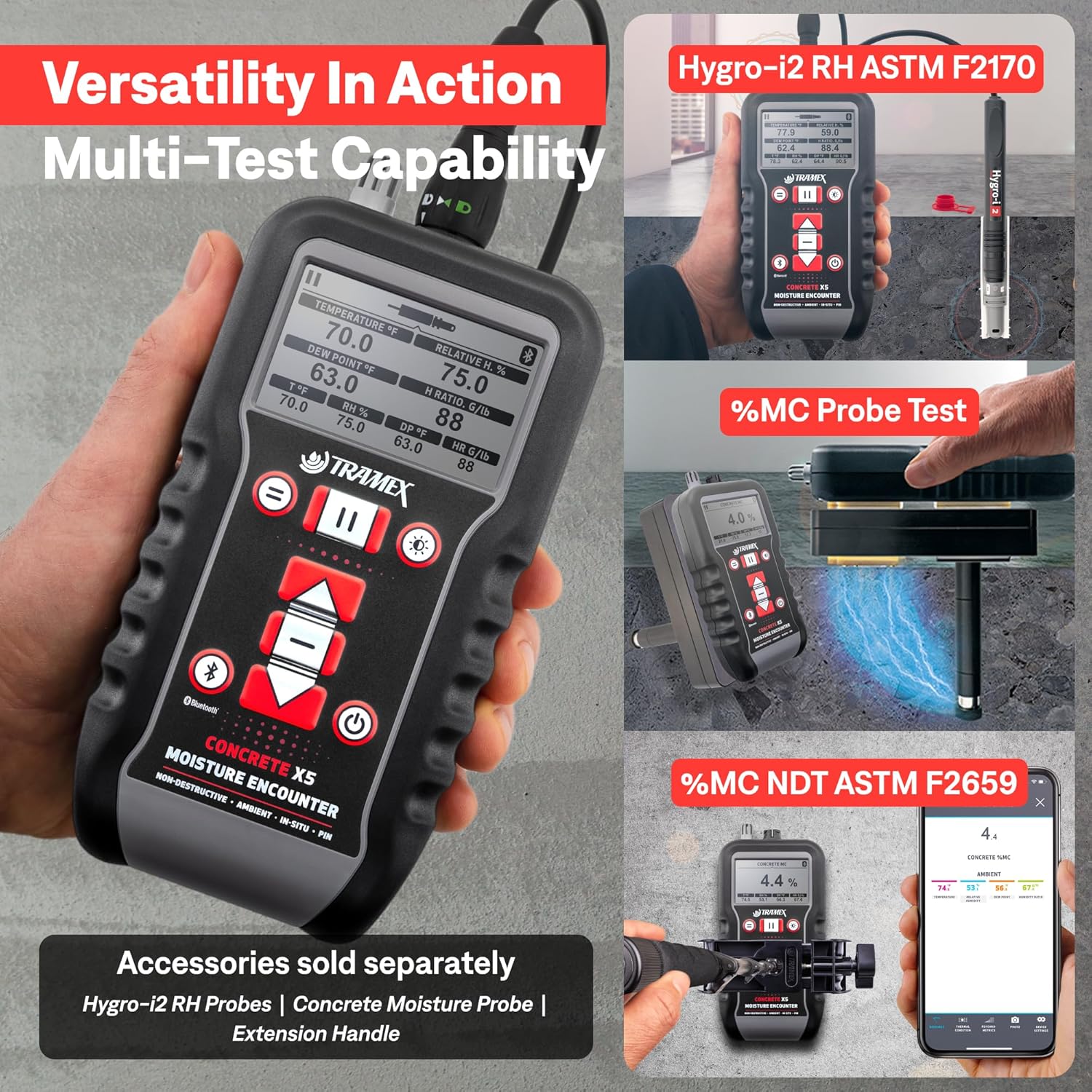
Figure 7: Depiction of the CMEX5's multi-test capability, showing its use with Hygro-i2 RH probes, concrete moisture probes, and an extension handle for various applications.
5.4. App Integration and Data Management
Connect the CMEX5 to the Tramex Meters App via Bluetooth for advanced features:
- Паказанні ў рэжыме рэальнага часу: View all measurements on your smartphone or tablet.
- Рэгістрацыя даных: Log readings over time for continuous monitoring.
- Moisture Mapping: Create visual maps of moisture levels.
- Стварэнне справаздачы: Generate geo-tagged and time-stamped reports with photos.
- Wood Species Selection: For pin probe measurements, select from over 500 wood species for accurate readings.

Figure 8: Screenshot illustrating the Tramex Meters App interface, showing psychometric readings and options for thermal condition, psychometrics, photo capture, and logging status.
6. Тэхнічнае абслугоўванне
6.1. Уборка
Wipe the device with a soft, dry cloth. Do not use abrasive cleaners or solvents. Ensure the non-destructive electrodes on the base are clean and free of debris for accurate readings.
6.2. Захоўванне
Store the CMEX5 in a cool, dry place away from direct sunlight and extreme temperatures. If storing for extended periods, remove the batteries to prevent leakage.
6.3. Замена батарэі
Replace batteries when the low battery indicator appears on the display. Refer to Section 4.1 for battery installation instructions.
7. Выпраўленне непаладак
| праблема | Магчымая прычына | Рашэнне |
|---|---|---|
| Прылада не ўключаецца. | Разраджаныя або няправільна ўсталяваныя батарэйкі. | Праверце палярнасць батарэек або заменіце іх новымі батарэйкамі тыпу АА. |
| Няправільныя паказанні. | Dirty electrodes; improper contact with surface; external interference. | Clean electrodes; ensure firm, flat contact; move away from strong electromagnetic fields. |
| Праблемы з падключэннем Bluetooth. | Bluetooth off on device/phone; out of range; app not updated. | Ensure Bluetooth is enabled on both devices; move closer to the meter; update Tramex Meters App. |
| External probe not recognized. | Probe not securely connected; damaged probe. | Ensure probe is fully inserted and locked; inspect probe for damage. |
8. Тэхнічныя характарыстыкі
| Асаблівасць | Дэталь |
|---|---|
| Памеры прадукту | 7 х 3.5 х 1.5 цалі |
| Нумар мадэлі тавару | CMEX5 |
| Батарэі | Патрабуецца 2 батарэйкі АА (у камплекце) |
| Вага прадмета | 12.59 унцыі (357 грама) |
| Вытворца | Tramex |
| Колер | Чорны, Чырвоны, Белы |
| Тып мацавання | Павярхоўны мантаж |
| Measurement Depth (Non-destructive) | Up to 3/4 inch (20 mm) into the slab |
| Сувязь | Bluetooth for iOS & Android App |
| Адпаведнасць | ASTM F2659 (Non-destructive concrete test) |
9. Гарантыя і падтрымка
For detailed warranty information, product registration, and technical support, please visit the official Tramex webсайт або звярніцеся ў службу падтрымкі кліентаў. Захоўвайце чэк аб куплі як пацвярджэнне пакупкі для прэтэнзій па гарантыі.
Official Tramex Webсайт: www.tramexmeters.com
For additional resources, including the User Guide (PDF), please refer to the product page where you purchased the device.