
Уводзіны
This manual provides comprehensive instructions for setting up, operating, and maintaining your Macally Bluetooth Keyboard. Designed for multi-device compatibility, this wireless keyboard features a built-in stand, a rechargeable battery, and 78 keys for efficient typing across various devices including tablets, smartphones, and computers.

Image: The Macally Bluetooth Keyboard in white, with a tablet securely docked in its integrated stand, showcasinг яго кампактны дызайн і функцыянальнасць.
Што ў скрынцы
Upon unboxing your Macally Bluetooth Keyboard, please ensure all the following items are present:
- Macally Bluetooth Keyboard
- USB-кабель для зарадкі
- Кіраўніцтва карыстальніка (гэты дакумент)
If any items are missing or damaged, please contact Macally customer support.
Асаблівасці прадукту
The Macally Bluetooth Keyboard is designed for versatility and convenience, offering several key features:
- Падключэнне некалькіх прылад: Seamlessly switch between up to 3 Bluetooth-enabled devices (e.g., tablet, smartphone, computer).
- Убудаваная падстаўка для прылады: Features a built-in 10.5-inch slot to securely hold your smartphone or tablet.
- Кампактны і партатыўны: Small enough to fit into most bags, making it ideal for on-the-go use.
- Акумулятарная батарэя: Equipped with a 280mAh rechargeable battery for extended use.
- Efficient Layout: Includes 78 quiet scissor-switch keys and 13 convenient shortcut/media keys for enhanced productivity.

Image: The keyboard demonstrating seamless Bluetooth connectivity with a 30ft wireless range, compatible with Apple, Windows, iOS, and Android operating systems.

Image: A visual representation of the keyboard's multi-device capability, showing it paired with a laptop, a desktop computer, and a smartphone simultaneously.

Image: The keyboard positioned on a desk, with both a tablet and a smartphone docked in its integrated 10.5-inch stand, highlighting its "setup anywhere" convenience.
Настройка
Зарадка клавіятуры
Before first use, fully charge your Macally Bluetooth Keyboard. Connect the provided USB charging cable to the keyboard's charging port and the other end to a USB power source (e.g., computer USB port, USB wall adapter). The charging indicator light will show the charging status.

Image: The keyboard with its charging cable connected, illustrating the rechargeable 280mAh battery and the included charging cable.
Спалучэнне Bluetooth
Follow these steps to pair your keyboard with a device:
- Пераканайцеся, што клавіятура зараджана і ўключана. Выключальнік харчавання знаходзіцца ў правым верхнім куце клавіятуры.
- На вашай прыладзе (планшэце, смартфоне, камп'ютары) уключыце Bluetooth.
- Націсніце і ўтрымлівайце Fn клавіша і адна з клавіш канала Bluetooth (B1, B2, або B3) simultaneously for a few seconds until the corresponding Bluetooth indicator light starts blinking rapidly. This indicates the keyboard is in pairing mode.
- On your device, search for "Macally Keyboard" or a similar name in the Bluetooth device list and select it to connect.
- Once connected, the indicator light will stop blinking and remain solid for a moment before turning off, indicating successful pairing.
To pair additional devices, repeat steps 3-5 using a different Bluetooth channel key (B1, B2, or B3).
Інструкцыя па эксплуатацыі
Пераключэнне паміж прыладамі
To switch between paired devices, simply press the Fn клавішу разам з адпаведнай клавішай канала Bluetooth (B1, B2, або B3) for the desired device. The keyboard will quickly connect to the selected device.
Using Shortcut Keys
The keyboard features 13 dedicated shortcut/media keys for quick access to common functions. These keys are typically located on the top row (F1-F12 and an additional key). Functions may vary slightly depending on the operating system of your connected device.
Common shortcut functions include:
- Элементы кіравання прайграваннем мультымедыя (прайграванне/паўза, наступны/папярэдні трэк)
- Рэгуляванне гучнасці (адключэнне гуку, павелічэнне/памяншэнне гучнасці)
- Рэгуляванне яркасці экрана
- Home screen/desktop access
- Функцыя пошуку
Refer to your device's operating system documentation for specific compatibility and functionality of these keys.

Выява: Падрабязны view of the keyboard's layout, emphasizing its 78 quiet scissor-switch keys and the 13 dedicated shortcut/media keys for efficient use.
Тэхнічнае абслугоўванне
To ensure the longevity and optimal performance of your Macally Bluetooth Keyboard, follow these maintenance guidelines:
- Уборка: Для чысткі паверхні клавіятуры выкарыстоўвайце мяккую, сухую тканіну без ворса. Для выдалення ўстойлівага бруду злёгкуampПрацярыце тканіну вадой або мяккім неабразіўным ачышчальнікам. Пазбягайце празмернай вільготнасці.
- захоўванне: Калі клавіятура не выкарыстоўваецца працяглы час, захоўвайце яе ў прахалодным, сухім месцы, удалечыні ад прамых сонечных прамянёў і экстрэмальных тэмператур.
- Сыход за батарэяй: To preserve battery life, avoid fully discharging the keyboard frequently. Recharge it when the low battery indicator appears. If storing for a long time, charge it to about 50% every few months.
- Пазбягайце разліваў: Keep liquids away from the keyboard to prevent internal damage.
Ліквідацыю непаладак
If you encounter issues with your Macally Bluetooth Keyboard, try the following solutions:
| праблема | Магчымае рашэнне |
|---|---|
| Клавіятура не ўключаецца. | Ensure the keyboard is charged. Connect it to a power source using the USB cable. |
| Не атрымалася спалучыць клавіятуру. |
|
| Клавіятура часта адключаецца. |
|
| Ключы не рэагуюць. |
|
If these solutions do not resolve the issue, please contact Macally customer support for further assistance.
Тэхнічныя характарыстыкі
| Асаблівасць | Дэталь |
|---|---|
| Нумар мадэлі | BTTABKEYBAT |
| Тэхналогія падлучэння | Bluetooth |
| Колькасць ключоў | 78 |
| Тып батарэі | 1 літый-іённы акумулятар (у камплекце) |
| Вага прадмета | 1.92 фунта |
| Памеры ўпакоўкі | 13.98 х 7.91 х 2.48 цалі |
| Вытворца | Mace Group Inc / Macally Peripherals |
| Сумяшчальныя прылады | PC, Tablet, Apple devices, Windows Desktop/Laptop, Surface, Chromebook, Smartphones, TVs (any device with Bluetooth) |
| Рэкамендуемае выкарыстанне | Office, School, Everyday Use, Personal, Education, Business |
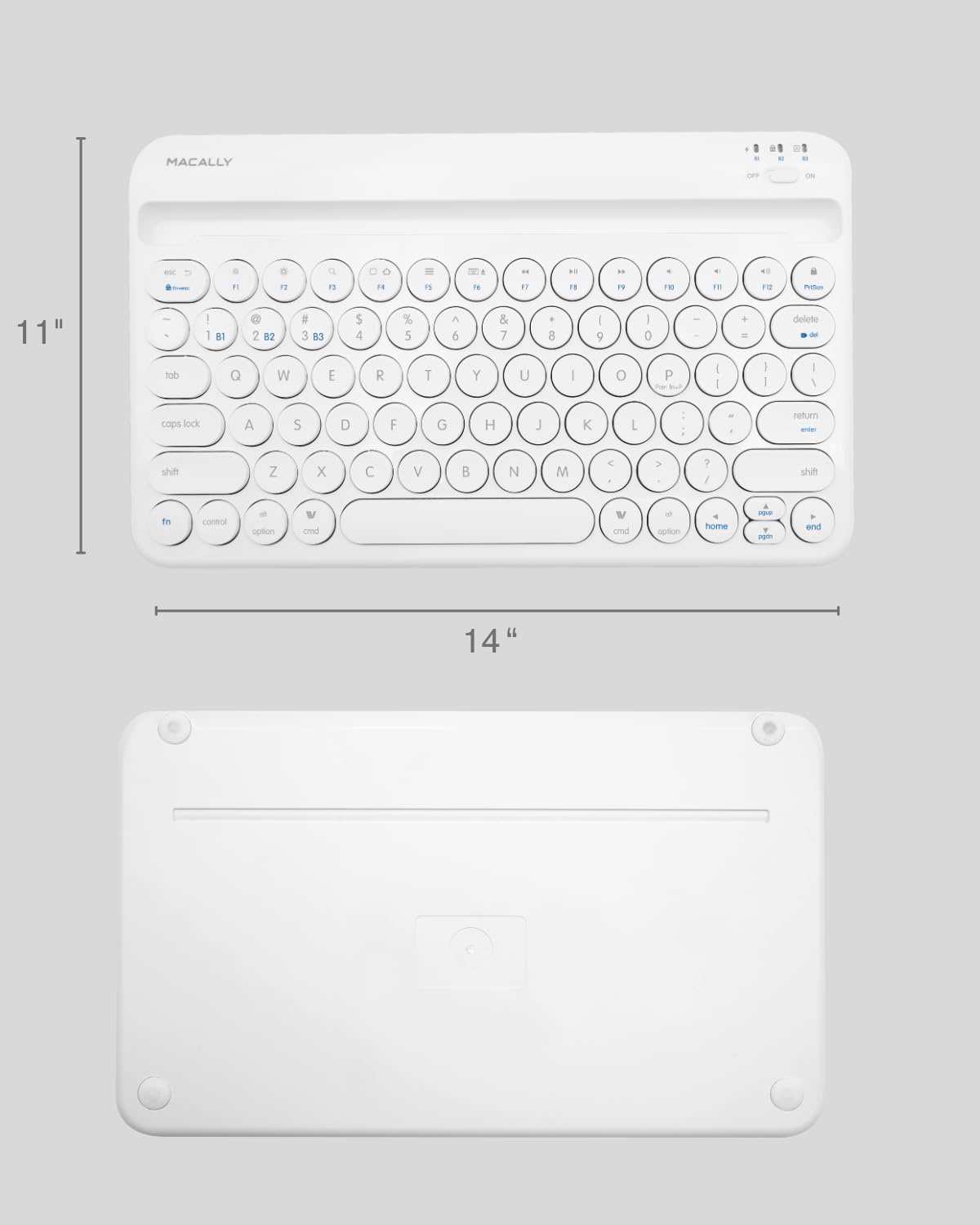
Image: The physical dimensions of the keyboard, measuring approximately 11 inches in width and 14 inches in length.

Image: The keyboard fitting easily into a backpack, demonstrating its compact size and suitability for travel and on-the-go use.
Гарантыя і падтрымка
Macally products are designed for quality and reliability. For information regarding product warranty, technical support, or service, please visit the official Macally webсайт або звярніцеся ў службу падтрымкі кліентаў. Захоўвайце чэк аб куплі як пацвярджэнне пакупкі для прэтэнзій па гарантыі.
Больш падрабязную інфармацыю і падтрымку вы можаце знайсці на Macally Store on Amazon.