
Уводзіны
This manual provides comprehensive instructions for the setup, operation, and maintenance of your Rimous Replacement Remote Control for LG Smart TVs. Designed for broad compatibility, this remote offers a convenient and reliable solution for controlling your LG television.
Асаблівасці прадукту
- Поўная сумяшчальнасць: Works with LG Smart TVs from 2010-2024 models, including OLED, 4K UHD, and WebOS systems.
- Папярэдне ўсталяваныя батарэі: Includes premium batteries for immediate use.
- Anti-Loss Holder: Comes with a wall-mounted holder to reduce the risk of misplacing the remote.
- One-Touch Shortcut Buttons: Dedicated buttons for Netflix and Prime Video for quick access.
- Палепшаная прадукцыйнасць: Equipped with a smart chip for improved functionality, longer transmission range, responsive buttons, and stable performance.
Настройка
1. Устаноўка батарэі
- Знайдзіце батарэйны адсек на задняй частцы пульта дыстанцыйнага кіравання.
- Зрушыце вечка батарэйнага адсека ўніз, каб адкрыць.
- Insert the two included AAA batteries, ensuring correct polarity (+ and - terminals match the markings inside the compartment).
- Адсуньце крышку батарэйнага адсека на месца, пакуль яна не зашчоўкнецца.

The image displays the Rimous replacement remote control, two AAA batteries, and a black wall-mount holder designed to keep the remote accessible.
2. Holder Installation
- Clean the desired surface (e.g., side of TV, wall, or table) where you wish to mount the holder. Ensure the surface is dry and free of dust.
- Remove the protective backing from the adhesive strip on the back of the holder.
- Press the holder firmly onto the cleaned surface for at least 30 seconds.
- Allow the adhesive to set for a few hours before placing the remote control in the holder.

A visual representation of the remote's performance, indicating a rapid 0.2-second response time and an effective transmission range exceeding 35 feet. The remote is shown being used in a living room setting.
Інструкцыя па эксплуатацыі
Асноўныя функцыі
The Rimous remote control is designed for immediate use with compatible LG TVs without requiring any programming. Simply point the remote at your TV and begin using its functions.
- Кнопка харчавання (⏻): Уключае або выключае тэлевізар.
- Лічбавыя кнопкі (0-9): Непасрэдны выбар каналаў.
- Павышэнне/памяншэнне гучнасці (VOL +/-): Рэгулюе гучнасць тэлевізара.
- Channel Up/Down (CH PAGE): Змяняе тэлеканалы.
- Кнопкі навігацыі (▲ ▼ ◀ ▶): Перамяшчайцеся па меню і параметрах.
- Кнопка ОК: Пацвярджае выбар.
- Кнопка "Назад": Вяртанне да папярэдняга экрана або меню.
- Кнопка выхаду: Выхад з бягучага меню або праграмы.
Кнопкі хуткага доступу
Access popular streaming services directly with dedicated buttons:
- Кнопка Netflix: Запускае прыкладанне Netflix.
- Кнопка Prime Video: Launches the Prime Video application.

Падрабязны view of the remote control, emphasizing the dedicated Netflix and Prime Video shortcut buttons for quick access to streaming services.
Сумяшчальнасць
This remote is compatible with a wide range of LG Smart TV models, including those with:
- LED, LCD, 3D, OLED, 4K UHD displays
- WebАС сістэмы
- Specific original remote models such as AKB74915305, AKB75375604, AKB75095307, AKB75675304, AKB74475401, AKB74475433, AKB73975702, AKB75055701, AKB73975711, AKB73715608, AKB74915324, AKB73715601, AKB75095308, AKB74915304, AKB75095330, AGF76631064.

This image illustrates the broad compatibility of the Rimous remote control across different LG television technologies, including LED, LCD, UHD, HD, OLED, WebOS, and 4K models.
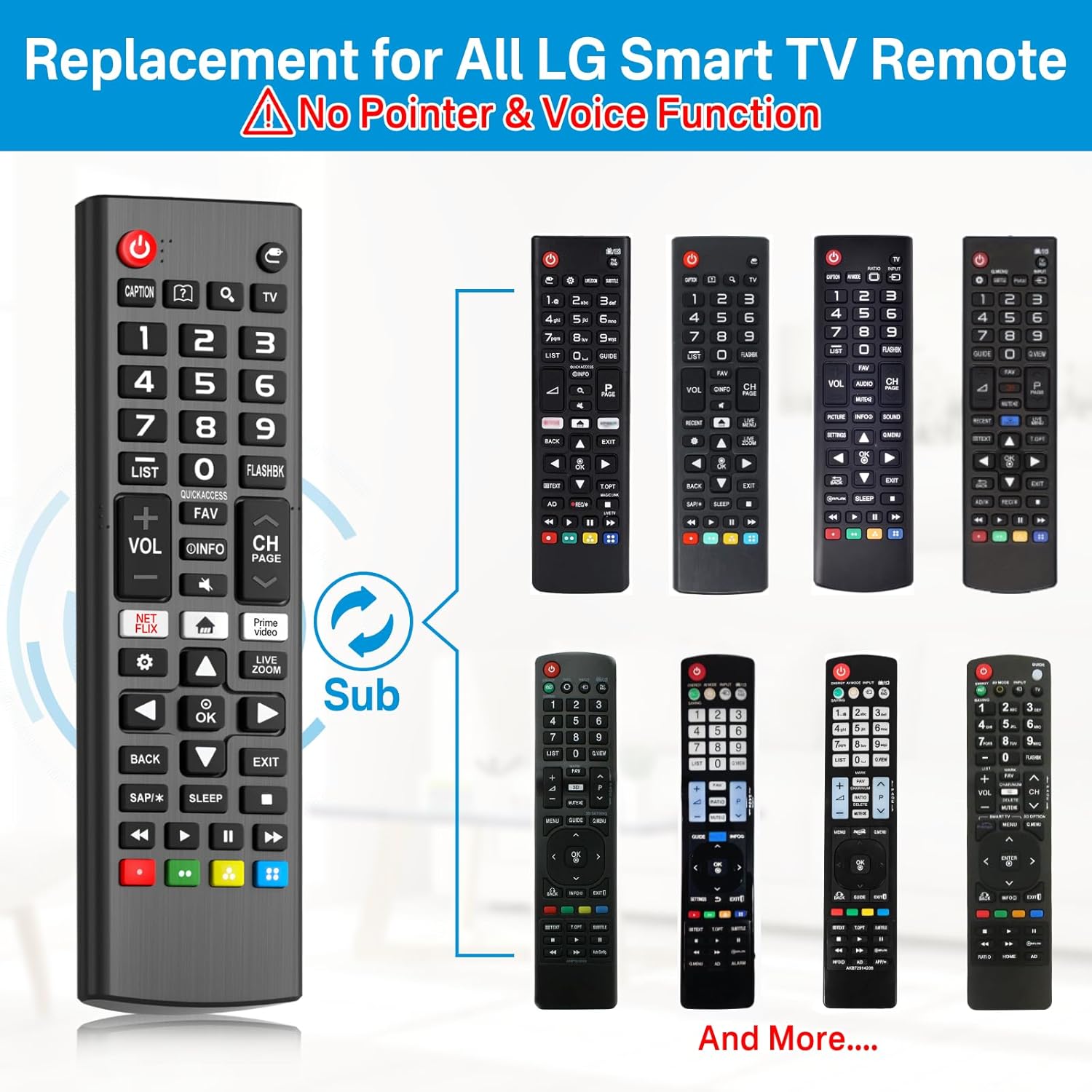
This image displays the Rimous remote alongside several original LG remote control designs, illustrating its function as a universal replacement for various models.
Тэхнічнае абслугоўванне
- Падтрымлівайце пульт дыстанцыйнага кіравання ў чысціні, праціраючы яго мяккай сухой тканінай.
- Avoid exposing the remote to extreme temperatures, moisture, or direct sunlight.
- Калі пульт не будзе выкарыстоўвацца працяглы час, выміце батарэйкі, каб прадухіліць іх уцечку.
Ліквідацыю непаладак
- Пульт не адказвае:
- Ensure the batteries are inserted correctly with the proper polarity.
- Replace the batteries with new ones if they are depleted.
- Пераканайцеся, што паміж пультам дыстанцыйнага кіравання і інфрачырвоным датчыкам тэлевізара няма перашкод.
- Verify that the remote is pointed directly at the TV.
- Не працуюць пэўныя кнопкі:
- Праверце на наяўнасць смецця або ліпкасці вакол кнопкі. Пры неабходнасці акуратна ачысціце.
- If only certain smart TV functions (like pointer or voice control) are not working, please note that this remote is a standard replacement and does not support advanced features like pointer or voice control found on some original LG Magic Remotes.
Тэхнічныя характарыстыкі
| Асаблівасць | Дэталь |
|---|---|
| Памеры прадукту | 6.3 х 3.54 х 0.39 цалі |
| Вага прадмета | 3.84 унцыі |
| Марка | Рымус |
| Вытворца | Рымус |
| Асаблівасць | Ergonomic, Lightweight, No Programming Required |
| Колер | Чорны |
| Максімальная колькасць падтрымоўваных прылад | 1 |
| Сумяшчальныя прылады | Television (LG Smart TVs) |
Гарантыя і падтрымка
Specific warranty information is not provided in the product details. For any support inquiries or further assistance, please refer to the seller's contact information or the platform where the product was purchased.