
Уводзіны
This manual provides detailed instructions for the VTech VS113-5 Extended Range 5-Handset Cordless Phone System. It covers setup, operation, and maintenance to ensure optimal performance and user experience. Please read this manual thoroughly before using your new phone system.
Настройка
Змест пакета
- VTech VS113-5 Base Unit
- 5 бесправадныя трубкі
- 5 Handset Chargers
- 5 Акумулятарныя батарэі
- Адаптар сілкавання для базавага блока
- Тэлефонны шнур
- Кіраўніцтва карыстальніка (гэты дакумент)
Ўстаноўка
- Падключыце базавы блок: Plug the power adapter into the base unit and a wall outlet. Connect the telephone line cord to the base unit and a telephone wall jack.
- Усталюйце батарэйкі ў тэлефон: Open the battery compartment on each handset and insert the provided rechargeable battery, ensuring correct polarity. Close the compartment.
- Зарадка тэлефонаў: Place each handset in its respective charger. The charge indicator light on the handset will illuminate. Allow at least 16 hours for the initial charge.

Image: The VTech VS113-5 system, showing the base unit and five cordless handsets in their charging cradles.
Інструкцыя па эксплуатацыі
Extended Range and Connect to Cell
The VS113-5 system offers extended range coverage and clarity through its unique antenna design and noise-filtering technology. It also features Bluetooth Connect to Cell, allowing you to make and receive cellular calls using your cordless handsets.
- Pairing Cell Phones: You can pair up to two cell phones with the base unit. Refer to the detailed pairing instructions in the full user guide.
- Здзяйсненне/прыём званкоў: Once paired, you can select whether to use your landline or a connected cell phone line for outgoing calls. Incoming calls from either line will ring on all handsets.

Image: Illustration of the 'Connect to Cell' feature, showing two smartphones wirelessly connected to the VTech cordless phone base unit.

Image: A diagram illustrating virtual multi-line operation, where a cellular line and a landline are connected to the cordless system, allowing calls on two lines simultaneously.
Смарт-блакаванне выклікаў
The Smart Call Blocker feature helps filter unwanted calls. Robocalls can be automatically blocked, and you can permanently blacklist any number with a single touch.
- Blocking Calls: Націсніце БЛОК ВЫЗОВА button on the handset or base during a call or from the Caller ID log to block a number.
- Screening Calls: Configure the system to screen unknown callers by prompting them to announce their name or press a key before connecting the call.

Image: A close-up of the handset showing the 'CALL BLOCK' button, highlighting the one-touch blocking capability of the Smart Call Blocker feature.
Digital Answering System with Voice Guide
The integrated digital answering system records up to 22 minutes of messages. A built-in voice guide assists with setup and message management.
- Запіс аб'яваў: Follow the voice guide prompts to record your personalized outgoing announcement.
- Прайграванне паведамленняў: Use the controls on the base unit or handset to play, skip, or delete messages.

Image: A close-up of the base unit's answering system controls, with a voice guide prompt indicating how to record an announcement.
Large Backlit Screen and Big Buttons
The handsets and base unit feature a 2-inch high-contrast backlit screen and enlarged font for easy readability of caller ID and call history. The lighted keypad facilitates dialing in low-light conditions.

Image: A VTech handset displaying a large, backlit screen with clear text and illuminated buttons, enhancing visibility.
Caller ID Announce
With Caller ID Announce, the handset and base unit will audibly announce the name of the caller, allowing you to identify who is calling without needing to look at the screen. This feature requires a subscription to Caller ID service from your telephone service provider.
Full Duplex Speakerphone and Push-to-Talk
The full duplex speakerphone on both the handset and base allows for natural, two-way conversations where both parties can speak and be heard simultaneously. The Push-to-Talk feature enables instant communication between handsets, functioning like an intercom system.

Image: A woman using the handset's speakerphone feature while performing kitchen tasks, demonstrating hands-free communication.

Image: The VTech base unit and a handset, highlighting the presence of full keypads and speakerphones on both devices for versatile operation.
Phonebook and Directory
The system supports a 1000-name and number phonebook directory. You can also download up to 1000 cellular phonebook entries from compatible Android phones (OS version 2.3 or above) using the free Connect to Cell™ app from the Google Play® Store.

Image: A VTech handset and base unit, illustrating the capability to download and store up to 1000 cellular phonebook entries.
Тэхнічнае абслугоўванне
- Уборка: Clean the phone system with a soft, damp тканінай. Не выкарыстоўвайце ачышчальныя спрэі або агрэсіўныя хімікаты.
- Сыход за батарэяй: Use only the provided rechargeable batteries. Replace batteries when they no longer hold a charge effectively.
- Умовы навакольнага асяроддзя: Avoid placing the phone system in direct sunlight, near heat sources, or in areas with excessive moisture.
Ліквідацыю непаладак
If you experience issues with your VTech VS113-5 phone system, try the following basic troubleshooting steps. For more detailed solutions, refer to the comprehensive user guide or VTech's support webсайт.
- Няма сігналу набору: Ensure the base unit's power adapter and telephone line cord are securely connected. If using a landline, your carrier may need to reboot the line.
- Тэлефон не зараджаецца: Verify the handset is correctly seated in its charger and the charger is plugged into a working outlet. Check battery installation.
- Дрэнная якасць выкліку: Ensure the base unit is not too close to other electronic devices that may cause interference. Check the signal strength on the handset.
- Cannot Make/Receive Cell Calls: Confirm your cell phone is paired and within range of the base unit. Check Bluetooth settings on your cell phone.
- Няправільная дата/час: Manually set the date and time through the handset menu if it does not update automatically.
Тэхнічныя характарыстыкі
| Асаблівасць | Спецыфікацыя |
|---|---|
| Нумар мадэлі | ВС113-5 |
| Памеры прадукту | 5.68 x 3.46 x 7.39 inches (Base) |
| Вага прадмета | 3.72 фунта |
| Дысплей | 2-inch Backlit Screen |
| Аўтаадказчык | Лічбавы, час запісу да 22 хвілін |
| Сувязь | Bluetooth Connect to Cell |
| Ёмістасць тэлефоннай кнігі | 1000 імёнаў і лічбаў |
| Батарэі | 5 батарэйкі, прызначаныя для канкрэтнага прадукту (у камплекце) |
| Вытворца | VTech |
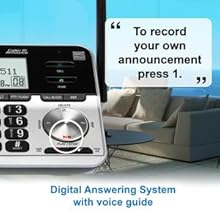
Image: Diagram showing the dimensions of the VTech VS113-5 base unit and handset, including wall-mountable options.
Гарантыя і падтрымка
This VTech product is manufactured by VTech. For specific warranty information, please refer to the documentation included with your product packaging or visit the official VTech support website. For technical assistance or customer service, please contact VTech customer support.