
Уводзіны
The SANWA Multi Device Bluetooth Keyboard with Touchpad (Model GSKBBT066) is designed for versatile use across various operating systems and devices. This compact, rechargeable keyboard features a built-in touchpad, multi-device switching capabilities, and convenient shortcut keys, enhancing productivity and entertainment experiences.
Настройка
1. Зарадка клавіятуры
Before initial use, fully charge the keyboard. Connect the provided USB charging cable to the keyboard's charging port and a USB power source. A full charge typically takes approximately 2 hours and provides up to 30 hours of constant use.

Image: The SANWA Bluetooth keyboard connected via USB cable to a wall adapter for charging.
2. Спалучэнне з прыладамі
The keyboard supports connection to up to three Bluetooth devices simultaneously. Use the dedicated pairing buttons to switch between connected devices.
- Пераканайцеся, што клавіятура зараджана і ўключана.
- Націсніце Fn key and one of the device selection keys (1, 2, або 3) simultaneously to select a channel. The corresponding LED will blink.
- Націсніце Таб key labeled 'Pairing' to enter pairing mode. The selected channel's LED will blink rapidly.
- On your device (laptop, tablet, smartphone), enable Bluetooth and search for available devices.
- Select 'SANWA GSKBBT066' from the list of found devices.
- Выконвайце любыя падказкі на экране, каб завяршыць працэс спалучэння.
- Каб пераключыцца паміж спалучанымі прыладамі, проста націсніце Fn + 1, Fn + 2, або Fn + 3.

Image: A close-up of the keyboard showing the 'Fn' key, 'Tab' (Pairing) key, and the device selection LEDs (1, 2, 3).
Video: An instructional video demonstrating the features and usage of the SANWA Bluetooth Rechargeable Keyboard with Touchpad.
Інструкцыя па эксплуатацыі
Keyboard Layout and Typing
The keyboard features a standard QWERTY layout with comfortable pantograph scissor-structure keys, designed for sensitive response and reduced typing noise. The layout is optimized for efficient typing.

Выява: зверху ўніз view of the SANWA Bluetooth keyboard, showcasinг яго поўная планіроўка.

Image: Close-up of the keyboard keys, illustrating the pantograph scissor-structure for comfortable typing.
Клавішы хуткага доступу
The keyboard includes 20 practical shortcut keys for quick access to various functions and media controls. These keys are typically activated by pressing the Fn key in combination with the corresponding function key (F1-F12) or dedicated media keys.
- F1: Зніжэнне яркасці
- F2: Павышэнне яркасці
- F3: Функцыя пошуку
- F4: Задача View
- F5: Switch to Desktop
- F6: Пераключэнне прыкладанняў
- F7: Адключыць гук
- F8: гучнасць -
- F9: Аб'ём +
- F10: Папярэдняя песня
- F11: Прайграванне/Паўза
- F12: Наступная песня
- Dedicated keys for Virtual Keyboard, Input Language Switch, and Open Browser.
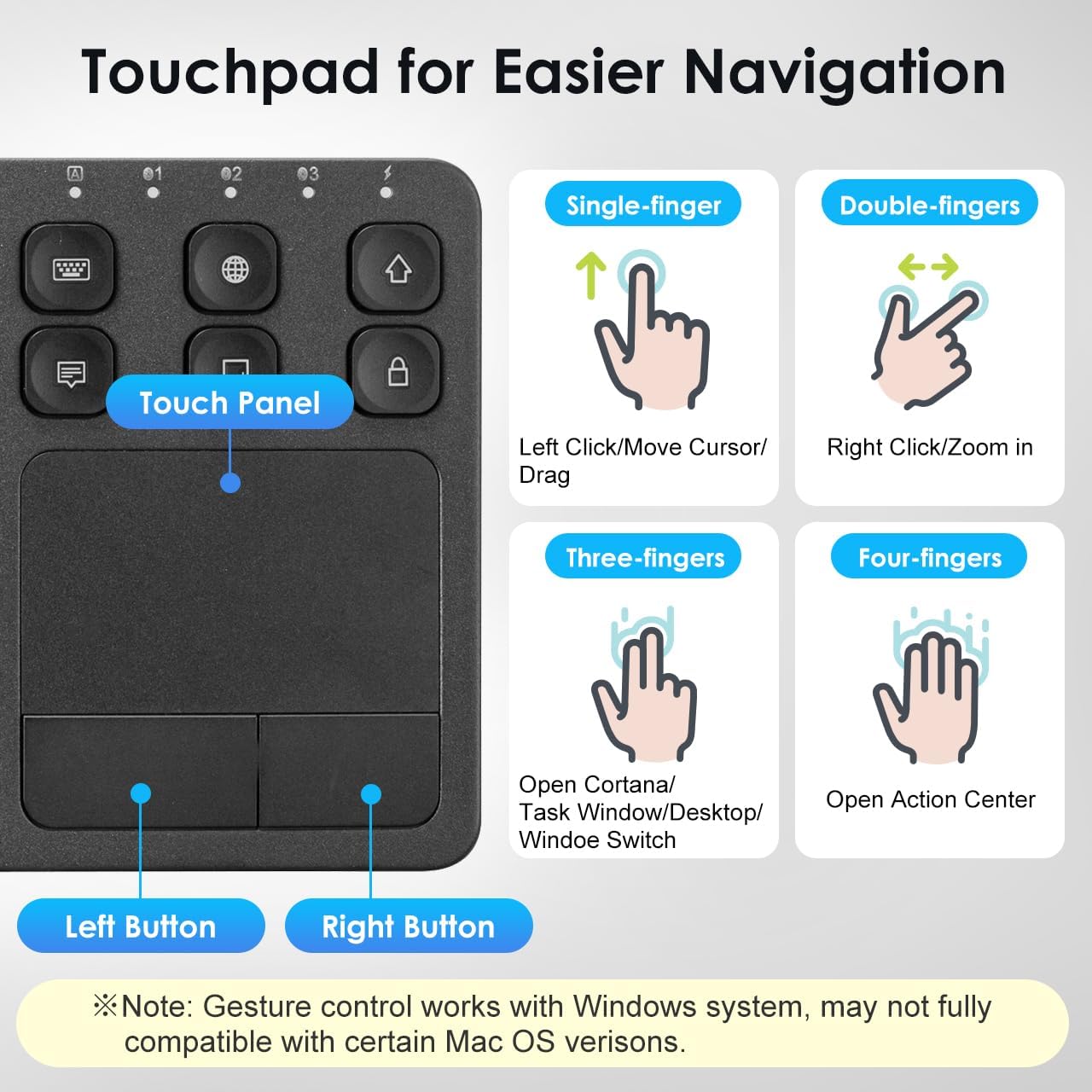
Image: The keyboard layout with icons indicating the functions of the shortcut keys.
Touchpad Functionality and Gestures (Windows System)
The integrated multi-touch touchpad provides effortless navigation. It supports various finger gestures, primarily optimized for Windows systems. Note that gesture compatibility may vary with certain macOS versions.

Выява: Падрабязны view of the touchpad and its gesture guide.
| Жэст | Функцыя |
|---|---|
| Single-finger tap/drag | Left Click / Move Cursor / Drag |
| Націсканне двума пальцамі | Пстрыкніце правай кнопкай мышы |
| Шчыпак двума пальцамі | Павялічыць/паменшыць |
| Пракрутка двума пальцамі | Page Up / Page Down |
| Націск трыма пальцамі | Open Cortana / Task Window / Desktop / Window Switch |
| Націск чатырма пальцамі | Адкрыйце Цэнтр дзеянняў |
Сумяшчальнасць
The SANWA Bluetooth Keyboard with Touchpad is broadly compatible with a range of operating systems and devices, making it a versatile tool for various computing needs.
- Аперацыйныя сістэмы: Windows 13/11/10/8.1/8/7/XP/Vista/98/2000/Me, macOS 10.12-10.15, Android 7.0-10, iPad OS13, iOS13 and later versions.
- Сумяшчальныя прылады: Desktop computers, laptops, cell phones, tablets, Mac, iPad, iPhone, Android TV BOX, Smart TVs, HTPC.
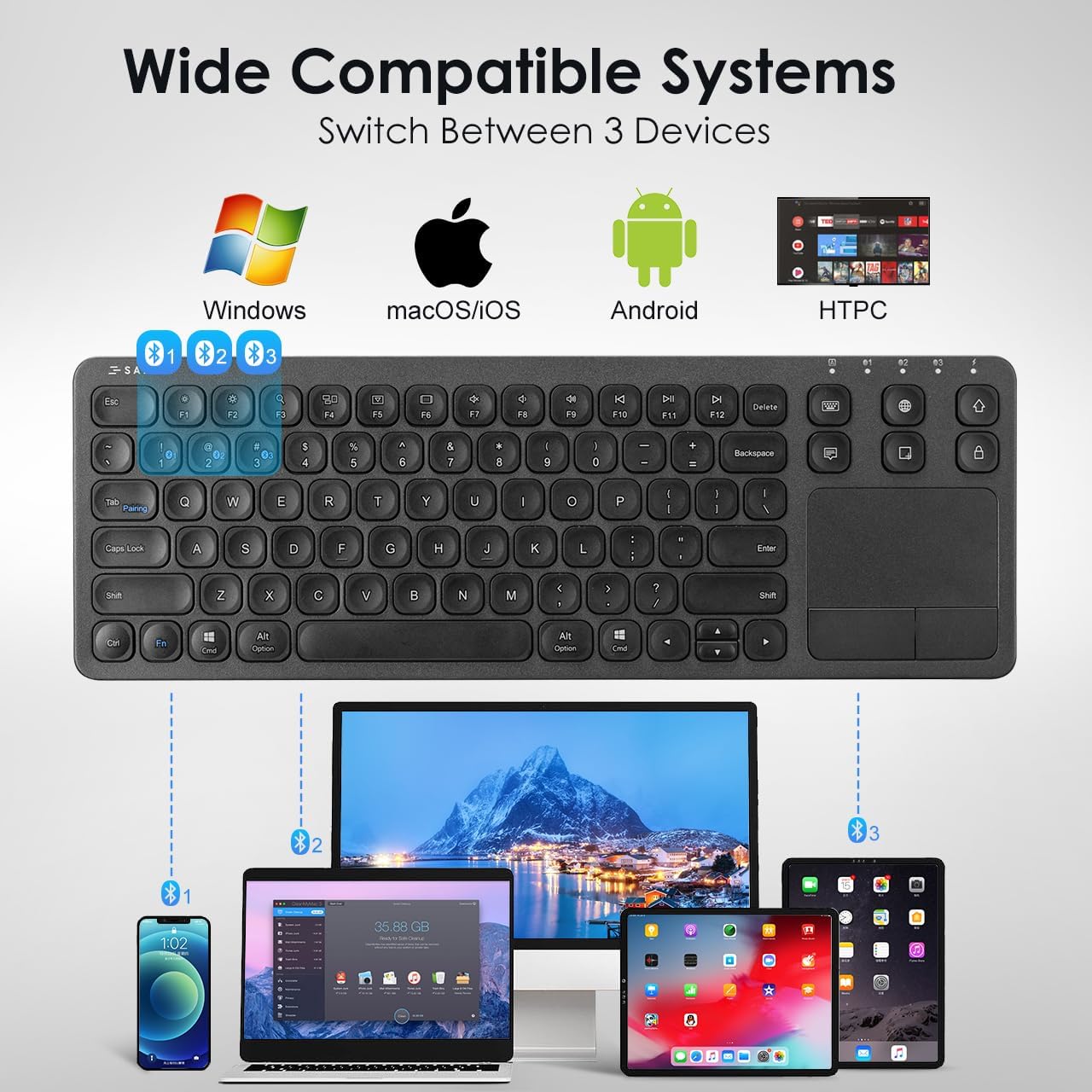
Image: The keyboard shown connected to a smartphone, laptop, and tablet, demonstrating multi-device compatibility.
Інфармацыя аб зарадцы і батарэі
The keyboard is equipped with a built-in rechargeable Lithium Polymer battery. To ensure optimal performance and longevity, adhere to the following guidelines:
- Час зарадкі: Прыкладна 2 гадзіны для поўнай зарадкі.
- Час працы: Up to 30 constant hours on a full charge.
- энергазберажэнне: The keyboard features an auto-sleep function after a period of inactivity to conserve battery. Press any key to wake it up.
- Індыкатар зарадкі: Refer to the keyboard's LED indicators for charging status.
Image: The SANWA Bluetooth keyboard connected via USB cable to a wall adapter for charging, with text indicating 30 hours work time and 2 hours full charge.
Догляд і абслугоўванне
To maintain the performance and appearance of your SANWA keyboard, follow these simple care instructions:
- Уборка: Для чысткі клавіятуры і сэнсарнай панэлі выкарыстоўвайце мяккую, сухую тканіну без ворса. Для выдалення ўстойлівага бруду злёгкуampПрацярыце тканіну вадой або мяккім ачышчальным растворам. Пазбягайце агрэсіўных хімічных рэчываў або абразіўных матэрыялаў.
- захоўванне: Захоўвайце клавіятуру ў прахалодным, сухім месцы, удалечыні ад прамых сонечных прамянёў і экстрэмальных тэмператур.
- Пазбягайце вадкасці: Не дапускайце кантакту вадкасцей з клавіятурай. У выпадку выпадковага разліву неадкладна выключыце клавіятуру і дайце ёй цалкам высахнуць перад паўторным выкарыстаннем.
- Асцярожна звяртайцеся: Пазбягайце падзення клавіятуры або моцных удараў.
Ліквідацыю непаладак
If you encounter issues with your SANWA Bluetooth Keyboard, refer to the following common problems and solutions:
| праблема | Рашэнне |
|---|---|
| Keyboard does not connect or pair. | Ensure the keyboard is charged and powered on. Verify Bluetooth is enabled on your device. Re-enter pairing mode on the keyboard and try pairing again. Ensure no other devices are interfering with the Bluetooth signal. |
| Typing is unresponsive or delayed. | Check battery level and charge if necessary. Ensure the keyboard is within the effective Bluetooth range (up to 32.8ft). Reconnect the Bluetooth connection. |
| Touchpad is not working correctly. | Ensure your device's operating system fully supports touchpad gestures. Some macOS versions may have limited gesture compatibility. Clean the touchpad surface. Restart the keyboard and device. |
| Keyboard frequently disconnects or goes to sleep. | The keyboard has an auto-sleep function to save power. Press any key to wake it up. Ensure the keyboard is not too far from the connected device. Some users report that the sleep function cannot be disabled, which is a design characteristic. |
| Two-finger scrolling is jumpy or unpredictable. | This can be a known characteristic for some users, especially with certain iPadOS versions. Consider using the arrow keys for navigation if scrolling is inconsistent. |
Тэхнічныя характарыстыкі прадукту
| Асаблівасць | Дэталь |
|---|---|
| Марка | Санва |
| Нумар мадэлі | GSKBBT066 |
| Тэхналогія падлучэння | Bluetooth |
| Апісанне клавіятуры | Шматфункцыянальны |
| Асаблівасць | Touchpad, shortcuts, ultra-thin |
| Колер | Чорны |
| Памеры прадукту | 14.72" Д х 5.08" Ш х 0.69" В (37.39 х 12.90 х 1.75 см) |
| Вага прадмета | 15.4 унцыі (436.54 грам) |
| Батарэі | 1 літый-палімерная батарэя (у камплекце) |
| Вытворца | ПАСТАЎКА SANWA |

Image: A diagram illustrating the length, width, and thickness of the ultra-slim keyboard.
Гарантыя і падтрымка
For warranty information, technical support, or customer service inquiries, please refer to the official SANWA webсайт або звярніцеся да прадаўца. Захоўвайце чэк аб куплі для прэтэнзій па гарантыі.