
Уводзіны
The CyberpowerPC Spectre 01 is a wired adjustable stereo gaming headset designed for comfort and high-quality audio. This manual provides essential information for setting up, operating, maintaining, and troubleshooting your headset to ensure an optimal gaming and audio experience across various platforms.
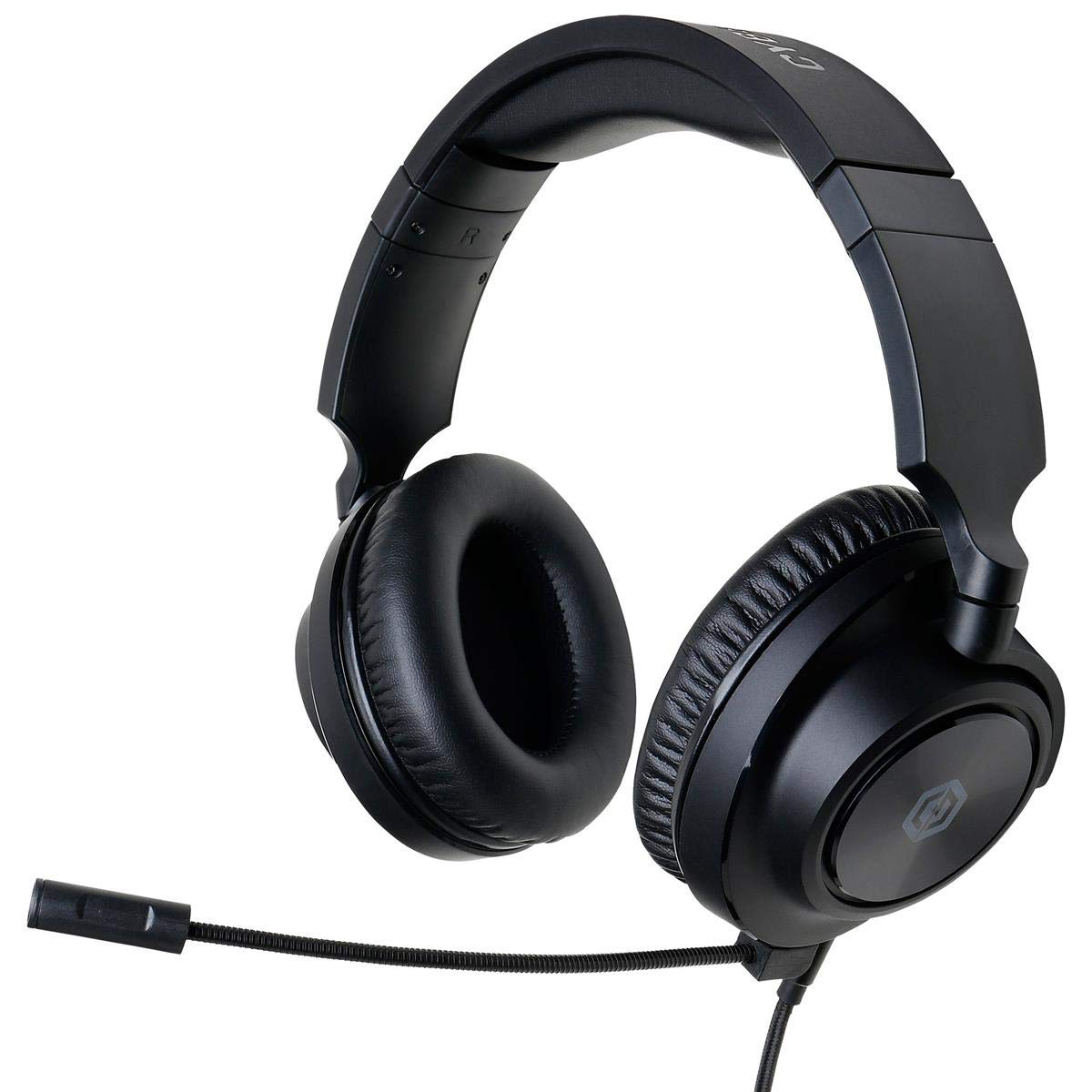
Figure 1: CyberpowerPC Spectre 01 Gaming Headset
Змест пакета
Праверце, ці ёсць усе прадметы ў вашай упакоўцы:
- Spectre Gaming Headset
- Аўдыёкабель
- Здымны мікрафон
- PC Splitter (Y-cable)
- Кароткае кіраўніцтва
Настройка
1. Падключэнне мікрафона
Locate the microphone input port on the left earcup. Align the microphone's connector with the port and gently push until it clicks into place. Ensure it is securely attached for proper function.
2. Падключэнне гарнітуры
The Spectre 01 headset uses a standard 3.5mm jack for audio and microphone connectivity.
- For devices with a single 3.5mm combo jack (e.g., most laptops, PS4, Xbox One, Switch, mobile phones): Plug the headset's 3.5mm audio cable directly into the device's audio port.
- For devices with separate audio and microphone jacks (e.g., most desktop PCs): Use the included PC splitter. Connect the headset's 3.5mm cable to the female end of the splitter. Then, plug the green-tipped male connector of the splitter into your computer's audio output jack (usually green), and the pink-tipped male connector into your computer's microphone input jack (usually pink).
3. Карэкціроўка для камфорту
The headset features an adjustable headband and flexible earcups. Extend or retract the headband to fit your head size. The earcups can pivot and tilt to conform to your ear shape, reducing pressure during extended use.

Figure 2: Headset Adjustments for Optimal Fit
Інструкцыя па эксплуатацыі
1. Элементы кіравання аўдыё
The headset features inline audio controls on the cable. Use the volume wheel to adjust the listening volume. A microphone mute switch is also present, allowing you to quickly toggle your microphone on or off.
2. Выкарыстанне мікрафона
Position the flexible boom microphone close to your mouth for clear voice capture. Ensure the microphone is not muted via the inline control or your device's settings.
3. Сумяшчальнасць з платформай
The Spectre 01 headset is compatible with a wide range of devices:
- ПК/Mac: Connect using the 3.5mm jack, utilizing the PC splitter for separate audio/mic ports if necessary.
- Плэйстэйшн 4 (PS4): Plug directly into the controller's 3.5mm port. Adjust audio settings in the PS4 system menu.
- Xbox One: Plug directly into the controller's 3.5mm port. An Xbox One Stereo Headset Adapter (sold separately) may be required for older controllers without a 3.5mm jack.
- Пераключальнік Nintendo: Plug directly into the console's 3.5mm port.
- Мабільныя прылады: Plug directly into the 3.5mm audio jack of your smartphone or tablet.

Figure 3: Earcup Flexibility for Enhanced Comfort
Тэхнічнае абслугоўванне
To ensure the longevity and performance of your CyberpowerPC Spectre 01 headset, follow these maintenance guidelines:
- Уборка: Выкарыстоўвайце мяккую сухую тканіну, каб выцерці амбушуры і агалоўе. Для ўстойлівага бруду злёгкуamp можна выкарыстоўваць тканіну, але пазбягайце празмернай вільгаці. Не выкарыстоўвайце агрэсіўныя хімікаты або абразіўныя ачышчальнікі.
- захоўванне: Store the headset in a clean, dry place away from extreme temperatures and direct sunlight. Avoid coiling the cable tightly to prevent damage.
- Апрацоўка: Always grasp the plug when disconnecting the cable, rather than pulling on the cable itself. Avoid dropping the headset or subjecting it to strong impacts.
Ліквідацыю непаладак
If you encounter issues with your Spectre 01 headset, refer to the following common solutions:
- Няма гуку або нізкая гучнасць:
- Пераканайцеся, што 3.5-мм раз'ём цалкам устаўлены ў прыладу.
- Check the inline volume control on the headset cable and increase the volume.
- Праверце налады аўдыёвыхаду і ўзровень гучнасці вашай прылады.
- If using the PC splitter, ensure both green and pink connectors are correctly plugged into the corresponding ports on your PC.
- Праверце гарнітуру з іншай прыладай, каб выключыць праблему, характэрную для гэтай прылады.
- Мікрафон не працуе:
- Пераканайцеся, што мікрафон надзейна падключаны да гарнітуры.
- Check the inline microphone mute switch on the cable and ensure it is in the 'unmuted' position.
- Verify your device's microphone input settings and ensure the Spectre 01 is selected as the default input device.
- If using the PC splitter, ensure the pink connector is correctly plugged into your PC's microphone input.
- Праверце мікрафон з дапамогай іншай прылады або праграмы.
- Sound Distortion or Static:
- Пераканайцеся, што ўсе злучэнні надзейныя і свабодныя ад смецця.
- Try connecting the headset to a different audio port or device to check if the issue persists.
- Reduce the volume on both the headset and the device to see if distortion lessens.
Тэхнічныя характарыстыкі
| Марка | CyberpowerPC |
| Нумар мадэлі | CPS01H200 |
| Назва мадэлі | Прывід |
| Колер | Чорны |
| Размяшчэнне вушэй | Над вухам |
| Формаў-фактар | Над вухам |
| Імпеданс | 32 Ом |
| Дыяпазон частот | ад 20 Гц да 20 кГц |
| Памер драйвера | 50 мм неадым |
| Тэхналогія падлучэння | Правадная |
| Раз'ём для навушнікаў | 3.5 мм Jack |
| Асаблівасці кабеля | Раздымныя |
| Матэрыял | Штучная скура, пластык |
| Дадатковыя магчымасці | Lightweight, Microphone Included, Inline Audio Controls |
Інфармацыя аб гарантыі
The CyberpowerPC Spectre 01 Gaming Headset is covered by a 1-гадовая абмежаваная гарантыя from the date of purchase. This warranty covers defects in materials and workmanship under normal use. It does not cover damage caused by accident, misuse, abuse, neglect, unauthorized modification, or improper installation. Please retain your proof of purchase for warranty claims.
Падтрымка
For further assistance, technical support, or warranty inquiries, please visit the official CyberpowerPC website or contact their customer service department. Refer to the contact information provided in your Quick Start Guide or on the CyberpowerPC webсайт.