
1. Уводзіны
This manual provides essential information for the safe and effective use of your ProForm Sport 3.0 Treadmill. Please read all instructions thoroughly before assembly and operation. Retain this manual for future reference.
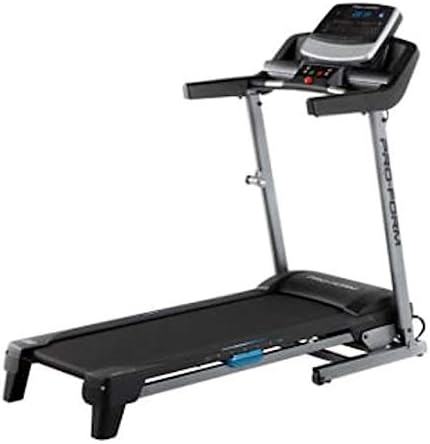
Image: The ProForm Sport 3.0 Treadmill, showcasing its overall design and console.
2. Важная інфармацыя па бяспецы
To reduce the risk of serious injury, read the following important precautions before using the treadmill:
- Пракансультуйцеся з урачом перад пачаткам любой праграмы практыкаванняў.
- The treadmill is designed to support a maximum user weight of 125 кілаграма (275 фунта).
- Recommended for users 15 гады і старэй.
- Always attach the ключ бяспекі to your clothing before starting the treadmill. The treadmill will stop if the safety key is disengaged.
- Трымайце дзяцей і хатніх жывёл далей ад бегавой дарожкі падчас працы.
- Размясціце бегавую дарожку на роўнай паверхні, пакідаючы за ёй не менш за 2 метры (6.5 футаў) вольнай прасторы і па 0.5 метра (1.6 футы) з кожнага боку.
- Апранайце адпаведную спартыўную вопратку і абутак.
- Не карыстайцеся бегавой дарожкай, калі пашкоджаны шнур харчавання або вілка, або калі яна працуе няправільна.
3. Інструкцыя па зборцы
The ProForm Sport 3.0 Treadmill requires assembly. Please refer to the separate assembly guide included with your product for detailed, step-by-step instructions. Ensure all components listed in the assembly guide are present before beginning. A tool kit is included to assist with assembly.
The treadmill features a Касмічная эканомія design, allowing it to be folded for storage after use. Follow the assembly guide for instructions on how to properly fold and unfold the treadmill.
4. Інструкцыя па эксплуатацыі

Выява: Крупны план view of the ProForm Sport 3.0 Treadmill console.
4.1 Уключэнне і выключэнне
- Connect the power cord to a grounded outlet. The treadmill operates on 9Vcc 2.0A.
- Locate the main power switch, usually near the front of the treadmill base, and flip it to the 'ON' position.
- To power off, flip the main power switch to 'OFF' and unplug the power cord.
4.2 Кансольная перадачаview
The console features a 5-inch Multi-Color Display that shows workout metrics such as speed, incline, time, distance, and heart rate. It includes an audio port compatible with two 2-inch speakers for entertainment during your workout.
4.3 Пачатак трэніроўкі
- Станьце на бегавую дарожку, паставіўшы ногі на бакавыя парэнчы.
- Прымацаваць ключ бяспекі clip to your clothing. Insert the safety key into its designated slot on the console.
- Націсніце кнопку «ПУСК» на кансолі. Стужка пачне рухацца з нізкай хуткасцю.

Image: A user engaging in a workout on the ProForm Sport 3.0 Treadmill.
4.4 Рэгуляванне хуткасці і нахілу
- Выкарыстоўвайце Лічбавы кантроль хуткасці buttons (usually '+' and '-') to adjust the belt speed from Ад 0 да 10 міль у гадзіну.
- Выкарыстоўвайце Digital Incline Control buttons to adjust the incline from ад 0% да 10%.
- Quick speed and incline buttons may also be available for rapid adjustments.
4.5 Выкарыстанне загадзя зададзеных праграм
The treadmill includes 16 Pre-set Training Programs. Select a program from the console. The treadmill will automatically adjust speed and incline according to the program's profile. Follow the on-screen prompts.
4.6 Маніторынг сардэчнага рытму
The treadmill is equipped with an EKG Pulse Sensor. To monitor your heart rate, grasp the metal contacts on the handlebars firmly with both hands. Your heart rate will be displayed on the console after a few seconds.
5. Тэхнічнае абслугоўванне
Рэгулярнае тэхнічнае абслугоўванне забяспечвае даўгавечнасць і аптымальную прадукцыйнасць вашай бегавой дарожкі.
- Уборка: Працярыце кансоль і іншыя паверхні рэкламайamp тканінай пасля кожнага выкарыстання. Пазбягайце выкарыстання абразіўных ачышчальнікаў або растваральнікаў.
- Праверка рамяня: Periodically check the walking belt for wear and tear. Ensure the belt is centered and properly tensioned. Refer to the assembly guide for belt adjustment procedures.
- змазка: The walking belt may require lubrication over time. Consult your assembly guide or manufacturer's recommendations for the correct lubricant and application frequency.
- Праверка кампанента: Regularly inspect all nuts, bolts, and moving parts for tightness and proper function. Tighten any loose fasteners.
6. Выпраўленне непаладак
If you experience issues with your treadmill, refer to the following common problems and solutions:
| праблема | Магчымая прычына | Рашэнне |
|---|---|---|
| Бегавая дарожка не ўключаецца. | Power cord not plugged in; main power switch off; circuit breaker tripped. | Ensure power cord is securely plugged in. Turn main power switch to 'ON'. Check household circuit breaker. |
| Рэмень не рухаецца. | Safety key not inserted; motor overload; belt misalignment. | Insert the safety key fully. Reduce user weight if exceeding capacity. Refer to assembly guide for belt alignment. |
| Няправільныя паказанні пульса. | Hands not firmly on sensors; dry hands; interference. | Ensure firm, consistent contact with EKG pulse sensors. Moisten hands slightly if dry. Avoid electronic interference. |
| Незвычайны шум падчас працы. | Loose components; belt friction; motor issue. | Check and tighten all visible bolts and screws. Lubricate belt if necessary (refer to manual). If noise persists, contact support. |
7. Тэхнічныя характарыстыкі
| Нумар мадэлі | Спорт 3.0 |
| Магутнасць рухавіка | 2.5 HP |
| Максімальная вага карыстальніка | 125 кг (275 фунтаў) |
| Дыяпазон хуткасцей | 0 - 10 MPH (Digital Control) |
| Дыяпазон нахілу | 0 - 10% (Digital Control) |
| Памеры бегавога пояса | 16 x 50 inches (approx. 40.6 x 127 cm) |
| Тып дысплея | 5-inch Multi-Color LCD |
| Прадусталяваныя праграмы | 16 |
| Сістэма амартызацыі | ProShoxTM Plus |
| Матэрыял каркаса | Сталёвы сплаў |
| Памеры прадукту (Д х Ш х У) | 170 х 70 х 30 см (прыблізна 67 х 27.5 х 11.8 цалі) |
| Вага прадукту | 50 кг (110 фунтаў) |
| Патрабаванні да магутнасці | 9Vcc 2.0A (Cable Eléctrico) |
| Уключаныя кампаненты | Power cable, Tool kit, Space Saver system, ProShoxTM Plus cushioning, Safety key braking system |
8. Гарантыя і падтрымка
For information regarding your product's warranty, please refer to the warranty card included with your purchase or visit the official ProForm website. If you require technical assistance, replacement parts, or have questions not covered in this manual, please contact ProForm customer support directly.
Extended protection plans may be available for purchase separately. Please consult your retailer for details on available extended warranty options.