
1. Уводзіны
Thank you for choosing the ILIFE A10s Lidar Robot Vacuum. This manual provides essential information for the safe operation, maintenance, and troubleshooting of your new robotic vacuum cleaner. Please read it thoroughly before use and keep it for future reference.
2. Прадукт скончыўсяview
The ILIFE A10s is an advanced robotic vacuum designed for efficient home cleaning. Key features include:
- Smart Laser Navigation & Mapping: Utilizes Lidar technology for precise mapping and navigation, allowing for custom area cleaning, virtual barriers, and multi-floor mapping.
- Праграма і галасавое кіраванне: Control the robot via the ILIFEHOME App or voice commands with Alexa. (Supports 2.4G network only).
- Self-Recharges and Resumes: Automatically returns to the charging station when the battery is low and resumes cleaning from where it left off once recharged.
- 2-in-1 Floating Roller Brush: Adapts to uneven surfaces for effective debris pickup on hard floors and low-to-medium pile carpets.
- Магутнае ўсмоктванне 2000 Па: Delivers strong suction for thorough cleaning of various floor types.
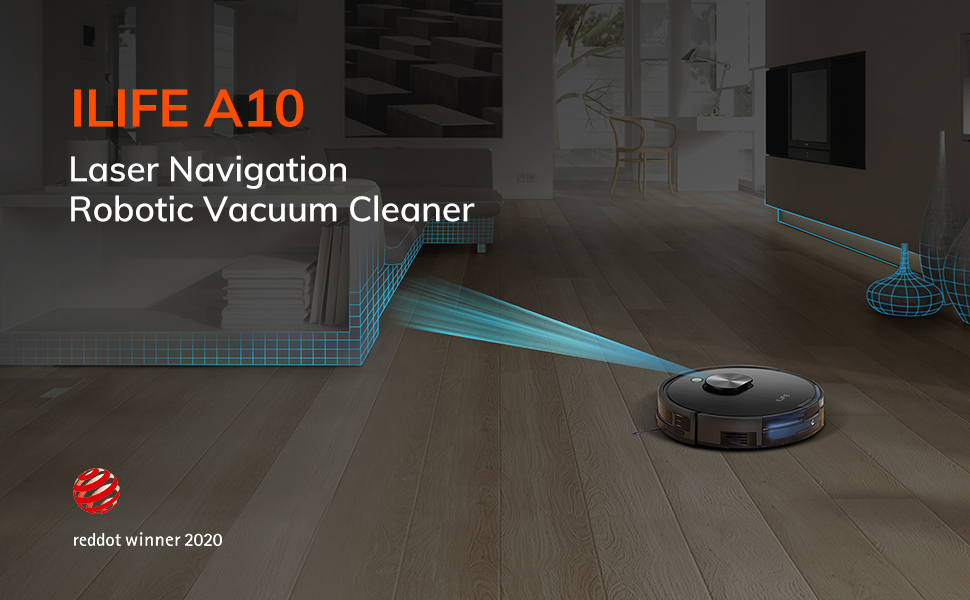
Image: The ILIFE A10s robot vacuum actively mapping a room using its laser navigation system, with a digital representation of the mapped area shown above.
3. Што ў скрынцы
Your ILIFE A10s package includes the following items:
- 1 ILIFE A10s Robot Vacuum
- 1 Сметніца
- 1 зарадная падстаўка
- 1 Charging Mat
- 1 Пульт дыстанцыйнага кіравання
- 2 батарэйкі ААА
- 1 Power Adapter (length 1.5 meters)
- 1 сродак для ачысткі
- 1 Валіковая шчотка
- 4 бакавыя шчоткі
- 1 High-Efficiency Filter
- 1 Кіраўніцтва карыстальніка
- 1 Кароткае кіраўніцтва
4. Настройка
- Charging Stand Placement: Place the charging stand against a wall in an open area, ensuring there are no obstacles within 1 meter (3 feet) to the sides and 2 meters (6 feet) in front. Connect the power adapter to the charging stand and plug it into a power outlet.
- Першапачатковая плата: Place the robot vacuum on the charging stand. Ensure the charging contacts on the robot align with those on the stand. Allow the robot to fully charge before its first use (approximately 5 hours). The indicator light will change to solid green when fully charged.
- Усталюйце бакавыя шчоткі: Устаўце бакавыя шчоткі ў прызначаныя для іх пазы ў ніжняй частцы робата.
- Download ILIFEHOME App: Download the 'ILIFEHOME' app from your smartphone's app store. Follow the in-app instructions to connect your robot to your home Wi-Fi network (2.4G network only).
- First Mapping Run: For optimal mapping, ensure all room doors are open during the robot's initial exploration. The robot will create a complete map of your home environment.

Image: The ILIFE A10s robot vacuum is shown docked and charging, with its charging station against a wall.
5. Інструкцыя па эксплуатацыі
The ILIFE A10s offers various cleaning modes and control options:
- Аўтаматычны рэжым: The most frequently used cleaning mode. The robot plans a cleaning path autonomously.
- Рэжым Edge: The robot moves along the edges of walls and furniture to clean corners and baseboards.
- Кропкавы рэжым: Cleans a specific area with concentrated dirt or debris in a square pattern.
- Максімальны рэжым: Павялічвае магутнасць ўсмоктвання для больш глыбокай уборкі.

Image: Visual representation of the robot vacuum operating in Path, Edge, Spot, and Max cleaning modes.
App Control (ILIFEHOME App)
The ILIFEHOME App provides advanced control features:
- Custom Area Cleaning: Выберыце пэўныя пакоі або зоны на карце для мэтанакіраванай уборкі.
- To-Go Zone: Designate areas for the robot to specifically clean.
- No-Go Zone/Virtual Barriers: Намалюйце віртуальныя межы на карце, каб прадухіліць уваход робата ў пэўныя зоны.
- Расклад уборкі: Set up daily or weekly cleaning schedules for automated cleaning.
- Шматпавярховае картаграфаванне: Create and store maps for different levels of your home (up to 3 maps).

Image: The ILIFE A10s robot vacuum is shown operating near a virtual 'No-go zone' boundary, illustrating the custom cleaning feature.

Image: A 3D diagram illustrating the robot's ability to map and store layouts for multiple floors (First floor and Second floor).
Галасавое кіраванне
The ILIFE A10s is compatible with Amazon Alexa. You can start or stop cleaning using simple voice commands.

Image: The ILIFE A10s robot vacuum is shown in a room with an Amazon Echo device, indicating voice control functionality.
Навігацыя
Equipped with Lidar navigation, the robot accurately scans and maps your home. It features intelligent anti-collision and anti-drop sensors to prevent damage to furniture and falls from stairs.
Video: An official ILIFE video demonstrating the A10s robot vacuum's smart laser navigation, mapping capabilities, and various cleaning features in a home environment.
6. Тэхнічнае абслугоўванне
Regular maintenance ensures optimal performance and extends the lifespan of your ILIFE A10s.
- Сметніца: Empty the dustbin after each cleaning cycle. The cellular dustbin design enhances filtration efficiency.
- Фільтр: Clean the high-efficiency filter regularly. Replace it every 3-6 months, or as needed, depending on usage.
- Валіковая шчотка: Remove and clean the 2-in-1 floating roller brush weekly to remove tangled hair and debris.
- Бакавыя шчоткі: Check and clean the side brushes regularly. Replace them if they are worn or damaged.
- Датчыкі: Wipe the sensors on the robot's bumper and bottom with a clean, dry cloth to ensure proper navigation.
7. Выпраўленне непаладак
If you encounter issues with your ILIFE A10s, refer to the following common solutions:
- Робат не зараджаецца: Ensure the charging stand is properly connected to power and the robot's charging contacts are aligned with the stand. Clean the charging contacts if dirty.
- Робат захрас або заблытаўся: Clear any cables, small objects, or loose rugs from the cleaning path. Regularly clean the roller brush and side brushes to prevent tangles.
- Слабая эфектыўнасць уборкі: Empty the dustbin, clean the filter, and check the roller and side brushes for debris. Ensure the suction power is set appropriately in the app.
- Праблемы з падключэннем да праграмы: Ensure your Wi-Fi network is 2.4G and stable. Restart your router, the robot, and the app.
- Памылкі навігацыі: Clean the Lidar sensor and other sensors on the robot. Ensure there are no sudden changes in the environment that might confuse the mapping.
8. Тэхнічныя характарыстыкі
| Марка | ЖЫЦЦЁ |
| Назва мадэлі | ILIFE A10s |
| Памеры прадукту | 12.3 см Д х 3.74 см Ш х 13 см В |
| Вага прадмета | 5.8 фунта |
| Тып фільтра | Disk (High-Efficiency Filter) |
| Тэрмін службы батарэі | 120 хвілін |
| тtage | 14.8 вольт |
| Крыніца харчавання | Харчаванне ад батарэі |
| Метад кантролю | Voice, App, Remote Control |
| Сумяшчальныя прылады | Amazon Echo |
| Рэкамендацыя па паверхні | Hard Floor, Carpet (low-medium pile) |
9. Гарантыя і падтрымка
ILIFE provides a worry-free 12-month warranty from the date of purchase. For customer care and support, please contact:
- тэлефон: 1-800-631-9676 (Monday to Friday, 8:00 A.M - 7:00 P.M. Central Standard Time)
- электронная пошта: support@iliferobot.com
Калі ласка, падрыхтуйце мадэль прадукту і інфармацыю пра пакупку, калі звяртаецеся ў службу падтрымкі.