
1. Уводзіны
Прадукт скончаныview
The AfterShokz OpenMove are bone conduction headphones designed for comfort and situational awareness. They transmit audio through your cheekbones, leaving your ears open to ambient sounds. The headphones feature Bluetooth 5.0 connectivity and multiple EQ modes to optimize your listening experience for various activities.

Малюнак 1: Вуглавы view of the AfterShokz OpenMove bone conduction headphones in slate grey, showcasing their lightweight, open-ear design.
Змест пакета
Калі ласка, пераканайцеся, што ўсе прадметы прысутнічаюць у вашай упакоўцы:
- AfterShokz OpenMove Headphones
- Зарадны кабель USB-C
- Берушы
- Dedicated Pouch
- Кіраўніцтва карыстальніка (англійская версія)
2. Настройка
Зарадка навушнікаў
Before initial use, fully charge your headphones to ensure optimal battery performance.
- Connect the USB-C charging cable to the charging port located on the headphones.
- Падключыце другі канец кабеля да адаптара харчавання USB (не ўваходзіць у камплект) або да USB-порта кампутара.
- The LED indicator will illuminate to show the charging status. A complete charge typically takes approximately 2 hours.
Спалучэнне з прыладай Bluetooth
Follow these steps to connect your headphones to your smartphone, tablet, or other Bluetooth-enabled device:
- Пераканайцеся, што навушнікі адключаны.
- Press and hold the power button for 5-7 seconds until the LED indicator flashes red and blue alternately. This indicates the headphones are in pairing mode.
- На сваёй прыладзе ўключыце Bluetooth і знайдзіце даступныя прылады.
- Select "OpenMove by AfterShokz" from the list of detected devices.
- Пасля паспяховага спалучэння святлодыёдны індыкатар будзе гарэць сінім колерам.
3. Інструкцыя па эксплуатацыі
Элементы кіравання навушнікамі
The AfterShokz OpenMove headphones feature intuitive controls for managing audio playback and calls.

Малюнак 2: Падрабязны view of the control buttons located on the right transducer arm, including volume and multi-function controls.
| Кнопка/функцыя | Дзеянне |
|---|---|
| Кнопка харчавання | Press and hold to Power On/Off; Single press to Play/Pause audio; Single press to Answer/End Call. |
| Павелічэнне гучнасці (+) | Single press to Increase Volume; Long press to skip to Next Track. |
| Volume Down (-) | Single press to Decrease Volume; Long press to go to Previous Track. |
| Multi-function Button (often combined with power) | Double press to Activate Voice Assistant; Triple press to Change EQ Mode. |
Рэжымы эквалайзера
The OpenMove headphones offer three distinct equalizer modes to optimize audio for different content and listening environments.
- Стандартны рэжым: This mode is suitable for general outdoor listening, providing a balanced audio experience.
- Вакальны рэжым: Designed to enhance human voices, making it ideal for listening to audiobooks, podcasts, and radio broadcasts.
- Earplug Mode: When used with the included earplugs, this mode provides a more immersive listening experience. It is suitable for noisy environments such as airplanes or trains, or for enjoying movies and games at home.
Нашэнне навушнікаў
For optimal sound quality and comfort, position the headphones correctly.
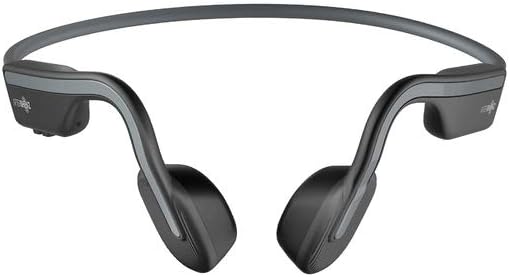
Малюнак 3: Спераду view of the AfterShokz OpenMove headphones, illustrating how the band rests behind the head and the transducers sit on the cheekbones.
Position the transducers on your cheekbones, just in front of your ears. The flexible band should rest comfortably behind your head. Ensure a snug fit for optimal sound transmission and clarity.
4. Тэхнічнае абслугоўванне
Уборка
Каб падтрымліваць даўгавечнасць і гігіену вашых навушнікаў:
- Працярыце навушнікі мяккай, damp тканіна.
- Do not use harsh chemicals or abrasive cleaners, as these can damage the materials.
- Ensure the charging port is completely dry before connecting the charging cable.
Захоўванне
When not in use, store your headphones properly:
- Store the headphones in the dedicated pouch provided to protect them from dust, scratches, and minor impacts.
- Avoid storing the headphones in environments with extreme temperatures (very hot or very cold) or high humidity.
5. Выпраўленне непаладак
Агульныя праблемы і рашэнні
If you encounter any problems with your AfterShokz OpenMove headphones, refer to the table below for potential solutions.
| выпуск | Магчымае рашэнне |
|---|---|
| Навушнікі не ўключаюцься. | Charge the headphones fully. Ensure the charging cable is securely connected. |
| Няма гуку з навушнікаў. | Ensure the headphones are powered on and successfully paired with your device. Check the volume level on both the headphones and your connected device. |
| Немагчыма спалучыць прыладу. | Ensure the headphones are in pairing mode (LED flashing red and blue). Turn off and then on Bluetooth on your device. Try restarting both the headphones and your device. |
| Дрэнная якасць гуку або нізкая гучнасць. | Adjust the position of the transducers on your cheekbones for a better fit. Experiment with different EQ modes. Ensure there are no obstructions between the headphones and your device. |
| Навушнікі не зараджаюцца. | Verify that the USB-C charging cable is properly connected to both the headphones and a working power source. Try a different USB port or power adapter. |
6. Тэхнічныя характарыстыкі
Тэхнічныя характарыстыкі
Detailed technical specifications for the AfterShokz OpenMove headphones:
| Асаблівасць | Спецыфікацыя |
|---|---|
| Нумар мадэлі | AFT-EP-000022 |
| Тып дынаміка | Датчыкі касцяной праводнасці |
| АЧХ | 20 Гц - 20,000 Гц |
| Адчувальнасць | 100 ± 3 дБ |
| Адчувальнасць мікрафона | -40 дБ ± 3 дБ |
| Версія Bluetooth | 5.0 |
| Падтрымліваецца Profiles | A2DP, AVRCP, HSP, HFP |
| Далёкасць бесправадной сувязі | Да 10 метраў (33 футаў) |
| Тэрмін службы батарэі | Да 6 гадзін |
| Час зарадкі | Прыкладна 2 гадзіны |
| Вага | 29 грам (1.02 унцый) |
| Узровень воданепранікальнасці | Воданепранікальны |
| Тэхналогія падлучэння | Бесправадная сувязь (Bluetooth) |
| Уключаныя кампаненты | Headphones, USB-C Cable, Earplugs, Pouch |
7. Гарантыя і падтрымка
Інфармацыя аб гарантыі
For detailed information regarding the product warranty, including terms, conditions, and duration, please refer to the official AfterShokz website or the warranty card included with your purchase. It is recommended to retain your proof of purchase for warranty claims.
Падтрымка кліентаў
If you encounter any issues or have questions not addressed in this manual, please visit the AfterShokz support page on their official website. You can also contact their customer service team for further assistance.