
PeakTech P 8005
PeakTech P 8005 Sound Level Meter User Manual
Мадэль: P 8005 | Марка: PeakTech
1. Уводзіны
The PeakTech P 8005 is a high-precision Class 2 sound level meter designed for accurate noise measurement and data logging. It is suitable for a wide range of applications including noise projects, quality control, disease prevention, and environmental sound measurements in factories, schools, offices, traffic, and households. This device features a 4-digit 20mm LCD multi-function display with a bargraph and backlight, a USB interface for continuous measurements, and AC/DC outputs for connection to frequency analyzers or X-Y wave recorders. This manual provides detailed instructions for the proper use, maintenance, and troubleshooting of your PeakTech P 8005.
2. Інфармацыя па бяспецы
Please read all safety instructions carefully before operating the device. Failure to follow these instructions may result in damage to the device or personal injury.
- Не падвяргайце прыладу ўздзеянню экстрэмальных тэмператур, вільготнасці або прамых сонечных прамянёў.
- Пазбягайце моцных вібрацый або ўдараў.
- Не спрабуйце адкрываць або мадыфікаваць прыладу. Рамонт павінен выконвацца толькі кваліфікаваным персаналам.
- Трымайце прыладу далей ад моцных электрамагнітных палёў.
- Ensure proper ventilation when using the AC adapter for extended periods.
- Утылізуйце батарэі ў адпаведнасці з мясцовымі правіламі.
3. Змесціва ўпакоўкі
Праверце, ці ўсе пералічаныя ніжэй прадметы ўваходзяць у вашу ўпакоўку:
- PeakTech P 8005 Sound Level Meter
- Сумка для пераноскі
- 3m Additional Microphone Cable
- Інтэрфейсны кабель USB
- Software for Windows (on CD-ROM)
- Міні штатыў
- Адаптар пераменнага току 9 В
- Акумулятар 9В
- Кіраўніцтва карыстальніка

4. Прадукт скончыўсяview
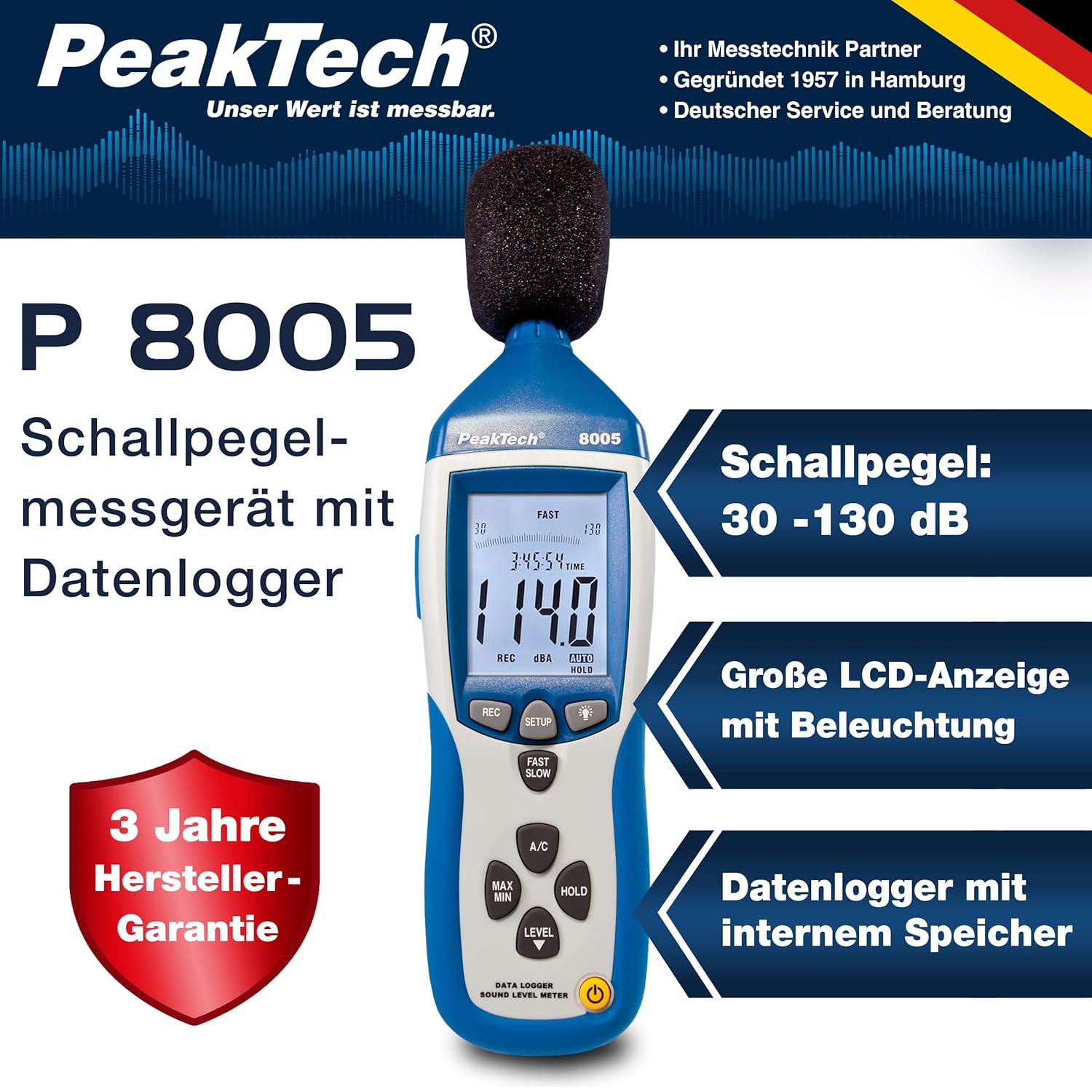
The PeakTech P 8005 is designed for user-friendly operation while providing professional-grade accuracy. Familiarize yourself with the main components and controls.
4.1. Асноўныя асаблівасці
- Дакладнасць вымярэння: Class 2 sound level meter (IEC-61672-1 compliant) for accurate readings even in noisy environments.
- Шырокі дыяпазон вымярэнняў: 30 to 130 dB across 4 ranges with 0.1 dB resolution.
- Рэгістрацыя даных: Internal memory for up to 32,000 readings (1x/sec to 1x/min).
- Падключэнне: USB 2.0 interface for PC connection and data transfer.
- Аналагавыя выхады: AC/DC outputs for connecting to frequency analyzers or X-Y wave recorders.
- Дысплей: 4-digit 20mm LCD with bargraph and backlight.
- Рэжымы вымярэння: Fast (125 ms) and Slow (1 s) response times, A and C weighting.
- Дадатковыя функцыі: MIN/MAX measurements, over-range/under-range indication.

5. Настройка
5.1. Устаноўка батарэі
The PeakTech P 8005 operates on a 9V battery or via the included 9V AC power adapter.
- Знайдзіце батарэйны адсек на задняй панэлі прылады.
- Адкрыйце крышку батарэйнага адсека.
- Устаўце батарэйку 9 В, сачыце за правільнай палярнасцю.
- Надзейна зачыніце крышку батарэі.
5.2. Харчаванне прылады
- Каб уключыць, націсніце УЛАДА кнопка.
- Каб выключыць харчаванне, націсніце і ўтрымлівайце УЛАДА кнопку, пакуль дысплей не выключыцца.
- For continuous operation, connect the 9V AC power adapter to the DC 9V input port on the side of the device.
5.3. Падключэнне мікрафона
The device comes with a built-in microphone. For remote measurements or specific setups, you can use the included 3m additional microphone cable.
- Unscrew the microphone cap from the top of the device.
- Connect the 3m microphone cable to the microphone input.
- Attach the external microphone to the other end of the cable.
- For stable measurements, attach the device to the mini tripod using the threaded mount at the bottom.

Відэа 5.1: Оверview of the PeakTech 8005 Sound Level Meter, demonstrating its features and setup, including the use of the external microphone and power adapter.
6. Інструкцыя па эксплуатацыі
6.1. Асноўныя вымярэнні
After powering on, the device will immediately begin measuring sound levels.
- The current sound level in dB is displayed on the LCD.
- Выкарыстоўвайце УЗРОВЕНЬ button to cycle through the four measurement ranges (30-80 dB, 50-100 dB, 80-130 dB, Auto 30-130 dB).
- Прэса ХУТКА/ПАВОЛЬНА to switch between fast (125 ms) and slow (1 s) response times. Fast is suitable for sudden noise changes, while slow is for average noise levels.
- Прэса Кандыцыянер to select A-weighting (dBA) or C-weighting (dBC). A-weighting mimics human ear response, C-weighting is for mechanical noise.

6.2. Data Logging and PC Connection
The P 8005 can record up to 32,000 measurement values internally. To access and analyze this data, use the included Windows software.
- Install the software from the provided CD-ROM onto a Windows PC (Windows 95/98/NT/2000/XP/VISTA/7/8/10 supported).
- Connect the sound level meter to your PC using the USB interface cable.
- Open the software. The software allows for real-time data display, data import from the device's internal memory, and export to formats like Excel for further analysis.
- Refer to the software's help documentation for detailed instructions on data logging setup and analysis.

7. Тэхнічнае абслугоўванне
7.1. Уборка
Рэгулярна чысціце прыладу, каб забяспечыць аптымальную прадукцыйнасць.
- Працярыце знешнюю частку мяккай сухой тканінай.
- Не выкарыстоўвайце абразіўныя ачышчальнікі або растваральнікі.
- Keep the microphone free from dust and debris.
7.2. Захоўванне
When not in use, store the device in its carrying case in a cool, dry place, away from direct sunlight and extreme temperatures.
7.3. Каліброўка
The PeakTech P 8005 is a precision instrument. Regular calibration is recommended to maintain accuracy, especially for professional applications. Refer to the included test report for the last calibration date. Contact PeakTech support for calibration services.
8. Выпраўленне непаладак
| праблема | Магчымая прычына | Рашэнне |
|---|---|---|
| Прылада не ўключаецца. | Low or dead battery; AC adapter not connected or faulty. | Replace the 9V battery or connect the AC adapter. Ensure the adapter is working. |
| Няправільныя паказанні. | Incorrect measurement range; microphone obstructed; device needs calibration. | Adjust the measurement range using the УЗРОВЕНЬ button. Clear any obstructions from the microphone. Consider professional calibration. |
| Software not recognizing device. | USB cable faulty; driver issue; software compatibility. | Try a different USB port or cable. Reinstall the software and drivers. Check software compatibility settings (e.g., Windows 98 compatibility mode for older systems). |
| Data logging issues. | Memory full; incorrect logging settings. | Download and clear data from the device. Review data logging settings in the software. |
9. Тэхнічныя характарыстыкі
| Параметр | Каштоўнасць |
|---|---|
| Прыкладной стандарт | IEC-61672-1 Type 2, ANSI S1.4 Type 2 |
| Дакладнасць (1 кГц сінус; A, C) | ± 1.4 дБ |
| Дакладнасць (дыяпазон частот) | According to EN-61672-1 Class 2, max. ± 5.6 dB |
| Дыяпазон частот | 31.5 Гц - 8 кГц |
| Дынамічны дыяпазон | 50 дБ |
| Дыяпазоны ўзроўню | Low: 30 dB ~ 80 dB, Med: 50 dB ~ 100 dB, High: 80 dB ~ 130 dB, Auto: 30 dB ~ 130 dB |
| Час водгуку | Fast: 125 ms / Slow: 1 s |
| Мікрафон | ½-inch Electret Condenser Microphone |
| дазвол | 0.1 дБ |
| Абнаўленне дысплея | 2 разы/сек. |
| Аналагавы выхад | AC/DC Outputs, AC: 1 Veff = 10 mV/dB |
| Аперацыйная Voltage | 9V Battery or 9V AC Power Adapter |
| Памеры (ШxВxГ) | 80 х 280 х 50 мм |
| Вага | 350 г |
| Data Logger Memory | Да 32,000 XNUMX чытанняў |
10. Гарантыя і падтрымка
PeakTech products are designed for reliability and performance. For warranty information and technical support, please refer to the documentation included with your product or visit the official PeakTech webсайт. Захоўвайце чэк аб куплі як пацвярджэнне пакупкі для гарантыйных прэтэнзій.
вытворца: PeakTech
Webсайт: PeakTech Official Store