
Уводзіны
This manual provides detailed instructions for the setup, operation, and maintenance of your groov e Atlas Radio Alarm Clock with Wireless Charger. Please read this manual thoroughly before using the device to ensure proper function and to maximize your user experience. Keep this manual for future reference.
Змест пакета
Праверце наяўнасць усіх прадметаў у камплекце:
- groov e Atlas Radio Alarm Clock
- Адаптар сілкавання
- Кіраўніцтва карыстальніка
Асаблівасці прадукту
- Wireless Charging (5W): Conveniently charge compatible smartphones by placing them on the top surface.
- FM-радыё: Tune into your favorite FM stations.
- Святлодыёдны дысплей: Clear digital time display.
- Харчаванне ад сеткі: Reliable power supply for continuous operation.
- USB-зарадная станцыя: Additional USB port for charging other devices.
- Двайны сігнал трывогі: Set two independent alarms for different wake-up times.
- Дыммер дысплея: Adjust the brightness of the LED display.
Настройка
- Падключыце харчаванне: Insert the power adapter into the 'DC IN' port on the back of the alarm clock, then plug the adapter into a wall outlet. The display will light up.
- Усталяваць час:
- Press and hold the 'TIME SET' button located on the back of the unit.
- Use the 'TUN-' or 'TUN+' buttons on the top panel to adjust the hour.
- Press 'TIME SET' again to confirm the hour and move to minutes.
- Use 'TUN-' or 'TUN+' to adjust the minutes.
- Press 'TIME SET' once more to confirm and exit time setting.
- To switch between 12-hour and 24-hour format, press the '12/24H' button on the back.

Выява: Задняя частка view of the groov e Atlas alarm clock, highlighting the DC IN power input and the USB charging port. The '12/24H TIME SET' and 'SLEEP' buttons are also visible.
Інструкцыя па эксплуатацыі
Setting Alarms (ALM1 / ALM2)
- Press the 'ALM1' or 'ALM2' button to select the alarm you wish to set. The alarm icon will flash on the display.
- Use the 'TUN-' or 'TUN+' buttons to adjust the alarm hour.
- Press the 'ALM1' or 'ALM2' button again to confirm the hour and move to minutes.
- Use 'TUN-' or 'TUN+' to adjust the alarm minutes.
- Press the 'ALM1' or 'ALM2' button a third time to confirm the alarm time. The alarm icon will remain lit, indicating the alarm is active.
- To deactivate an alarm, press the corresponding 'ALM1' or 'ALM2' button until the alarm icon disappears from the display.
Праца FM-радыё
- Уключыць/выключыць: Press the 'ON/OFF' button to turn the radio on or off.
- Аўтаматычнае сканаванне: Press the 'SCAN' button to automatically scan and save available FM stations.
- Ручная настройка: Use the 'TUN-' or 'TUN+' buttons to manually adjust the frequency. Press and hold for faster tuning.
- Запраграмаваныя станцыі: Use 'MEM-' or 'MEM+' to cycle through saved preset stations.
- Наладзіць гучнасць: Use the 'VOL-' or 'VOL+' buttons to control the radio volume.
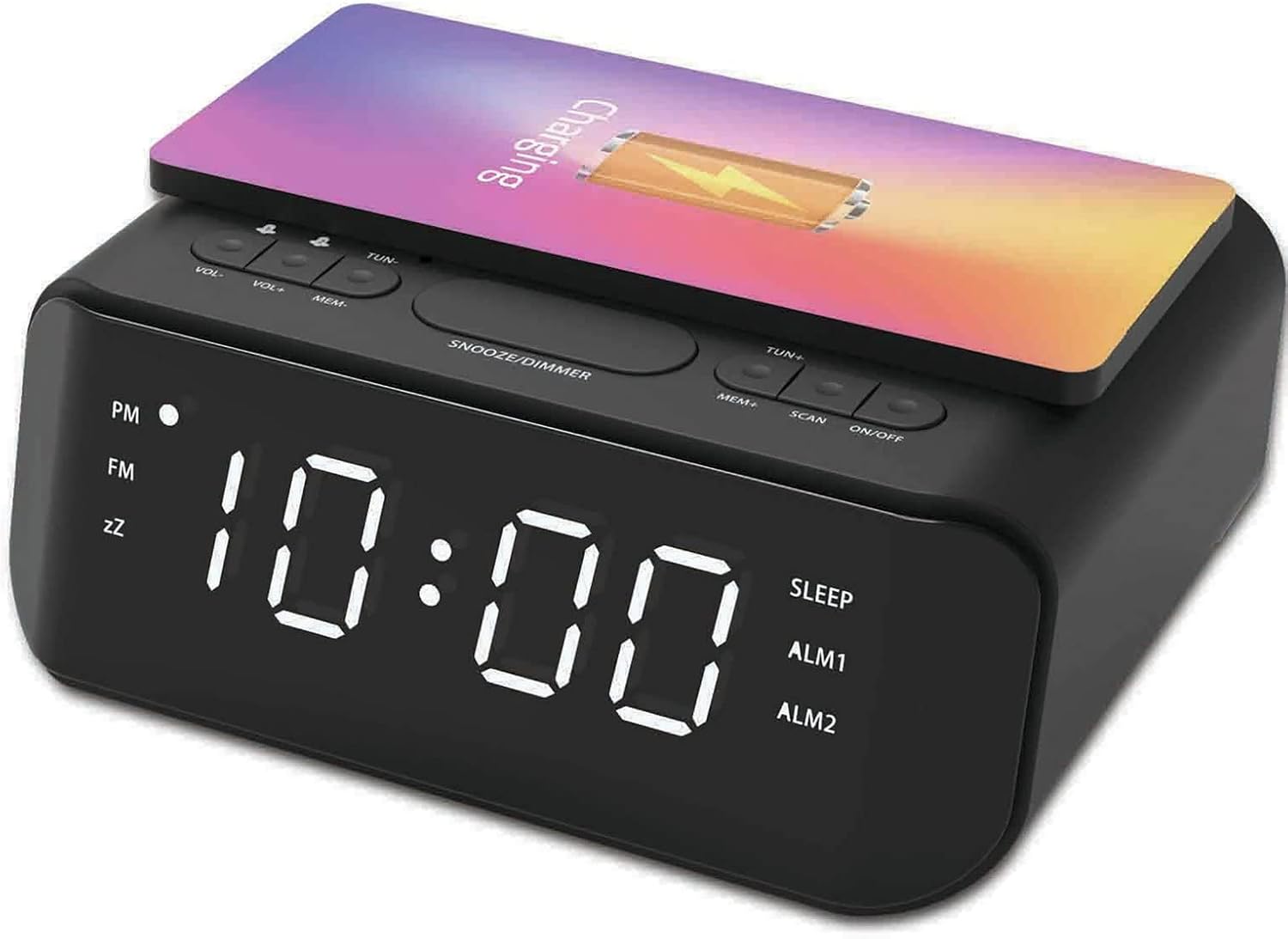
Выява: Уверсе view of the groov e Atlas alarm clock, illustrating the layout of the control buttons for volume, tuning, memory, scan, and power.
Бесправадная зарадка
- Ensure your smartphone is compatible with 5W Qi wireless charging.
- Place your compatible smartphone centrally on the wireless charging pad located on the top surface of the alarm clock.
- The phone's display should indicate that charging has begun. If not, adjust the phone's position.

Image: A smartphone placed on the groov e Atlas alarm clock's top surface, showing the charging indicator on the phone's screen, confirming wireless charging is active.
USB-зарадка
- Connect a USB charging cable (not included) to the USB port on the back of the alarm clock.
- Падключыце іншы канец кабеля да прылады.
- Ваша прылада пачне зараджацца.
Дыммер дысплея
Press the 'SNOOZE/DIMMER' button to cycle through different brightness levels for the LED display. This allows you to adjust the display to your preferred visibility, especially in dark environments.
Тэхнічнае абслугоўванне
- Уборка: Use a soft, dry cloth to clean the surface of the alarm clock. Do not use liquid cleaners or abrasive materials.
- захоўванне: Калі прылада не выкарыстоўваецца працяглы час, адключыце вілку ад сеткі і захоўвайце яе ў прахалодным сухім месцы.
- Бяспека: Do not expose the device to water, high humidity, or extreme temperatures. Avoid dropping or subjecting the device to strong impacts.
Ліквідацыю непаладак
| праблема | Магчымая прычына | Рашэнне |
|---|---|---|
| Прылада не ўключаецца. | Адаптар сілкавання не падключаны або няспраўная разетка. | Ensure the power adapter is securely plugged into the device and a working wall outlet. Try a different outlet. |
| Бесправадная зарадка не працуе. | Phone not Qi-compatible or not positioned correctly. | Verify your phone supports Qi wireless charging. Reposition the phone centrally on the charging pad. Remove any thick phone cases. |
| Сігналізацыя не гучыць. | Сігналізацыя не ўключана або гучнасць занадта нізкая. | Check if the alarm icon is lit on the display. Increase the alarm volume using the 'VOL+' button. |
| Дрэнны прыём радыё. | Слабы сігнал або становішча антэны. | Extend and adjust the position of the FM antenna wire on the back of the unit for better reception. |
Тэхнічныя характарыстыкі
- Нумар мадэлі: GVWC06BK
- Марка: паз
- колер: Чорны
- Тып дысплея: Лічбавы святлодыёд
- Крыніца харчавання: Mains Powered (AC Adapter included)
- Бесправадны выхад зарадкі: 5W
- Выхад зарадкі USB: 5 В/1 А
- Асаблівасці сігналізацыі: Dual Alarm, Snooze
- радыё: FM
- матэрыял: Акрыланітрылбутадыенстырол (АБС)
- Форма: Прамавугольны
- Тып мацавання: Настольнае мацаванне
- Тып руху: Кварц
- батарэі: Not included (requires 1 battery for backup, type not specified in data)
Гарантыя і падтрымка
Your groov e Atlas Radio Alarm Clock GVWC06BK comes with a standard manufacturer's warranty. Please refer to the warranty card included in your package for specific terms and conditions, including the warranty period and coverage details.
For technical support, troubleshooting assistance, or warranty claims, please contact groov e customer service through their official webсайт або кантактную інфармацыю, указаную ў гарантыйным талоне.
Калі ласка, захавайце пацвярджэнне пакупкі для любых пытанняў, звязаных з гарантыяй.