
Уводзіны
The 4smarts Powerbank Enterprise 2 is a high-capacity 20000 mAh portable charger designed to provide fast and efficient power to a wide range of electronic devices. With a total output of 130 watts and multiple charging ports, it supports various fast charging standards, including Power Delivery (PD), Qualcomm Quick Charge 3.0 (QC3.0), and Samsung Adaptive Fast Charge. This manual provides essential information for the safe and optimal use of your power bank.

Image: The 4smarts Powerbank Enterprise 2, highlighting its 130W output capability.
Настройка
Першапачатковая зарадка
Before first use, fully charge your 4smarts Powerbank Enterprise 2. For the fastest charging experience, use a 100W Power Delivery (PD) compatible wall charger and a USB-C to USB-C cable (sold separately). The power bank can be fully recharged in approximately 60 minutes with a 100W charger.
Святлодыёдныя індыкатары
The power bank features LED indicators to display the current charge level. Observe these lights to monitor the battery status during charging and discharging.
Інструкцыя па эксплуатацыі
Зарадка Power Bank
- Connect a compatible charging cable to either the USB-C1 or USB-C2 input port on the power bank. For optimal speed, use the USB-C1 port with a 100W PD charger.
- Акрамя таго, вы можаце выкарыстоўваць Micro USB input port with a compatible cable and charger.
- The LED indicators will illuminate to show the charging progress. All LEDs will be solid when fully charged.
Зарадка знешніх прылад
The Powerbank Enterprise 2 offers multiple output ports to charge your devices:
- USB-C1 Output (PD/PPS): Up to 100W for fast charging laptops (e.g., MacBook Pro), tablets, and smartphones.
- USB-C2 Output (PD): Up to 30W for fast charging tablets and smartphones.
- USB-A Output (QC3.0): Up to 18W for devices supporting Qualcomm Quick Charge 3.0 or other standard charging protocols.
Каб зарадзіць прыладу:
- Connect your device to the appropriate output port on the power bank using a compatible charging cable.
- Паўэрбанк аўтаматычна пачне зараджаць вашу прыладу. Калі не, націсніце кнопку харчавання адзін раз, каб актываваць зарадку.
- You can charge multiple devices simultaneously. The total output is up to 130W (e.g., USB-C1 at 100W + USB-C2 at 30W). For safety, if the total output exceeds 130W, the power bank will regulate the output of each port accordingly.

Image: Diagram illustrating the various input and output ports of the power bank, including their respective wattages and functions (Micro USB input, USB-C1 input/output with PD/PPS, USB-C2 input/output with PD, and USB-A output with QC3.0).
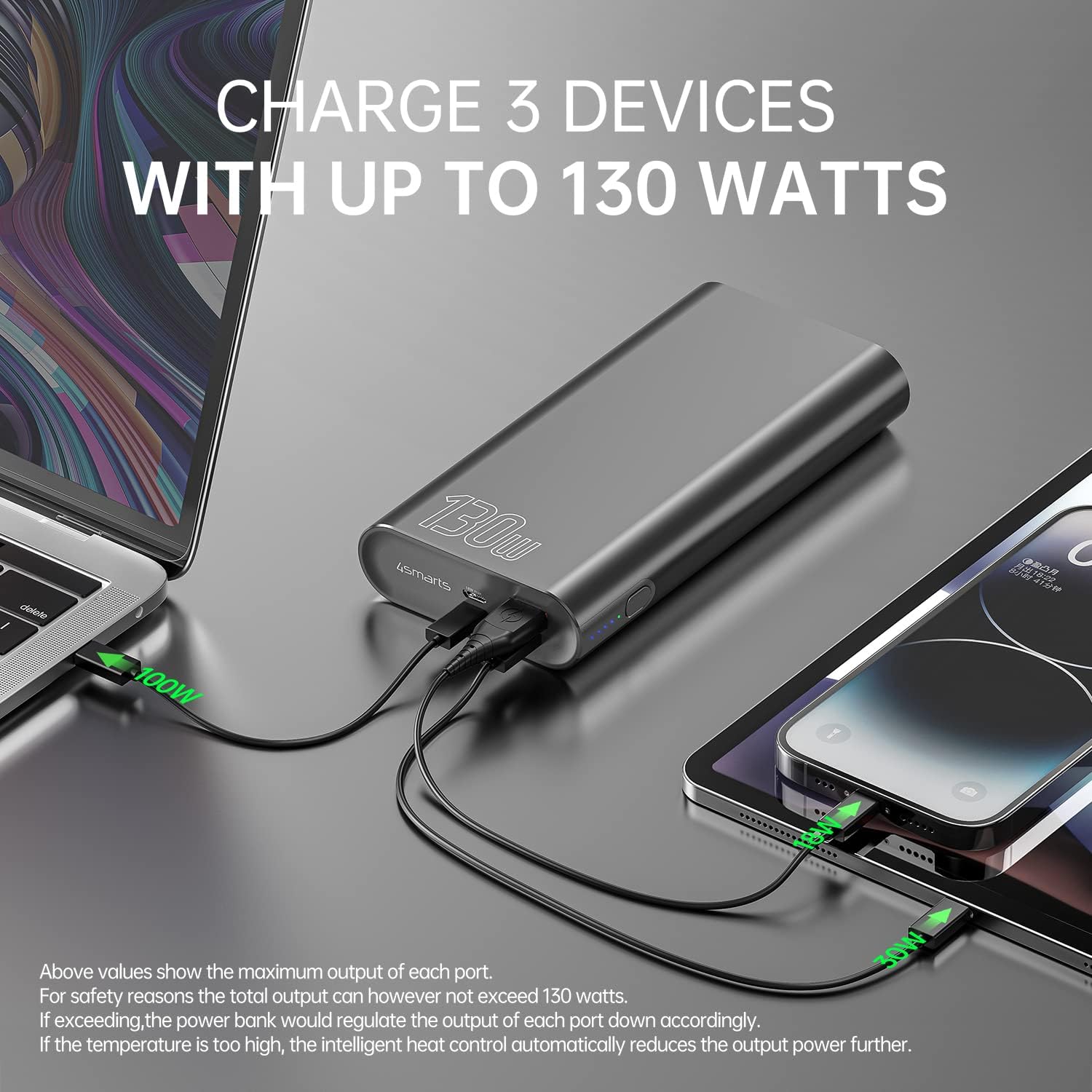
Image: The power bank connected and simultaneously charging a laptop and a tablet, demonstrating its multi-device charging capability.

Image: The power bank charging a MacBook Pro 16", illustrating 100W fast charging to reach 50% in 45 minutes.
Тэхнічнае абслугоўванне
- Уборка: Для чысткі знешніх акумулятараў выкарыстоўвайце мяккую сухую тканіну. Пазбягайце выкарыстання агрэсіўных хімічных рэчываў або абразіўных матэрыялаў.
- захоўванне: Захоўвайце знешні акумулятар у прахалодным, сухім месцы, удалечыні ад прамых сонечных прамянёў, экстрэмальных тэмператур і вільготнасці.
- Сыход за батарэяй: To prolong battery life, fully charge the power bank at least once every three months if not in regular use. Avoid completely draining the battery for extended periods.
- Апрацоўка: Do not drop, puncture, or disassemble the power bank. This can damage the internal components and void the warranty.
Ліквідацыю непаладак
- Паўэрбанк не зараджаецца: Ensure the charging cable and wall adapter are functioning correctly and are securely connected. For fastest charging, use a 100W PD charger with the USB-C1 port.
- Прылада не зараджаецца ад паўэрбанка: Ensure the power bank has sufficient charge. Press the power button to activate output if necessary. Check that the cable connecting your device to the power bank is not damaged and is compatible.
- Павольная зарадка: Verify that your device and cable support fast charging protocols (PD, QC3.0) and are connected to the appropriate high-output port (USB-C1 for up to 100W, USB-C2 for up to 30W, USB-A for up to 18W).
- Перагрэў: The power bank features intelligent heat control. If the temperature is too high, it will automatically reduce output power. Ensure proper ventilation during use.
The 4smarts Powerbank Enterprise 2 is equipped with multiple safety features, including overload protection, short circuit protection, intelligent charge shutdown, and deep discharge protection, to ensure safe operation.

Image: An internal diagram of the power bank, showcasing its certified safety features such as overload protection, short circuit protection, intelligent charge shutdown, and deep discharge protection.
Тэхнічныя характарыстыкі
| Асаблівасць | Дэталь |
|---|---|
| Назва мадэлі | Powerbank Enterprise 2 |
| Нумар мадэлі тавару | 4S468747 |
| Ёмістасць батарэі | 20000 мАг |
| Склад батарэі | Lithium-ion (4 Tesla 21700 Li-ion cells) |
| Уваход Micro USB | DC 5V/2A, 9V/2A, 12V/1.5A (Max 18W) |
| USB-C1 Input/Output (PD/PPS) | DC 5V/3A, 9V/3A, 12V/3A, 15V/3A, 20V/5A (Max 100W) |
| USB-C2 Input/Output (PD) | DC 5V/3A, 9V/3A, 12V/3A, 15V/2A, 20V/1.5A (Max 30W) |
| Выхад USB-A (QC3.0) | DC 5V/3A, 9V/2A, 12V/1.5A (Max 18W) |
| Агульны выхад | 130W (USB-C1 100W + USB-C2 30W) |
| Power Bank Charging Time | Approx. 60 minutes (with 100W AC charger and cable, sold separately) |
| Памеры (Д х Ш х У) | 15.2 х 7.5 х 2.5 см (5.98 х 2.95 х 0.98 цалі) |
| Вага прадмета | 515 грама (1.13 фунта) |
| Колер | Чорны |
| Асаблівасці | Fast Charging, Overload Protection, Short Circuit Protection, Deep Discharge Protection |
| Рэкамендуемае выкарыстанне | iPhone, Laptop, Smartphone, Tablet |
Інфармацыя па бяспецы
- Не падвяргайце знешні акумулятар уздзеянню вады, агню або экстрэмальных тэмператур.
- Пазбягайце падзення і моцных удараў павербанка.
- Do not attempt to disassemble, repair, or modify the power bank.
- Захоўваць у месцах, недаступных дзецям.
- Выкарыстоўвайце толькі арыгінальныя або сертыфікаваныя сумяшчальныя кабелі і адаптары для зарадкі.
- Утылізуйце знешні акумулятар адказна ў адпаведнасці з мясцовымі правіламі ўтылізацыі электронных адходаў.
Гарантыя і падтрымка
Гарантыя
The 4smarts Powerbank Enterprise 2 comes with a manufacturer's warranty. Please refer to the warranty card included in the product packaging or visit the official 4smarts webпадрабязныя гарантыйныя ўмовы для вашага рэгіёна глядзіце на сайце.
Падтрымка кліентаў
For technical assistance, troubleshooting, or any questions regarding your 4smarts Powerbank Enterprise 2, please contact 4smarts customer support. Contact information can typically be found on the official 4smarts webсайце або ва ўпакоўцы прадукту.