
Прадукт скончаныview
The SteelSeries Aerox 3 Wireless mouse is engineered for speed and durability. Its ultra-lightweight 66g design is optimized for fast mouse swipes, while the TrueMove Air optical sensor ensures precise tracking. With Quantum 2.0 Dual Wireless technology, you get a stable and reliable connection for uninterrupted gameplay. The mouse also features a long-lasting 200-hour battery life with fast charging capabilities via USB-C, and an IP54-rated AquaBarrier for water and dust resistance.

Малюнак 1: Спераду view of the SteelSeries Aerox 3 Wireless Gaming Mouse with RGB lighting.
Кіраўніцтва па ўстаноўцы
Follow these steps to set up your SteelSeries Aerox 3 Wireless Gaming Mouse:
- Распакоўка: Carefully remove the mouse and all accessories from the packaging. You should find the Aerox 3 Wireless Mouse, a USB-C to USB Type-A Super Mesh Data/Charging Cable, a USB-C Wireless Dongle, and an Extension Adapter.
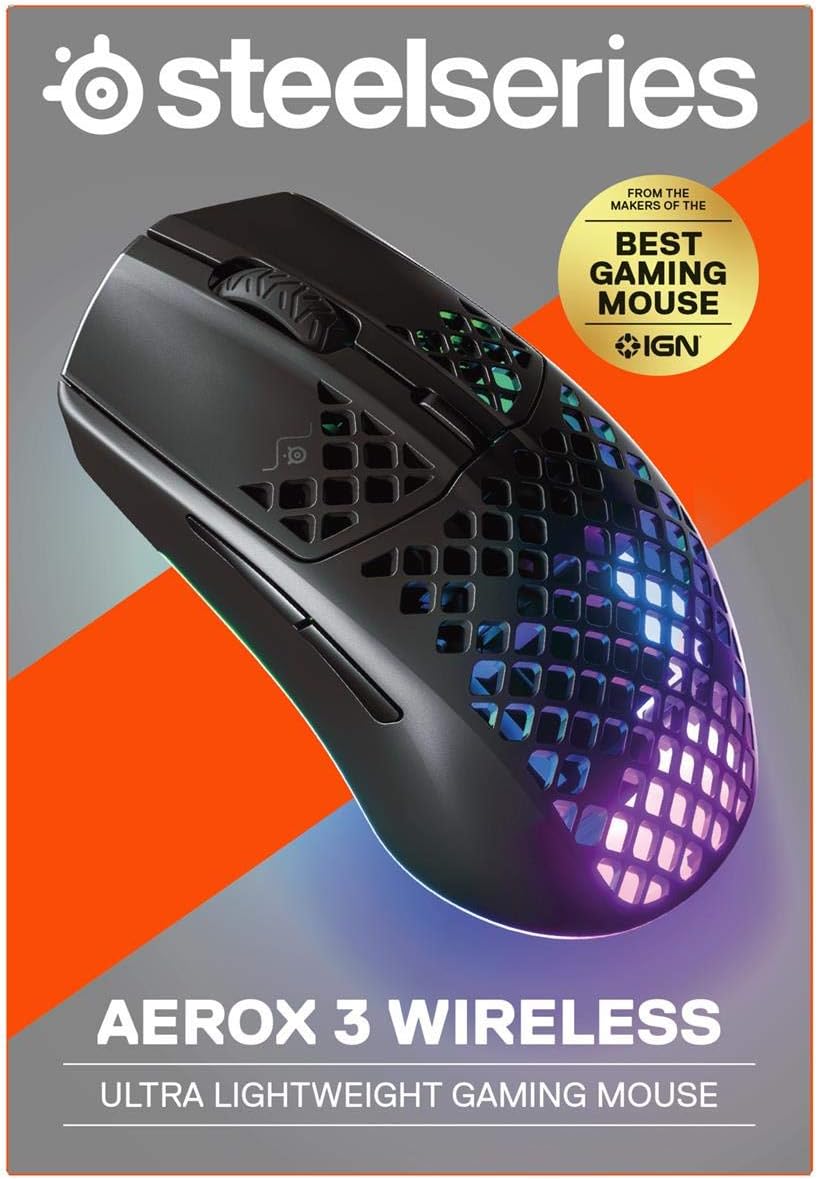
Figure 2: Packaging of the SteelSeries Aerox 3 Wireless Gaming Mouse.
- Зарадка: Before first use, it is recommended to fully charge the mouse. Connect the USB-C end of the charging cable to the mouse and the USB-A end to a powered USB port on your computer or a USB wall adapter. The mouse supports fast charging.

Малюнак 3: бок view showing the USB-C charging port.
- Connect Wireless Dongle: For optimal wireless performance, plug the USB-C Wireless Dongle directly into an available USB-C port on your PC. If a USB-C port is not available, use the Extension Adapter with the USB-C to USB Type-A cable to connect the dongle to a USB-A port.

Малюнак 4: унізе view of the mouse showing the wireless dongle storage and power switch.
- Уключэнне: Locate the power switch on the bottom of the mouse and slide it to the "2.4G" position for wireless mode or "Bluetooth" position for Bluetooth mode.
- Усталюйце праграмнае забеспячэнне SteelSeries Engine: For full customization of RGB lighting, button remapping, and CPI settings, download and install the SteelSeries Engine software from the official SteelSeries website. This software is compatible with Windows, macOS, and Linux.
Відэа 1: Афіцыйнае відэа пра прадуктasing the features and design of the Aerox 3 Wireless Gaming Mouse.
Інструкцыя па эксплуатацыі
Рэжымы падлучэння:
- Бесправадная сувязь 2.4 ГГц: For gaming-grade, low-latency performance, use the included USB-C Wireless Dongle. Ensure the switch on the bottom of the mouse is set to "2.4G".
- Bluetooth 5.0: For general use and multi-device connectivity, switch the mouse to "Bluetooth" mode. Pair it with your device through your operating system's Bluetooth settings.
Асноўныя функцыі:
- Клік левай/правай кнопкай мышы: Стандартныя кнопкі мышы для асноўных і дадатковых дзеянняў.
- Кола пракруткі: Выкарыстоўваецца для пракруткі дакументаў і web pages. It also functions as a clickable middle button.
- Кнопка DPI: Located behind the scroll wheel, this button cycles through pre-set CPI (Counts Per Inch) sensitivity levels. Customize these levels using the SteelSeries Engine software.
- Бакавыя кнопкі: Two programmable buttons on the left side of the mouse, typically used for forward/back navigation or in-game actions.
Кіраванне батарэяй:
The Aerox 3 Wireless boasts up to 200 hours of battery life. The RGB lighting can indicate battery status. When the battery is low, the lighting may flash or change color. Connect the USB-C cable to charge. The mouse can be used while charging.
Тэхнічнае абслугоўванне
Уборка:
The Aerox 3 Wireless features an AquaBarrier (IP54 rated) for water and dust resistance. To clean the mouse, gently wipe it with a soft, damp cloth. Avoid using harsh chemicals or abrasive materials. Ensure the USB-C port is dry before charging.
Абнаўленні праграмнага забеспячэння:
Regularly check for updates to the SteelSeries Engine software. Updates often include performance improvements, bug fixes, and new features for your mouse.
Ліквідацыю непаладак
| праблема | Магчымая прычына | Рашэнне |
|---|---|---|
| Mouse not responding/connecting. | Low battery, incorrect wireless mode, dongle not connected, interference. | Charge the mouse. Ensure the switch is in the correct mode (2.4G or Bluetooth). Re-insert the wireless dongle. Try a different USB port. Reduce interference from other wireless devices. |
| Inconsistent CPI/tracking. | Dirty sensor, software issue, surface not suitable. | Clean the optical sensor on the bottom of the mouse. Reinstall SteelSeries Engine software. Use a clean, uniform mouse pad. |
| RGB-падсветка не працуе. | Software settings, low battery. | Check RGB settings in SteelSeries Engine. Ensure mouse is charged. |
| Mouse not charging. | Faulty cable/port, mouse issue. | Try a different USB-C cable and/or USB port. Ensure the cable is fully inserted. |
For more detailed troubleshooting or advanced issues, please refer to the official SteelSeries support resources.
Тэхнічныя характарыстыкі
| Асаблівасць | Дэталь |
|---|---|
| Марка | SteelSeries |
| Нумар мадэлі | 62604 |
| Тэхналогія падлучэння | Wireless (2.4 GHz, Bluetooth), USB-C (for charging/wired mode) |
| Датчык | Паветраны аптычны датчык TrueMove |
| CPI (Counts Per Inch) | Up to 18,000 CPI |
| Адсочванне хуткасці | 400 IPS (Inches Per Second) |
| Паскарэнне | 40G |
| Стаўка апытання | 1000Hz / 1 ms |
| Вага | 66g (Ultra-lightweight) |
| Тэрмін службы батарэі | Да 200 гадзін |
| Устойлівасць да вады і пылу | AquaBarrier (IP54 Rated) |
| Памеры (ДхШхВ) | 4.75 х 2.64 х 1.5 цалі |
| Сумяшчальнасць аперацыйнай сістэмы | Windows, macOS, Linux |
Гарантыя і падтрымка
Інфармацыя аб гарантыі:
SteelSeries products are covered by a limited warranty. For specific warranty terms and conditions, including duration and coverage details, please refer to the warranty card included with your product or visit the official SteelSeries support webсайт.
Тэхнічная падтрымка:
For technical assistance, software downloads (SteelSeries Engine), FAQs, and additional resources, please visit the official SteelSeries support page:
Visit the SteelSeries Store for Support
Вы таксама можаце знайсці афіцыйнае кіраўніцтва карыстальніка ў фармаце PDF тут.