
Прадукт скончаныview
The X9 Performance Wired Keyboard and Mouse Combo is designed to provide a highly efficient and comfortable workspace. This set includes a full-size wired keyboard, a wired optical mouse, and a memory foam mouse pad with wrist rest.
The keyboard features 104 concave keys, 14 shortcut/media keys, a 17-key numeric keypad, and an adjustable kickstand for ergonomic typing. The mouse is designed with an ambidextrous body, a high-resolution optical sensor with adjustable DPI settings (1000/1600/2400/3200), and 6 buttons for enhanced control.
This combo offers plug-and-play compatibility with Windows PC and Chrome OS, requiring no additional drivers or batteries.

Image: The X9 Performance Wired Keyboard and Mouse Combo, including the keyboard, mouse, and mouse pad with wrist rest.
Інструкцыя па наладзе
- Распакуйце кампаненты: Асцярожна дастаньце клавіятуру, мыш і кілімок для мышы з упакоўкі.
- Падключэнне клавіятуры: Locate an available USB-A port on your computer (PC or Chromebook). Insert the USB connector of the keyboard into the USB-A port.
- Падключыце мыш: Locate another available USB-A port on your computer. Insert the USB connector of the mouse into the USB-A port.
- Размяшчэнне: Position the mouse pad on your desk. Place the keyboard and mouse in comfortable positions for use.
- Аўтаматычнае распазнаванне: Your operating system (Windows or Chrome OS) will automatically detect and install the necessary drivers. No manual driver installation is required. The devices are ready for use once connected.

Image: Close-up of USB-A cables from the keyboard and mouse connected to the back of a computer tower.
Operating Instructions - Keyboard
The X9 Performance keyboard is a full-size 104-key layout with additional features for enhanced productivity.
- Стандартны набор тэксту: Use the main alphanumeric keys for text input.
- Лічбавая клавіятура: The dedicated 17-key numeric keypad on the right allows for efficient data entry. Ensure 'Num Lock' is active (indicated by an LED).
- Shortcut/Media Keys: The keyboard includes 14 dedicated shortcut or media keys (F1-F12, etc.) for quick access to functions like volume control, media playback, and web browsing. Refer to your operating system's documentation for specific functions of these keys.
- Рэгуляваная падстаўка: Flip out the kickstands located on the underside of the keyboard to adjust the typing angle for improved comfort.
- Святлодыёдныя індыкатары: LEDs above the numeric keypad indicate the status of Num Lock, Caps Lock, and Scroll Lock.
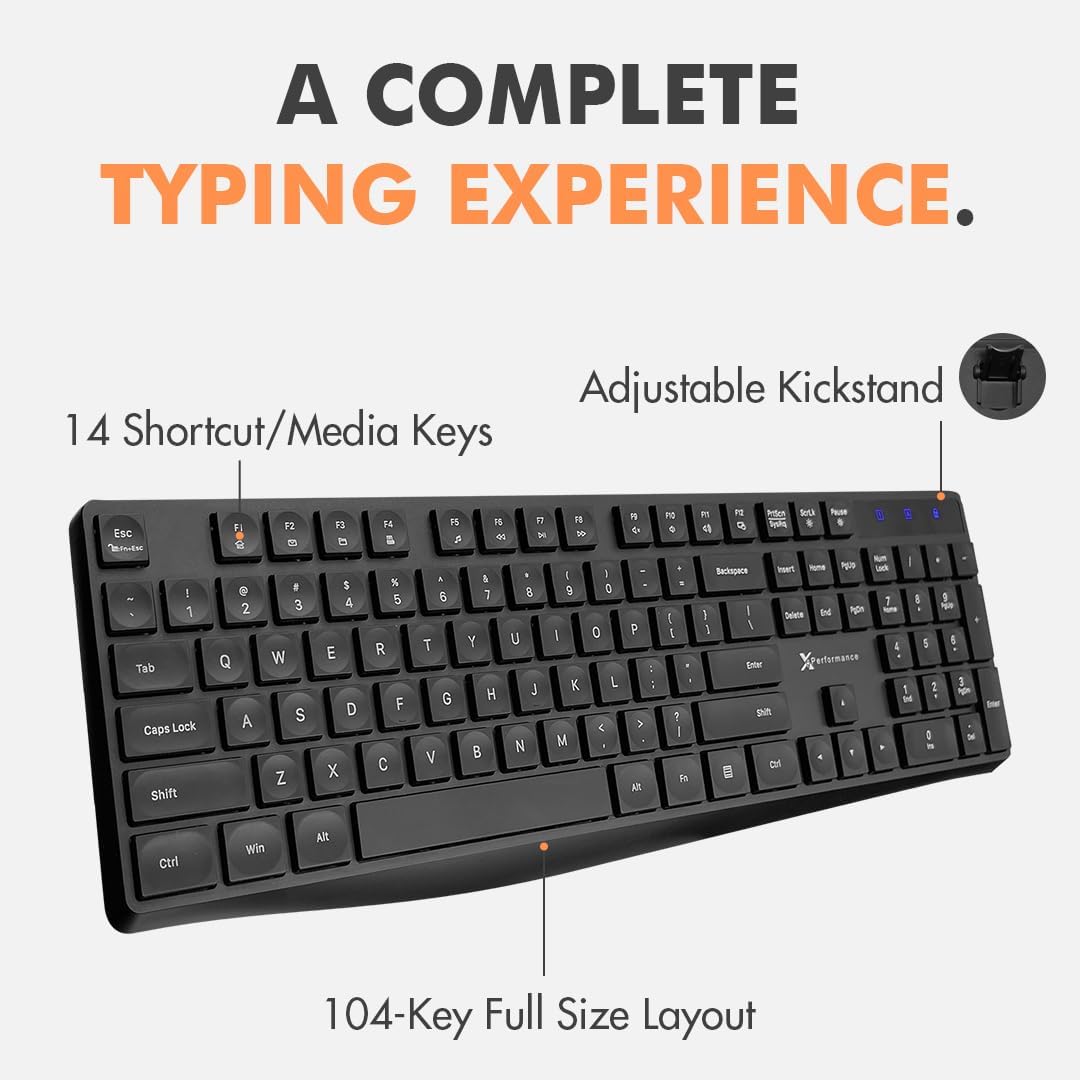
Image: The X9 Performance wired keyboard, highlighting its 104-key full-size layout and 14 shortcut/media keys.
Operating Instructions - Mouse
The X9 Performance wired mouse offers precise control and an ergonomic design.
- Асноўныя функцыі: Use the left and right click buttons for standard operations. The scroll wheel allows for vertical scrolling and can also function as a middle click button.
- Рэгуляванне DPI: The mouse features a DPI button, typically located behind the scroll wheel. Press this button to cycle through different sensitivity settings: 1000, 1600, 2400, and 3200 DPI. Choose the setting that best suits your preference and task.
- Бакавыя кнопкі: Two side buttons are provided for quick navigation, commonly configured as 'Forward' and 'Back' in web браўзэры і file даследчыкі.
- Эрганамічны дызайн: The ambidextrous shape is designed for comfortable use by both left and right-handed users. The included memory foam mouse pad provides wrist support to reduce strain during extended use.

Image: The X9 Performance wired mouse, showcasing its ergonomic design, DPI button, and side navigation buttons.
Тэхнічнае абслугоўванне
To ensure the longevity and optimal performance of your X9 Performance Keyboard and Mouse Combo, follow these maintenance guidelines:
- Уборка: Рэгулярна працірайце клавіятуру і мыш мяккай, сухой тканінай без ворса. Для выдалення ўстойлівага бруду злёгкуampen the cloth with water or a mild, non-abrasive cleaner. Avoid spraying liquids directly onto the devices.
- Выдаленне пылу: Use compressed air to remove dust and debris from between the keyboard keys and from the mouse's optical sensor area.
- Пазбягайце экстрэмальных умоў: Не падвяргайце прылады ўздзеянню экстрэмальных тэмператур, прамых сонечных прамянёў або высокай вільготнасці.
- Сыход за кабелем: Avoid bending or twisting the USB cables excessively to prevent internal damage.
Ліквідацыю непаладак
If you encounter issues with your keyboard or mouse, try the following troubleshooting steps:
- Прылада не распазнана:
- Пераканайцеся, што USB-кабелі надзейна падключаны да партоў USB-A кампутара.
- Паспрабуйце падключыць прылады да розных USB-портаў вашага кампутара.
- Перазагрузіце кампутар.
- Check your computer's Device Manager (Windows) or System Information (Chrome OS) to see if the devices are listed.
- Keys Not Responding (Keyboard):
- Пераканайцеся, што клавіятура правільна падключана.
- If specific keys are not working, check for any physical obstructions or debris under the keys.
- Праверце клавіятуру на іншым камп'ютары, каб вызначыць, у чым праблема: у клавіятуры ці ў камп'ютары.
- Mouse Cursor Not Moving or Erratic:
- Пераканайцеся, што мыш правільна падключана.
- Ачысціце аптычны датчык на ніжняй частцы мышы.
- Ensure you are using the mouse on a suitable surface (the included mouse pad is ideal).
- Адрэгулюйце налады DPI з дапамогай кнопкі DPI на мышы.
- Test the mouse on another computer.
If these steps do not resolve the issue, please contact X9 Performance customer support.
Тэхнічныя характарыстыкі
| Асаблівасць | Апісанне |
|---|---|
| Марка | Прадукцыйнасць X9 |
| мадэль | B08LZLMY3B |
| Тэхналогія падлучэння | USB (правадной) |
| Сумяшчальныя прылады | Ноўтбук, персанальны кампутар |
| Аперацыйная сістэма | Chrome OS, Windows OS |
| Раскладка клавіятуры | QWERTY, Full-Size (104 keys) |
| Keyboard Special Features | 14 Shortcut/Media Keys, Adjustable Kickstand |
| Mouse Movement Detection | Аптычны |
| Налады DPI мышы | 1000/1600/2400/3200 |
| Mouse Hand Orientation | Амбідэкстр |
| Крыніца харчавання | Правадная электрычная (USB) |
| Патрабуюцца батарэі | няма |
Афіцыйнае відэа пра прадукт
Video: An official product video from X9 Performance showcasing the features and setup of the USB Wired Keyboard and Mouse Combo.
Гарантыя і падтрымка
X9 Performance values customer satisfaction. This product comes with a warranty and support:
- Гарантыя: Up to 2 years of warranty from the date of purchase.
- Вяртае: Free returns are available.
- Падтрымка кліентаў: Friendly support is available for any questions or issues you may encounter. Please refer to the contact information provided with your purchase or on the X9 Performance official webсайт для дапамогі.