Уводзіны
Thank you for choosing the TECNOSWITCH CR035WB Wi-Fi Touch Thermostat. This device is designed to provide precise and convenient control over your home's heating and cooling systems. With its intuitive touch interface and Wi-Fi connectivity, you can manage your climate settings locally or remotely via a dedicated smartphone application. Please read this manual carefully before installation and operation to ensure proper use and optimal performance.
Важная інфармацыя па бяспецы
ПАПЯРЭДЖАННЕ: Electrical installation should only be performed by a qualified electrician. Disconnect power at the circuit breaker before installing or servicing the thermostat to prevent electrical shock or equipment damage.
- Ensure the power supply is 230VAC, 50-60Hz as specified.
- Не падвяргайце тэрмастат уздзеянню вады або празмернай вільготнасці.
- Не спрабуйце рамантаваць або мадыфікаваць прыладу самастойна. Звярніцеся да кваліфікаванага абслугоўваючага персаналу.
- Захоўвайце ўпаковачныя матэрыялы далей ад дзяцей.
Прадукт скончаныview
The TECNOSWITCH CR035WB is a wall-mounted Wi-Fi touch thermostat featuring a backlit LCD display. It offers daily and weekly programming capabilities for both heating and cooling modes. Remote control is available via iOS and Android applications.
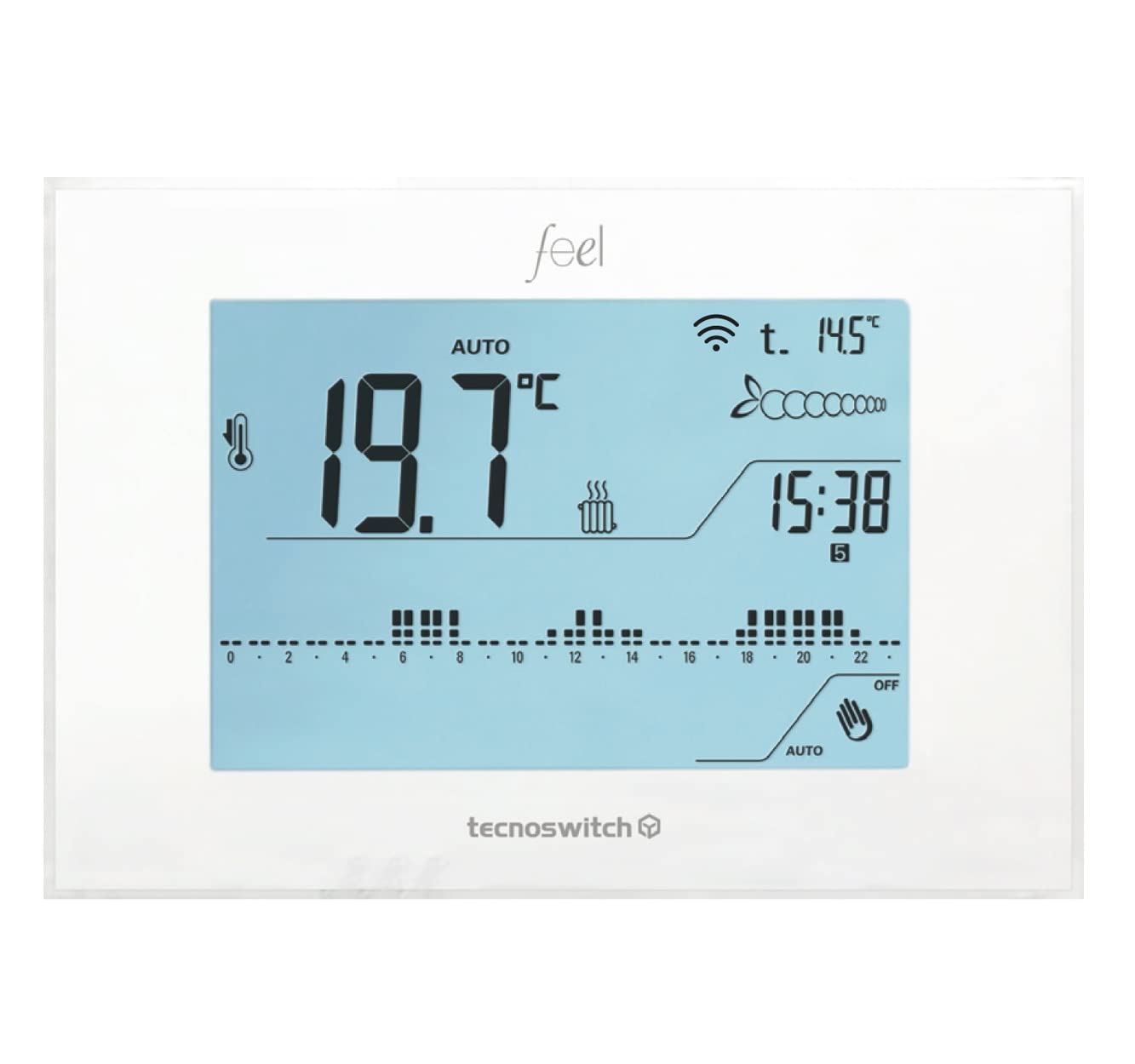
Малюнак 1: Спераду view of the TECNOSWITCH CR035WB Wi-Fi Touch Thermostat, showing its LCD display and touch interface.
Настройка
1. Ўстаноўка
- Адключэнне сілкавання: Turn off the main power supply to your heating/cooling system at the circuit breaker before beginning installation.
- Мантаж: Mount the thermostat on a standard wall box. Ensure it is placed in an area free from direct sunlight, drafts, or heat sources that could affect temperature readings.
- Праводка: Connect the power supply (230VAC, 50-60Hz) to the designated terminals. Connect the heating/cooling system wires to the appropriate relay terminals (6A 250VAC contact rating). Refer to the wiring diagram provided in the product packaging for specific connections.
- Optional External Probe: If using an external temperature probe (model SO001SE), connect it to the dedicated terminals.
- Бяспечнае мацаванне: Secure the thermostat to the wall box using screws.
- Аднаўленне харчавання: Restore power to the system at the circuit breaker.
2. Пачатковае ўключэнне і асноўныя налады
- Upon first power-on, the LCD display will illuminate.
- Set the current date and time using the touch controls.
- Select the operating mode: Heating (Riscaldamento) or Cooling (Affrescamento).
- Adjust the temperature differential (from 0 to 1°C) if proportional temperature control is desired.
3. Падключэнне да Wi-Fi і праграмы
- Спампаваць прыкладанне: Download the official TECNOSWITCH app from the App Store (iOS) or Google Play Store (Android).
- Стварыць уліковы запіс: Open the app and create a user account, or log in if you already have one.
- Дадаць прыладу: Follow the in-app instructions to add your CR035WB thermostat. This typically involves putting the thermostat into pairing mode (refer to the on-screen instructions on the thermostat or the app) and connecting it to your home Wi-Fi network.
- Пульт дыстанцыйнага кіравання: Once connected, you can control the thermostat remotely via the app.
Інструкцыя па эксплуатацыі
1. Basic Controls (Touch Interface)
The CR035WB features a touch-sensitive LCD display. Navigate menus and adjust settings by tapping the corresponding icons or areas on the screen.
2. Рэгуляванне тэмпературы
- Ручная налада: In manual mode, you can directly set the desired temperature using the up/down arrows on the display. The thermostat will maintain this temperature until changed or until a programmed schedule takes over.
- Дыяпазон тэмператур: The adjustable temperature range is +2°C to +35°C.
3. Рэжымы працы
The thermostat supports two main operating modes:
- Heating (Riscaldamento): Activates the heating system when the ambient temperature falls below the setpoint.
- Cooling (Affrescamento): Activates the cooling system when the ambient temperature rises above the setpoint.
- Switch between modes via the thermostat's menu or the mobile app.
4. Programming (Daily/Weekly)
The CR035WB allows for daily and weekly programming to automate temperature control.
- Access Program Menu: Navigate to the programming section on the thermostat's display or through the app.
- Set Time Slots: Define specific time periods for each day of the week.
- Set Temperature Levels: Assign one of three customizable temperature levels (e.g., Comfort, Economy, Away) to each time slot.
- Save Program: Ensure you save your programmed schedule. The internal supercapacitor maintains programming in case of power loss.
5. Кіраванне праграмамі (iOS/Android)
The mobile application provides comprehensive control and monitoring features:
- Remote temperature adjustment and mode selection.
- Creation and modification of daily/weekly programs.
- Monitoring of current temperature and system status.
- Access to advanced functions and statistics.
6. Пашыраныя функцыі
- Keyboard Lock (Password): Secure the thermostat's physical controls with a password to prevent unauthorized changes.
- Anti-seize Pump Function: Periodically activates the pump to prevent seizing during long periods of inactivity.
- Boiler Block Detection: Monitors the boiler status and can detect potential issues.
- Статыстыка: View usage statistics and temperature trends.
- Зваротны адлік: Timer function for temporary temperature changes.
Тэхнічнае абслугоўванне
- Уборка: Gently wipe the thermostat's display and casing with a soft, dry cloth. Do not use abrasive cleaners, solvents, or spray cleaners directly onto the device.
- Няма частак, якія абслугоўваюцца карыстальнікам: The CR035WB does not contain user-serviceable parts. Do not attempt to open the casing.
- Суперкандэнсатар: The internal supercapacitor maintains programming settings during power outages, eliminating the need for battery replacement for this function.
Ліквідацыю непаладак
| праблема | Магчымая прычына | Рашэнне |
|---|---|---|
| Дысплей тэрмастата пусты. | Няма крыніцы харчавання. | Check the circuit breaker and wiring connections. Ensure 230VAC power is supplied. |
| Сістэма ацяплення/астуджэння не рэагуе. | Incorrect wiring; System mode incorrect; Temperature setpoint not reached. | Verify wiring connections. Ensure the thermostat is in the correct operating mode (Heating/Cooling). Adjust the setpoint to be above/below the ambient temperature to trigger the system. |
| Збой падключэння да Wi-Fi або адключэнне. | Incorrect Wi-Fi password; Router too far; Network issues. | Re-enter Wi-Fi password. Move router closer or use a Wi-Fi extender. Restart router and thermostat. Ensure your Wi-Fi network is 2.4GHz. |
| Кіраванне праграмамі не працуе. | No internet connection; App not updated; Thermostat not connected to Wi-Fi. | Check phone's internet connection. Update the app to the latest version. Verify the thermostat's Wi-Fi connection status. |
| Паказчыкі тэмпературы здаюцца недакладнымі. | Тэрмастат падвяргаўся ўздзеянню скразнякоў, прамых сонечных прамянёў або крыніц цяпла. | Relocate the thermostat if possible, or shield it from external influences. If an external probe is connected, ensure it is correctly installed and functioning. |
Тэхнічныя характарыстыкі
| мадэль | CR035WB |
| Марка | TECNOSWITCH |
| Электразабеспячэнне | 230 В пераменнага току, 50-60 Гц |
| Тып дысплея | LCD, Backlit Blue |
| Дыяпазон рэгулявання тэмпературы | ад +2°C да +35°C |
| Рэйтынг кантактаў | 6A 250VAC |
| Тып кантролю тэмпературы | ON-OFF, Proportional |
| Adjustable Thermal Differential | ад 0 да 1°C |
| Рэжымы працы | Ацяпленне / астуджэнне |
| Сувязь | Wi-Fi |
| Метад кантролю | App (iOS, Android), Touch Interface |
| Унутраная памяць | Supercapacitor for program retention |
| External Probe Support | Yes (SO001SE) |
Інфармацыя аб гарантыі
TECNOSWITCH products are manufactured to high-quality standards. This product is covered by a standard manufacturer's warranty against defects in materials and workmanship. The specific duration and terms of the warranty may vary by region and retailer. Please refer to your purchase documentation or contact TECNOSWITCH customer support for detailed warranty information applicable to your product.
Пацвярджэнне пакупкі патрабуецца для ўсіх прэтэнзій па гарантыі.
Падтрымка кліентаў
If you encounter any issues or have questions regarding the installation, operation, or maintenance of your TECNOSWITCH CR035WB thermostat, please contact our customer support team.
- Webсайт: Visit the official TECNOSWITCH webсайт з часта задаванымі пытаннямі, рэсурсамі падтрымкі і кантактнымі формамі.
- Электронная пошта/тэлефон: Refer to the contact information provided in your product packaging or on the official TECNOSWITCH webсайт для непасрэднай падтрымкі.
Please have your product model (CR035WB) and purchase details ready when contacting support.