
1. Уводзіны
The OttLite Entertain LED Speaker Lamp (Model S83WGW) is a versatile lighting and audio solution designed for various indoor environments. This device integrates an LED lamp with adjustable brightness and color modes, a Bluetooth speaker for wireless audio streaming, and a detachable emergency light feature. This manual provides detailed instructions for the proper setup, operation, and maintenance of your lamp.

Image 1.1: The OttLite Entertain LED Speaker Lamp, шоуasinг яго інтэграваны дызайн.
2. Змесціва ўпакоўкі
Праверце наяўнасць усіх прадметаў у камплекце:
- OttLite Entertain LED Speaker Lamp (S83WGW)
- Сілавы кабель
3. Настройка
- Распакаванне: Акуратна дастаньце ўсе кампаненты з упакоўкі.
- Размяшчэнне: Змесціце lamp на ўстойлівую роўную паверхню.
- Падключэнне сілкавання: Connect the provided power cable to the lamp's power input port and then plug it into a standard 120V AC wall outlet. The lamp's internal battery will begin charging automatically.
4. Інструкцыя па эксплуатацыі
4.1. Light Functions
У лamp features touch-activated controls located on the top of the shade for easy adjustment of light settings.
- Уключэнне/выключэнне харчавання: Lightly touch the metallic button on the top center of the lamp shade to turn the light on or off.
- Наладзіць яркасць: With the light on, repeatedly touch the metallic button to cycle through three brightness levels.
- Змяніць каляровы рэжым: Press and hold the metallic button for approximately 2 seconds to switch between the three color temperature modes: warm white, bright white, and natural daylight. Release the button when the desired mode is active.
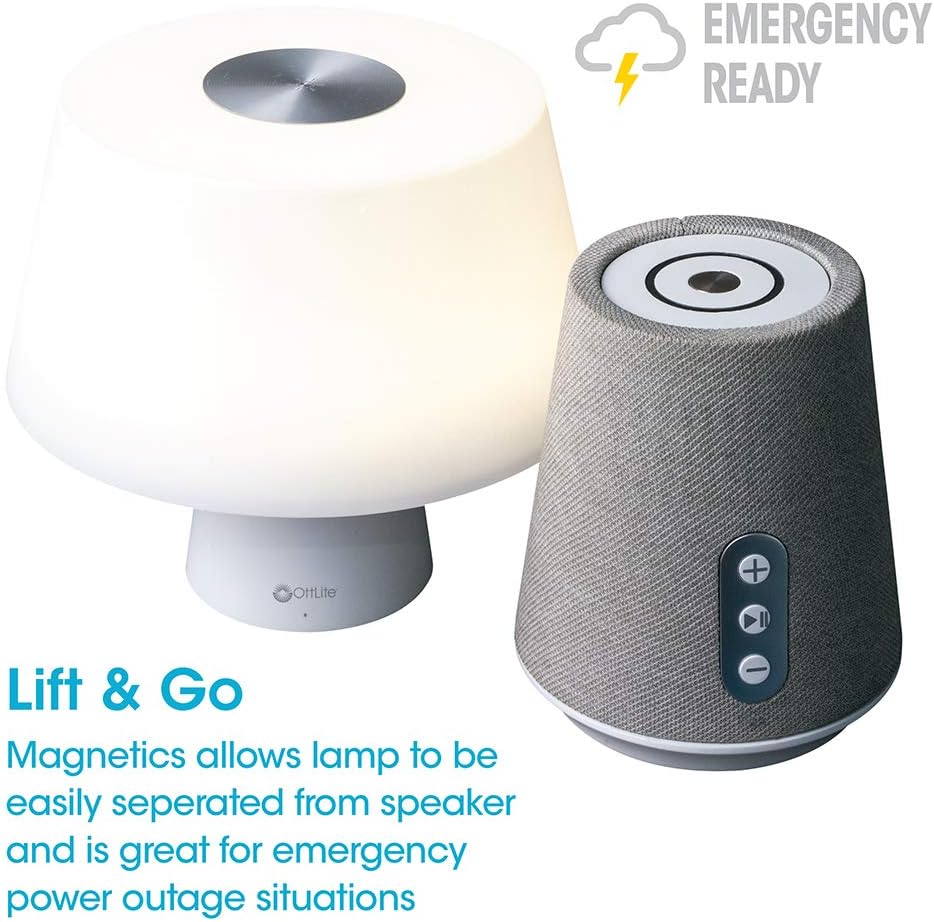
Image 4.1: Activating the lamp's light functions via the touch control on top of the shade.

Малюнак 4.2: Лamp offers three distinct color temperature modes for varied lighting needs.
4.2. Bluetooth-дынамік
The integrated Bluetooth speaker allows for wireless audio playback from compatible devices.
- Уключаны дынамік: Press the Play/Pause button on the front of the speaker base to turn the speaker on. A tone will indicate it is ready for pairing.
- Спалучэнне: On your audio device (e.g., smartphone, tablet), enable Bluetooth and search for available devices. Select "OttLite Entertain" from the list. A confirmation tone will sound upon successful pairing.
- Кантроль гуку:
- Націсніце + кнопку для павелічэння гучнасці.
- Націсніце - кнопка для памяншэння гучнасці.
- Націсніце Прайграванне/Паўза кнопка для прайгравання або прыпынення гуку.
- Power Off Speaker: Press and hold the Play/Pause button for approximately 3 seconds to turn the speaker off.

Image 4.3: The speaker base with clearly labeled controls for volume and playback.

Image 4.4: The speaker base highlights its Bluetooth connectivity feature.
4.3. Emergency Light Feature (Lift & Go)
У лamp portion can be detached from the speaker base to function as a portable emergency light.
- Detaching the Light: Акуратна падніміце lamp shade portion straight up from the speaker base. It is held in place by magnets.
- Using the Emergency Light: The detached light will operate on its internal rechargeable battery. Use the touch control on top of the shade to turn it on/off and adjust brightness as described in Section 4.1. The light can provide illumination for 5 to 30+ hours depending on the brightness setting.
- Перазарадка: To recharge the emergency light, simply place it back onto the speaker base. Ensure it is properly seated for charging to commence.

Image 4.5: The 'Lift & Go' feature allows the lamp to be used as a portable emergency light.
5. Тэхнічнае абслугоўванне
To ensure the longevity and optimal performance of your OttLite Entertain LED Speaker Lamp, выконвайце наступныя рэкамендацыі па тэхнічным абслугоўванні:
- Уборка: Адлучыце lamp from the power source before cleaning. Use a soft, dry cloth to wipe down the exterior surfaces. Do not use abrasive cleaners, solvents, or harsh chemicals, as these may damage the finish.
- захоўванне: Калі прылада не выкарыстоўваецца працяглы час, захоўвайце яеamp у прахалодным сухім месцы, удалечыні ад прамых сонечных прамянёў і экстрэмальных тэмператур.
- Сыход за батарэяй: For the internal rechargeable battery, avoid fully discharging it frequently. Recharge the lamp regularly, even if not in constant use, to maintain battery health.
6. Выпраўленне непаладак
Калі ў вас узнікнуць праблемы з вашым лamp, звярніцеся да наступных крокаў па ліквідацыі непаладак:
| праблема | Магчымая прычына | Рашэнне |
|---|---|---|
| Lamp святло не гарыць. | Не падключана; адсутнічае харчаваннеtage; internal battery depleted; faulty connection. | Ensure power cable is securely plugged in. Check power outlet. Recharge the lamp by placing it on the base. |
| Bluetooth-калонка не падключаецца. | Speaker not in pairing mode; device Bluetooth off; already connected to another device. | Ensure speaker is on and in pairing mode. Turn Bluetooth on your device. Disconnect from other devices. |
| Emergency light does not work when detached. | Internal battery depleted. | Place the light back on the speaker base to recharge its internal battery. |
| Poor audio quality from speaker. | Device too far from speaker; interference; low battery. | Move device closer to speaker. Avoid obstacles. Ensure speaker is charged. |
7. Тэхнічныя характарыстыкі
| Асаблівасць | Дэталь |
|---|---|
| Нумар мадэлі | S83WGW |
| Марка | OttLite |
| Памеры прадукту | 3.12" Г x 3.12" Ш x 10.87" У |
| Вага прадмета | 2.6 фунта |
| Тып крыніцы святла | святлодыёд |
| Ватtage | 3 ват |
| Яркасць | 337 люмен |
| Каляровая тэмпература | 5000 кельвінаў (дзённае святло) |
| Метад кантролю | Дакранацца |
| Крыніца харчавання | Corded Electric (with rechargeable battery for emergency light) |
| Батарэі | 1 літый-іённы акумулятар (у камплекце) |
| Матэрыял | Пластыкавыя |
| UPC | 761712019116 |
8. Гарантыя і падтрымка
For warranty information or technical support, please refer to the official OttLite webсайт або звярніцеся ў службу падтрымкі кліентаў. Захоўвайце чэк аб куплі як пацверджанне пакупкі для любых гарантыйных прэтэнзій.
Кантактная інфармацыя: Калі ласка, наведайце OttLite's official store page for current support options and contact details.