
Уводзіны
This manual provides comprehensive instructions for the Elekpia Universal Remote Control, model CT-RC1US-18. This remote is designed for seamless compatibility with a wide range of Toshiba LED LCD HDTV models, including but not limited to CT-90325, CT-90326, CT-90329, CT-8037, CT-90302, CT-90275, CT-90, CT-90366, and CT-RC1US-18. Please read this manual carefully to ensure proper setup and operation of your new remote control.
Настройка
Ўстаноўка акумулятара
The Elekpia Universal Remote Control requires two (2) 1.5V AA batteries for operation. No programming is needed; simply install the batteries, and the remote will be ready to use with your compatible Toshiba TV.
- Знайдзіце крышку батарэйнага адсека на задняй частцы пульта дыстанцыйнага кіравання.
- Націсніце на язычок і зрушце вечка ўніз, каб адкрыць адсек.
- Устаўце дзве (2) батарэйкі тыпу АА, пераканаўшыся, што станоўчая (+) і адмоўная (-) клемы правільна сумяшчаюцца з пазнакамі ўнутры адсека.
- Засуньце вечка батарэйнага адсека на месца, пакуль яна надзейна не зашчоўкне.

Малюнак 1: Пярэдняя і задняя часткі view of the Elekpia Universal Remote Control, highlighting the battery compartment on the rear.
Once batteries are installed, the remote is ready for immediate use with your Toshiba TV. No additional setup or code entry is required.
Інструкцыя па эксплуатацыі
This universal remote control is designed to replicate the functions of your original Toshiba TV remote. Point the remote directly at your television's infrared receiver for optimal performance.
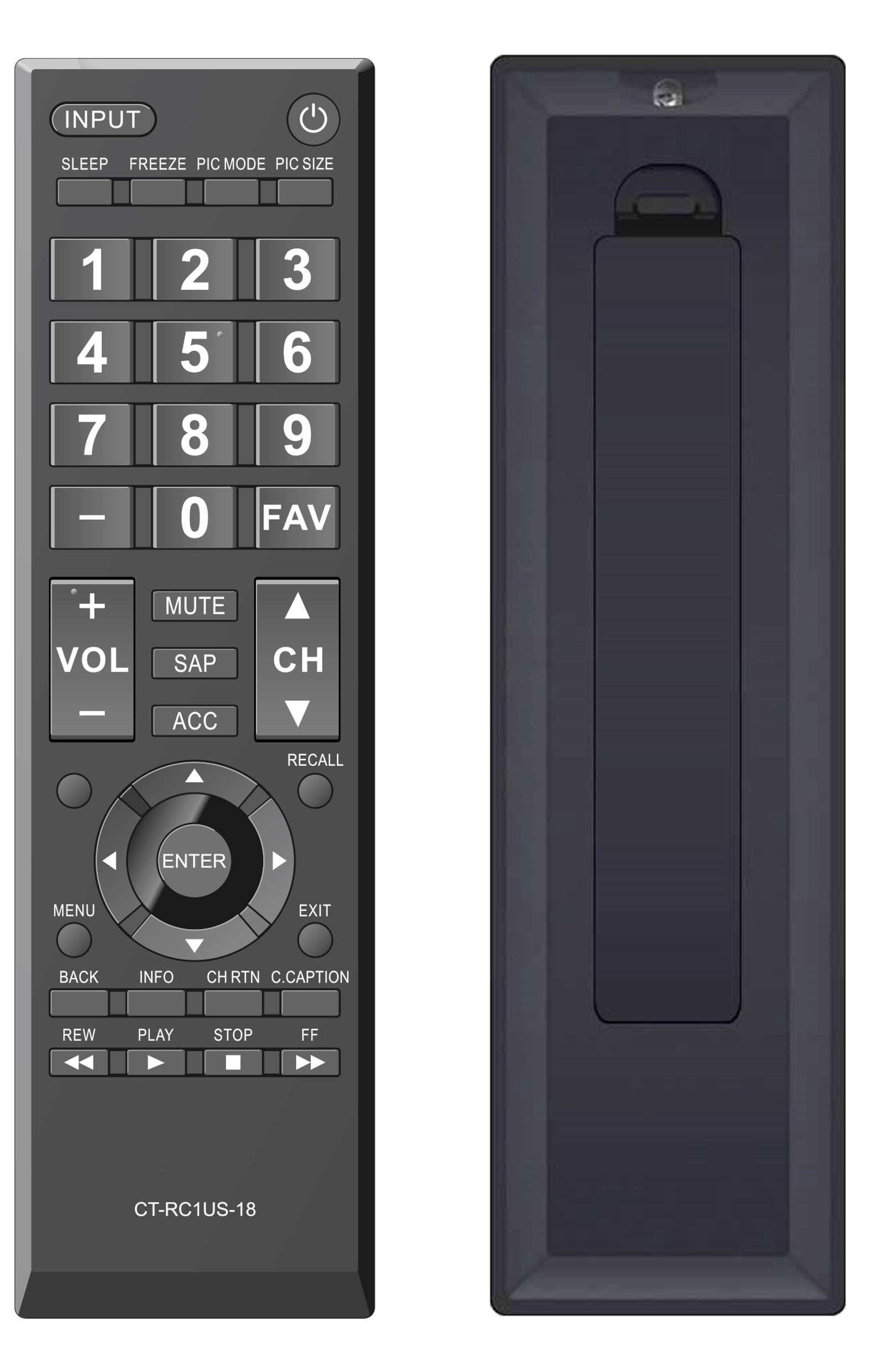
Малюнак 2: Спераду view of the Elekpia Universal Remote Control, displaying the layout of all buttons.
Функцыі кнопак
- Магутнасць (⏻): Уключае або выключае тэлевізар.
- УВОД: Cycles through available input sources (HDMI 1, HDMI 2, AV, etc.).
- СПАЦЬ: Activates or adjusts the TV's sleep timer function.
- ЗАМАРЫЦЬ: Pauses the current image on the screen (functionality may vary by TV model).
- РЭЖЫМ PIC: Adjusts picture modes (e.g., Standard, Movie, Dynamic).
- PIC SIZE: Changes the aspect ratio or picture size.
- Нумары (0-9): Непасрэдны ўвод нумароў каналаў.
- - (Dash): Выкарыстоўваецца для ўводу падканалаў (напрыклад, 7-1).
- АБРАШАНАЕ: Доступ да спісу абраных каналаў.
- аб'ём (+/-): Increases or decreases the volume level.
- МУК: Silences the television audio.
- SAP: Selects Secondary Audio Program (SAP) or alternate audio tracks.
- АКК: Accesses accessibility features or audio settings.
- CH (Уверх/Уніз): Змяняе тэлевізійны канал уверх або ўніз.
- АДЗВІННЕ: Switches between the current and previously viewрэдагаваны канал.
- Навігацыйная панэль (Уверх, Уніз, Улева, Управа, ENTER): Navigates through on-screen menus and confirms selections.
- МЕНЮ: Адкрывае галоўнае меню тэлевізара.
- ВЫХАД: Closes the current menu or returns to the previous screen.
- НАЗАД: Вяртанне да папярэдняга меню або экрана.
- ІНФА: Паказвае інфармацыю пра бягучую праграму або ўваходны сігнал.
- CH RTN (Channel Return): Similar to RECALL, returns to the previous channel.
- C.CAPTION (Closed Caption): Toggles closed captions on or off.
- REW (Rewind), PLAY, STOP, FF (Fast Forward): Controls for media playback (e.g., when using a connected USB device or smart TV apps, if supported by the TV).
Тэхнічнае абслугоўванне
Чыстка пульта дыстанцыйнага кіравання
Каб падтрымліваць знешні выгляд і функцыянальнасць пульта дыстанцыйнага кіравання, рэгулярна яго чысціце:
- Выкарыстоўвайце мяккую, сухую тканіну, каб праціраць паверхню пульта дыстанцыйнага кіравання.
- Для ўстойлівага бруду злёгку ачысціцеampПрацярыце тканіну вадой або мяккім неабразіўным ачышчальнікам. Пазбягайце празмернай вільготнасці.
- Не выкарыстоўвайце агрэсіўныя хімікаты, растваральнікі або абразіўныя ачышчальныя губкі, бо яны могуць пашкодзіць пакрыццё пульта дыстанцыйнага кіравання або ўнутраныя кампаненты.
Замена батарэі
Replace batteries when the remote's response becomes sluggish or stops working. Always replace both AA batteries at the same time with new ones. Do not mix old and new batteries, or different types of batteries, as this can lead to leakage or damage.
Захоўванне
Калі пульт дыстанцыйнага кіравання не будзе выкарыстоўвацца працяглы час, выміце батарэйкі, каб прадухіліць магчымае ўцечку і пашкоджанне прылады.
Ліквідацыю непаладак
If you encounter issues with your Elekpia Universal Remote Control, please refer to the following common solutions:
- Пульт не адказвае:
- Ensure the batteries are correctly installed with the proper polarity (+/-).
- Заменіце батарэі на новыя батарэі АА.
- Праверце на наяўнасць перашкод паміж пультам дыстанцыйнага кіравання і інфрачырвоным датчыкам тэлевізара.
- Ensure you are pointing the remote directly at the TV.
- Некаторыя кнопкі не працуюць:
- This remote is pre-programmed for Toshiba TVs. Verify your TV model is compatible.
- Clean the remote's surface, especially around the unresponsive buttons, to remove any dirt or debris that might be interfering with button presses.
- Тэлевізар не ўключаецца/выключаецца:
- Confirm the TV is plugged into a working power outlet.
- Try using the power button directly on the TV to confirm it is operational.
If these steps do not resolve the issue, please refer to the customer support section.
Тэхнічныя характарыстыкі
| Нумар мадэлі | CT-RC1US-18 |
| Марка | Элекпія |
| Памеры прадукту | 7 х 2 х 0.6 цалі |
| Вага прадмета | 3 унцыі |
| Крыніца харчавання | 2 батарэйкі тыпу АА 1.5 В (не ўключаны) |
| Сумяшчальныя прылады | Toshiba LED LCD HDTVs |
| Максімальная колькасць падтрымоўваных прылад | 1 |
| Колер | Чорны |
Інфармацыя аб гарантыі
Specific warranty details for the Elekpia Universal Remote Control CT-RC1US-18 are not provided in this manual. Please refer to the product packaging, the retailer's return policy, or the manufacturer's official webсайт для атрымання інфармацыі аб гарантыйным пакеце і ўмовах.
Падтрымка кліентаў
For further assistance or inquiries regarding your Elekpia Universal Remote Control, please contact the retailer from whom you purchased the product. You may also visit the official Elekpia webсайт для атрымання патэнцыйных рэсурсаў падтрымкі або кантактнай інфармацыі.