
1. Уводзіны
The ProForm Carbon T7 Smart Treadmill is designed to provide an effective and engaging cardiovascular workout experience in your home. Featuring a 7-inch HD touchscreen and integration with iFIT, this treadmill offers a variety of interactive training options. This manual provides essential information for the safe assembly, operation, maintenance, and troubleshooting of your Carbon T7 treadmill.

This image shows the ProForm Carbon T7 Smart Treadmill from a front-side angle, highlighting its console with a 7-inch HD touchscreen, the running deck, and the sturdy frame.
2. Важная інфармацыя па бяспецы
Before operating the ProForm Carbon T7 Smart Treadmill, please read all instructions carefully. Keep this manual for future reference. Failure to follow these instructions could result in injury or damage to the product.
- Заўсёды кансультуйцеся з лекарам перад пачаткам любой праграмы практыкаванняў.
- Размясціце бегавую дарожку на роўнай паверхні, пакідаючы за ёй не менш за 2 метры (6.5 футаў) вольнай прасторы і па 0.5 метра (1.6 футы) з кожнага боку.
- Трымайце дзяцей і хатніх жывёл далей ад бегавой дарожкі падчас працы.
- Не карыстайцеся бегавой дарожкай, калі пашкоджаны шнур харчавання або вілка, або калі яна працуе няправільна.
- Апранайце адпаведную спартыўную вопратку і спартыўны абутак. Пазбягайце свабоднай вопраткі, якая можа трапіць у рухомыя часткі.
- Always use the safety key. Attach the clip to your clothing before starting the treadmill.
- Не заходзьце на бегавую дарожку і не сыходзьце з яе, пакуль рухомае стужка.
- Do not attempt to adjust or repair the treadmill yourself. Contact qualified service personnel.
3. зборка
The ProForm Carbon T7 Treadmill requires assembly. For detailed, step-by-step 3D instructions, download the free Bilt app on your smartphone or tablet. Ensure all parts are present before beginning assembly. It is recommended to have two people for assembly due to the weight and size of the components.
- Unpack all components and place them on a clear, flat surface.
- Follow the instructions provided in the Bilt app or the included assembly guide.
- Ensure all bolts, nuts, and screws are securely tightened before use.

The ProForm Carbon T7 Smart Treadmill is shown in its upright, folded configuration, illustrating its SpaceSaver design for compact storage when not in use.
4. Аперацыя
4.1 Пачатак працы
- Падключэнне сілкавання: Падключыце шнур харчавання да заземленай разеткі.
- Ключ бяспекі: Attach the safety key clip to your clothing and insert the safety key into the console. The treadmill will not operate without the safety key in place.
- Standing on the Treadmill: Stand on the foot rails, not the running belt, before starting your workout.
- Пачатак трэніроўкі: Націсніце кнопку «Пуск» на кансолі. Стужка пачне рухацца з нізкай хуткасцю.
4.2 Using the Console and 7" HD Touchscreen
The Carbon T7 features a 7-inch HD interactive touchscreen display that allows you to stream iFIT workouts directly. The console also includes physical buttons for quick adjustments.
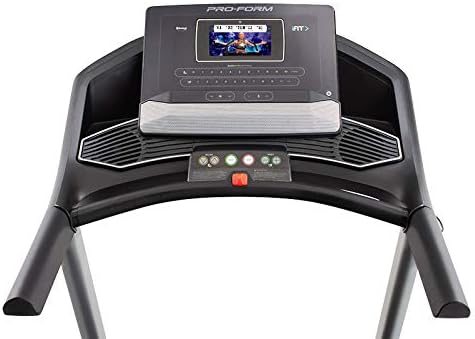
Падрабязны view of the treadmill's console, featuring the 7-inch HD touchscreen display, control buttons for speed and incline, and integrated speakers.
- Навігацыя з сэнсарным экранам: Use the touchscreen to browse iFIT workouts, adjust settings, and view workout metrics.
- QuickSpeed Controls: Use the 'Speed' buttons or quick-select buttons on the console to adjust the running belt speed from 0 to 10 MPH.
- Quick Incline Controls: Use the 'Incline' buttons or quick-select buttons to adjust the incline from 0% to 10%.
- Спыненне трэніроўкі: Press the 'Stop' button to pause or end your workout. Remove the safety key to fully power off the treadmill.
4.3 iFIT Integration
Your ProForm Carbon T7 Treadmill includes a 30-Day iFIT Family Membership. iFIT provides access to live workouts, studio classes, and global workouts led by expert personal trainers. With iFIT, your trainer can auto-adjust your treadmill's speed and incline for an optimized and immersive exercise experience.
- Activating iFIT: Follow the on-screen prompts on the 7-inch HD touchscreen to activate your iFIT membership.
- Выбар трэніроўкі: Browse the iFIT library for a wide range of workouts, including running, walking, and cross-training.
- Trainer Control: During iFIT workouts, the treadmill's speed and incline may automatically adjust according to the trainer's program. You can override these adjustments manually if needed.

A woman is shown actively running on the ProForm Carbon T7 Smart Treadmill, demonstrating its use in a typical home environment. The treadmill's running deck and console are visible.
5. Тэхнічнае абслугоўванне
Regular maintenance ensures the longevity and optimal performance of your ProForm Carbon T7 Treadmill.
- Уборка: Regularly wipe down the treadmill surfaces with a damp тканіна. Пазбягайце выкарыстання абразіўных ачышчальнікаў або растваральнікаў.
- Чыстка рамянёў: Periodically clean the running belt and the area beneath it to prevent debris buildup.
- Змазка рамяня: The running belt is pre-lubricated. Refer to the full product manual for specific lubrication instructions and frequency, typically required after a certain number of hours of use.
- Выраўноўванне і нацяжэнне рамяня: Check the running belt for proper alignment and tension. Adjust as needed according to the detailed instructions in the full product manual.
- Праверка шнура сілкавання: Праверце шнур харчавання на наяўнасць пашкоджанняў. Калі ён пашкоджаны, спыніце выкарыстанне і звярніцеся ў службу падтрымкі кліентаў.
6. Выпраўленне непаладак
If you encounter issues with your ProForm Carbon T7 Treadmill, refer to the table below for common problems and solutions.
| праблема | Магчымая прычына | Рашэнне |
|---|---|---|
| Бегавая дарожка не ўключаецца. | Power cord not plugged in; circuit breaker tripped; safety key not inserted. | Ensure power cord is securely plugged in. Check household circuit breaker. Insert safety key fully into the console. |
| Running belt does not move. | Safety key not inserted; 'Start' button not pressed; motor overload. | Insert safety key. Press 'Start'. If motor overload, reduce load and try again. |
| Рэмень праслізгвае або вагаецца. | Нацяжэнне рамяня занадта слабое; рамень патрабуе змазкі. | Adjust belt tension according to the full manual. Lubricate the belt if necessary. |
| Console display is blank or unresponsive. | Праблема з харчаваннем; праграмны збой. | Ensure power is connected. Try unplugging the treadmill for 60 seconds and plugging it back in. If issue persists, contact customer support. |
7. Тэхнічныя характарыстыкі
Key technical specifications for the ProForm Carbon T7 Smart Treadmill:
| Асаблівасць | Дэталь |
|---|---|
| Нумар мадэлі | PFTL87720 |
| Памеры прадукту (Д х Ш х У) | 186.69 см х 89.41 см х 146.05 см (73.5" х 35.2" х 57.5") |
| Вага прадмета | 97.98 кг (216 фунтаў) |
| Маторная конская сіла | 2.6 CHP (Continuous Horsepower) |
| Дыяпазон хуткасцей | 0-10 MPH (0-16 KPH) |
| Дыяпазон нахілу | 0-10% Digital Quick Incline |
| Tread Belt Size | 20 цалі х 55 цалі (51 см х 140 см) |
| Дысплей | 7" HD Interactive Touchscreen |
| Ёмістасць вагі | 300 фунтаў (136 кг) |
| Матэрыял каркаса | Легаваная сталь |
| Крыніца харчавання | Правадная электрычная |
| Асаблівасці | SpaceSaver Design, ISO Flex Deck Cushioning |
8. Гарантыя і падтрымка кліентаў
Your ProForm Carbon T7 Smart Treadmill is backed by a comprehensive warranty to ensure your peace of mind.
- Гарантыя на раму: 10 гады
- Гарантыя на дэталі і працу: 1 год
For warranty claims, technical assistance, or to order replacement parts, please contact ProForm customer support. Refer to the contact information provided in your product packaging or on the official ProForm webсайт.