
Уводзіны
This manual provides essential information for the safe and effective use of your ProForm City L6 Folding Treadmill. Please read all instructions carefully before operating the equipment. Retain this manual for future reference.

Image: The ProForm City L6 Folding Treadmill, showcasing its compact design and console.
Важная інфармацыя па бяспецы
To reduce the risk of serious injury, read all important precautions and instructions in this manual before using the treadmill. ProForm assumes no responsibility for personal injury or property damage sustained by or through the use of this product.
- Пракансультуйцеся з урачом перад пачаткам любой праграмы практыкаванняў.
- Трымайце дзяцей і хатніх жывёл далей ад бегавой дарожкі.
- Размясціце бегавую дарожку на роўнай паверхні, пакідаючы за ёй не менш за 2 метры (6.5 футаў) вольнай прасторы і па 0.5 метра (1.6 футы) з кожнага боку.
- Апранайце адпаведную спартыўную вопратку і абутак.
- Не выкарыстоўвайце бегавую дарожку, калі шнур сілкавання або вілка пашкоджаныя.
- Заўсёды трымайцеся за поручні пры запуску або прыпынку бегавой дарожкі.
- Do not exceed the maximum user weight capacity of 250 pounds (113 kg).
Настройка
Распакоўка і размяшчэнне
Carefully remove all components from the packaging. Place the treadmill on a flat, stable surface. Ensure adequate clearance around the unit for safe operation and maintenance.
Assembly (Folding Mechanism)
The ProForm City L6 features a SpaceSaver Design for compact storage. To prepare for use, carefully unfold the treadmill deck until it locks into place. To fold for storage, lift the deck until it secures in the upright position.
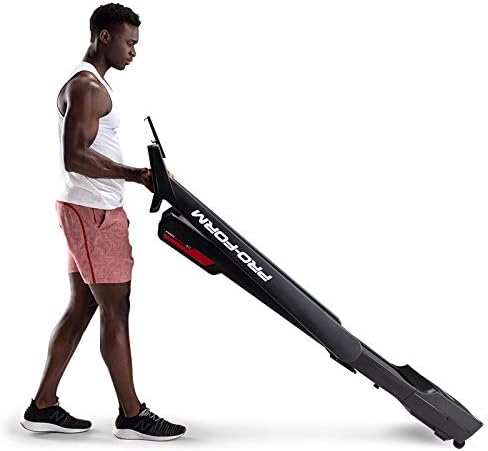
Image: A user demonstrating the folding mechanism of the ProForm City L6 Treadmill for compact storage.
Падключэнне сілкавання
Connect the power cord to a grounded outlet. Ensure the safety key is properly inserted into the console before attempting to power on the treadmill.
iFIT Activation
Your treadmill includes a 30-day iFIT membership. To activate, download the iFIT app on your tablet or smartphone. Connect your device to the treadmill via Bluetooth. Follow the on-screen instructions in the iFIT app to set up your account and access workouts.

Image: The treadmill console with a tablet mounted, showing the iFIT application interface.
Інструкцыя па эксплуатацыі
Запуск бегавой дарожкі
- Пераканайцеся, што ключ бяспекі на месцы.
- Станьце на бегавую дарожку, паставіўшы ногі на бакавыя парэнчы.
- Націсніце СТАРТ кнопка. Стужка пачне рухацца з нізкай хуткасцю.
- Gradually increase speed using the ХУТКАСЦЬ + buttons or Digital QuickSpeed controls.

Image: A user engaged in a running workout on the ProForm City L6 Treadmill.
Рэгуляванне хуткасці
Выкарыстоўвайце ХУТКАСЦЬ + і ХУТКАСЦЬ - buttons on the console to adjust the treadmill's speed. The treadmill offers speeds from 0 to 8 MPH. For iFIT workouts, the trainer may automatically adjust your speed.
Stopping the Treadmill
Націсніце СТОП button to gradually slow down and stop the treadmill belt. For an emergency stop, pull the safety key from the console.
Выкарыстанне дысплея
The 5-inch high-contrast display shows your workout metrics, including distance, speed, estimated calorie burn, and time. When connected to iFIT, enhanced metrics are available through the app.
Тэхнічнае абслугоўванне
Уборка
Рэгулярна чысціце бегавую дарожку адamp cloth and mild soap. Avoid using abrasive cleaners or solvents. Wipe down the console and handrails after each use to remove sweat and debris.
Сыход за поясам
Inspect the walking belt periodically for wear and tear. Ensure the belt is properly centered and tensioned. Refer to the full product manual (if available from manufacturer) for detailed instructions on belt adjustment and lubrication, if required.
Агульны агляд
Check all bolts and nuts for tightness regularly. Replace any worn components immediately. Unplug the treadmill before performing any maintenance or cleaning.
Ліквідацыю непаладак
| праблема | Магчымая прычына | Рашэнне |
|---|---|---|
| Бегавая дарожка не ўключаецца. | Power cord not plugged in; safety key not inserted; circuit breaker tripped. | Пераканайцеся, што шнур харчавання надзейна падключаны. Да канца ўстаўце ключ бяспекі. Праверце аўтаматычны выключальнік у хатняй сетцы. |
| Бегавая стужка слізгае або вагаецца. | Нацяжэнне рамяня занадта слабое; рамень патрабуе змазкі. | Adjust belt tension (refer to manufacturer's detailed guide). Lubricate belt if necessary (use approved silicone lubricant). |
| Дысплей кансолі пусты або нераўнамерны. | Loose cable connection; power issue. | Check all cable connections to the console. Unplug and re-plug the treadmill. |
Калі ў вас узнікнуць праблемы, якія не пералічаны тут, або калі рашэнні не вырашаюць праблему, звярніцеся ў службу падтрымкі кліентаў.
Тэхнічныя характарыстыкі
- мадэль: PFTL28820
- Марка: ProForm
- Памеры прадукту: 30.48 х 81.28 х 187.96 см (12 х 32 х 74 цалі)
- Вага прадмета: 65.77 кг (145 фунтаў)
- Максімальная вага карыстальніка: 250 фунтаў (113 кг)
- Дыяпазон хуткасцей: 0-8 MPH Digital QuickSpeed Controls
- Бегавы пояс: 18 цалі х 47 цалі
- Дысплей: 5-inch High-Contrast LCD
- Моц рухавіка: 2 HP
- Асаблівасці: SpaceSaver Design (Foldable), iFIT Bluetooth Connectivity
- Крыніца харчавання: Правадная электрычная

Image: The ProForm City L6 Treadmill with its physical dimensions indicated.
Гарантыя
The ProForm City L6 Folding Treadmill is protected by the following warranties:
- кадр: 10-гадовая абмежаваная гарантыя
- Часткі і праца: 1-гадовая абмежаваная гарантыя
This warranty applies to the original owner and is valid only in the country where the product was purchased. For full warranty terms and conditions, please refer to the warranty card included with your product or visit the official ProForm webсайт.
Падтрымка
For technical assistance, parts inquiries, or warranty claims, please contact ProForm Customer Service. Have your model number (PFTL28820) and serial number ready when contacting support.
Visit the official ProForm website for additional resources, FAQs, and contact information: www.proform.com