
Xtorm FS401
Кіраўніцтва карыстальніка для знешніх акумулятараў Xtorm 20W Fuel Series 10.000mAh
Мадэль: FS401
Уводзіны
Thank you for choosing the Xtorm 20W Fuel Series Power Bank 10.000mAh. This manual provides essential information for the safe and efficient use of your power bank. Please read it carefully before use and keep it for future reference.
The Xtorm Fuel Series Power Bank is designed to provide portable power for your mobile devices, featuring 20W power delivery, a 10,000mAh battery capacity, and multiple output ports for versatile charging.
Змест пакета
Пераканайцеся, што ўсе прадметы прысутнічаюць у пасылцы:
- 1x Xtorm 20W Fuel Series Power Bank 10.000mAh (Model: FS401)
- 1 кабель USB-USB-C
- 1x Кіраўніцтва карыстальніка
Прадукт скончаныview
Familiarize yourself with the components of your Xtorm Power Bank:

выява: Зверху ўніз view of the Xtorm Fuel Series Power Bank FS401, showcasing its textured grey surface and orange accent.
This image displays the overall design of the power bank, highlighting its compact and ergonomic form factor. The textured surface provides a secure grip, and the orange accent adds a touch of style.

выява: Xtorm Fuel Series Power Bank shown next to a credit card and passport, with dimensions indicated.
This image illustrates the portable travel size of the power bank, with dimensions of 136mm length, 71mm width, and 15mm thickness. It weighs 215 grams, making it easy to carry in a pocket or bag.
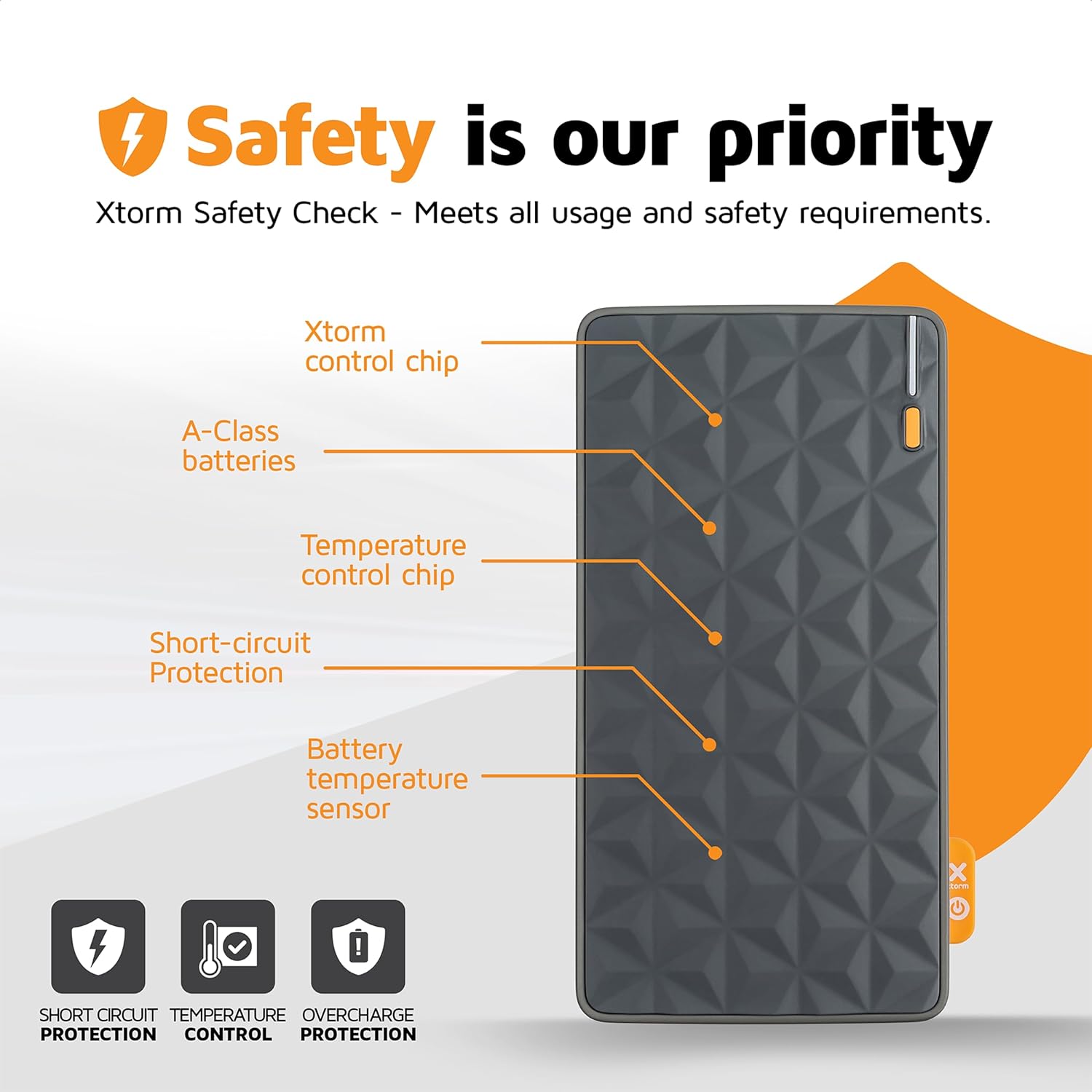
выява: Diagram highlighting the safety features of the Xtorm Fuel Series Power Bank.
This diagram points out key internal components responsible for safety, including the Xtorm control chip, A-Class batteries, temperature control chip, short-circuit protection, and battery temperature sensor. These features ensure safe and reliable operation, protecting against short circuits, temperature fluctuations, and overcharge.

выява: Xtorm Fuel Series Power Bank demonstrating universal compatibility with various devices.
This image shows the power bank's ability to charge different devices, including smartphones (Apple iPhone, Samsung Galaxy) and tablets, indicating its versatile charging capabilities with 2x Universal USB output and 1x USB-C in/output.

выява: Xtorm Fuel Series Power Bank simultaneously charging a smartphone, tablet, and wireless earbuds.
This image illustrates the power bank's capability to charge up to three devices concurrently using its multiple output ports (1x USB-C PD 20W, 2x USB Quick Charge 3.0).
Настройка
Пачатковая зарадка паўэрбанка
Before first use, it is recommended to fully charge your Xtorm Power Bank.
- Connect the supplied USB to USB-C cable to the USB-C input port on the power bank.
- Connect the other end of the cable to a compatible USB wall charger (not included). For optimal charging speed, use a 20W USB-C PD adapter.
- Святлодыёдныя індыкатары на знешнім акумулятары будуць загарацца, паказваючы працэс зарадкі.
- The power bank is fully charged when all LED indicators are solid. A full charge takes approximately 2.5 hours with a 20W PD charger.
Заўвага: The power bank may not be fully charged out of the box.
Інструкцыя па эксплуатацыі
Зарадка вашых прылад
The Xtorm Power Bank features one USB-C output and two standard USB outputs, allowing you to charge up to three devices simultaneously.
- Вызначце правільны кабель зарадкі для вашай прылады.
- Connect one end of your device's charging cable to the appropriate output port on the power bank (USB-C or USB-A).
- Падключыце іншы канец кабеля да прылады.
- Паўэрбанк аўтаматычна пачне зараджаць вашу прыладу. Святлодыёдныя індыкатары будуць паказваць пакінуты ўзровень зараду батарэі паўэрбанка.
Выхад USB-C: Provides up to 20W Power Delivery (PD) for fast charging compatible smartphones and tablets.
Выхады USB-A: Provide standard USB charging for a wide range of devices.
Праверка ўзроўню зарада батарэі
The power bank is equipped with LED indicators to show its current battery level. Press the power button once to activate the indicators.
- 4 святлодыёды гараць пастаянна: Зараджана 75-100%.
- 3 святлодыёды гараць пастаянна: Зараджана 50-75%.
- 2 святлодыёды гараць пастаянна: Зараджана 25-50%.
- 1 святлодыёд пастаянна свеціцца: Зараджана 0-25%.
- 1 святлодыёд міргае: Нізкі акумулятар, патрабуе падзарадкі
Тэхнічнае абслугоўванне
Правільнае абслугоўванне забяспечвае даўгавечнасць і аптымальную працу вашага паўэрбанка.
- Уборка: Выкарыстоўвайце мяккую сухую тканіну для чысткі паверхні паўэрбанка. Не выкарыстоўвайце агрэсіўныя хімікаты або абразіўныя матэрыялы.
- захоўванне: Захоўвайце знешні акумулятар у прахалодным, сухім месцы, удалечыні ад прамых сонечных прамянёў і экстрэмальных тэмператур.
- Сыход за батарэяй: Каб падоўжыць тэрмін службы акумулятара, пазбягайце частай поўнай разрадкі. Зараджайце яго, калі ўзровень зарада акумулятара нізкі. Пры працяглым захоўванні зараджайце яго прыкладна да 50-70% кожныя 3-6 месяцаў.
- Пазбягайце кропель: Абараняйце знешні акумулятар ад падзенняў і ўдараў, якія могуць пашкодзіць унутраныя кампаненты.
Ліквідацыю непаладак
| праблема | Магчымая прычына | Рашэнне |
|---|---|---|
| Power bank не зараджаецца |
|
|
| Прылада не зараджаецца ад Power Bank |
|
|
| Павольная хуткасць зарадкі |
|
|
| Power bank gets hot during use/charging |
|
|
Тэхнічныя характарыстыкі
| Асаблівасць | Дэталь |
|---|---|
| Нумар мадэлі | FS401 |
| Ёмістасць батарэі | 10,000 мАг |
| Уваход (USB-C) | Магутнасць харчавання 20 Вт (PD) |
| Выхад 1 (USB-C) | Магутнасць харчавання 20 Вт (PD) |
| Выхад 2 (USB-A) | Стандартны выхад USB |
| Выхад 3 (USB-A) | Стандартны выхад USB |
| Памеры | 136 х 71 х 15 мм |
| Вага | 215 грамаў |
| Тып батарэі | Літый-палімерны |
| Колер | Multicolor (Grey/Orange) |
Гарантыя і падтрымка
The Xtorm 20W Fuel Series Power Bank 10.000mAh comes with a 2-year Xtorm warranty.
For warranty claims, technical support, or any questions regarding your product, please contact Xtorm customer service. Refer to the official Xtorm webсайт для атрымання самай актуальнай кантактнай інфармацыі.
Важна: Do not attempt to disassemble or repair the power bank yourself. This will void the warranty and may cause damage or injury.
Інфармацыя па бяспецы
Калі ласка, прачытайце і выконвайце гэтыя рэкамендацыі па бяспецы, каб пазбегнуць пашкоджання вырабу або траўмаў.
- Не падвяргайце знешні акумулятар уздзеянню экстрэмальных тэмператур (высокіх або нізкіх), прамых сонечных прамянёў або высокай вільготнасці.
- Do not use the power bank in wet environments or submerge it in water.
- Keep the power bank away from flammable materials and explosive environments.
- Не кідайце, не праколвайце і не разбірайце знешні акумулятар.
- Захоўваць у месцах, недаступных дзецям.
- Утылізуйце знешні акумулятар адказна ў адпаведнасці з мясцовымі правіламі ўтылізацыі электронных адходаў.
- Only use original or certified charging cables and adapters.
Ask a question about this manual
Ask about setup, troubleshooting, compatibility, parts, safety, or missing instructions. Manuals+ will review the question and use this page’s manual context to help answer it.