
SNOOZ SNOOZ-G1-Charcoal
SNOOZ Go - Portable White Noise Machine User Manual
Model: SNOOZ-G1-Charcoal
Уводзіны
The SNOOZ Go is an ultra-portable white noise machine and Bluetooth speaker designed to create an optimal sleep environment wherever you are. It features a rechargeable battery, multiple sound options, and a soft night light, making it ideal for travel, home use, or any situation where you need to mask unwanted noise.
Асноўныя характарыстыкі
- Доўгі тэрмін службы батарэі: Up to 20 hours of continuous use on a single charge, perfect for travel, campING, і магутнасць нtages. Recharges via USB-C.
- Двайная функцыянальнасць: Functions as a high-quality Bluetooth speaker for music and podcasts during the day, and a white noise machine at night.
- Six High-Quality Sounds: Choose from white noise, fan sounds, and pink noise to create your ideal sleep environment. Suitable for babies, children, adults, and even pets.
- Ультрапартатыўны дызайн: Compact size (9.7 cm) for easy transport in hand luggage, suitcases, or backpacks.
- Шумавая маскіроўка: Effectively masks unwanted noises such as loud neighbors, slamming doors, street noise, and outdoor disturbances.
- Мяккае начное святло: Provides a gentle, warm glow for additional illumination. Easily turn on/off with a long press of the power button.
Прадукт скончаныview
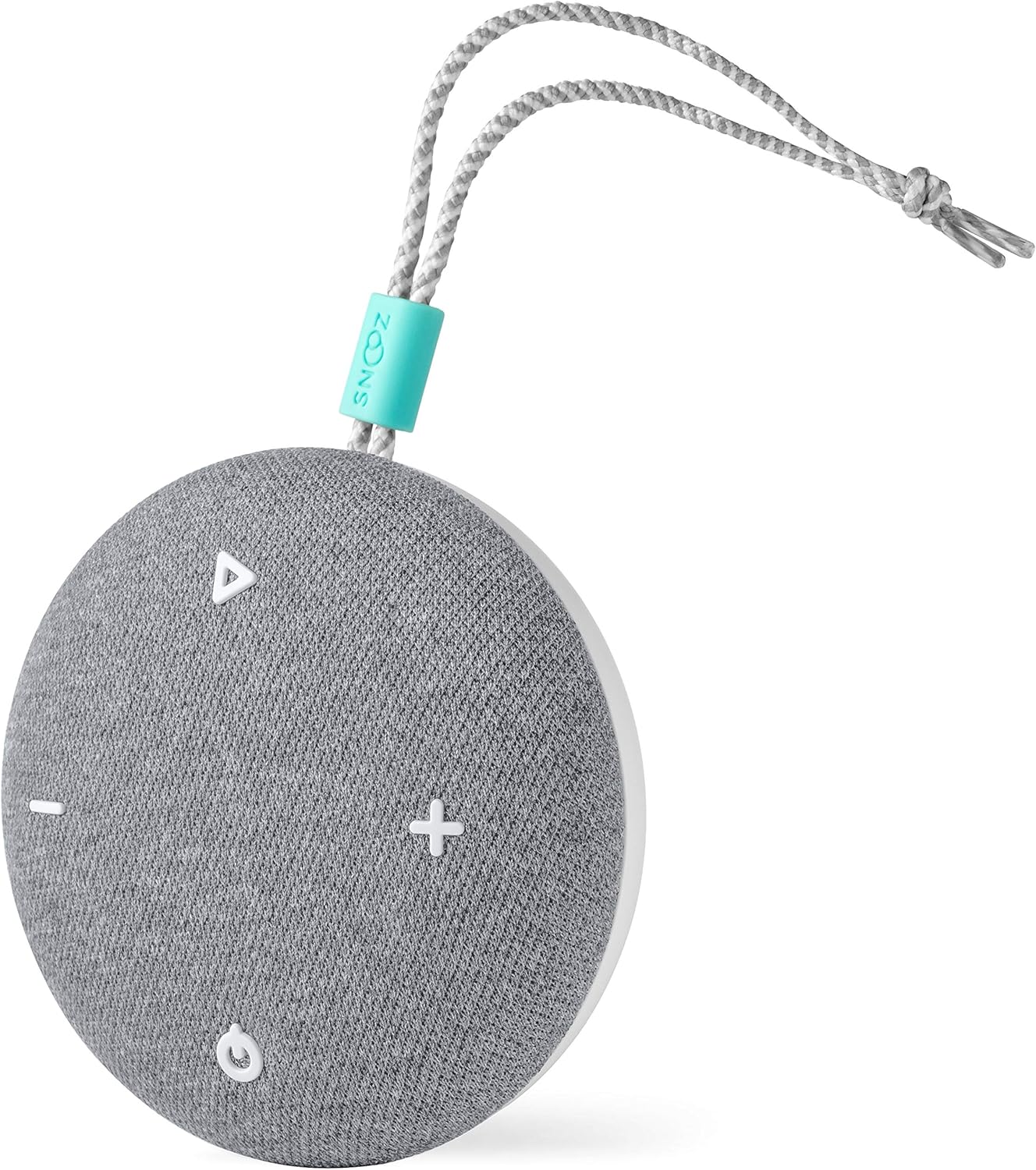


Настройка
Зарадка прылады
- Locate the USB-C charging port on the SNOOZ Go.
- Connect the included USB-C cable to the device.
- Падключыце другі канец кабеля USB-C да сумяшчальнага адаптара харчавання USB (не ўваходзіць у камплект) або да USB-порта кампутара.
- Індыкатар зарадкі загарыцца, паказваючы, што прылада зараджаецца.
- Поўнай зарадкі хапае на 20 гадзіны выкарыстання.
Уключэнне/выключэнне
- Каб уключыць прыладу, націсніце і ўтрымлівайце кнопку харчавання (⏻) на працягу 2 секунд.
- To power off, press and hold the power button (⏻) на працягу 2 секунд.
Інструкцыя па эксплуатацыі
Выбар гуку
- Press the sound selection button (△) to cycle through the six available sound profiles: White Noise, Fan Sound 1, Fan Sound 2, Pink Noise, Fan Sound 3, Fan Sound 4.
Рэгуляванне гучнасці
- Press the volume up button ( + ) to increase the volume.
- Press the volume down button ( - ) to decrease the volume.
Рэжым дынаміка Bluetooth
- Ensure the SNOOZ Go is powered on.
- Націсніце кнопку Bluetooth (☊) to enter Bluetooth pairing mode. The indicator light will flash.
- On your device (smartphone, tablet, etc.), enable Bluetooth and search for "SNOOZ Go".
- Select "SNOOZ Go" from the list of available devices to pair.
- Once paired, the indicator light will become solid, and you can play audio through the SNOOZ Go.
- To disconnect Bluetooth, press the Bluetooth button (☊) зноў.
Функцыя начнога святла
- To turn the night light on or off, press and hold the power button (⏻) for approximately 3 seconds while the device is powered on.
Тэхнічнае абслугоўванне
- Уборка: Wipe the exterior of the SNOOZ Go with a soft, dry cloth. Do not use liquid cleaners or abrasive materials.
- захоўванне: Калі прылада не выкарыстоўваецца, захоўвайце яе ў прахалодным сухім месцы.
- Сыход за батарэяй: Каб падоўжыць тэрмін службы батарэі, пазбягайце частай поўнай разрадкі. Рэгулярна зараджайце прыладу, нават калі яна не выкарыстоўваецца пастаянна.
Ліквідацыю непаладак
| праблема | Магчымая прычына | Рашэнне |
|---|---|---|
| Прылада не ўключаецца. | Акумулятар разраджаны. | Зараджайце прыладу з дапамогай кабеля USB-C. |
| Няма гуку або нізкі ўзровень гучнасці. | Volume is too low or muted. Incorrect sound profile выбраны. | Increase volume using the '+' button. Cycle through sound profiles using the '△' button. |
| Немагчыма падключыцца праз Bluetooth. | Device not in pairing mode. Bluetooth disabled on source device. Interference. | Press the Bluetooth button to enter pairing mode. Ensure Bluetooth is enabled on your device. Move closer to the SNOOZ Go and away from other wireless devices. |
| Night light does not turn on/off. | Няправільная працягласць націскання кнопкі. | Ensure the device is powered on. Press and hold the power button for approximately 3 seconds. |
Тэхнічныя характарыстыкі
- Нумар мадэлі: SNOOZ-G1-Charcoal
- Памеры (Д х Ш х У): 9.65 х 9.65 х 4.32 см (3.8 х 3.8 х 1.7 цалі)
- Вага: 160 грама (0.35 фунта)
- Крыніца харчавання: Працуе ад батарэі (1 літый-палімерная батарэя ў камплекце)
- Тэрмін службы батарэі: Да 20 гадзін
- Порт для зарадкі: USB-C
- Гукавыя дарожкі: 6 (White Noise, Pink Noise, 4 Fan Sounds)
- колер: драўняны вугаль
- UPC: 860003757215
Гарантыя і падтрымка
For warranty information and customer support, please visit the official SNOOZ website or contact their customer service team. Keep your proof of purchase for any warranty claims.
Note: Specific warranty terms may vary by region. Please refer to the documentation included with your purchase or the manufacturer's website for the most accurate and up-to-date warranty details.