
Уводзіны
The Clean Remote CR3HOME is a universal TV remote control designed for simplicity and ease of use. It features a nonporous, sealed membrane surface for easy cleaning and enhanced hygiene. This remote is compatible with nearly all TV brands and cable boxes, offering a streamlined control experience without unnecessary buttons.
This manual provides instructions for setting up, operating, maintaining, and troubleshooting your CR3HOME remote control.
Прадукт скончаныview
The Clean Remote CR3HOME features a basic key layout, focusing on essential functions for TV and cable box control. It is designed to be user-friendly for all ages.

Выява: спераду view of the Clean Remote CR3HOME, highlighting its simple key layout and absence of input, menu, or guide buttons.
Асноўныя функцыі ўключаюць у сябе:
- Universal compatibility with most TV brands and cable boxes.
- Nonporous, sealed membrane surface for easy cleaning.
- Simplified button layout: No Input, Menu, or Guide buttons.
- Large, easy-to-press buttons.
Інструкцыя па наладзе
1. Устаноўка батарэі
- Знайдзіце батарэйны адсек на задняй частцы пульта дыстанцыйнага кіравання.
- Зрушыце вечка батарэйнага адсека ўніз, каб адкрыць.
- Устаўце дзве (2) батарэйкі тыпу AAA, сочачы за правільнай палярнасцю (+ і -), як паказана ўнутры адсека.
- Replace the battery cover by sliding it back into place until it clicks.
2. TV Pairing
The CR3HOME remote is designed for quick setup with most televisions.
- For Samsung and LG TVs: The remote instantly replaces and works with these brands without any setup required. Simply point and use.
- For All Other TV Brands (One-Touch Setup):
- Ensure your TV is turned ON.
- Point the CR3HOME remote at your TV.
- Націсніце і ўтрымлівайце НАСТРОЙКА кнопку, пакуль на пульце дыстанцыйнага кіравання не загарыцца чырвоны індыкатар і не загарыцца пастаянна.
- Утрымліваючы НАСТРОЙКА кнопку, націсніце ТЭЛЕВАРЫЯ button once. The red light will blink.
- Release both buttons. The remote will now attempt to find the correct code for your TV. Test the remote by pressing the ТЭЛЕВАРЫЯ button. If the TV turns off, the setup is complete.
- If the TV does not turn off, repeat steps 3-5. The remote cycles through codes quickly, so you may need to try a few times.
3. Cable Box Setup
The CR3HOME remote offers simple setup for cable boxes.
- Ensure your cable box is turned ON.
- Point the CR3HOME remote at your cable box.
- Націсніце і ўтрымлівайце НАСТРОЙКА кнопку, пакуль на пульце дыстанцыйнага кіравання не загарыцца чырвоны індыкатар і не загарыцца пастаянна.
- Утрымліваючы НАСТРОЙКА кнопку, націсніце CBL button once. The red light will blink.
- Release both buttons. The remote will now attempt to find the correct code for your cable box. Test the remote by pressing the CH+ or CH- buttons. If the channel changes, the setup is complete.
- If the channel does not change, repeat steps 3-5.
Інструкцыя па эксплуатацыі
The Clean Remote CR3HOME is designed for straightforward operation with its essential buttons.
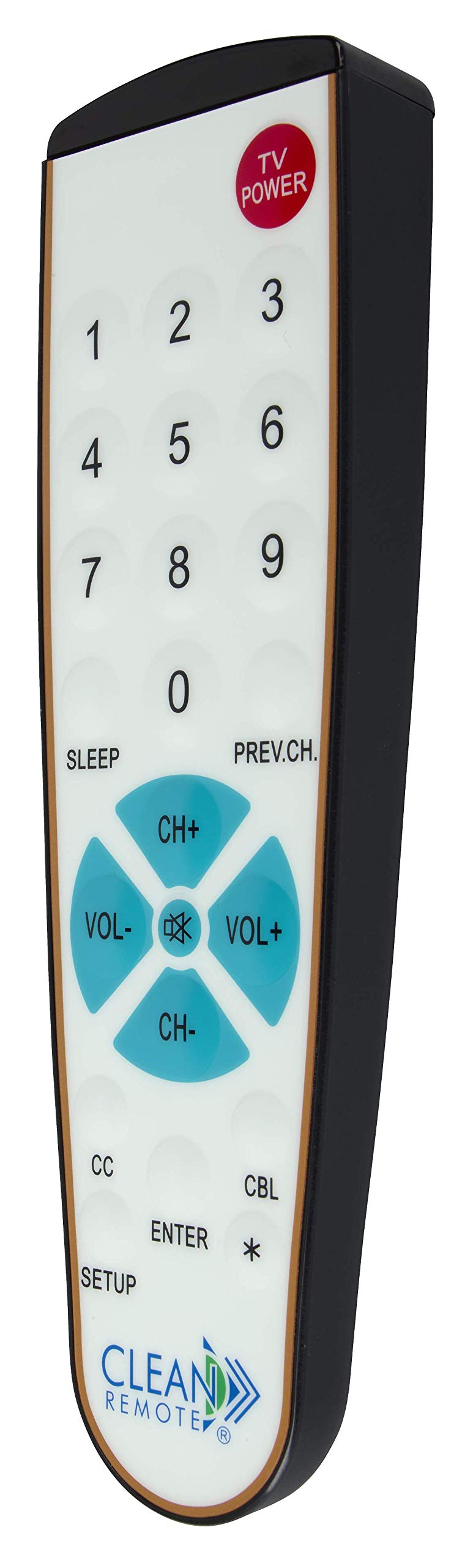
Выява: Падрабязная view of the Clean Remote CR3HOME, illustrating the layout of its power, number, volume, and channel buttons.
- МАГУТНАСЦЬ ТЭЛЕВІЗАРА: Уключае або выключае тэлевізар.
- Лічбавыя кнопкі (0-9): Выкарыстоўваецца для непасрэднага ўводу нумароў каналаў.
- ГУЧ+ / ГУЧ-: Павялічвае або памяншае гучнасць.
- CH+ / CH-: Змяняе канал уверх ці ўніз.
- ПАПЯРЭДНІ.CH: Вяртаецца да ранейшага viewрэдагаваны канал.
- СОН: Activates the TV's sleep timer function (if supported by your TV).
- CC (Closed Captioning): Toggles closed captioning on or off (if supported by your TV).
- УВОД: Confirms selections or channel entries.
- *: May function as a dash or special character depending on the TV/cable box.
Заўвага: This remote intentionally omits Input, Menu, and Guide buttons to prevent accidental changes to TV settings, making it ideal for environments where simplicity is key.
Тэхнічнае абслугоўванне
The Clean Remote CR3HOME is designed for easy maintenance due to its spill-proof and sealed construction.
- Уборка: To clean the remote, simply wipe its nonporous, sealed membrane surface with a damp cloth or a mild disinfectant wipe. Avoid using abrasive cleaners or submerging the remote in liquid.
- Замена батарэі: Replace batteries when the remote's indicator light becomes dim or the remote becomes unresponsive. Always use fresh AAA batteries.
- захоўванне: Store the remote in a dry place away from extreme temperatures.
Ліквідацыю непаладак
- Пульт не адказвае:
- Праверце, ці правільна ўстаўлены батарэйкі і ці не разраджаныя. Пры неабходнасці замяніце іх.
- Ensure there is a clear line of sight between the remote and the TV/cable box. Remove any obstructions.
- Make sure you are within the effective range of the remote (typically up to 20 feet).
- Remote not controlling TV/Cable Box after setup:
- Repeat the TV Pairing or Cable Box Setup steps carefully. The remote cycles through codes, and sometimes it may require multiple attempts to find the correct one.
- Ensure the TV/cable box is powered on during the setup process.
- Некаторыя кнопкі не працуюць:
- Verify that the button functionality is supported by your specific TV or cable box model.
- Remember that the CR3HOME intentionally does not have Input, Menu, or Guide buttons.
Тэхнічныя характарыстыкі
| Марка | АЧЫСТЫ ПДУ |
| Нумар мадэлі | CR3HOME |
| Асаблівасць | Spillproof, Universal |
| Сумяшчальныя прылады | Television, Cable Box |
| Тэхналогія падлучэння | Інфрачырвоны |
| Тып кантролера | Кіраванне кнопкамі |
| Крыніца харчавання | 2 х ААА батарэі (не ўключаны) |
| UPC | 816466021271 |
Інфармацыя аб гарантыі
Clean Remote products are typically covered by a limited manufacturer's warranty. Please refer to the packaging or the official Clean Remote webКаб даведацца пра канкрэтныя ўмовы гарантыі, у тым ліку пра тэрмін і пакрыццё, наведайце наш сайт. Захоўвайце пацвярджэнне пакупкі для прэтэнзій па гарантыі.
Падтрымка кліентаў
For further assistance, technical support, or inquiries regarding your Clean Remote CR3HOME, please visit the official Clean Remote webсайт або звярніцеся ў службу падтрымкі кліентаў. Кантактную інфармацыю звычайна можна знайсці на ўпакоўцы прадукту або на сайце вытворцы webсайт.


