
Уводзіны
This manual provides detailed instructions for the safe and efficient operation of your KORAD KWR103 Programmable DC Power Supply. Please read this manual thoroughly before using the device to ensure proper functionality and to prevent damage or injury. The KWR103 is a versatile programmable DC power supply offering a wide range of voltage and current outputs, including 60V/15A/300W, designed for various testing and application needs.
Важная інфармацыя па бяспецы
Always observe the following safety precautions to prevent electric shock, injury, or damage to the device:
- Ensure the power supply is connected to a grounded AC outlet with the correct voltage.
- Не выкарыстоўвайце прыладу ў вільготных або damp умовы.
- Не адчыняйце casing; there are no user-serviceable parts inside. Refer servicing to qualified personnel.
- Verify correct polarity and voltage/current settings before connecting to any load.
- Пазбягайце кароткага замыкання выхадных клем.
- Адключыце харчаванне перад тым, як рабіць або змяняць падключэнні.
- Забяспечце дастатковую вентыляцыю вакол прылады, каб прадухіліць перагрэў.
Прадукт скончаныview
The KORAD KWR103 is a high-precision programmable DC power supply. Familiarize yourself with its components:
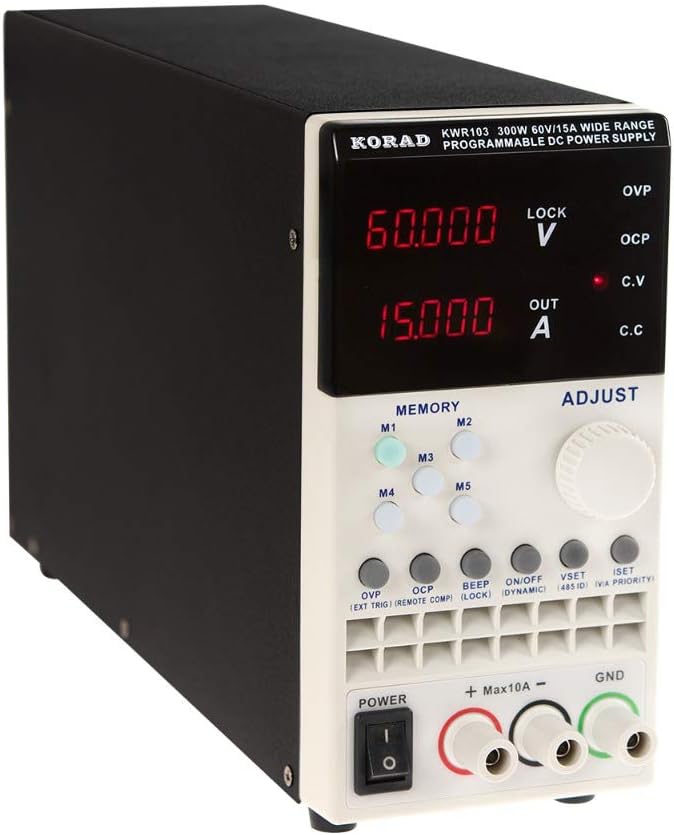
Пярэдняя панэль

Малюнак 1: Front panel of the KORAD KWR103, showing the display, control buttons, adjustment knob, and output terminals.
- Дысплей: Digital readouts for voltage (V) і ток (A).
- Memory Buttons (M1-M5): For saving and recalling preset voltagе і бягучыя значэнні.
- Ручка рэгулявання: Rotary encoder for precise adjustment of voltagе і ток.
- Функцыянальныя кнопкі: OVP, OCP, BEEP, ON/OFF, VSET, ISET, V/A PRIORITY for various settings and controls.
- Выхадныя тэрміналы: Positive (+), Negative (-), and Ground (GND) connections. Max 10A output directly from front terminals.
- Выключальнік сілкавання: Асноўны рэгулятар харчавання для прылады.
Задняя панэль

Малюнак 2: Rear panel of the KORAD KWR103, featuring power input, communication ports, and sense terminals.
- Улада пераменнага току: For connecting the main power cord.
- Трымальнік засцерагальніка: Змяшчае ахоўны засцерагальнік.
- Sense Terminals (SENSE TRIG IN+): For remote sensing to compensate for voltage drop across load wires.
- Тэрміналы RS485: Для сувязі RS485.
- Порт USB: For computer control and communication.
- Порт RS232: For serial communication.
- Порт LAN: For network communication and control.
Аксэсуары ў камплекце
Малюнак 3: The KORAD KWR103 power supply shown with its standard accessories, including power cord, output cables, USB cable, RS232 cable, and software CD.
Your KWR103 package typically includes:
- KORAD KWR103 Programmable DC Power Supply Unit
- Шнур сілкавання
- Output Test Leads (Red/Black)
- Кабель сувязі USB
- Кабель сувязі RS232
- Software CD (for PC control)
- Кіраўніцтва карыстальніка (гэты дакумент)
Настройка
- Распакаванне: Carefully remove the power supply and all accessories from the packaging. Inspect for any signs of damage.
- Размяшчэнне: Place the unit on a stable, level surface with adequate ventilation. Ensure no vents are obstructed.
- Падключэнне сілкавання:
- Пераканайцеся, што выключальнік харчавання на пярэдняй панэлі знаходзіцца ў становішчы ВЫКЛ.
- Connect the supplied AC power cord to the AC power input on the rear panel.
- Падключыце другі канец шнура харчавання пераменнага току да заземленай электрычнай разеткі.
- Падключэнне нагрузкі:
- Connect the red output test lead to the positive (+) terminal and the black output test lead to the negative (-) terminal on the front panel.
- Connect the other ends of the test leads to your load, ensuring correct polarity. For currents exceeding 10A, use the rear output terminals (if available on your specific model) or thicker gauge wires directly to the internal terminals, following safety guidelines.
- Для дакладнага аб'ёмуtage regulation at the load, especially with long cables or high currents, connect the remote sense wires (SENSE TRIG IN+) from the rear panel directly across your load.
- Communication Interface Connection (Optional):
- USB: Connect the USB cable from the rear panel to your computer.
- RS232: Connect the RS232 cable from the rear panel to your computer's serial port or a USB-to-serial adapter.
- LAN: Connect an Ethernet cable from the rear panel to your network router or switch.
- Install the provided software drivers and control application from the included CD or manufacturer's webсайт.
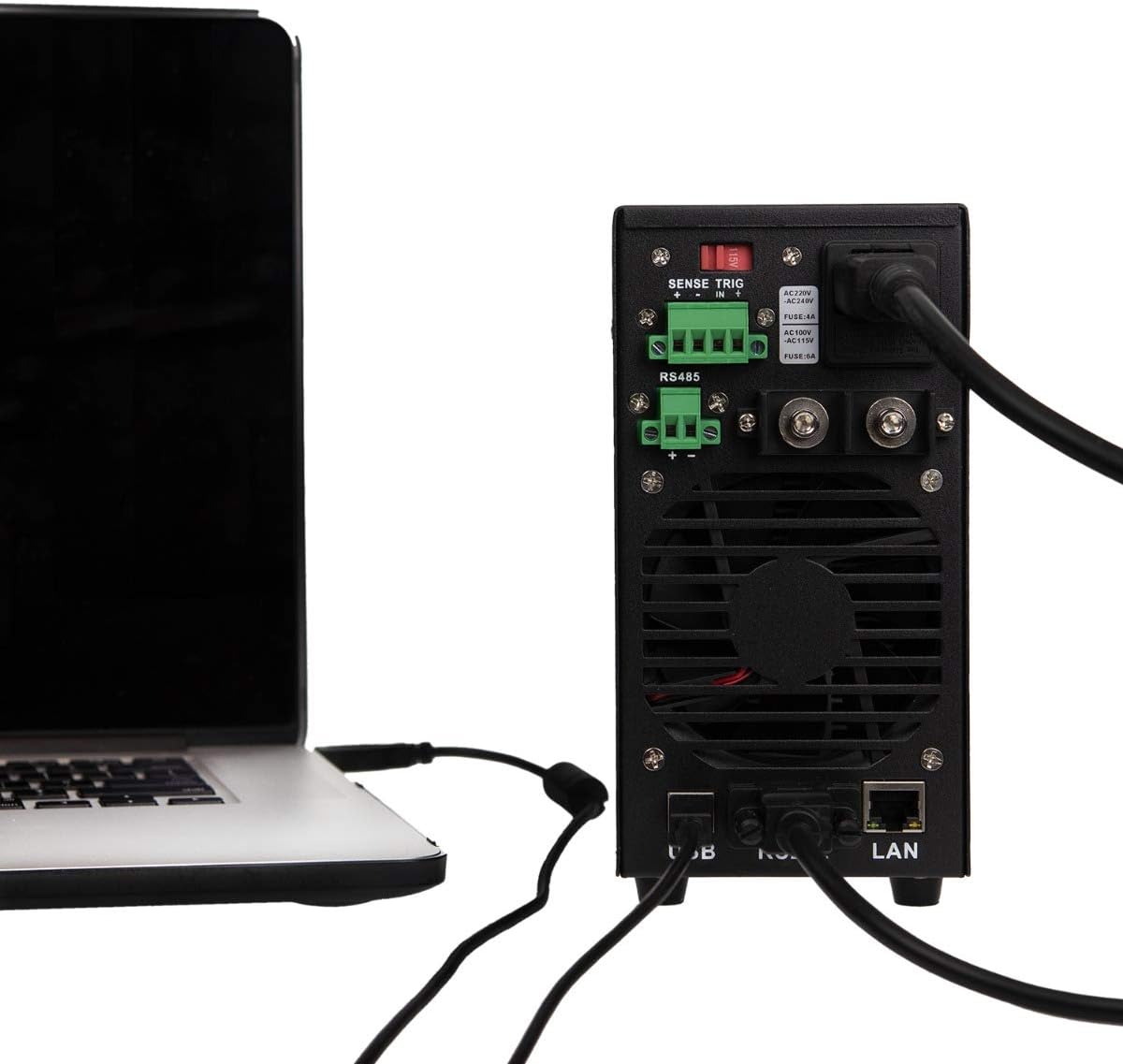
Малюнак 4: Example of the KORAD KWR103 rear panel connected to a laptop, illustrating USB and LAN connections for remote control.
Інструкцыя па эксплуатацыі
- Уключэнне: Flip the power switch on the front panel to the ON position. The display will illuminate.
- Налада Voltagе і ток:
- Націсніце VSET кнопка для ўваходу ў тtagрэжым налады. Гучнасцьtage display will flash.
- Павярнуць Адрэгулюйце ручку to set the desired voltage. Press the knob to move between digits for fine adjustment.
- Націсніце ISET button to enter current setting mode. The current display will flash.
- Павярнуць Адрэгулюйце ручку to set the desired current limit. Press the knob to move between digits.
- Прэса VSET or ISET again to exit setting mode, or wait a few seconds for it to exit automatically.
- Кантроль выхаду:
- Пасля ўстаноўкі абtage and current, press the ВКЛ/ВЫКЛ button to enable the output. The "OUT" indicator will light up.
- Прэса ВКЛ/ВЫКЛ again to disable the output.
- Memory Functions (M1-M5):
- Захаванне налад: Усталюйце патрэбную гучнасцьtage and current. Press and hold one of the М1-М5 buttons until a beep sounds, indicating the settings are saved.
- Выкліканне налад: Каротка націсніце адзін з М1-М5 buttons to recall the saved settings.
- Над Voltage Protection (OVP) and Over Current Protection (OCP):
- Націсніце OVP button to set the over-voltage protection limit. Use the Адрэгулюйце ручку.
- Націсніце OCP button to set the over-current protection limit. Use the Адрэгулюйце ручку.
- These functions automatically shut down the output if the set limits are exceeded, protecting the load and the power supply.
- Пульт дыстанцыйнага кіравання:
- Once the communication drivers and software are installed, you can control the power supply via USB, RS232, or LAN.
- Refer to the software manual for detailed instructions on using the PC control application.
Тэхнічнае абслугоўванне
- Уборка: Disconnect the power supply from the AC outlet before cleaning. Use a soft, dry cloth to wipe the exterior. Do not use abrasive cleaners or solvents.
- Вентыляцыя: Ensure the ventilation openings are clear of dust and debris. Periodically clean the fan intake/exhaust areas.
- Замена засцерагальніка: If the unit does not power on, the fuse may need replacement.
- Адлучыце шнур сілкавання пераменнага току.
- Знайдзіце трымальнік засцерагальніка на задняй панэлі.
- Carefully remove the fuse holder and replace the fuse with one of the same type and rating (e.g., FUSE: 4A for AC220V, FUSE: 6A for AC110V).
- Reinsert the fuse holder and reconnect the AC power.
Ліквідацыю непаладак
| праблема | Магчымая прычына | Рашэнне |
|---|---|---|
| Прылада не ўключаецца. | Няма пераменнага току; перагарэў засцерагальнік; выключаны выключальнік харчавання. | Check AC power connection; Replace fuse (see Maintenance); Ensure power switch is ON. |
| Няма аб'ёму вывадуtagе/ток. | Output disabled; OVP/OCP triggered; Incorrect settings; Loose connections. | Press ON/OFF button; Check OVP/OCP settings; Verify voltage/current settings; Secure output connections. |
| тtage/Current unstable. | Poor load connection; Remote sense not used or incorrectly connected; Overheating. | Check load connections; Use remote sense for critical applications; Ensure adequate ventilation. |
| Не працуе пульт дыстанцыйнага кіравання. | Incorrect cable; Driver not installed; Software configuration error. | Verify correct USB/RS232/LAN cable; Install drivers; Check software settings and communication parameters. |
Тэхнічныя характарыстыкі
| Параметр | Каштоўнасць |
|---|---|
| мадэль | KWR103 |
| Выхад Voltage | 0-60В |
| Выхадны ток | 0-15А |
| Выходная магутнасць | 300 Вт |
| тtage Рэзалюцыя | 1mV |
| Дзеючае дазвол | 1 мА |
| Інтэрфейсы | LAN, USB, RS232, RS485 |
| Функцыі аховы | OVP (над тымtage Protection), OCP (Over Current Protection), OTP (Over Temperature Protection) |
| Вага прадмета | 11.29 фунта (прыблізна 5.12 кг) |
| Памеры ўпакоўкі | 16.14 х 11.22 х 7.68 цалі (прыблізна 41 х 28.5 х 19.5 см) |
| Спосаб астуджэння | паветра |
Гарантыя і падтрымка
For warranty information and technical support, please refer to the documentation included with your purchase or contact KORAD customer service. Keep your purchase receipt as proof of purchase for warranty claims.
For the latest drivers, software, and additional support resources, please visit the official KORAD webсайт.