
1. Прадукт скончыўсяview
The LUMI LPA37-696 is an X-Large Heavy-Duty Full Motion TV Wall Mount designed for 60-inch to 100-inch curved and flat panel televisions. This mount supports TVs weighing up to 80 kg (176 lbs). Its robust construction ensures durability and safety, having been tested to withstand a minimum of four times its stated load capacity.
The full-motion design provides maximum flexibility, allowing users to tilt and swivel their television for optimal viewing angles from various positions within a room. Post-installation, a level adjustment feature enables the TV to be rotated up to 3 degrees clockwise or counterclockwise, ensuring a perfectly level display.
Асноўныя функцыі ўключаюць у сябе:
- Цяжкая канструкцыя: Made from high-quality steel, certified with CE and RoHS, and passes international standard drop tests.
- Універсальная сумяшчальнасць: Fits most 60"-100" TVs with VESA patterns up to 900x600mm.
- Поўная функцыя руху: Allows for tilting, swiveling, and extension for flexible viewінж.
- Выраўноўванне пасля ўстаноўкі: Features ±3° level adjustment for precise alignment.
- Пашыраны ахоп: Extends up to 18.5 inches (47 cm) from the wall and retracts to 2.75 inches (7 cm) for space-saving.
- Інтэграванае кіраванне кабелямі: Helps organize and conceal TV cables for a tidy appearance.
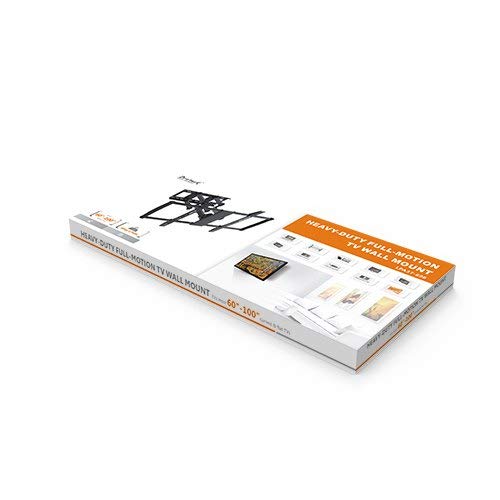
Figure 1: Packaging for the LUMI LPA37-696 TV Wall Mount, showing the product box.
2. Змесціва ўпакоўкі
Before beginning installation, verify that all components are present and undamaged. Refer to the included installation manual for a detailed list of parts and hardware.
- 1 x LPA37-696 TV Wall Mount Assembly
- 1 x Accessory Kit Package (containing various screws, anchors, and washers)
- 1 х Кіраўніцтва па ўстаноўцы
3. Настройка і ўстаноўка
Installation of the LUMI LPA37-696 TV Wall Mount requires careful attention to safety and proper procedures. It is recommended to have at least two people for installation due to the size and weight of the mount and television. Always consult the dedicated "INSTALLATION MANUAL" provided in the package for step-by-step instructions specific to your wall type and TV model.
3.1 Важныя меркаванні
- Тып сцяны: Ensure your wall can safely support the combined weight of the TV mount and your television. This mount is designed for various wall types, but specific anchors and techniques are required.
- Ёмістасць вагі: Не перавышайце максімальную грузападымальнасць 80 кг (176 фунтаў).
- Сумяшчальнасць VESA: Verify your TV's VESA mounting pattern matches the mount's supported range (200x200mm to 900x600mm).
- Неабходныя інструменты: Gather all necessary tools as specified in the installation manual before starting.
3.2 Этапы ўстаноўкі (рэзюмэ)
While the detailed steps are in the included manual, the general process involves:
- Marking the desired mounting location on the wall.
- Drilling pilot holes according to the wall plate template.
- Securing the wall plate to the wall using appropriate fasteners.
- Attaching the TV brackets to the back of your television.
- Carefully lifting and hooking the TV (with brackets) onto the wall plate.
- Securing the TV to the mount.
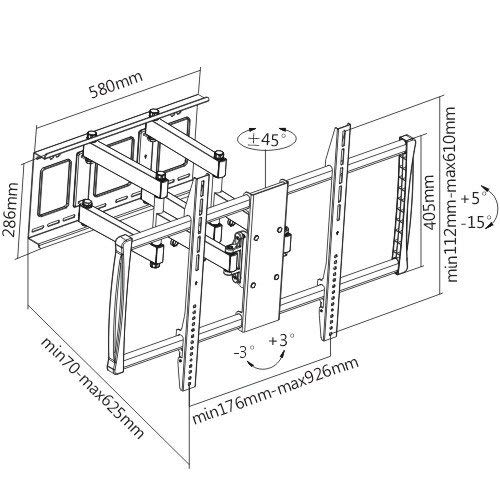
Figure 2: Technical drawing illustrating the dimensions, VESA compatibility, and range of motion (tilt, swivel, extension) for the LPA37-696 TV Wall Mount.
4. Operating the TV Mount
Once installed, the LUMI LPA37-696 mount offers various adjustments to optimize your viewвопыту.
4.1 Рэгуляванне нахілу
The mount allows for vertical tilt adjustment. This feature is useful for reducing glare or achieving a comfortable viewing angle when the TV is mounted higher than eye level. Loosen the tilt adjustment knobs (refer to the installation manual for exact location), adjust the TV to the desired angle, and then securely tighten the knobs.
4.2 Рэгуляванне павароту
The full-motion arm enables horizontal swivel. Gently push or pull the TV to rotate it left or right to face different areas of the room. The mount is designed for smooth movement, but avoid excessive force.
4.3 Выцягванне і ўцягванне
Extend the TV away from the wall for easier access to cables or to bring the screen closer for a more immersive view. To retract, gently push the TV back towards the wall until it reaches the desired distance. The mount can extend up to 18.5 inches (47 cm) and retract to 2.75 inches (7 cm) from the wall.
4.4 Выраўноўванне пасля ўстаноўкі
If the TV appears slightly unlevel after installation, use the ±3° leveling function. Locate the leveling bolts (as shown in the installation manual) and adjust them until the TV is perfectly horizontal. Once level, ensure the bolts are tightened to secure the position.
4.5 Арганізацыя кабеляў
Utilize the integrated cable management features to route and conceal your TV cables. This helps maintain a clean and organized appearance and prevents cables from being snagged during adjustments.
5. Тэхнічнае абслугоўванне
Рэгулярнае абслугоўванне забяспечвае даўгавечнасць і бяспечную працу вашага насценнага мацавання для тэлевізара.
- Уборка: Перыядычна працірайце пыл з мацавання мяккай сухой тканінай. Пазбягайце абразіўных ачышчальнікаў або растваральнікаў, якія могуць пашкодзіць пакрыццё.
- Праверце злучэнні: Annually, inspect all mounting bolts and screws to ensure they remain securely tightened. Over time, vibrations or movement can cause fasteners to loosen.
- змазка: The moving parts of the mount are designed for smooth operation. If any movement becomes stiff, consult the manufacturer's support or a qualified technician. Do not apply lubricants unless specifically instructed.
6. Выпраўленне непаладак
This section addresses common issues you might encounter with your TV wall mount.
6.1 TV Appears Unlevel
- рашэнне: Use the post-installation ±3° level adjustment feature. Locate the leveling bolts and adjust them until the TV is perfectly horizontal. Ensure they are tightened afterward.
6.2 Difficulty Moving the TV
- рашэнне: Ensure no cables are snagged or obstructing movement. Check if any tilt or swivel locking mechanisms are engaged (refer to the installation manual). If movement remains stiff, contact customer support.
6.3 Mount Feels Loose on the Wall
- рашэнне: Immediately remove the TV from the mount. Re-check all wall mounting fasteners to ensure they are securely tightened. If the issue persists, consult a professional installer to assess the wall integrity and mounting method. Do not use the mount if it feels loose.
7. Тэхнічныя характарыстыкі
| Марка | ЛЮМІ |
| мадэль | ЛПА37-696 |
| Сумяшчальныя памеры экрана | 60" - 100" |
| Ёмістасць вагі | 80 кг (176 фунтаў) |
| Сумяшчальнасць VESA | 200x200, 300x300, 400x200, 400x400, 600x400, 800x400, 800x600, 900x600 mm |
| Тып мацавання | Насценнае мацаванне |
| Тып руху | Full Motion (Tilt, Swivel, Extension) |
| Дыяпазон нахілу | ад +5° да -15° |
| Дыяпазон павароту | Да ±45° (у залежнасці ад памеру тэлевізара) |
| Рэгуляванне ўзроўню | ±3° Post-installation |
| Пашырэнне ад сцяны | 2.75" (7 cm) to 18.5" (47 cm) |
| Матэрыял | сталь |
| Аздабленне паверхні | Парашковае пакрыццё |
| Памеры вырабу (у складзеным выглядзе) | 92.6 х 7 х 61 см |
| Вага прадмета (мацаванне) | 18 кг |
| Колер | ЧОРНЫ |
8. Гарантыя і падтрымка
For warranty information, technical support, or assistance with installation and operation, please refer to the contact details provided in your product packaging or visit the official LUMI webсайт. Захоўвайце чэк аб куплі як пацвярджэнне пакупкі для гарантыйных прэтэнзій.
Manufacturer: ARIHANT INFOMATICS / LUMI
Contact: 8108164916 (as per product specifications)


