
Уводзіны
This manual provides essential instructions for the safe and efficient operation, maintenance, and troubleshooting of your Brother LB7000 Computerized Embroidery and Sewing Machine. Please read this manual thoroughly before using the machine to ensure proper function and to prevent damage.
The Brother LB7000 is a versatile machine designed for both sewing and embroidery tasks, offering a range of features to enhance your creative projects.

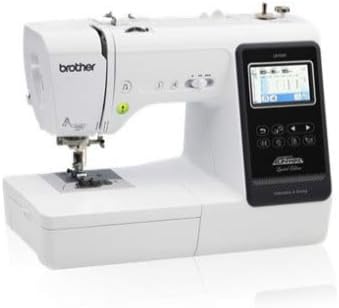
Image: The Brother LB7000 Computerized Embroidery and Sewing Machine in its standard configuration.
1. Настройка
1.1 Распакоўка і размяшчэнне
- Асцярожна дастаньце прыладу з упакоўкі. Захавайце ўсе ўпаковачныя матэрыялы для будучай транспарціроўкі або захоўвання.
- Place the machine on a stable, level surface. Ensure adequate space around the machine for comfortable operation and ventilation.
- Падключыце шнур харчавання да прылады, а затым да адпаведнай электрычнай разеткі.
1.2 Attaching the Embroidery Unit
For embroidery functions, the embroidery unit must be attached.
- Пераканайцеся, што прылада выключана.
- Slide the embroidery unit onto the machine's free arm until it clicks securely into place.
- Turn on the machine. The display will show embroidery mode options.

Image: The Brother LB7000 machine with the embroidery unit and hoop attached, ready for embroidery.
1.3 Запраўка ніткі ў машыну
Proper threading is crucial for optimal sewing and embroidery performance.
- Надзеньце шпульку нітак на штыфт.
- Выконвайце пранумараваны шлях запраўкі ніткі, пазначаны на машыне, праводзячы нітку праз усе дыскі нацяжэння і накіроўвалыя.
- Use the automatic needle threader for convenience, or manually thread the needle from front to back.
1.4 Намотка шпулькі
- Надзеньце пустую шпульку на вал намотвальніка шпулькі.
- Правядзіце нітку з шпулькі праз дыск нацяжэння намоткі шпулькі.
- Wrap the thread around the bobbin a few times, then push the bobbin winder shaft to the right.
- Press the Start/Stop button to begin winding. The machine will stop automatically when the bobbin is full.
2. Інструкцыя па эксплуатацыі
2.1 Basic Sewing Operations
- Selecting Stitches: Use the touch screen display to navigate and select desired utility or decorative stitches.
- Рэгуляванне параметраў: Modify stitch length and width using the dedicated buttons or touch screen controls.
- Starting to Sew: Place fabric under the presser foot, lower the presser foot, and press the Start/Stop button or use the foot controller.
- Зваротнае шыццё: Press and hold the reverse stitch button to sew in reverse for securing seams.
Выява: Крупны план view of the Brother LB7000's control panel and LCD screen, showing sewing stitch selection.
2.2 Embroidery Operations
- Hooping Fabric: Securely place your fabric and stabilizer within the embroidery hoop. Ensure the fabric is taut and wrinkle-free.
- Selecting Designs: Choose from built-in embroidery designs or load designs via USB (if applicable).
- пазіцыянаванне: Use the touch screen to adjust the design's position, rotation, and size within the hoop area.
- Starting Embroidery: Attach the hooped fabric to the embroidery unit. Confirm thread color and press the Start/Stop button. The machine will prompt for thread changes as needed.
3. Тэхнічнае абслугоўванне
3.1 Чыстка прылады
- Рэгулярная ўборка: After each use, or every few hours of operation, remove the needle plate and bobbin case. Use the provided brush to remove lint and dust from the feed dogs and bobbin area.
- Знешняя ачыстка: Працірайце знешнія паверхні прылады мяккай сухой тканінай. Не выкарыстоўвайце агрэсіўныя хімікаты або абразіўныя ачышчальнікі.
3.2 Замена іголкі
Replace the needle regularly (approximately every 8-10 hours of sewing) or if it becomes bent, dull, or damaged.
- Выключыце машыну.
- Паслабце іголку клamp шруба.
- Remove the old needle and insert a new needle with the flat side facing the back of the machine, pushing it up as far as it will go.
- Зацягнуць іголку клamp надзейна закруціце.
3.3 Змазка
The Brother LB7000 is designed to be largely maintenance-free regarding oiling. Do not oil any part of the machine unless specifically instructed by Brother service personnel or an authorized service center. Improper oiling can damage the machine.
4. Выпраўленне непаладак
| праблема | Магчымая прычына | Рашэнне |
|---|---|---|
| Машына не ўключаецца. | Шнур харчавання падключаны няправільна. | Check power cord connection to machine and outlet. Ensure outlet is functional. |
| Upper thread breaks. | Incorrect threading, needle bent/dull, tension too high, poor quality thread. | Re-thread the machine correctly. Replace needle. Adjust upper thread tension. Use good quality thread. |
| Прапушчаныя швы. | Incorrect needle type/size, bent needle, improper threading. | Use appropriate needle for fabric. Replace needle. Re-thread machine. |
| Захрасанне тканіны. | Incorrect presser foot, feed dogs not engaged, fabric too thick/thin. | Use correct presser foot. Ensure feed dogs are up. Use appropriate needle and stabilizer for fabric. |
| Poor embroidery quality. | Improper hooping, wrong stabilizer, incorrect tension, dull needle. | Re-hoop fabric tautly. Use correct stabilizer for fabric and design. Adjust tension. Replace needle. |
5. Тэхнічныя характарыстыкі
| Асаблівасць | Дэталь |
|---|---|
| Марка | брат |
| Нумар мадэлі | LB7000 |
| Крыніца харчавання | Правадная электрычная |
| Электрычны | так |
| UPC | 012502649830 |
| GTIN | 012502649830 |
6. Гарантыя і падтрымка
For detailed warranty information, please refer to the warranty card included with your product or visit the official Brother webсайт. Захоўвайце пацвярджэнне пакупкі для прэтэнзій па гарантыі.
If you encounter issues not covered in this troubleshooting section or require technical assistance, please contact Brother Customer Support. You can find contact information on the official Brother webсайт або праз Brother Store on Amazon.