
1. Прадукт скончыўсяview
The Spigen 70W Dual USB-C Wall Charger (Model PE2007UJ) utilizes advanced Gallium Nitride (GaN II) technology to provide efficient and fast charging for a wide range of devices. Its compact design and dual USB-C ports make it suitable for charging multiple devices simultaneously.
1.1 Змест пакета
- 1 x Spigen 70W Dual USB-C Wall Charger
- 1 x USB Cable (Note: Specific cable type may vary or be sold separately as per product details)
1.2 Асноўныя магчымасці
- 70W Total Power Delivery: Provides up to 70W total output across two USB-C ports.
- Тэхналогія GaN II: Offers a more compact design, higher efficiency, and cooler operation compared to traditional silicon chargers.
- Intelligent Power Diffusion (IPD): Dynamically distributes power to connected devices for optimal charging.
- Quantum Boost: Automatic device detection for maximum power delivery.
- Складаная разетка: Паляпшае партатыўнасць і зручнасць захоўвання.
- Тэхналогія якасці электраэнергіі: Minimizes ripple noise for stable power output and extended device lifespan.
1.3 Сумяшчальнасць
Compatible with a wide range of USB-C powered devices, including:
- Apple devices: MacBook Pro 13''/14''/15'', MacBook Air 13'', iPad Air Series, iPhone 17/Air/Pro/Pro Max, iPhone 16/Plus/Pro/Pro Max, iPhone 15/Plus/Pro/Pro Max, iPhone 14/Plus/Pro/Pro Max, iPhone 13/Pro Max/Pro/Mini, iPhone 12/Pro/Pro Max/Mini, iPhone 11/Pro/Pro Max, iPhone X/XS/XR/XS Max, iPhone SE, iPhone 8/8 Plus.
- Samsung Galaxy S series: S23, S22, S21, S20 series.
- Google Pixel series: Pixel Fold, 10, 9, 8, 7a, 7, 6, 6 Pro, 5a, 5, 4.
- Other devices: Steam Deck, Dell XPS, and other USB-C laptops.
Note: Does not support Super Fast Charging (Samsung) and OnePlus Warp Charging.
2. Настройка
2.1 Падключэнне зараднай прылады
- Разгарніце кантакты пераменнага току з корпуса зараднай прылады.
- Устаўце зарадную прыладу ў звычайную разетку.
- Connect your device's USB-C charging cable to one of the USB-C ports on the charger.
- Падключыце другі канец зараднага кабеля да прылады.
The charger will automatically detect your device and begin charging.
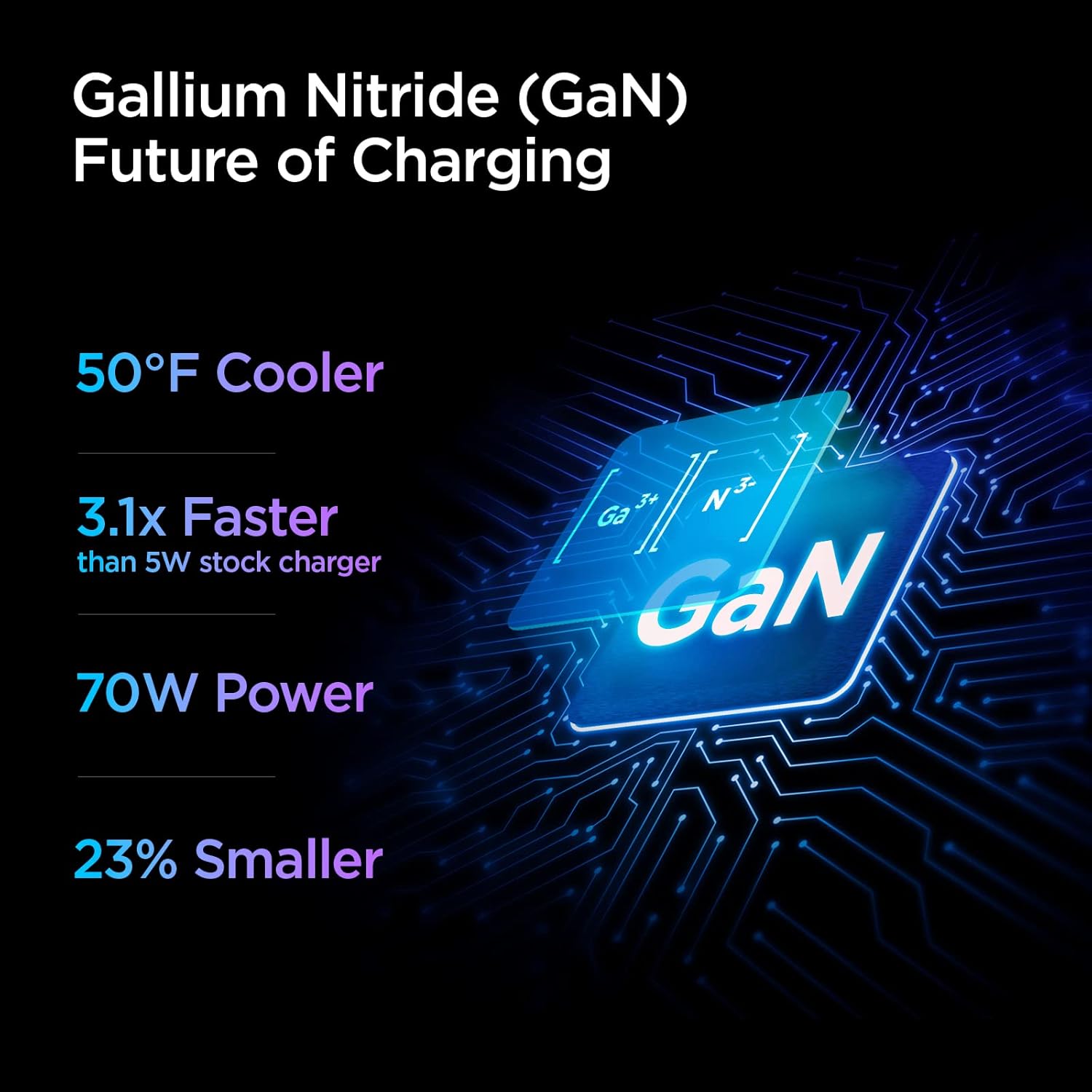
Image: The Spigen 70W Dual USB-C Wall Charger with its foldable plug extended, connected to a wall outlet. A USB-C cable is plugged into one port, charging a MacBook Pro, and another USB-C cable is plugged into the second port, charging an iPhone. This illustrates the dual-port charging capability.
3. Інструкцыя па эксплуатацыі
3.1. Размеркаванне магутнасці
The charger features Intelligent Power Diffusion (IPD) technology, which optimizes power output based on the connected devices.
Выкарыстанне аднаго порта
When only one device is connected to either USB-C port, the charger can deliver up to 60W of power. This is ideal for fast-charging laptops like the MacBook Pro/Air or other high-power devices.

Image: A diagram showing the Spigen 70W Dual USB-C Wall Charger plugged into a wall socket. A single USB-C cable is connected to one port, indicating a maximum output of 60W for single-device charging.
Выкарыстанне двух партоў
When two devices are connected simultaneously, the charger intelligently distributes the total 70W output. Typically, this will be 50W for one port and 20W for the other, allowing for simultaneous fast charging of a laptop and a smartphone.
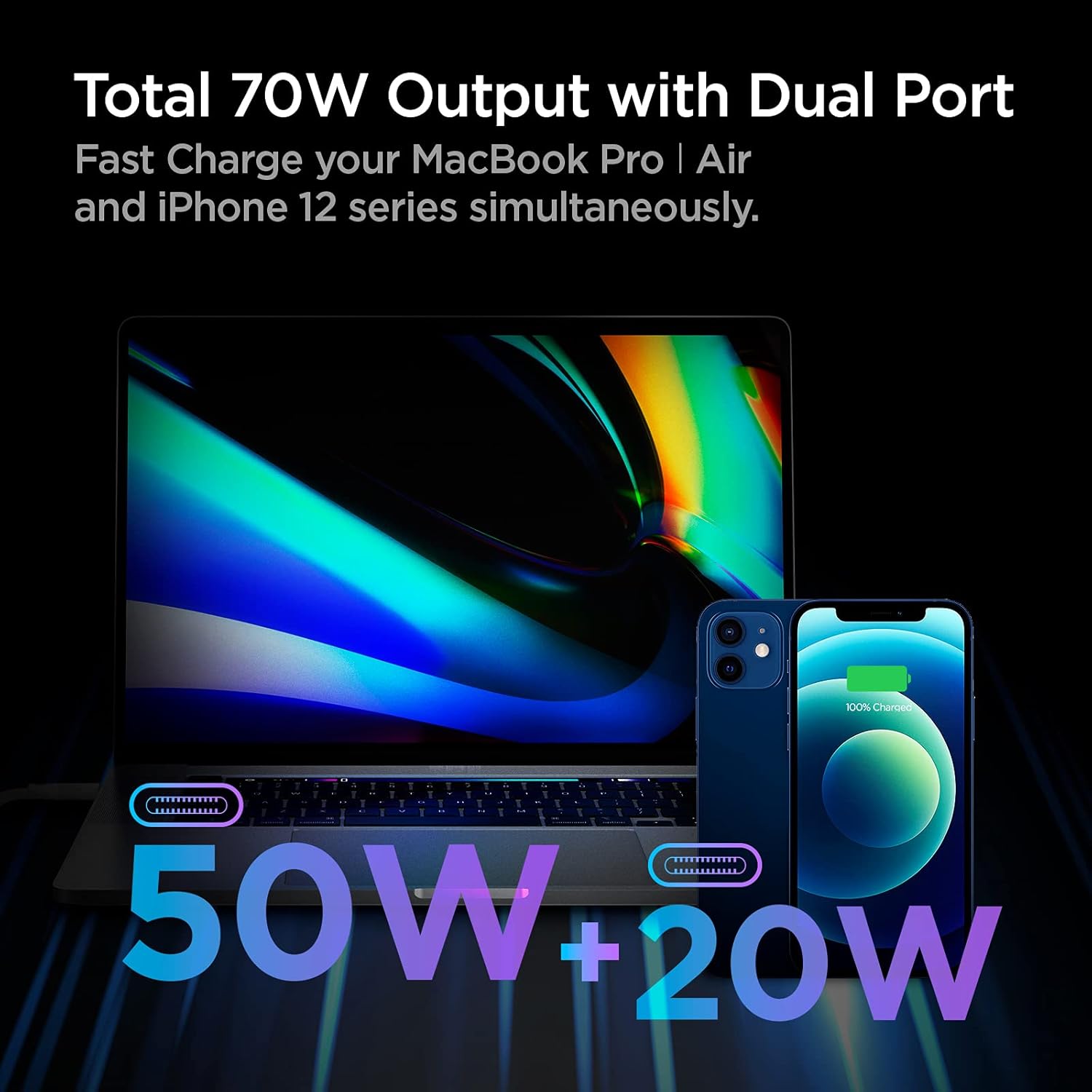
Image: A visual representation of the Spigen 70W Dual USB-C Wall Charger's power distribution. A MacBook Pro is shown receiving 50W, and an iPhone is receiving 20W, totaling 70W when both ports are in use.
3.2 Gallium Nitride (GaN) Technology
This charger incorporates GaN II technology, which allows for smaller, more efficient power components. Benefits include:
- Зніжаная тэмпература: Operates cooler than traditional silicon-based chargers.
- Больш хуткая зарадка: Delivers power more efficiently.
- Кампактны памер: Smaller form factor for enhanced portability.

Выява: Інфаграфіка, якая падкрэслівае перавагіtages of Gallium Nitride (GaN) technology, stating it's 50°F cooler, 3.1x faster than a 5W stock charger, provides 70W power, and is 23% smaller.
3.3 Power Quality Technology
The charger is designed with Power Quality Technology to minimize ripple noise, ensuring a stable and clean power supply to your devices. This helps protect your devices and prolong their battery lifespan.

Image: A graph comparing voltage stability over time between "Other" chargers (red line, showing high ripple noise) and "ArcStation Pro" (blue line, showing minimal ripple noise). Text explains that high ripple noise can cause heating and damage, while Power Quality Technology minimizes it for stable current.
4. Тэхнічнае абслугоўванне
- Keep the charger clean and dry. Avoid exposure to liquids or excessive humidity.
- Не спрабуйце разабраць або мадыфікаваць зарадная прылада.
- Калі зарадная прылада не выкарыстоўваецца, захоўвайце яе ў прахалодным сухім месцы.
- Regularly inspect the charger and cables for any signs of damage. Discontinue use if damage is found.
5. Выпраўленне непаладак
5.1 Прылада не зараджаецца
- Праверце падключэнне сілкавання: Пераканайцеся, што зарадная прылада надзейна падключана да спраўнай разеткі.
- Праверце падключэнне кабеля: Verify that the USB-C cable is firmly connected to both the charger and your device.
- Паспрабуйце іншы кабель: Test with another known-good USB-C cable to rule out a faulty cable.
- Паспрабуйце іншы порт: If using dual ports, try connecting to the other port.
- Перазагрузка прылады: Sometimes restarting your device can resolve charging issues.
5.2 Павольная зарадка
- Verify Cable Compatibility: Ensure you are using a high-quality USB-C cable that supports fast charging and the required wattage.
- Размеркаванне магутнасці: If two devices are connected, the power is distributed. Disconnect one device to see if the charging speed improves for the other.
- Патрабаванні да прылады: Confirm your device supports the fast charging protocols provided by this charger.
- Фонавыя праграмы: Зачыніце непатрэбныя фонавыя праграмы на прыладзе, якія могуць спажываць шмат энергіі.
5.3 Перагрэў зараднай прылады
- While the charger is designed to operate cooler due to GaN technology, some warmth during high-power charging is normal.
- If the charger becomes excessively hot to touch, disconnect it immediately and allow it to cool down.
- Ensure adequate ventilation around the charger and avoid covering it.
- Калі перагрэў не знікае, звярніцеся ў службу падтрымкі кліентаў.
6. Тэхнічныя характарыстыкі
| Асаблівасць | Дэталь |
|---|---|
| Нумар мадэлі | PE2007UJ |
| Агульная ватtage | 70 Вт |
| Парты USB | 2 х USB Type-C |
| Адзін порт выхаду | Да 60 Вт |
| Двайны выхадны порт | 50W + 20W (Intelligent Power Diffusion) |
| Уваходны кнtage | 240 Volts (Standard AC input) |
| Памеры | 2.44 х 2.44 х 1.22 цалі |
| Вага прадмета | 5.1 унцыі |
| Асаблівасці | Fast Charging, Lightweight Design, Retractable Plug, Short Circuit Protection, Travel-friendly |
| Колер | Белы |
7. Важная інфармацыя па бяспецы
- Не падвяргайце зарадная прылада ўздзеянню вады ці вільгаці.
- Пазбягайце экстрэмальных тэмператур.
- Захоўваць у месцах, недаступных дзецям.
- Не выкарыстоўвайце, калі зарадная прылада або кабель пашкоджаны.
- Адключайце зарадную прыладу ад сеткі падчас навальніцы або калі яна не выкарыстоўваецца працяглы час.
8. Гарантыя і падтрымка
Каб атрымаць інфармацыю пра гарантыю і падтрымку кліентаў, звярніцеся да афіцыйнага сайта Spigen. webсайт або звярніцеся непасрэдна ў службу падтрымкі кліентаў.
Spigen is committed to user safety and product quality, adhering to a 15-point safety standard and rigorous testing.
Каб атрымаць дадатковую дапамогу, наведайце: Афіцыйная крама Spigen на Amazon
9. Відэа пра прадукт
Відэа: Афіцыйная відэапрэзентацыя прадуктуasing the Spigen ArcStation Pro 70W Dual Port GaN Charger, demonstrating its features, compact design, and dual-device charging capabilities.