
Naztech 15350
Naztech Xpods PRO True Wireless Noise Cancelling Earbuds
Мадэль: 15350
Brand: Naztech
Уводзіны
The Naztech Xpods PRO are advanced true wireless noise-cancelling earbuds designed for an immersive audio experience and clear communication. Featuring HD sound, touch controls, and IPX4 water resistance, these earbuds are suitable for various activities, including sports and daily use. They come with a wireless charging case for extended playtime and convenient recharging.

Image: Naztech Xpods PRO earbuds, charging case, and product packaging, highlighting key features like 25 hours play time and touch controls.
Настройка
Што ў скрынцы
- Чахол для бесправадной зарадкі
- Зарадны кабель USB-C
- 6 Sets of Silicone Ear Tips (3 sizes, 2 colors)
Зарадка навушнікаў і чахла
Before first use, fully charge the Xpods PRO and their charging case. The case can be charged via the included USB-C cable or a Qi-compatible wireless charging pad.
- Зарадка USB-C: Падключыце кабель USB-C да порта зарадкі на корпусе і да крыніцы харчавання.
- Бесправадная зарадка: Пастаўце зарадны чахол на бесправадную зарадную пляцоўку, сумяшчальную са стандартам Qi. Пераканайцеся, што чахол правільна размешчаны для зарадкі.
A 10-minute quick charge provides approximately 1 hour of playback. A full charge offers up to 5 hours of playtime for the earbuds, with the charging case providing an additional 20 hours, totaling 25 hours of playtime.
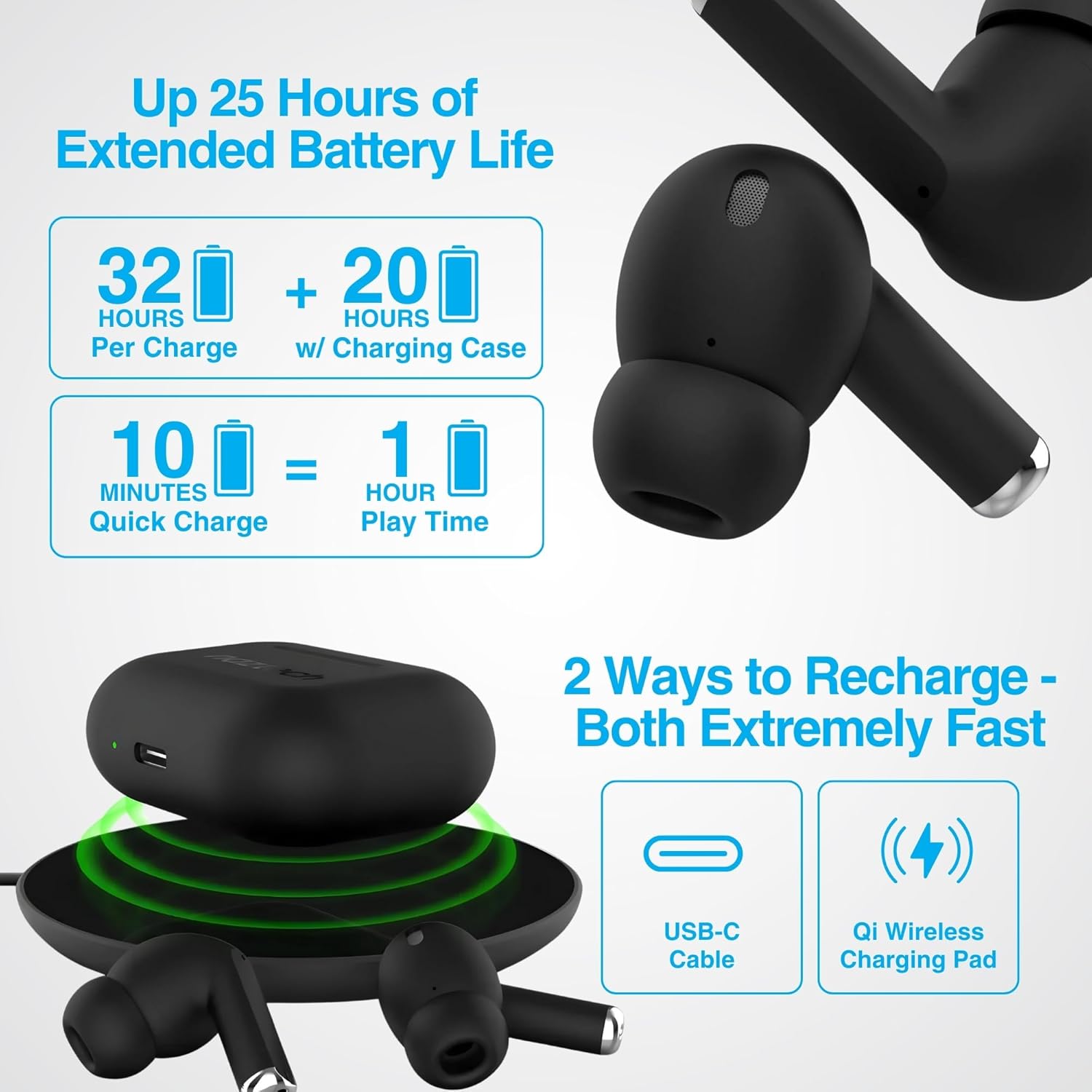
Image: Illustration showing USB-C and Qi wireless charging options for the Naztech Xpods PRO case, along with battery life indicators.
Спалучэнне з вашай прыладай
- Пераканайцеся, што навушнікі зараджаны.
- Адкрыйце зарадны кейс. Навушнікі аўтаматычна пяройдуць у рэжым спалучэння.
- На вашай прыладзе (смартфоне, планшэце і г.д.) перайдзіце ў налады Bluetooth і ўключыце Bluetooth.
- Select "NAZTECH Xpods PRO" from the list of available devices.
- Пасля падключэння вы пачуеце гукавое пацверджанне, і навушнікі будуць гатовыя да выкарыстання.
The Xpods PRO feature Bluetooth 5.0 for stable connectivity up to 33 feet (10 meters) and auto-pair technology for seamless re-connection with previously paired devices.

Image: A smartphone screen showing the "NAZTECH Xpods PRO" listed in Bluetooth settings, demonstrating universal compatibility with various devices.
Інструкцыя па эксплуатацыі
Сэнсарныя элементы кіравання
The Xpods PRO feature intuitive touch sensor controls on each earbud for easy management of audio playback and calls.
| Дзеянне | Кантроль |
|---|---|
| Прайграванне/прыпыненне музыкі | Адзін націск на любы навушнік |
| Наступны трэк | Двойчы націсніце на правы навушнік |
| Папярэдні трэк | Двойчы націсніце на левы навушнік-ўкладыш |
| Адказаць/завяршыць выклік | Адзін націск на любы навушнік |
| Адхіліць выклік | Націсніце і ўтрымлівайце любы навушнік на працягу 2 секунд |
| Актывуйце галасавой памочнік | Тройчы націсніце на любы навушнік |

Image: Diagram illustrating the touch control functions on the Naztech Xpods PRO earbuds.
Нашэнне навушнікаў
For optimal sound quality and a secure fit, choose the silicone ear tips that best suit your ear canal. The Xpods PRO come with 6 sets of silicone ear tips in 3 sizes and 2 colors to ensure a comfortable and noise-isolating fit.

Image: Naztech Xpods PRO earbuds shown with various silicone ear tip sizes, emphasizing customizable fit.
Шумапрыглушэнне
The Xpods PRO feature Passive Noise Cancellation through their closed-system design, which helps to immerse you in music by preserving low-frequency bass richness and reducing ambient noise. Dual microphones with advanced voice capture technology filter out wind and background noise for clear conversations.

Image: A person using Naztech Xpods PRO, illustrating the clear call quality and passive noise cancellation features.
Тэхнічнае абслугоўванне
Уборка
To maintain optimal performance and hygiene, regularly clean your Xpods PRO earbuds and charging case. Use a soft, dry, lint-free cloth to wipe down the surfaces. For ear tips, you may gently wipe them with a slightly damp тканінай і дайце ім цалкам высахнуць, перш чым зноў прымацаваць.
Avoid using abrasive materials, solvents, or harsh chemicals, as these can damage the product.
Воданепранікальнасць (IPX4)
The Naztech Xpods PRO are rated IPX4 water-resistant, meaning they are protected against splashing water from any direction. This makes them suitable for workouts and light rain. However, they are not designed for submersion in water or exposure to pressurized water jets. Do not use them while swimming or showering.

Image: A person wiping sweat from their face, indicating the IPX4 water-resistant rating of the Naztech Xpods PRO for active use.
Захоўванне
When not in use, store your Xpods PRO in their charging case to protect them from dust, dirt, and physical damage. Store the case and earbuds in a cool, dry place away from extreme temperatures and direct sunlight.
Ліквідацыю непаладак
If you encounter issues with your Naztech Xpods PRO, refer to the following common solutions:
Навушнікі не спалучаюцца або не падключаюцца
- Праверце акумулятар: Пераканайцеся, што і навушнікі, і зарадны футляр дастаткова зараджаныя.
- Паўторная пара: Turn off Bluetooth on your device, place earbuds back in the case, close and reopen the case. Then, re-enable Bluetooth on your device and try pairing again.
- Забыць прыладу: On your device's Bluetooth settings, "forget" or "unpair" the "NAZTECH Xpods PRO" and then attempt to pair from scratch.
- Адлегласць: Ensure your device is within the 33ft (10m) Bluetooth range.
- Перашкоды: Адыдзіце ад іншых бесправадных прылад, якія могуць выклікаць перашкоды.
Sound Quality Issues (e.g., Static, Low Volume)
- Чыстыя навушнікі: Ensure the mesh filters and ear tips are clean and free of debris.
- Памер вушной насадкі: Experiment with different sized silicone ear tips to ensure a proper seal in your ear canal, which significantly impacts sound quality and bass response.
- Якасць крыніцы: Пераканайцеся, што крыніца гуку (музыка file, струменевы сэрвіс) мае высокую якасць.
- Гучнасць прылады: Праверце ўзровень гучнасці як на падлучанай прыладзе, так і на навушніках.
Праблемы з зарадкай
- Праверка кабеля: Ensure the USB-C cable is securely connected to both the case and the power source. Try a different USB-C cable and power adapter if available.
- Бесправадная панэль: If using wireless charging, ensure the case is correctly positioned on the charging pad and the pad is powered on.
- Размяшчэнне навушнікаў: Ensure the earbuds are correctly seated in the charging case, making proper contact with the charging pins.
Тэхнічныя характарыстыкі
| Асаблівасць | Дэталь |
|---|---|
| Назва мадэлі | NAZTECH Xpods PRO |
| Нумар мадэлі тавару | 15350 |
| Тэхналогія падлучэння | Бесправадная сувязь (Bluetooth 5.0) |
| Далёкасць бесправадной сувязі | Да 33 футаў / 10 м |
| Тып кіравання | Сэнсарны (кіраванне медыя) |
| Кантроль шуму | Пасіўнае падаўленне шуму |
| Рэйтынг воданепранікальнасці | IPX4 |
| Агульны час гульні | Да 25 гадзін (з чахлом для зарадкі) |
| Час прайгравання навушнікаў-ўкладышаў (на адну зарадку) | Да 5 гадзін |
| Хуткая зарадка | 10 min charge for 1 hour playback |
| Інтэрфейс для зарадкі | USB-C, бесправадная зарадка Qi |
| Уключаныя кампаненты | USB-C Charging Cable, 6 Sets of Silicone Ear Tips, Wireless Charging Case |
| Матэрыял | Пластыкавыя |
| Памеры прадукту | 2.39 х 1.81 х 0.91 цалі |
| Вага прадмета | 4.4 унцыі |
Гарантыя і падтрымка
Naztech products are designed for quality and performance. While specific warranty details are not provided in this manual, Naztech generally backs its products with warranties. For detailed warranty information, product support, or technical assistance, please visit the official Naztech webсайт або звярніцеся непасрэдна ў службу падтрымкі кліентаў.
Больш падрабязную інфармацыю і рэсурсы падтрымкі можна знайсці, наведаўшы Naztech Store on Amazon або іх чыноўнік webсайт.
Ask a question about this manual
Ask about setup, troubleshooting, compatibility, parts, safety, or missing instructions. Manuals+ will review the question and use this page’s manual context to help answer it.