
Уводзіны
The Xtrike Me GM-512 is a high-performance wired optical gaming mouse designed for precision and comfort. It features 7 programmable buttons, adjustable DPI settings, and an RGB backlight with transition effects. This manual provides essential information for setting up, operating, maintaining, and troubleshooting your GM-512 gaming mouse.

Figure 1: Xtrike Me GM-512 Gaming Mouse. This image displays the top-front view of the mouse, highlighting its ergonomic design, honeycomb pattern, and vibrant RGB lighting.
Асноўныя характарыстыкі:
- 7 праграмуемых кнопак: Customize your gaming experience with versatile button assignments.
- Рэгуляваны DPI: Cycle through 800/1600/2400/3200/4800/6400 DPI settings for optimal precision.
- RGB-падсветка: Enjoy dynamic lighting effects with various transition schemes.
- Аптычны датчык: Reliable and accurate tracking for gaming and general use.
- Трывалы дызайн: Built for longevity with a switching capacity of up to 3 million clicks.
- Інтэрфейс USB 2.0: Standard wired connectivity for stable performance.
Настройка
Follow these steps to set up your Xtrike Me GM-512 gaming mouse:
- Распакуйце мыш: Carefully remove the GM-512 mouse from its packaging.
- Падключыцеся да кампутара: Locate an available USB port on your computer. Insert the USB connector of the GM-512 mouse firmly into the USB port.
- Ўстаноўка драйвера: The mouse is plug-and-play. Your operating system (Windows 7 or newer) will automatically detect and install the necessary drivers. No additional software installation is typically required for basic functionality.
- Праверка функцыянальнасці: Once connected, the RGB backlight will illuminate. Move the mouse and click the buttons to ensure it is functioning correctly.
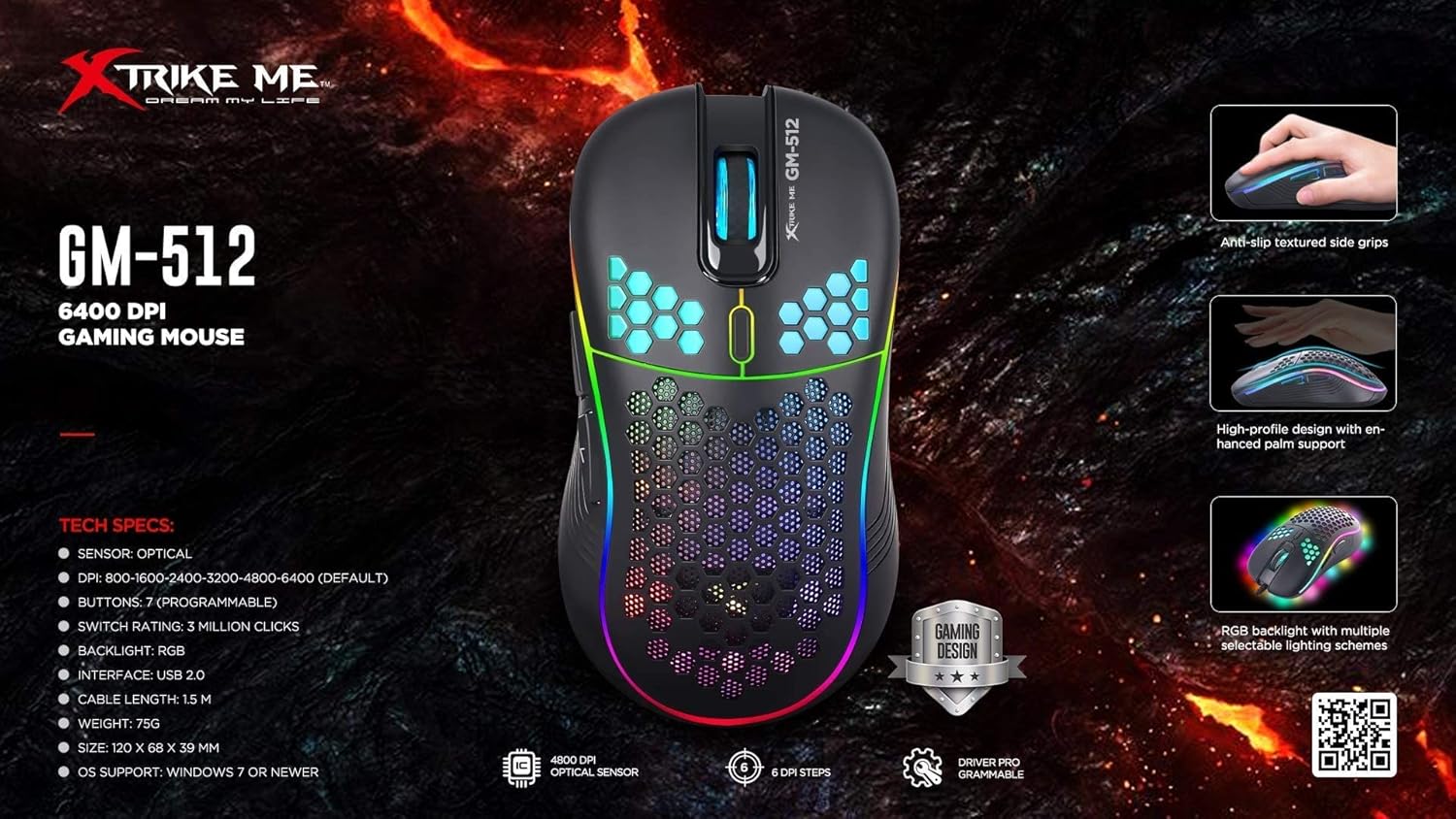
Figure 2: GM-512 Gaming Mouse Feature Overview. This image highlights key technical specifications and design elements such as anti-slip textured side grips, high-profile design for palm support, and RGB backlight schemes.
Інструкцыя па эксплуатацыі
The Xtrike Me GM-512 mouse features 7 buttons and adjustable DPI settings for enhanced control.
Функцыі кнопак:
- Левая кнопка мышы: Стандартная функцыя асноўнага кліку.
- Правая кнопка мышы: Стандартная функцыя другаснага кліку.
- Кола пракруткі (сярэдняя кнопка): Scroll up/down, and click for middle button function.
- Кнопка пераключэння DPI: Located below the scroll wheel. Press to cycle through DPI settings.
- Кнопка «Наперад» (збоку): Typically used for navigating forward in web браўзэры або file даследчыкі.
- Кнопка «Назад» (збоку): Typically used for navigating backward in web браўзэры або file даследчыкі.
- Seventh Button: Function may vary or be programmable depending on software.

Малюнак 3: бок View of GM-512 Mouse. This image shows the left side of the mouse, highlighting the two side buttons (forward and backward) and the RGB light strip along the edge.
Рэгуляванне DPI:
The DPI (Dots Per Inch) button allows you to instantly change the mouse's sensitivity. Press the DPI button to cycle through the following settings:
- 800 DPI
- 1600 DPI
- 2400 DPI
- 3200 DPI
- 4800 DPI
- 6400 DPI (па змаўчанні)
Each DPI setting may be indicated by a change in the RGB lighting color or pattern, allowing for quick visual confirmation.

Малюнак 4: Верх View of GM-512 Mouse. This image provides a top-down angled view, clearly showing the left and right click buttons, the scroll wheel, and the DPI switch button located just behind the scroll wheel.
RGB-падсветка:
The mouse features an RGB backlight with transition effects. The lighting is automatic and typically cycles through various colors and patterns. Specific controls for the RGB lighting may be available through dedicated software if provided by the manufacturer (check the Xtrike Me website for driver downloads).
Тэхнічнае абслугоўванне
Proper maintenance ensures the longevity and optimal performance of your GM-512 gaming mouse.
- Уборка: Выкарыстоўвайце мяккую сухую тканіну для працірання паверхні мышы. Для выдалення ўстойлівага бруду злёгку працярыцеampПрацярыце тканіну вадой або мяккім ачышчальным растворам. Пазбягайце выкарыстання агрэсіўных хімікатаў або абразіўных матэрыялаў.
- Ачыстка датчыка: Часам вакол аптычнага датчыка на ніжняй частцы мышы можа назапашвацца пыл або смецце. Выкарыстоўвайце ватовы тампон або сціснутае паветра, каб акуратна ачысціць вобласць датчыка.
- Сыход за кабелем: Пазбягайце рэзкага згінання або скручвання USB-кабеля. Захоўвайце мыш такім чынам, каб кабель не быў перагнуты або пашкоджаны.
- захоўванне: Калі мыш не выкарыстоўваецца, захоўвайце яе ў чыстым, сухім месцы, удалечыні ад экстрэмальных тэмператур.
Ліквідацыю непаладак
If you encounter issues with your Xtrike Me GM-512 mouse, refer to the following troubleshooting tips:
| праблема | Магчымае рашэнне |
|---|---|
| Мышка не рэагуе. |
|
| Рух курсора няўстойлівы або скачковы. |
|
| RGB backlight is not working. |
|
| Buttons are not responding or double-clicking. |
|
Тэхнічныя характарыстыкі
Detailed technical specifications for the Xtrike Me GM-512 Gaming Mouse:
| Асаблівасць | Дэталь |
|---|---|
| Нумар мадэлі | GM-512 (Item Model Number: XDXT512) |
| Тып датчыка | Аптычны |
| Налады DPI | 800/1600/2400/3200/4800/6400 |
| Колькасць кнопак | 7 |
| Камутацыйны патэнцыял | Да 3 мільёнаў клікаў |
| Падсвятленне | RGB with transition effect |
| Сувязь | Правадной USB 2.0 |
| Сумяшчальныя аперацыйныя сістэмы | Windows 7 і больш позняя версія |
| Сумяшчальныя прылады | Персанальны камп'ютар, ноўтбук |
| Рука арыентацыі | правільна |
| Памеры прадукту | 20 х 13.6 х 5.6 см |
| Вага прадмета | 75 грам |
| Крыніца харчавання | Электрычны шнур (харчаванне ад USB) |
| Патрабуюцца батарэі | няма |
Гарантыя і падтрымка
For warranty information and technical support, please refer to the documentation included with your purchase or visit the official Xtrike Me webсайт. Захоўвайце пацвярджэнне пакупкі для любых гарантыйных прэтэнзій.