
1. Уводзіны
This manual provides essential information for the installation, operation, maintenance, and troubleshooting of your MAXSUN GeForce RTX 2060 iCraft 6GB graphics card. Please read this manual thoroughly before installing and using the product to ensure proper functionality and safety.
2. Інфармацыя па бяспецы
- Заўсёды адключайце камп'ютар ад харчавання перад усталёўкай або зняццем якіх-небудзь кампанентаў.
- Насіце антыстатычны бранзалет або часта дакранайцеся да заземленага металічнага прадмета, каб пазбегнуць пашкоджання кампанентаў электрастатычным разрадам (ESD).
- Трымайце відэакарту за краю, каб не дакранацца да адчувальных кампанентаў.
- Забяспечце належную вентыляцыю ўнутры корпуса кампутара, каб прадухіліць перагрэў.
- Do not attempt to repair the graphics card yourself. Refer to qualified service personnel.
3. Змесціва ўпакоўкі
Пераканайцеся, што ваш пакет змяшчае наступныя элементы:
- 1 x MAXSUN GeForce RTX 2060 iCraft 6GB Graphics Card
Калі якія-небудзь прадметы адсутнічаюць або пашкоджаныя, звярніцеся да прадаўца.
4. Прадукт скончыўсяview
The MAXSUN GeForce RTX 2060 iCraft 6GB graphics card is designed for gaming PCs, featuring NVIDIA's Turing GPU architecture, 6GB GDDR6 memory, and a 192-bit memory interface. It includes a triple-fan cooling system and RGB lighting.

Малюнак 4.1: Спераду view of the MAXSUN GeForce RTX 2060 iCraft 6GB graphics card, showing the three cooling fans and RGB lighting elements.

Малюнак 4.2: Пад вуглом view of the graphics card, highlighting its robust design and cooling solution.

Малюнак 4.3: Задняя частка view відэакарты, дысплейasing the alloy backplate designed for structural integrity and heat dissipation.

Figure 4.4: Display output ports on the graphics card, including DisplayPort (DP), HDMI, and DVI connectors.
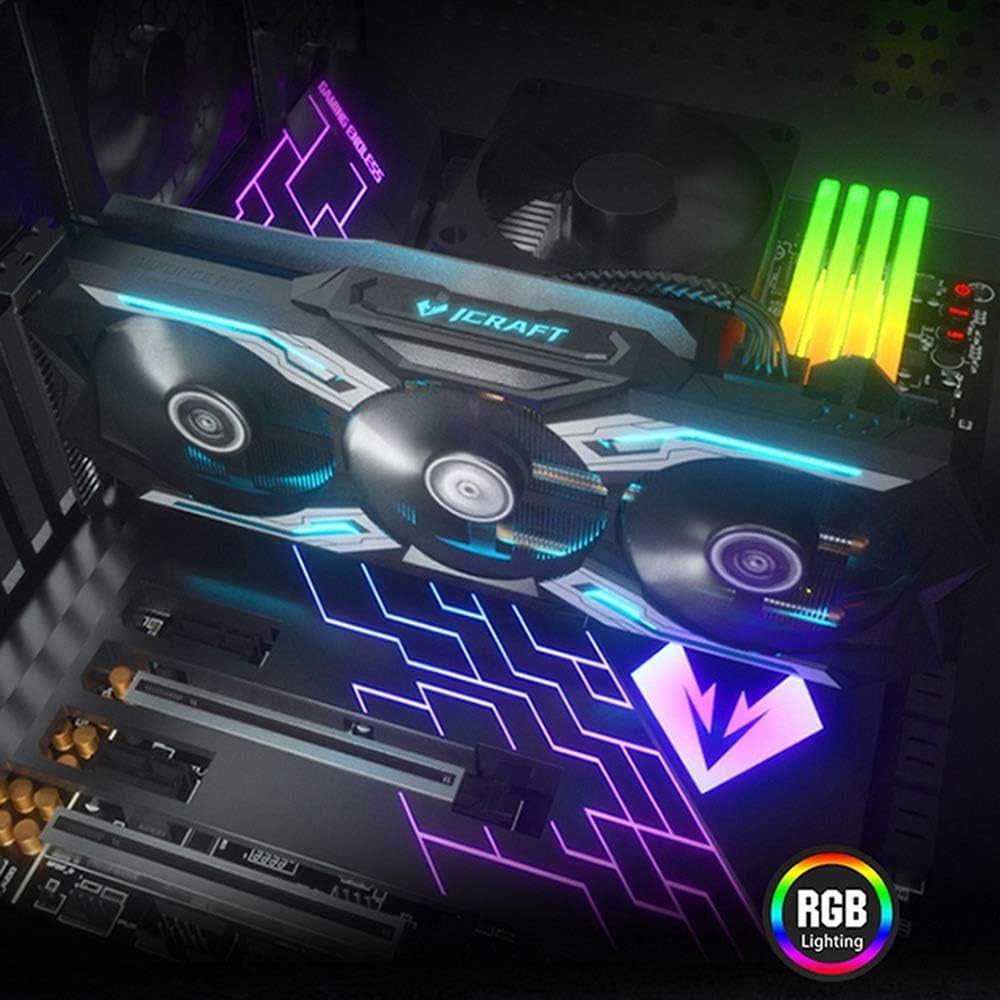
Figure 4.5: The graphics card installed in a PC case, demonstrating its integrated RGB lighting.
Асноўныя характарыстыкі:
- Turing GPU Architecture: Provides enhanced performance for real-time ray tracing and AI capabilities.
- iCraft Series RGB Lighting: Features auto RGB lighting for aesthetic customization within your PC build.
- Triple Fan Cooling: Equipped with 3 MAXSUN Blade II hydro-mechanics low noise fans for efficient heat dissipation.
- Alloy Backplate & Radiator: Includes an alloy backplate and a high-end fin technology radiator with 5 heat pipes for improved thermal performance.
- Прадукцыйнасць: Boost Clock up to 1680 MHz, 6GB GDDR6 memory, 192-bit memory interface.
5. Настройка і ўстаноўка
5.1 Перад устаноўкай
- Выключэнне: Выключыце камп'ютар і адлучыце кабель сілкавання ад разеткі.
- Адкрыць справу: Адкрыйце корпус кампутара, каб атрымаць доступ да матчынай платы і слотаў PCIe.
- Статычная абарона: Ground yourself by touching a metal part of the computer chassis or wearing an anti-static wrist strap to prevent ESD.
- Выдаліце старую картку (калі ёсць): If replacing an existing graphics card, carefully remove it by unscrewing its bracket and releasing the PCIe retention clip.
5.2 Фізічная ўстаноўка
- Знайдзіце слот PCIe: Identify an available PCIe x16 slot on your motherboard. This is typically the topmost long slot.
- Устаўце відэакарту: Align the graphics card with the PCIe slot and press down firmly until it is securely seated. The PCIe retention clip should click into place.
- Бяспечная карта: Замацуеце відэакарту да корпуса кампутара шрубамі.
- Падключыце харчаванне: Connect the required PCIe power cables from your power supply to the graphics card. This model typically requires one 8-pin PCIe power connector. Ensure all connections are firm.
- Закрыць справу: Зачыніце корпус кампутара і зноў падключыце кабель харчавання.
5.3 Ўстаноўка драйвера
- Уключэнне: Connect your monitor to one of the graphics card's output ports (HDMI, DisplayPort, or DVI) and power on your computer.
- Спампаваць драйверы: Перайдзіце на афіцыйны сайт NVIDIA webсайт (www.nvidia.com/drivers) каб спампаваць найноўшыя драйверы для GeForce RTX 2060.
- Ўстаноўка драйвераў: Запусціце спампаваны ўсталёўшчык драйвера і выконвайце інструкцыі на экране. Пасля ўсталёўкі можа спатрэбіцца перазагрузка.
Video 5.1: An official video demonstrating the MAXSUN Nvidia Geforce RTX 2060 iCraft 6GB graphics card, showcasinяго дызайн і асаблівасці. Гэта відэа дае візуальнае ўяўленне праview прадукту.
6. Інструкцыя па эксплуатацыі
6.1 Падключэнне дысплеяў
Connect your monitor(s) to the available display output ports on the graphics card (HDMI, DisplayPort, DVI). The card supports multiple displays simultaneously. Ensure your display cables are securely connected.
6.2 RGB-асвятленне
The MAXSUN iCraft series graphics card features automatic RGB lighting. The lighting effects are pre-programmed and activate upon system power-on. Please note that dedicated software for controlling the RGB lighting is not typically provided for this model, and it may not be compatible with third-party motherboard RGB software.
7. Тэхнічнае абслугоўванне
7.1 Ачыстка
- Частата: Clean your graphics card periodically, especially if you notice dust accumulation on the fans or heatsink.
- Працэдура: Disconnect power from your PC. Use compressed air to gently blow dust out of the heatsink fins and fan blades. Hold the fan blades in place while blowing to prevent over-spinning and potential damage.
- Пазбягайце: Do not use liquid cleaners or abrasive materials on the graphics card.
7.2 Тэхнічнае абслугоўванне вентылятара
The Blade II hydro-mechanics fans are designed for durability. If you notice unusual fan noise or reduced cooling performance, ensure there are no obstructions to the fan blades. Do not attempt to lubricate or disassemble the fans.
8. Выпраўленне непаладак
8.1 Няма вываду на дысплей
- Пераканайцеся, што кабель манітора надзейна падключаны як да відэакарты, так і да манітора.
- Verify that the graphics card is fully seated in the PCIe slot and that all power connectors are properly attached.
- Праверце, ці на вашым маніторы ўсталяваны правільны ўваходны сігнал.
- Калі магчыма, паспрабуйце іншы кабель дысплея або манітор.
8.2 Performance Issues or Crashes
- Пераканайцеся, што ў вас усталяваныя апошнія версіі драйвераў NVIDIA.
- Monitor your GPU temperatures using third-party software. High temperatures can lead to throttling or instability. Ensure proper case airflow.
- Пераканайцеся, што ваш блок сілкавання (БП) адпавядае мінімальным патрабаванням да магутнасціtagпатрабаванні да вашай сістэмы, у тым ліку да відэакарты.
- Check for any conflicting software or background applications that might be consuming system resources.
8.3 Fan Noise
- Ensure no cables or obstructions are interfering with the fan blades.
- Clean any dust accumulation from the fans and heatsink.
- Fan speed will increase under load to maintain optimal temperatures. This is normal operation.
9. Тэхнічныя характарыстыкі
| Асаблівасць | Спецыфікацыя |
|---|---|
| Графічны супрацэсар | NVIDIA GeForce RTX 2060 |
| Марка | maxsun |
| Памер аператыўнай памяці відэакарты | 6 ГБ GDDR6 |
| Інтэрфейс вываду відэа | DVI, DisplayPort, HDMI |
| Вытворца графічнага працэсара | NVIDIA |
| Памеры прадукту | 12.05 х 4.92 х 1.61 цалі |
| Вага прадмета | 3.19 фунта |
| Нумар мадэлі | NVIDIA Geforce RTX 2060 iCraft 6G |
10. Гарантыя і падтрымка
For warranty information and technical support, please refer to the documentation provided with your purchase or visit the official MAXSUN webсайт. Захоўвайце пацвярджэнне пакупкі для прэтэнзій па гарантыі.