
1. Уводзіны
This manual provides detailed instructions for the proper setup, operation, and maintenance of your HAKRDRDO T3 Teleprompter. Please read this guide thoroughly before using the device to ensure optimal performance and longevity.
2. Інфармацыя па бяспецы
- Handle the teleprompter with care, especially the reflective glass, to prevent damage.
- Ensure all components are securely fastened before use to prevent equipment from falling.
- Трымайце прыладу далей ад вады і экстрэмальных тэмператур.
- Do not attempt to disassemble or modify the teleprompter, as this may void the warranty and cause damage.
3. Змесціва ўпакоўкі
Праверце, ці ўсе пералічаныя ніжэй прадметы ўваходзяць у вашу ўпакоўку:
- Teleprompter Unit (x1)
- Пульт дыстанцыйнага кіравання (x1)
- Mobile Phone Clip (x1)
- Adapter Rings (49-77mm for camera recording)
- Phone Barn Doors (for phone recording)
- Сумка для захоўвання (x1)

Image: Packing list showing all included components.
4. Інструкцыі па ўсталёўцы
4.1. Усталёўка камеры
- Install the holder onto the teleprompter unit.
- Remove the original filter ring from your camera lens.
- Attach the appropriate camera adapter ring (49-77mm) to your camera lens.
- Mount the teleprompter onto the camera lens via the adapter ring.

Image: Step-by-step guide for camera installation.
4.2. Mobile Phone Installation (for recording)
- Install the holder onto the teleprompter unit.
- Insert the original ring into the teleprompter's camera opening.
- Attach the phone barn doors to the teleprompter.
- Install the mobile phone clip onto the teleprompter.
- Place your phone securely into the mobile phone clip.

Image: Step-by-step guide for mobile phone installation for recording.
4.3. Device Compatibility (for display)
The teleprompter supports various devices for displaying your script:
- Смартфоны: Place your smartphone in the designated tray for script display.
- Таблеткі: The teleprompter is compatible with tablets up to 12 inches. Insert the tablet into the tray on the opposite side of the holder for larger devices.

Image: Illustration of phone and tablet PC insertion for script display.
5. Інструкцыя па эксплуатацыі
5.1. Teleprompter Application
To use the teleprompter, you will need a compatible teleprompter application on your smartphone or tablet. This app will mirror and scroll your script.
- Download a suitable teleprompter application from the Google Play Store (for Android) or the Apple App Store (for iOS).
- Ensure the app supports mirroring text horizontally so it appears correctly when reflected by the teleprompter glass.
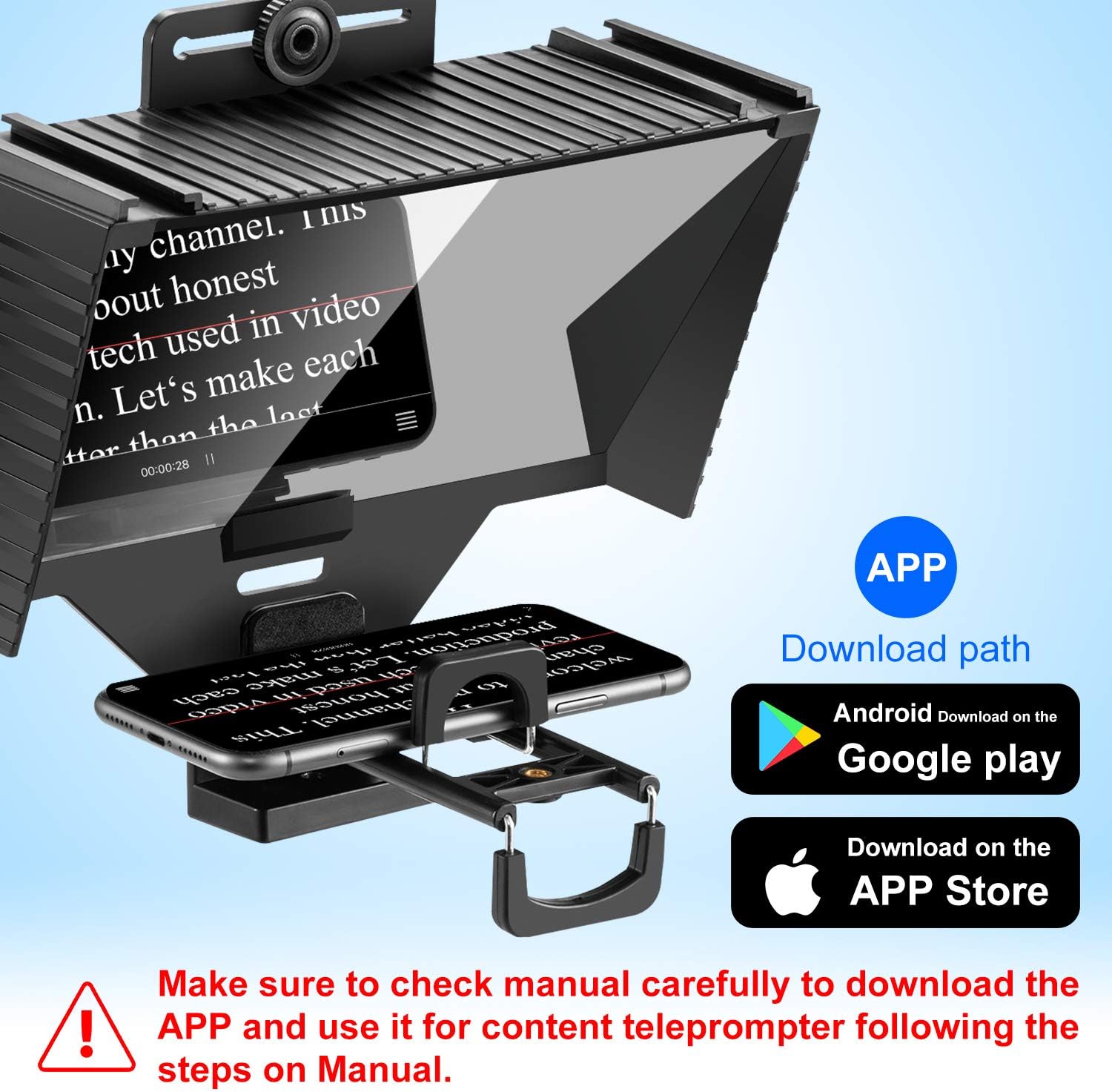
Image: Teleprompter in use with app download paths.
5.2. Функцыі дыстанцыйнага кіравання
The included Bluetooth remote control allows for convenient operation of your teleprompter application.
- Уключэнне/выключэнне харчавання: Use the dedicated button to turn the remote on or off.
- Паўза/прайграванне: Control the scrolling of your script.
- Наперад/назад: Navigate through your script or adjust scrolling speed.
- KEY/GAME: This button may have additional functions depending on the teleprompter application used.

Image: Bluetooth remote control and its functions.
6. Тэхнічнае абслугоўванне
- Уборка: Use a soft, lint-free cloth to clean the teleprompter glass. For stubborn smudges, a small amount of lens cleaning solution can be applied to the cloth (not directly to the glass).
- захоўванне: When not in use, store the teleprompter in the provided storage bag to protect it from dust and scratches.
- Апрацоўка: Avoid dropping or subjecting the teleprompter to strong impacts.
7. Выпраўленне непаладак
- Text not clear/blurry: Ensure the display device (phone/tablet) is positioned correctly and securely in the tray. Check for smudges on the teleprompter glass and clean if necessary.
- Text appears backward: Activate the mirroring function within your teleprompter application.
- Пульт дыстанцыйнага кіравання не працуе: Ensure the remote is powered on and properly paired via Bluetooth to your display device. Check battery levels.
- Teleprompter not attaching to camera: Verify that you are using the correct size adapter ring for your camera lens.
8. Тэхнічныя характарыстыкі
| Асаблівасць | Спецыфікацыя |
|---|---|
| Нумар мадэлі | T3 |
| Вага прадмета | 2.2 фунты (прыблізна 1 кг) |
| Памеры ўпакоўкі | 10.67 х 10.59 х 6.93 цалі |
| Display Device Compatibility | Smartphones, Tablets up to 12 inches |
| Camera Lens Compatibility | Lenses with 49-77mm filter threads (via adapter rings) |
9. Expandability
The HAKRDRDO T3 Teleprompter features a standard 1/4-inch screw mount, allowing for versatile attachment to various photography and videography accessories.
- Штатывы: Easily mount the teleprompter onto a table tripod, lamp bracket, or floor tripod for stable recording.
- Аксэсуары: The 1/4-inch screw can also be used to attach additional accessories such as external lights or microphones (not included).
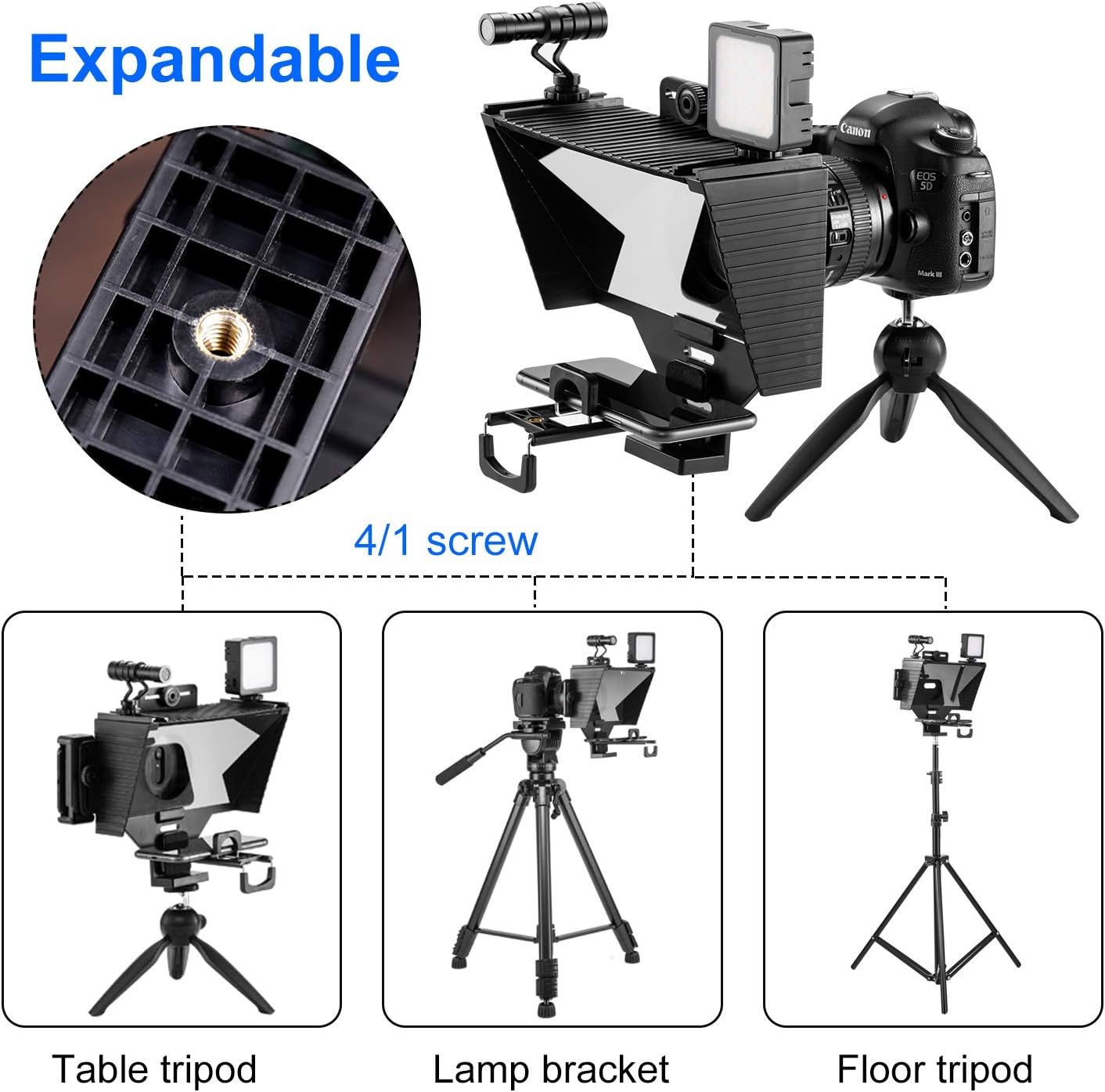
Image: Expandable features with 1/4 inch screw mount.
10. Гарантыя і падтрымка
For warranty information or technical support, please refer to the contact details provided with your purchase or visit the official HAKRDRDO webсайт. Захоўвайце пацвярджэнне пакупкі для прэтэнзій па гарантыі.