
1. Уводзіны
Дзякуй за пакупкуasing the R.W.FLAME RW5314-G 85 Degree Oscillating Tower Fan. This manual provides important information regarding the safe operation, installation, maintenance, and troubleshooting of your new fan. Please read this manual thoroughly before use and retain it for future reference.
2. Інструкцыі па тэхніцы бяспекі
Каб знізіць рызыку пажару, паражэння электрычным токам або траўмаў, выконвайце наступныя меры бяспекі:
- Always ensure the fan is placed on a stable, level surface to prevent tipping. The steady base provides anti-toppling stability.
- Do not insert fingers or foreign objects into the fan grille. The bladeless design enhances safety, especially around children and pets.
- Адключайце вентылятар ад разеткі перад чысткай, перамяшчэннем або любым тэхнічным абслугоўваннем.
- Не выкарыстоўвайце вентылятар з пашкоджаным шнуром або вілкай. Калі шнур або вілка пашкоджаны, звярніцеся ў службу падтрымкі кліентаў.
- Трымайце шнур сілкавання далей ад нагрэтых паверхняў.
- Не выкарыстоўвайце вентылятар у вільготных або damp месцы, такія як ванныя пакоі або пральні.
- Гэты прыбор не прызначаны для выкарыстання асобамі (у тым ліку дзецьмі) з абмежаванымі фізічнымі, сэнсарнымі або разумовымі здольнасцямі, або з адсутнасцю вопыту і ведаў, за выключэннем выпадкаў, калі яны знаходзяцца пад наглядам або інструкцыямі адносна выкарыстання прыбора асобай, адказнай за іх бяспеку .
- За дзецьмі трэба сачыць, каб яны не гулялі з прыборам.

Image: The R.W.FLAME tower fan features an anti-toppling design for enhanced stability, making it safer in environments with children and pets.
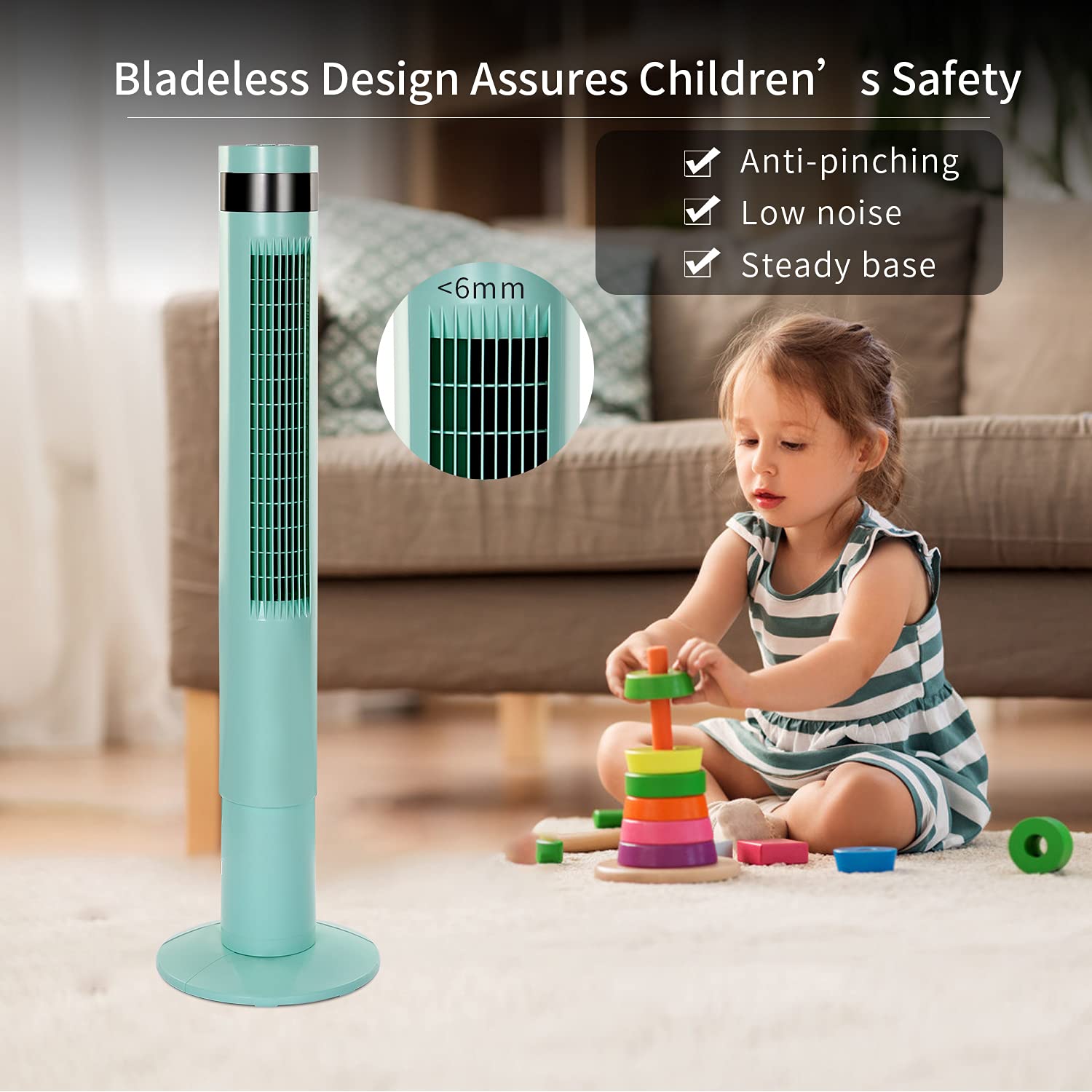
Image: The bladeless design of the R.W.FLAME tower fan ensures safety, preventing accidental pinching and providing a secure environment for children.
3. Змесціва ўпакоўкі
Калі ласка, праверце ўпакоўку на наяўнасць наступных прадметаў:
- R.W.FLAME RW5314-G Tower Fan Unit
- Пульт дыстанцыйнага кіравання
- Кіраўніцтва карыстальніка (гэты дакумент)
4. Настройка
Follow these steps to set up your tower fan:
- Распакуйце: Асцярожна выміце ўсе кампаненты з упакоўкі. Захавайце ўпаковачныя матэрыялы для наступнага захоўвання або транспарціроўкі.
- Зборка асновы (пры неабходнасці): If the base is separate, align the base sections and attach them to the main fan unit according to the diagrams provided in the quick start guide (if applicable). Ensure it is securely fastened.
- Размяшчэнне: Place the fan on a firm, level surface. Ensure there is adequate space around the fan for optimal airflow and oscillation. The fan has a small 11.81 x 11.81 inch footprint.
- Падключэнне сілкавання: Падключыце шнур сілкавання да звычайнай электрычнай разеткі.

Image: The R.W.FLAME tower fan stands 43.31 inches tall with an 11.81-inch diameter base, designed for efficient space utilization.
5. Інструкцыя па эксплуатацыі
Your R.W.FLAME tower fan can be operated using the control panel on top of the unit or the included remote control.
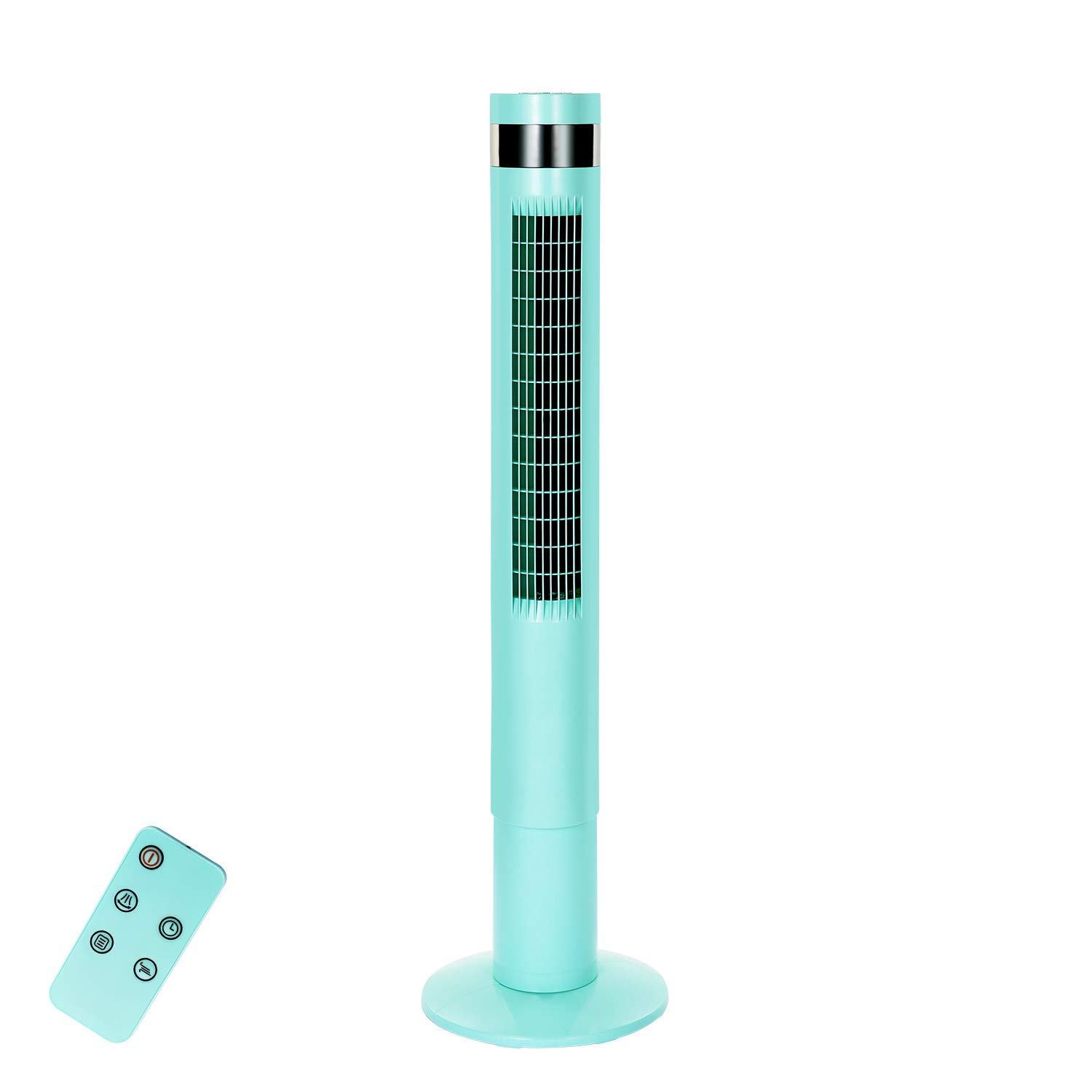
Image: The control panel on the R.W.FLAME tower fan offers simple operation with clearly marked buttons for power, wind modes, timer, and oscillation.

Image: The R.W.FLAME tower fan features a user-friendly control panel and offers three distinct wind modes: Normal, Natural, and Sleep, each designed for different comfort levels.
5.1 Панэль кіравання і пульт дыстанцыйнага кіравання
The control panel is located on the top of the fan. The remote control allows operation from up to 17 feet away. Ensure the remote control has working batteries.
5.2 Уключэнне/выключэнне сілкавання
- Націсніце Магутнасць кнопка (
 ) адзін раз, каб уключыць вентылятар.
 - Націсніце Магутнасць button again to turn the fan off.
5.3 рэжыму ветру
Націсніце Рэжым кнопка ( ) to cycle through the available wind modes:
- Звычайны рэжым: Забяспечвае пастаянны, стабільны паток паветра.
- Натуральны рэжым: Імітуе натуральны ветрык, змяняючы хуткасць вентылятара.
- Рэжым сну: Designed for quiet operation during sleep. In this mode, the fan speed will reduce by one level every half an hour until it reaches the lowest speed, where it will remain until turned off.
5.4 хуткасці ветру
Націсніце хуткасць кнопка ( ) to adjust the fan speed. There are 3 wind speed settings available.
5.5 Ваганне
Націсніце асцыляцый кнопка ( ) to activate or deactivate the 85-degree oscillation feature, which helps distribute air across a wider area.
5.6 Налады таймера
Націсніце Таймер кнопка ( ) to set the fan to automatically turn off after a specified period. The fan offers 12-hour timer settings. Each press typically increases the timer by one hour.
6. Тэхнічнае абслугоўванне
Рэгулярнае тэхнічнае абслугоўванне забяспечвае аптымальную прадукцыйнасць і даўгавечнасць вашага вентылятара.
- Уборка: Before cleaning, always unplug the fan. Use a soft, damp cloth to wipe the exterior surfaces. Do not use abrasive cleaners or solvents. The fan is designed to be easy to clean.
- захоўванне: Калі вентылятар захоўваецца працяглы час, адключыце яго ад сеткі, старанна ачысціце і захоўвайце ў прахалодным, сухім месцы, пажадана ў арыгінальнай упакоўцы.
7. Выпраўленне непаладак
Калі ў вас узніклі праблемы з вентылятарам, звярніцеся да наступных распаўсюджаных праблем і іх рашэнняў:
| праблема | Магчымая прычына | Рашэнне |
|---|---|---|
| Вентылятар не ўключаецца. | Няма крыніцы харчавання. | Пераканайцеся, што шнур харчавання надзейна падключаны да спраўнай электрычнай разеткі. Праверце аўтаматычны выключальнік. |
| Не працуе пульт дыстанцыйнага кіравання. | Разраджаныя батарэйкі або перашкода. | Replace the batteries in the remote control. Ensure there are no obstructions between the remote and the fan's sensor. The remote works within 17 feet. |
| Вентылятар не вагаецца. | Oscillation feature is off. | Press the Oscillation button on the control panel or remote control to activate it. |
| Слабы струмень паветра. | Low speed setting or obstruction. | Increase the fan speed. Ensure the air intake and outlet are not blocked. |
If the problem persists after trying these solutions, please contact R.W.FLAME customer support.
8. Тэхнічныя характарыстыкі
| Асаблівасць | Спецыфікацыя |
|---|---|
| Марка | RWFLAME |
| Нумар мадэлі | RW5314-G |
| Тып | Tower Fan (Floor Fan) |
| Вышыня | 43.31 цаляў |
| След | 11.81 х 11.81 цалі |
| асцыляцый | 85 градусаў |
| Рэжымы ветру | Нармальны, натуральны, сон |
| Колькасць хуткасцяў | 3 |
| Налады таймера | Да 12 гадзін |
| Крыніца харчавання | Правадная электрычная |
| Ватtage | 50 ват |
| Тып кантролера | Remote Control, On-unit Control Panel |
| Асаблівасці | Bladeless Design, Anti-toppling Steady Base, Low Noise, Energy Saving |
| Матэрыял | Пластыкавыя |
9. Гарантыя і падтрымка
Your R.W.FLAME RW5314-G Tower Fan comes with a one-year guarantee for free replacement from the date of purchase. This warranty covers manufacturing defects and ensures your product functions as intended under normal use.
For warranty claims, technical support, or any questions regarding your product, please contact R.W.FLAME customer service through the retailer where the product was purchased or refer to the contact information provided with your purchase documentation.