
1. Уводзіны
The ERICKHILL ECO-06 CO2 Meter is an advanced air quality monitor designed to accurately measure carbon dioxide (CO2) concentration, temperature, and relative humidity in real-time. Utilizing a dual-channel NDIR infrared sensor, this device provides precise and rapid readings, helping to ensure a healthy indoor environment. It also calculates dew point and wet bulb temperature, offering a comprehensive overview of your air quality.
This manual provides detailed instructions for the proper setup, operation, maintenance, and troubleshooting of your ERICKHILL ECO-06 CO2 Meter.
2. Інфармацыя па бяспецы
- Перад выкарыстаннем прылады ўважліва прачытайце ўсе інструкцыі.
- Не падвяргайце прыладу ўздзеянню экстрэмальных тэмператур, прамых сонечных прамянёў або высокай вільготнасці.
- Не кідайце прыладу і не падвяргайце яе моцным ударам.
- Не спрабуйце разбіраць або мадыфікаваць прыладу. Гэта прывядзе да анулявання гарантыі і можа прывесці да пашкоджанняў.
- Use only the provided USB cable and charging plug for charging.
- Трымайце прыладу далей ад вады і іншых вадкасцей.
- Ensure proper ventilation around the device for accurate readings.
3. Змесціва ўпакоўкі
Праверце наяўнасць усіх прадметаў у камплекце:
- ERICKHILL ECO-06 CO2 Meter
- Кабель USB
- Раз'ём для зарадкі
- Кіраўніцтва карыстальніка (гэты дакумент)

Image: The ERICKHILL ECO-06 CO2 Meter and its accessories as found in the product packaging.
4. Прадукт скончыўсяview
The ERICKHILL ECO-06 features a clear FPC color screen for displaying data and a three-color LED indicator for quick air quality assessment. It includes three control buttons for menu navigation and operation.
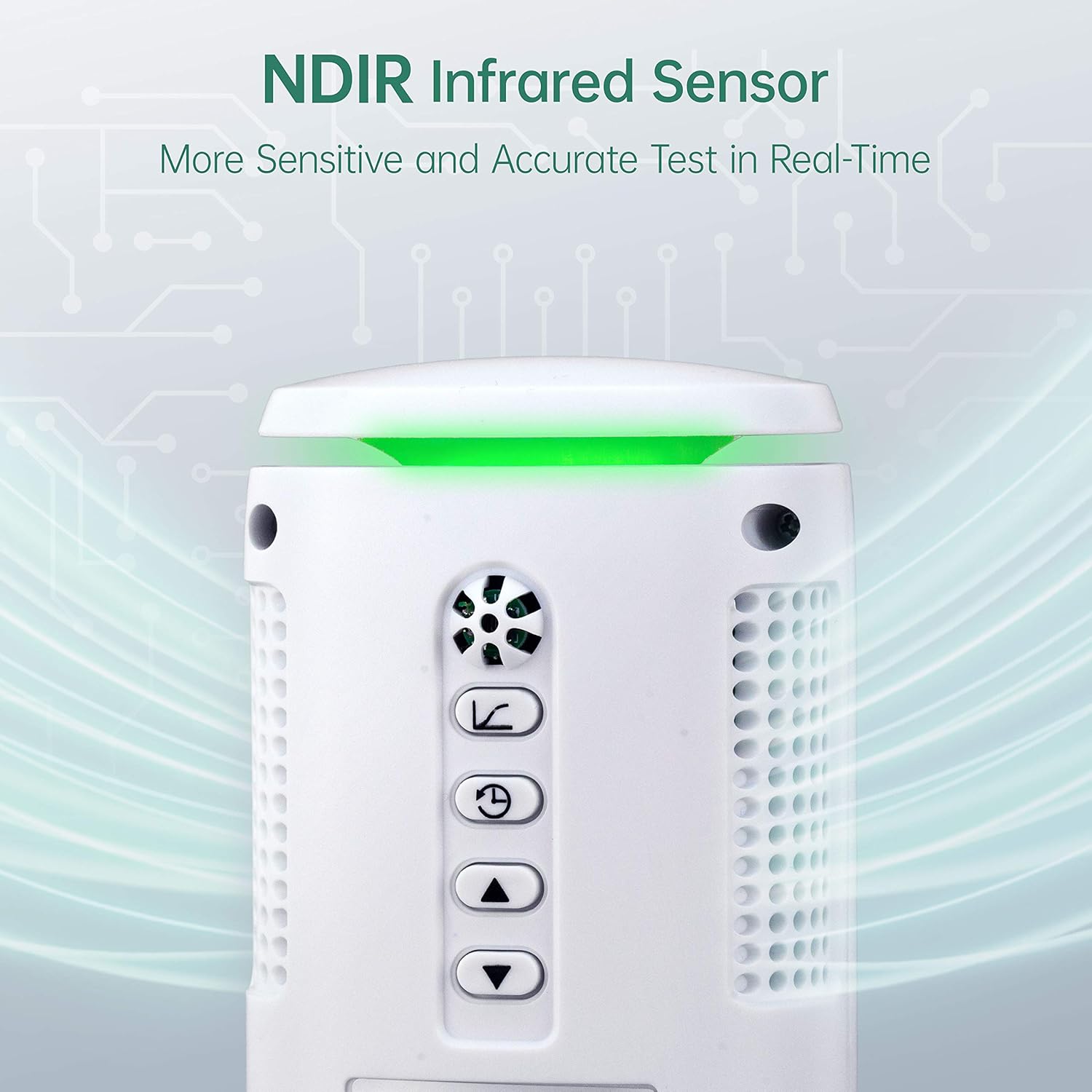
Выява: Уверсе view of the ERICKHILL ECO-06 CO2 Meter, highlighting the NDIR infrared sensor and control buttons.
4.1 Кампаненты прылады
- NDIR Infrared Sensor: Located at the top, for accurate CO2 detection.
- FPC Color Screen: Displays CO2 concentration, temperature, humidity, and other data.
- Святлодыёдны індыкатар: Provides a visual cue for air quality (Green, Orange, Red).
- Кнопка МЕНЮ: Accesses device settings and options.
- ON/OFF ENTER Button: Powers the device on/off and confirms selections.
- RETURN LIGHT Button: Navigates back in menus and controls backlight.
- Порт для зарадкі USB: For charging the internal battery and connecting to a computer.
5. Настройка
5.1 Зарадка прылады
Before first use, fully charge the device. Connect the provided USB cable to the device's charging port and the other end to the charging plug, then plug it into a power outlet. The device can also be charged via a computer's USB port. A full charge typically takes several hours. The battery icon on the display will indicate charging status, though it may show full bars until the battery is critically low.
5.2 Уключэнне/выключэнне
Націсніце і ўтрымлівайце ON/OFF ENTER button for a few seconds to power the device on or off.
5.3 Пачатковае размяшчэнне
Place the CO2 meter in the area where you wish to monitor air quality. Ensure it is on a stable surface, away from direct airflow (e.g., vents, open windows) and heat sources, which could affect temperature and humidity readings. For optimal CO2 readings, place it at a typical breathing height.
6. Інструкцыя па эксплуатацыі
6.1 Маніторынг у рэжыме рэальнага часу
Once powered on, the device will immediately begin displaying real-time data on its FPC color screen. The main screen shows:
- Канцэнтрацыя CO2: Measured in parts per million (ppm).
- тэмпература: Displayed in °F or °C.
- Адносная вільготнасць (RH): Адлюстроўваецца ў працэнтахtage.
- Dew Point (DP) and Wet Bulb (WB) Temperature: Calculated values.

Image: The ERICKHILL ECO-06 CO2 Meter displaying current CO2, temperature, humidity, dew point, and wet bulb measurements.
6.2 Індыкатар якасці паветра
The device features a three-color LED indicator at the top, providing a quick visual assessment of CO2 levels:
- Зялёнае святло: CO2 concentration is between 0-700 ppm (Good air quality).
- Аранжавы святло: CO2 concentration is between 701-5000 ppm (Moderate to poor air quality).
- Чырвонае святло: CO2 concentration is above 5001 ppm (Very poor air quality, requires immediate ventilation).

Image: Visual representation of the ERICKHILL ECO-06's LED air quality indicator, showing green for low CO2, orange for moderate, and red for high CO2 levels.
6.3 Навігацыя па меню
Use the following buttons to navigate the device's menu:
- Прэса МЕНЮ каб увайсці ў галоўнае меню.
- Выкарыстоўвайце ON/OFF ENTER кнопку, каб выбраць опцыю або пацвердзіць наладу.
- Выкарыстоўвайце RETURN LIGHT button to go back to the previous screen or exit the menu.
- The ON/OFF ENTER і RETURN LIGHT buttons may also function as Up/Down arrows within menu options for adjusting values.
6.4 Налада будзільнікаў
The device allows you to customize the CO2 warning alarm range. Navigate to the alarm settings in the menu to set your desired high CO2 threshold. When the CO2 concentration exceeds this threshold, the device will emit an audible alarm and the LED indicator will turn red (or orange, depending on your setting).

Image: The ERICKHILL ECO-06 CO2 Meter with its orange LED alarm activated, signaling high CO2 levels.
6.5 Рэгістрацыя і аналіз дадзеных
The ECO-06 can store up to 80,000 groups of records. You can configure the recording mode (continuous or timed) and the recording interval (hour/minute/second) through the device's menu. To view and analyze historical data, connect the device to a computer using the provided USB cable. The device supports real-time graphic viewing and analysis, allowing you to identify peak values (MAX/MIN/AVG) over time.

Image: The ERICKHILL ECO-06 CO2 Meter connected to a computer, showing its data logging capabilities and software interface.
6.6 Automatic Baseline Calibration (ABC)
The device features Automatic Baseline Calibration (ABC) to maintain accuracy. For optimal calibration, it is recommended to periodically expose the monitor to fresh outdoor air for a period of time. The manual does not provide specific details on frequency or duration for user-initiated ABC, nor does it offer a manual calibration option.
7. Тэхнічнае абслугоўванне
7.1 Ачыстка
To clean the device, gently wipe the exterior with a soft, dry cloth. Do not use abrasive cleaners, solvents, or immerse the device in water. Ensure the sensor openings are free from dust and debris.
7.2 Сыход за акумулятарам
The device contains a rechargeable lithium-ion battery. To prolong battery life:
- Пазбягайце частай поўнай разрадкі акумулятара.
- Рэгулярна зараджайце прыладу, нават калі яна не выкарыстоўваецца пастаянна.
- Захоўвайце прыладу ў прахалодным, сухім месцы, калі яна не выкарыстоўваецца працяглы час.
8. Выпраўленне непаладак
If you encounter issues with your ERICKHILL ECO-06 CO2 Meter, refer to the following common problems and solutions:
| праблема | Магчымая прычына | Рашэнне |
|---|---|---|
| Прылада не ўключаецца. | Нізкі зарад батарэі або няспраўнасць прылады. | Charge the device fully. If it still doesn't turn on, contact customer support. |
| CO2 reading is stuck at 0 ppm or appears inaccurate. | Sensor malfunction or calibration issue. | Ensure the sensor area is clean. Move the device to an outdoor environment for several minutes to allow for automatic baseline calibration. If the issue persists, the sensor may be faulty; contact support. |
| Паказчыкі тэмпературы/вільготнасці здаюцца недакладнымі. | Environmental factors or sensor deviation. | Ensure the device is not near heat sources, direct sunlight, or strong drafts. Compare readings with another calibrated device. Note that consumer-grade sensors may have slight deviations. |
| Battery icon always shows full, then device suddenly shuts off. | Firmware or battery indicator issue. | This is a known characteristic for some units. Monitor usage time to anticipate shutdown. Keep the device connected to USB power for continuous monitoring if needed. |
| Cannot connect to computer for data transfer. | Incorrect cable, driver issue, or software incompatibility. | Ensure you are using the correct USB cable. Check if the necessary drivers or software are installed on your computer. Contact ERICKHILL support for software links and compatibility information. |
9. Тэхнічныя характарыстыкі
| Асаблівасць | Апісанне |
|---|---|
| Марка | ЭРЫХІЛ |
| Нумар мадэлі | ЭКА-06 |
| Тып датчыка | Dual-channel NDIR (Non-Dispersive Infrared) |
| Вымераныя параметры | CO2 concentration, Temperature, Relative Humidity, Dew Point, Wet Bulb Temperature |
| Дыяпазон вымярэння CO2 | Typically 0-9999 ppm (refer to device for exact range) |
| Дыяпазон тэмператур | Typically -10°C to 50°C (14°F to 122°F) |
| Дыяпазон вільготнасці | Ад 0% да 99% адноснай вільготнасці |
| Дысплей | FPC Color Screen, Three-color LED Indicator |
| Захоўванне дадзеных | Up to 80,000 groups of records |
| Сувязь | USB for charging and data transfer |
| Крыніца харчавання | Rechargeable 1500 mAh, DC3.7V Lithium-ion Battery |
| Колер | Белы |
10. Гарантыя і падтрымка
ERICKHILL provides a 36-month after-sale service and lifetime technical support for the ECO-06 CO2 Meter. If you have any questions, require assistance, or experience issues not covered in this manual, please do not hesitate to contact our professional after-sales team. They are available to help resolve your problem in a timely manner.
For support, please refer to the contact information provided on the ERICKHILL official webсайта або ўпакоўкі прадукту.