
1. Уводзіны
The Lepro PR902103-US Smart Table Lamp offers versatile lighting solutions for your home. This LED touch lamp features RGB color changing capabilities, tunable warm to cool white light, and dimmable brightness. It is designed for seamless integration with smart home ecosystems, supporting both Amazon Alexa and Google Assistant for voice control, as well as control via a dedicated mobile application. This manual provides comprehensive instructions for setup, operation, and maintenance.

Figure 1: Lepro Smart Table Lamp шоуasing its app control interface.
2. Што ў скрынцы
Калі ласка, пераканайцеся, што ўсе кампаненты прысутнічаюць ва ўпакоўцы:
- 1 x Lepro Smart Table Lamp (Model: PR902103-US)
- 1 x 4.9 ft USB Cable
- 1 х адаптар сілкавання
- 1 х Кіраўніцтва карыстальніка (гэты дакумент)
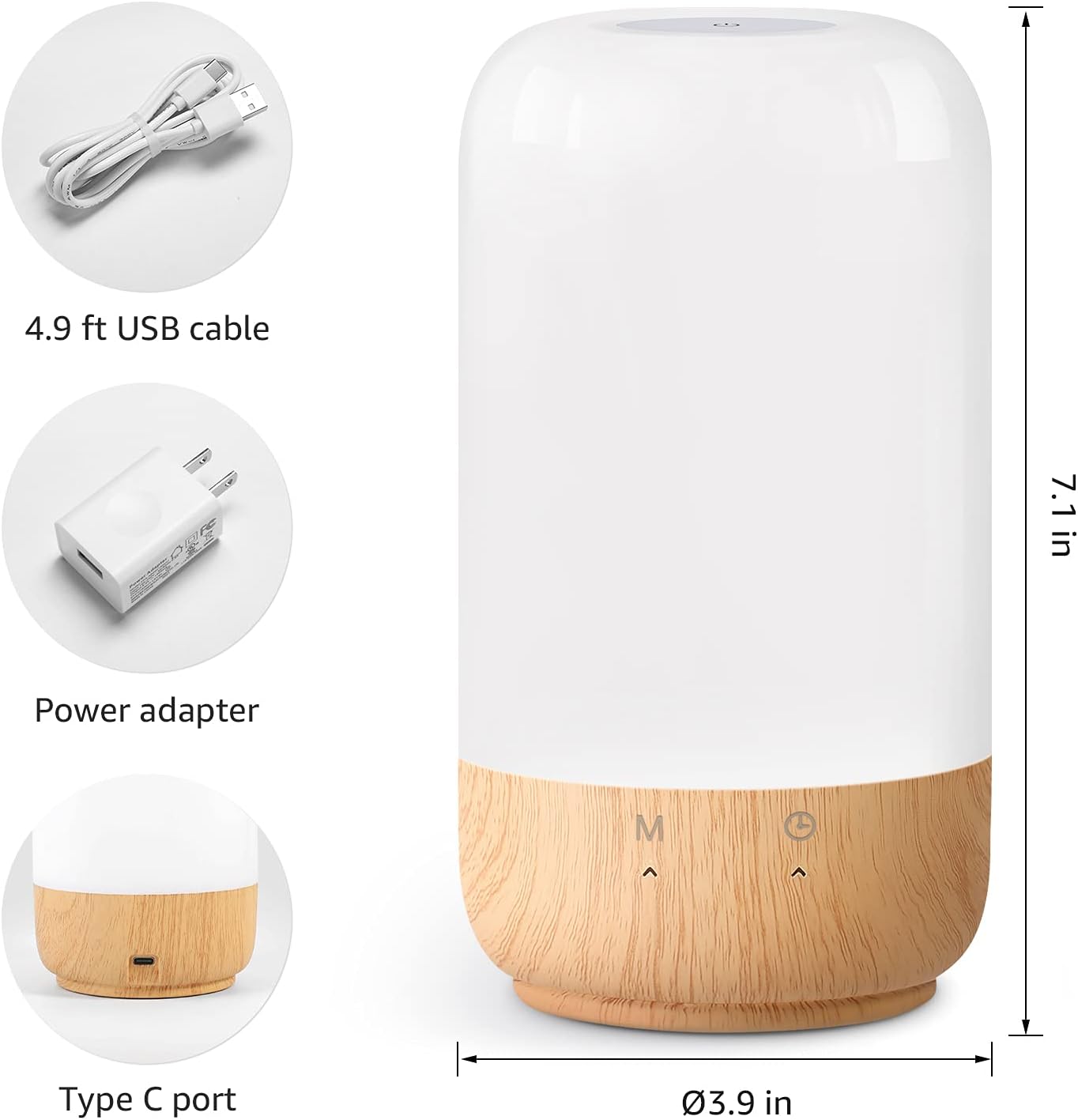
Figure 2: Included components and product dimensions.
3. Настройка
Follow these steps to set up your Lepro Smart Table Lamp:
- Падключэнне сілкавання: Падключыце USB-кабель з камплекта да lamp's Type-C port and the power adapter. Plug the power adapter into a standard wall outlet. The lamp будзе асвятляць.
- Загрузка прыкладання: Download the 'Lepro LampUX' app from your mobile device's App Store (iOS) or Google Play Store (Android).
- Рэгістрацыя акаўнта: Open the 'Lepro LampUX' app and register a new account or log in if you already have one.
- Спалучэнне прылад:
- У дадатку націсніце «Дадаць прыладу» або значок «+».
- Select 'Table Lamp' from the lighting category.
- Пераканайцеся, што lamp is powered on. Long press the timer button on the lamp's base for at least 5 seconds until the indicator light blinks rapidly.
- Confirm the indicator light is blinking rapidly in the app and proceed.
- Select your 2.4 GHz Wi-Fi network and enter the password. (Note: The lamp only supports 2.4 GHz Wi-Fi networks. If your router is 5 GHz, please set it to 2.4 GHz during setup.)
- The app will begin adding the device. Once successfully added, you can rename your lamp для лягчэйшай ідэнтыфікацыі.
Video 1: Detailed steps on how to set up your Lepro Smart Lamp using the mobile application.
4. Інструкцыя па эксплуатацыі
Разумны стол Lepro Lamp can be controlled via touch, the mobile app, or voice commands.
4.1. Сэнсарныя элементы кіравання
- Уключэнне/выключэнне харчавання: Short press the power button (marked 'M') on the lampбаза.
- Рэгуляванне яркасці: Slide your finger along the left side of the lamp's base to adjust brightness.
- Color Change (RGB): Slide your finger along the right side of the lamp's base to cycle through RGB colors.
- Пераключальнік рэжымаў: Short press the timer button (clock icon) to switch between white light modes (warm white, cool white) and RGB color mode.
4.2. Mobile App Controls
The 'Lepro LampUX' app provides comprehensive control over your lamp:
- Brightness & Color Temperature: Adjust the brightness level and select color temperatures from 2700K (warm white) to 5700K (cool white).
- Выбар колеру RGB: Choose from 16 million colors using the color wheel in the app.
- Сцэны: Select from pre-set scenes like 'Night', 'Read', 'Meeting', 'Leisure', or customize your own scenes with specific colors and effects.
- Timer & Wake-up: Устанавіць расклад для лamp to turn on/off automatically. Utilize the 'Sunrise Simulation' feature to gradually increase light for a gentle wake-up.

Figure 3: Mobile application interface for controlling lamp налады.

Малюнак 4: lamp's timer and wake-up functions in use.
4.3. Галасавое кіраванне
Разумны стол Lepro Lamp is compatible with Amazon Alexa and Google Assistant. To enable voice control:
- Пераканайцеся, што ваш лamp is successfully paired with the 'Lepro LampUX' app.
- Адкрыйце праграму Amazon Alexa або Google Home.
- Перайдзіце ў раздзел «Навыкі і гульні» (Alexa) або «Працуе з Google» (Google Home).
- Пошук and enable the 'Lepro LampUX' skill/service.
- Link your 'Lepro LampUX' account with your Alexa/Google account.
- Пасля падключэння вы можаце выкарыстоўваць галасавыя каманды, такія як:
- Алекса, уключы [L]amp Імя].
- «Гэй, Google, усталюй [L]»amp Імя] да цёпла-белага колеру."
- Алекса, змяні [L]amp Імя] да сіняга колеру."
- "Hey Google, dim [Lamp Імя] да 50%.

Figure 5: Voice control integration with Amazon Alexa.
Video 2: Demonstration of the Lepro Smart Table Lamp working with Alexa and Google Home.
5. Тэхнічнае абслугоўванне
To ensure the longevity and optimal performance of your Lepro Smart Table Lamp, please follow these maintenance guidelines:
- Уборка: Адключыце сілкаванне перад чысткай. Выкарыстоўвайце мяккую сухую тканіну, каб выцерці лamp's surface. Avoid using abrasive cleaners, solvents, or harsh chemicals, as these may damage the finish or electronic components.
- захоўванне: Пры захоўванні lamp працяглы час, пераканайцеся, што ён чысты і сухі. Захоўвайце яго ў прахалодным, сухім месцы, удалечыні ад прамых сонечных прамянёў і экстрэмальных тэмператур.
- Апрацоўка: Апрацоўваць лamp асцярожна. Пазбягайце падзення або моцных удараў.
6. Выпраўленне непаладак
If you encounter issues with your Lepro Smart Table Lamp, звярніцеся да наступных распаўсюджаных праблем і іх рашэнняў:
| праблема | Магчымая прычына | Рашэнне |
|---|---|---|
| Lamp не ўключаецца. | Няма крыніцы харчавання. | Check if the power adapter is securely plugged into the lamp and the wall outlet. Ensure the outlet is functional. |
| Немагчыма падключыцца да Wi-Fi. | Incorrect Wi-Fi band (5 GHz). Няправільны пароль. Слабы сігнал Wi-Fi. | Ensure your Wi-Fi network is 2.4 GHz. Verify the Wi-Fi password. Move the lamp closer to your router. |
| Галасавое кіраванне не працуе. | Skill not enabled/linked. Incorrect device name. | Ensure the 'Lepro LampUX' skill is enabled and linked in your Alexa/Google Home app. Use the exact device name configured in the app. |
| Lamp не рэагуе. | Часовы збой праграмнага забеспячэння. | Адключыце lamp from the power outlet for 10 seconds, then plug it back in to perform a soft reset. |
7. Тэхнічныя характарыстыкі
| Асаблівасць | Дэталь |
|---|---|
| Марка | Праказа |
| Нумар мадэлі | PR902103-ЗША |
| Памеры прадукту | 3.9" Г x 3.9" Ш x 7.1" У |
| Вага прадмета | 1.19 фунта |
| Матэрыял | Пластык, дрэва |
| Тып крыніцы святла | святлодыёд |
| Ватtage | 7 ват |
| Яркасць | 350 люмен |
| Светлы колер | RGB + CCT (Tunable White 2700-5700K) |
| Метад кантролю | App, Touch, Voice (Alexa, Google Assistant) |
| Сувязь | 2.4 GHz WiFi Only |
| Выкарыстанне ў памяшканні/на вуліцы | У памяшканні |
8. Гарантыя і падтрымка
Lepro products are designed and manufactured to the highest quality standards. For warranty information and technical support, please refer to the contact details provided on the product packaging or visit the official Lepro webсайт. Захоўвайце чэк аб куплі як пацвярджэнне пакупкі для гарантыйных прэтэнзій.