
Уводзіны
This manual provides detailed instructions for the setup, operation, maintenance, and troubleshooting of your DAREU EK815s Mechanical Gaming Keyboard. Please read this manual thoroughly before using the product to ensure optimal performance and longevity.
The DAREU EK815s is a full-size mechanical gaming keyboard featuring durable blue switches, customizable rainbow backlighting, and anti-ghosting technology for a responsive and reliable user experience.

Image: DAREU EK815s Mechanical Gaming Keyboard, showcasinяго поўная кампаноўка і дызайн.
Змест пакета
Праверце наяўнасць усіх прадметаў у камплекце:
- DAREU EK815s Mechanical Gaming Keyboard
- Кабель USB
- Кіраўніцтва карыстальніка (гэты дакумент)
Настройка
- Распакуйце клавіятуру: Carefully remove the DAREU EK815s keyboard and its accessories from the packaging.
- Падключыце USB-кабель: Insert the USB-C end of the provided cable into the port on the keyboard. Connect the standard USB-A end to an available USB port on your computer.
- Ўстаноўка драйвера: The keyboard is plug-and-play and typically does not require additional drivers for basic functionality. For advanced features like programmable keys and custom lighting effects, download the dedicated software from the official DAREU webсайт.
- Размяшчэнне: Position the keyboard on a stable, flat surface. Adjust the integrated foot pads at the rear of the keyboard for your preferred typing angle.

Image: The keyboard features three cable routing outlets for organized cable management.
Інструкцыя па эксплуатацыі
Асноўныя характарыстыкі
- Сінія механічныя перамыкачы: The EK815s uses blue mechanical switches, known for their tactile bump and audible click, providing distinct feedback for each keystroke. These switches have a 4mm key stroke travel, 50 ± 4G key elastic force, and a lifespan of 65 million keystrokes.
- Anti-Ghosting: Advanced anti-ghosting technology ensures that multiple simultaneous key presses are registered accurately without conflict, crucial for gaming.
- Падвойныя каўпачкі клавіш: The keycaps are made using a double-shot injection molding process, ensuring legends do not fade over time and are easy to clean.
- Aluminum Alloy Panel: The keyboard features an aluminum alloy metal panel, providing durability and resistance against rust, impacts, sweat, and corrosion.

Image: Detailed diagram of the blue mechanical switches, highlighting their specifications.
Кіраванне асвятленнем
The DAREU EK815s features adjustable rainbow backlighting with multiple effects. Use the following shortcut keys to control the lighting:
- FN + F1 to F5: Some characters are illuminated and can be customized.
- FN+F6: Cycle through Wave effect / Shuttle effect.
- FN+F7: Cycle through Point light effect / Ripples effect.
- FN+F11: Change Light up mode.
- FN + Home: Activate Sidelight mode.
- FN + '=' / '-': Adjust Brightness.
- FN + PgUp / PgDn: Adjust Lighting speed.
- FN + Ins / Del: Adjust Sidelight speed.

Image: The keyboard displaying its RGB flank rainbow backlighting.

Image: The keyboard's durable aluminum alloy metal panel construction.
Мультымедыйныя функцыі
The keyboard includes dedicated multimedia function keys for quick access to common controls. Refer to the keyboard layout for specific key assignments, typically accessed via the Function (FN) key in combination with F-keys.
Праграмуемыя ключы
For advanced customization, the DAREU EK815s supports programmable keys. Download the official DAREU software from their website to customize key functions and create personalized macros and lighting profiles.
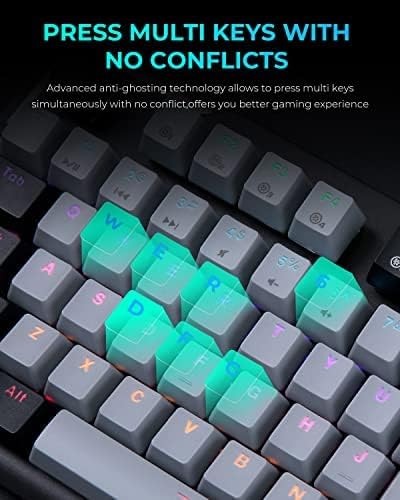
Image: A close-up of the keyboard demonstrating its anti-ghosting feature, allowing multiple keys to be pressed simultaneously.
Тэхнічнае абслугоўванне
- Генеральная ўборка: Regularly clean the keyboard to prevent dust and debris buildup. Use a soft, dry cloth to wipe the surface. For deeper cleaning, use compressed air to clear debris from between the keycaps.
- Ачыстка клавіш: The double-shot keycaps are designed for easy cleaning. If necessary, gently remove keycaps using a keycap puller (not included) and clean them with a mild soap solution and a soft brush. Ensure keycaps are completely dry before reattaching.
- Прадухіленне разліву: While the aluminum alloy panel offers some resistance to liquids, avoid spilling liquids directly onto the keyboard. In case of a spill, immediately disconnect the keyboard from your computer and allow it to dry completely before reconnecting.
- захоўванне: Калі клавіятура не выкарыстоўваецца працяглы час, захоўвайце яе ў сухім месцы без пылу.
Ліквідацыю непаладак
| праблема | Магчымая прычына | Рашэнне |
|---|---|---|
| Клавіятура не адказвае | Слабае падключэнне USB, няспраўны порт USB, праблема з драйверам. | Пераканайцеся, што кабель USB надзейна падключаны. Паспрабуйце іншы порт USB. Перазагрузіце камп'ютар. Праверце дыспетчар прылад на наяўнасць праблем з драйверамі. |
| Клавішы не рэгіструюцца або ўводзяцца два разы | Смецце пад клавішай, няспраўны перамыкач. | Clean under the affected keycap using compressed air. If the issue persists, the switch may be faulty and require professional service. |
| Падсветка не працуе або працуе няправільна | Lighting settings, software glitch. | Use FN key combinations to adjust brightness and mode. Restart the keyboard by unplugging and replugging. Reinstall the DAREU software if applicable. |
| Праграмуемыя клавішы не працуюць | Праграмнае забеспячэнне ўсталявана або настроена няправільна. | Ensure DAREU software is installed and running. Verify key assignments within the software. Update software to the latest version. |
Тэхнічныя характарыстыкі
- мадэль: EK815s
- Памеры: 17.72 х 5.51 х 1.57 цалі (450 х 140 х 40 мм)
- Вага: 2.9 фунта (1.3 кг)
- Тып пераключальніка: Сінія механічныя перамыкачы
- Key Stroke Travel: 4 мм
- Key Elastic Force: 50 ± 4G
- Keystroke Life: 65 мільёнаў разоў
- Падключэнне: USB-C
- Падсвятленне: Вясёлка RGB
- матэрыял: Алюміній, пластык
- Сумяшчальныя прылады: Гульнявая кансоль, ПК
- Асаблівасці: Backlit, Customizable Display Keys, Ergonomic, Water Resistant (panel), Wrist Rest (optional/model dependent)
- Дата першай даступнасці: 26 сакавіка 2021 г
Гарантыя і падтрымка
The DAREU EK815s Mechanical Gaming Keyboard comes with a Гарантыя 1 год з даты пакупкі. Гэтая гарантыя распаўсюджваецца на вытворчыя дэфекты і праблемы, якія ўзніклі ў выніку нармальнага выкарыстання.
If you encounter any quality problems with your product within the 1-year warranty period, please contact DAREU customer support. Provide your purchase details and a description of the issue for assistance. Our support team is committed to helping you resolve any concerns.
For further assistance, product registration, or to download the latest software and drivers, please visit the official DAREU webсайт або звярніцеся непасрэдна ў службу падтрымкі кліентаў.