
Teslong TD450D85L1 Articulating Borescope User Manual
Model: TD450D85L1
1. Уводзіны
The Teslong TD450D85L1 Articulating Borescope is a professional inspection tool designed for visual examination of hard-to-reach areas. It features a two-way 180-degree articulating probe, an integrated 4.5-inch IPS LCD monitor, and high-definition imaging capabilities. This manual provides essential information for the safe and effective use of your borescope.
2. Інфармацыя па бяспецы
- Non-Waterproof Probe: The inspection probe of this borescope is НЕ ВОДАНЕПРЫМАЛЬНЫ. Do not submerge the probe or any part of the device in water or other liquids. Doing so will cause damage and void the warranty.
- Avoid using the device in environments with extreme temperatures or high humidity.
- Трымайце прыладу далей ад моцных магнітных палёў.
- Не спрабуйце разбіраць або мадыфікаваць прыладу. Рамонт павінен выконвацца толькі ўпаўнаважаным персаналам.
- Ensure the device is fully charged before use to prevent unexpected power loss during inspections.

3. Змесціва ўпакоўкі
Праверце, ці ўсе пералічаныя ніжэй прадметы ўваходзяць у вашу ўпакоўку:
- TD450D85L1 Articulating Borescope Unit (with integrated 4.5-inch IPS monitor)
- Зарадны кабель USB Type-C
- Карта MicroSD на 8 ГБ (папярэдне ўсталяваная)
- Сумка для пераноскі
- Кіраўніцтва карыстальніка

4. Прадукт скончыўсяview і Асаблівасці
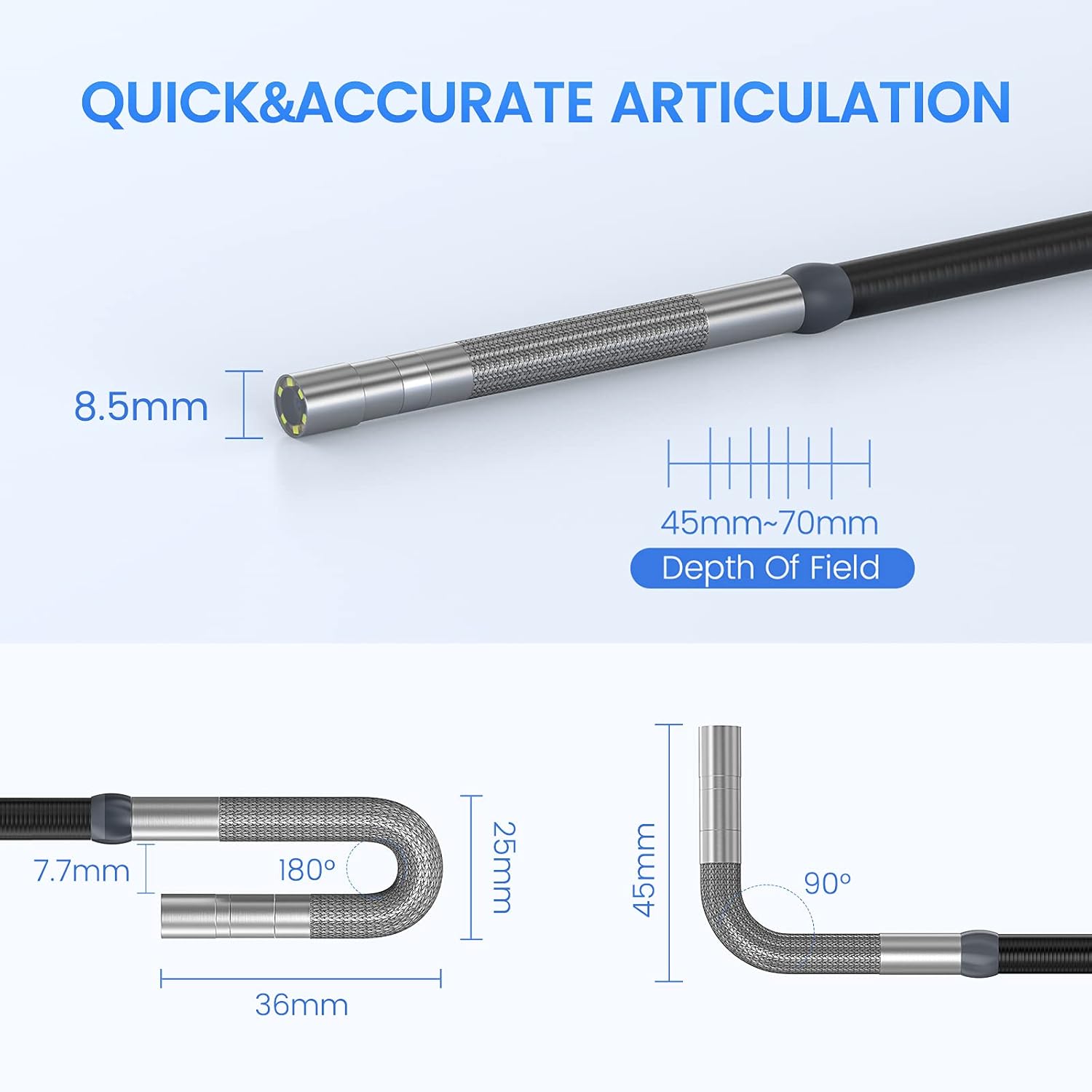
The Teslong TD450D85L1 is an advanced inspection camera designed for detailed visual inspections. It features a flexible gooseneck probe with an 8.5mm diameter and a 2.0MP CMOS sensor, providing 1080P HD image and video capture. The integrated 4.5-inch IPS LCD monitor offers a clear view without the need for external devices or Wi-Fi connections.
Асноўныя характарыстыкі:
- Two-Way 180° Articulation: Allows precise control of the probe tip for navigating complex spaces and maintaining optimal viewныя вуглы.
- Integrated 4.5-inch IPS LCD Monitor: Provides a clear, real-time display of the inspection area. No smartphone, Wi-Fi, or app required.
- Выява высокай выразнасці: 1080P HD resolution with a 2.0MP CMOS sensor for capturing detailed images and videos.
- Adjustable LED Illumination: Built-in highlighting LEDs ensure clear visibility in dark conditions.
- Фота- і відэазапіс: Supports JPG image and AVI video recording directly to the included 8GB MicroSD card. Includes a microphone and speaker for audio recording.
- Доўгі тэрмін службы батарэі: Equipped with a built-in 5000mAh rechargeable battery for extended operation.


5. Настройка
5.1 Першапачатковая зарадка
- Connect the USB Type-C charging cable to the borescope's charging port.
- Падключыце другі канец USB-кабеля да стандартнага USB-адаптара харчавання (не ўваходзіць у камплект) або да USB-порта кампутара.
- Allow the device to charge fully before first use. The charging indicator light will change when charging is complete.
5.2 Усталёўка карты MicroSD
The 8GB MicroSD card is typically pre-installed. If it needs to be inserted or replaced:
- Locate the MicroSD card slot on the side of the monitor unit.
- Gently insert the MicroSD card with the gold contacts facing down until it clicks into place.
- Каб выняць карту, злёгку націсніце на яе, пакуль яна не выскочыць.

6. Інструкцыя па эксплуатацыі
6.1 Уключэнне/выключэнне
- Каб уключыць прыладу, націсніце і ўтрымлівайце кнопку харчавання, пакуль не падсвеціцца экран.
- To power off, press and hold the Power button until the screen shuts down.
6.2 Controlling Articulation
The borescope probe features two-way 180-degree articulation. Use the control knob on the handle to adjust the direction of the probe tip:
- Rotate the knob clockwise or counter-clockwise to bend the probe tip left or right.
- The articulation can be locked in position for stable viewінж.

6.3 Рэгуляванне падсветкі святлодыёдаў
The probe tip is equipped with adjustable LED lights to illuminate the inspection area. Use the dedicated button on the monitor unit to cycle through different brightness levels or turn the lights off.
6.4 Taking Photos and Recording Videos
- Каб зрабіць фота: У жывым эфіры view, press the Photo button (usually indicated by a camera icon) to capture a still image.
- Каб запісаць відэа: Press the Video button (usually indicated by a video camera icon) to start recording. Press it again to stop recording. The device will record audio through its built-in microphone.
- All captured media is saved to the installed MicroSD card.
6.5 ReviewСМІ
Access the playback mode from the main menu to view captured photos and videos. Use the navigation buttons to browse through your media files.
7. Тэхнічнае абслугоўванне
- Уборка: Gently wipe the monitor screen and the probe with a soft, dry cloth. For stubborn dirt on the probe, use a slightly damp cloth and ensure it is completely dry before storage. Do not use abrasive cleaners or solvents.
- захоўванне: Store the borescope in its carrying case in a cool, dry place, away from direct sunlight and extreme temperatures.
- Сыход за батарэяй: For optimal battery life, charge the device regularly and avoid fully discharging it for extended periods. If storing for a long time, charge it to about 50% every few months.
- Абнаўленні праграмнага забеспячэння: Праверце вытворцы website periodically for any available firmware updates.
8. Выпраўленне непаладак
| праблема | Магчымая прычына | Рашэнне |
|---|---|---|
| Прылада не ўключаецца. | Нізкі акумулятар. | Зарадзіце прыладу цалкам. |
| Няма выявы на экране. | Probe cable not securely connected. | Ensure the probe cable is firmly connected to the monitor unit. |
| Выява размытая або цёмная. | Insufficient lighting; dirty camera lens; incorrect focus. | Adjust LED brightness. Clean the camera lens. Ensure the object is within the 45-70mm depth of field. |
| Немагчыма запісваць фота/відэа. | MicroSD card full or not inserted correctly; card error. | Check MicroSD card insertion. Delete unnecessary files or replace the card. Format the card if necessary (this will erase all data). |
| Articulation is stiff or unresponsive. | Mechanical obstruction; debris in articulation mechanism. | Carefully inspect the probe tip for any obstructions. Do not force articulation. Contact customer support if the issue persists. |
9. Тэхнічныя характарыстыкі
| Асаблівасць | Спецыфікацыя |
|---|---|
| Назва мадэлі | Articulating Endoscope Inspection Camera (TD450D85L1) |
| Памер экрана | 4.5-цалевы IPS LCD |
| Эфектыўнае рашэнне | 2 МП |
| Дазвол відэазахопу | 1080p |
| Дыяметр зонда | 8.5 мм |
| Артыкуляцыя | Two-Way 180 Degrees |
| Macro Focus Range (Depth of Field) | 45-70 мм |
| Сапраўдны кут View | 60 градусаў |
| Тып датчыка | CMOS |
| Тып носьбіта | Карта Micro SD (8 ГБ у камплекце) |
| File фармат | JPG (images), AVI (videos) |
| Аўдыёзапіс | Yes (with internal microphone) |
| Тэхналогія падлучэння | USB |
| Ёмістасць батарэі | 5000 мАг (акумулятарная) |
| Узровень воданепранікальнасці | Not Waterproof (probe) |
10. Гарантыя і падтрымка
Your Teslong TD450D85L1 Articulating Borescope comes with a Гарантыя 12 месяцаў from the date of purchase. This warranty covers manufacturing defects and ensures reliable performance under normal use.
For technical assistance, troubleshooting, or warranty claims, please contact Teslong customer service. Refer to the contact information provided on the official Teslong website or in your product packaging for the most up-to-date support channels.
Please have your model number (TD450D85L1) and purchase details ready when contacting support.