
Уводзіны
The BOAVISION S20-WIFI Outdoor Security Camera is a wireless, solar-powered surveillance solution designed for outdoor use. It features a 14400mAh rechargeable battery, Pan-Tilt-Zoom (PTZ) capabilities, color night vision, two-way audio, and PIR motion detection. With an IP66 waterproof rating, it is built to withstand various outdoor weather conditions, providing reliable security monitoring for your property.

Figure 1: BOAVISION S20-WIFI Outdoor Security Camera with integrated solar panel and a smartphone displaying its live feed.
Настройка
Змест пакета
Before beginning installation, verify that all components are present in the package. The standard package includes the camera unit with integrated solar panel, mounting accessories, and a user manual.

Figure 2: Detailed diagram of the camera components and included accessories such as the solar panel, antennas, USB power cable, TF card slot, and screw bag.
- BOAVISION S20-WIFI Camera with Solar Panel
- Solar USB Power Cable
- Мантажныя шрубы і анкеры
- Папера для пазіцыянавання
- Кіраўніцтва карыстальніка
Харчаванне камеры
The camera is equipped with a 14400mAh rechargeable battery and an 8W external solar panel. For initial setup, ensure the battery is sufficiently charged. The solar panel continuously recharges the battery, providing ultra-long standby time of up to 180 days without direct sunlight, depending on usage.
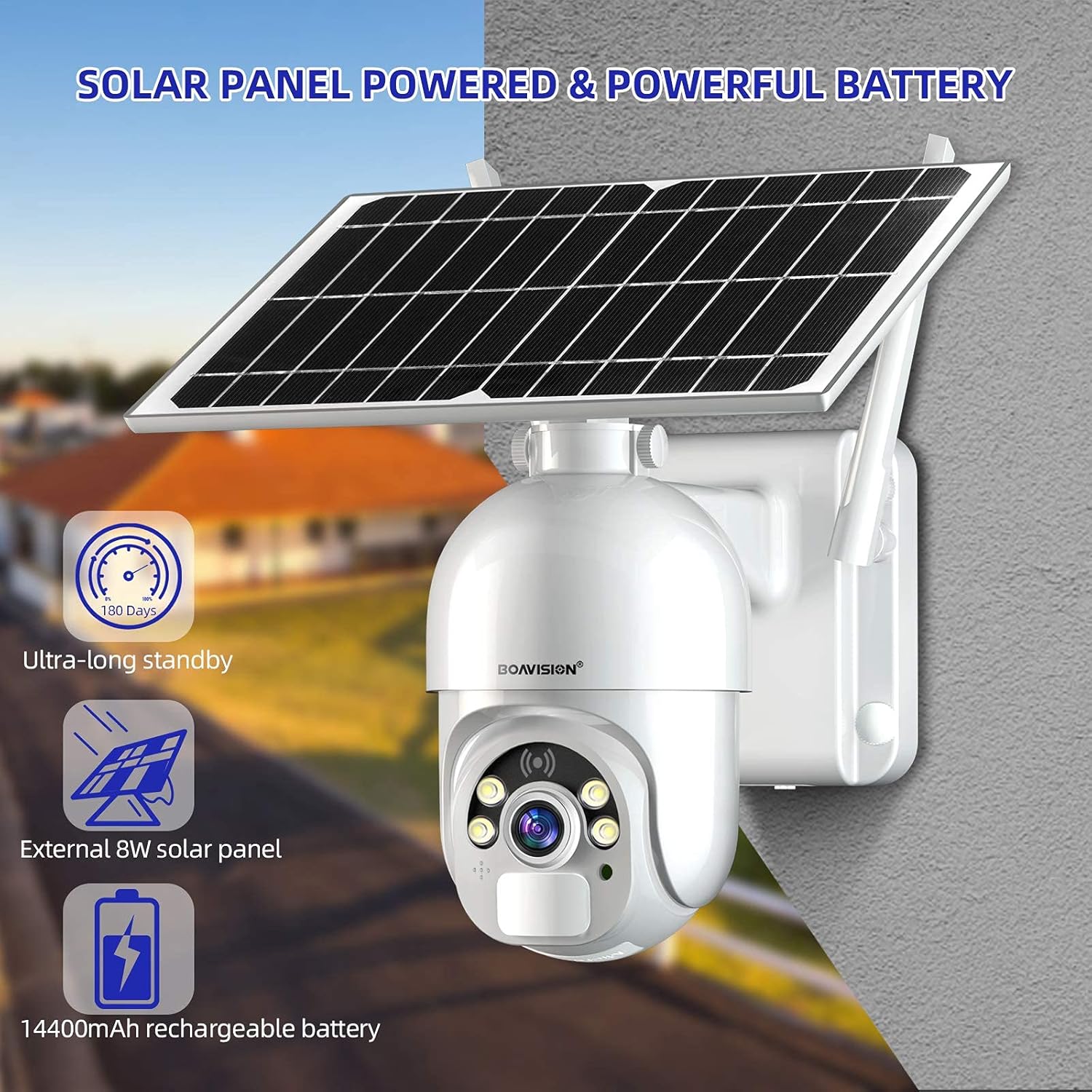
Figure 3: The camera's solar panel and powerful 14400mAh rechargeable battery, designed for extended outdoor operation.
- Connect the solar panel to the camera using the provided solar USB power cable.
- Ensure the camera's power switch is in the ON position.
- For first-time use or after prolonged storage, it is recommended to fully charge the camera using a standard 5V USB charger before relying solely on solar power.
Мантаж камеры
Select a mounting location that provides an optimal view of the area you wish to monitor and receives adequate sunlight for the solar panel. The camera is designed for wall mounting.
- Choose a sturdy surface for mounting.
- Use the positioning paper to mark drill holes.
- Прасвідруйце адтуліны і пры неабходнасці ўстаўце анкеры.
- Замацуйце кранштэйн камеры на сцяне з дапамогай прадугледжаных шруб.
- Attach the camera unit to the mounting bracket, ensuring it is firmly in place.
- Adjust the angle of the solar panel to maximize sun exposure throughout the day.
App Installation and Initial Pairing
The camera operates via a mobile application available for both iOS and Android devices. Пошук the recommended app (e.g., "UBOX" as per some user feedback, though the manual should specify the official app name) on the App Store or Google Play.

Figure 4: The mobile application interface for live viewі двухбаковай аўдыясувязі.
- Download and install the official BOAVISION camera application from your device's app store.
- Зарэгіструйце новы ўліковы запіс або ўвайдзіце ў сістэму, калі ён у вас ужо ёсць.
- Follow the in-app instructions to add your new camera. This typically involves scanning a QR code on the camera or connecting to its Wi-Fi hotspot.
- Ensure your smartphone is connected to a 2.4GHz Wi-Fi network during the pairing process, as the camera supports Wi-Fi connectivity.
Інструкцыя па эксплуатацыі
жыць Viewзапіс і прайграванне
Once connected, you can access the live video feed from your camera anytime, anywhere via the mobile application. The camera supports video recording to a micro SD card (up to 128GB) or an optional cloud storage service.
- Адкрыйце праграму і абярыце камеру са спісу прылад, каб view жывы канал.
- Use the playback function within the app to review запісана footagзахоўваюцца на SD-карце або ў воблаку.
Паварот і нахіл
The camera features Pan-Tilt (PT) functionality, allowing you to remotely adjust its viewкут агляду для поўнага ахопу.

Figure 5: The camera offers 320-degree horizontal pan and 90-degree vertical tilt rotation, controllable via the app.
- У прамым эфіры view interface of the app, use the directional controls to pan the camera horizontally up to 320 degrees and tilt it vertically up to 90 degrees.
Двухбаковае аўдыё
Communicate with visitors or deter intruders using the camera's built-in microphone and speaker.
- Націсніце на значок мікрафона ў прамым эфіры праграмы view гаварыць праз камеру.
- The camera's speaker will transmit your voice, and its microphone will capture audio from the camera's vicinity.
Інтэлектуальнае выяўленне PIR
The camera utilizes a highly sensitive Passive Infrared (PIR) motion sensor to detect human and animal movement, reducing false alarms from environmental factors. It has a 120-degree detection angle.

Figure 6: The camera's PIR sensor detects motion, triggering alerts and recording events to your phone app.
- Configure motion detection sensitivity and alert settings within the app.
- Upon detection, the camera will send push notifications to your smartphone and begin recording.
Day and Night Color Vision
The camera provides clear 1080P HD footage during the day and offers advanced night vision capabilities, including color night vision and infrared (IR) night vision up to 100 feet.

Figure 7: The camera's ability to provide clear color vision even in low-light conditions using its motion-activated spotlight.
- Камера аўтаматычна пераключаецца паміж дзённым і начным рэжымамі ў залежнасці ад навакольнага асвятлення.
- Dual LEDs enable motion-activated spotlight color night vision, providing full-color video even in darkness.
- Infrared LEDs provide traditional black-and-white night vision for discreet monitoring.
Тэхнічнае абслугоўванне
Battery and Solar Panel Care
To ensure optimal performance and battery longevity, regularly check the solar panel for any obstructions or dirt that might reduce its charging efficiency.

Figure 8: The camera's IP66 weatherproof design ensures reliable operation in various outdoor conditions, including rain and snow.
- Wipe the solar panel surface with a soft, damp cloth to remove dust, leaves, or other debris.
- Ensure the solar panel is positioned to receive maximum direct sunlight throughout the day.
- While the camera has a 14400mAh battery for extended standby, consistent solar charging is crucial for continuous operation without manual recharging.
Cleaning the Camera Lens and Housing
Periodically clean the camera lens and housing to maintain clear image quality and ensure proper functioning of sensors.
- Use a soft, lint-free cloth to gently wipe the camera lens. For stubborn dirt, a lens cleaning solution designed for optics can be used sparingly.
- Ачысціце корпус камеры ад рэкламыamp cloth. Avoid abrasive cleaners or solvents that could damage the finish or seals.
Ўстойлівасць да надвор'я
The camera is rated IP66 waterproof, meaning it is protected against dust ingress and powerful water jets. While designed for outdoor use, extreme weather conditions may still impact performance or require additional protective measures.
- Ensure all cable connections are securely sealed to maintain the IP66 rating.
- Avoid submerging the camera in water.
Ліквідацыю непаладак
Камера па-за сеткай / Няма падключэння
- Праверце сігнал Wi-Fi: Ensure the camera is within range of your 2.4GHz Wi-Fi router and the signal strength is adequate. Obstacles like thick walls can weaken the signal.
- Стан маршрутызатара: Verify your Wi-Fi router is functioning correctly and has internet access.
- Перазагрузіць камеру: Turn the camera off and then on again using the power switch.
- Re-pair Camera: If the issue persists, try re-pairing the camera with the app following the initial setup instructions.
Poor Image Quality / Blurry Video
- Чысты аб'ектыў: Акуратна працярыце аб'ектыў камеры мяккай тканінай без ворса.
- Прапускная здольнасць сеткі: Ensure your internet connection has sufficient upload bandwidth for smooth video streaming.
- Умовы асвятлення: Verify there are no strong light sources directly facing the camera at night that could cause glare.
Датчык руху не працуе / Занадта шмат ілжывых трывог
- Адрэгуляваць адчувальнасць: In the app settings, adjust the PIR motion detection sensitivity. Lower sensitivity for fewer false alarms, higher for more precise detection.
- Зона выяўлення: Ensure the camera's detection area covers the desired region.
- Фактары навакольнага асяроддзя: Strong winds, moving branches, or direct sunlight changes can sometimes trigger false alarms. Adjust camera placement if possible.
Battery Not Charging / Low Battery
- Уздзеянне сонечных панэляў: Ensure the solar panel receives at least 4-6 hours of direct sunlight daily. Clear any obstructions.
- Кабельнае злучэнне: Check that the solar panel cable is securely connected to the camera.
- Manual Charge: If the battery is critically low, bring the camera indoors and charge it fully using a standard 5V USB charger.
Тэхнічныя характарыстыкі
| Асаблівасць | Дэталь |
|---|---|
| Нумар мадэлі | S20-WIFI |
| Крыніца харчавання | Сонечная батарэя, акумулятарная батарэя ёмістасцю 14400 мАг |
| Сонечная панэль Wattage | 8 ват |
| Сувязь | Wi-Fi (2.4 ГГц) |
| Дазвол відэазахопу | 1080p HD |
| Дыяпазон павароту/нахілу | 320° па гарызанталі, 90° па вертыкалі |
| Дыяпазон начнога бачання | Up to 100 feet (Color Night Vision & IR) |
| Дэтэктар руху | PIR Sensor, 120° Detecting Angle |
| Аўдыё | Двухбаковая аўдыёсувязь (убудаваны мікрафон і дынамік) |
| Параметры захоўвання | Карта Micro SD (да 128 ГБ), воблачнае сховішча (па жаданні) |
| Ацэнка ўстойлівасці да надвор'я | IP66 |
| Памеры (Д х Ш х У) | 6.29 х 8.81 х 5.51 цалі |
| Вага прадмета | 3.36 фунта |
| Сумяшчальныя прылады | Смартфон (iOS, Android) |
| UPC | 735520282376 |
Гарантыя і падтрымка
Specific warranty terms and conditions for the BOAVISION S20-WIFI camera are not provided within this manual. For detailed warranty information, technical support, or customer service inquiries, please refer to the official BOAVISION webсайт або звярніцеся непасрэдна ў службу падтрымкі кліентаў.
You may find additional resources and frequently asked questions on the manufacturer's support pages.
- вытворца: БААВІЗІЯ
- Афіцыйны Webсайт: Visit the BOAVISION Store on Amazon (агульная інфармацыя пра брэнд)