
Уводзіны
Дзякуй за пакупкуasing the NIDAGE 5mm Dual Lens Wireless Endoscope Camera. This device is designed for inspecting hard-to-reach areas with its high-definition dual lenses, wireless connectivity, and durable waterproof probe. Please read this manual carefully before use to ensure proper operation and to maximize the product's lifespan.
Асаблівасці прадукту
- 1080P Dual Lens Camera: The endoscope features a 5.0mm dual-lens camera with 1080P Full HD resolution (1920x1080) for capturing both still images and videos. It offers a 78° field of view from both front and side lenses, making it suitable for inspecting narrow pipes and inaccessible areas.
- Adjustable LED Illumination: Equipped with seven adjustable LED lights (six on the front, one on the side) at the camera tip, and an additional LED light on the controller unit, this endoscope ensures clear image capture even in dark environments. The brightness can be adjusted to suit various inspection conditions.
- Wireless Connectivity & Integrated Power: The endoscope connects wirelessly via Wi-Fi to your smartphone or tablet. Simply download the dedicated app for Android or iPhone to view жывая камера фуtage. A built-in high-capacity rechargeable battery provides approximately 4 hours of continuous operation on a full charge, eliminating the need for external power sources or cables.
- Rigid Waterproof Cable: The rigid cable maintains its shape, allowing for precise positioning and angle adjustment in hard-to-reach areas. With an IP67 waterproof rating, the camera probe can be submerged in water up to 1 meter, making it suitable for inspecting wet or submerged environments.

Image: The dual-lens design allows for both front and side views, with focus ranges of 3-15cm for the front lens and 3-6cm for the side lens.
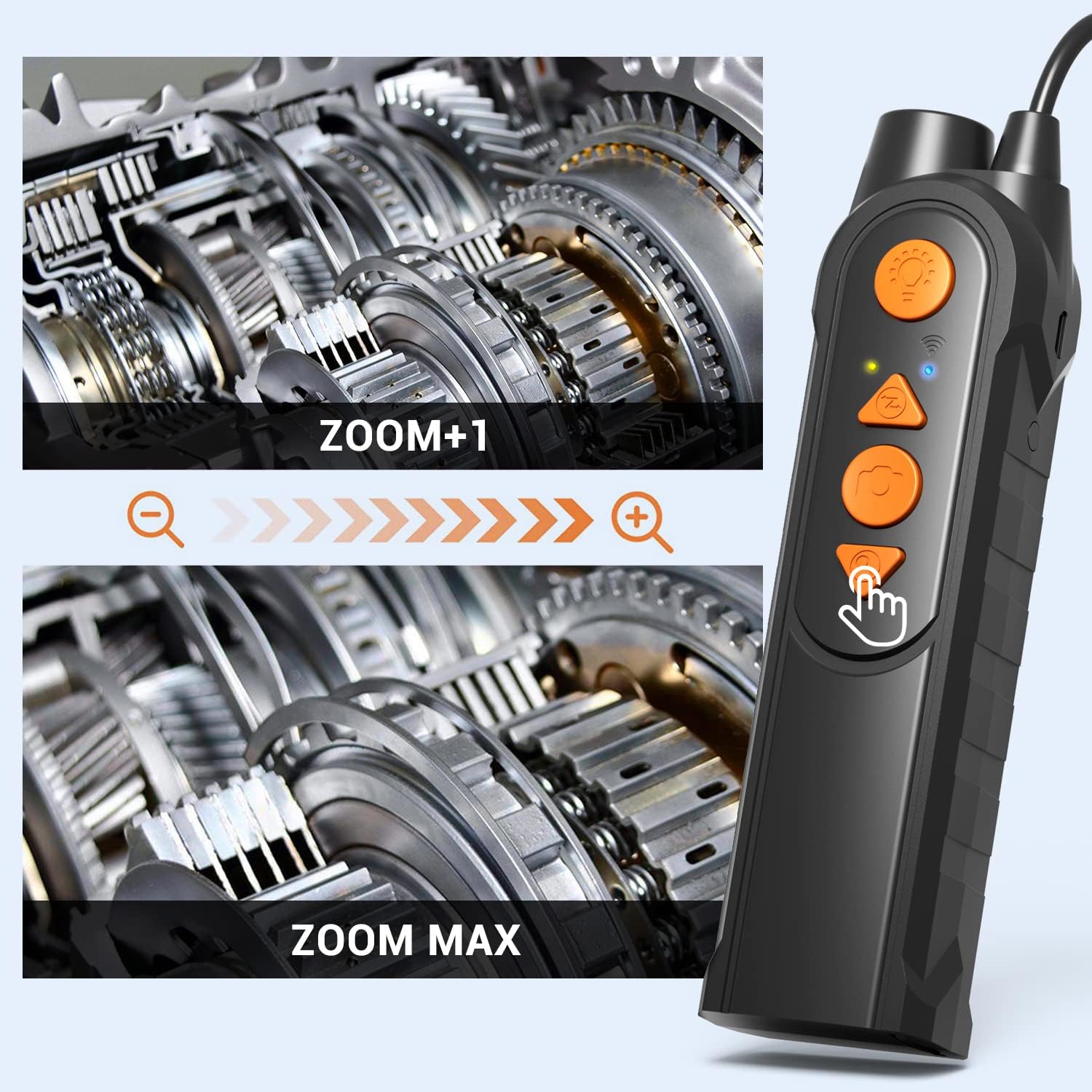
Image: The ultra-fine 5.0mm lens is ideal for inspecting narrow spaces, as demonstrated by its ability to fit into a spark plug hole compared to a larger 8.5mm lens.

Image: The camera tip features 7 adjustable LED lights for optimal illumination and is IP67 waterproof, allowing for use in wet conditions.
Настройка
- Зарадзіць прыладу: Before first use, fully charge the endoscope using the provided USB charging cable. The charging port is located on the controller unit.
- Спампаваць прыкладанне: Scan the QR code provided in the manual or on the product packaging, or search for the dedicated app (e.g., "HD Digicam" or similar, as indicated in the product's quick start guide) in the Apple App Store (for iOS) or Google Play Store (for Android). Install the app on your smartphone or tablet.
- Уключэнне: Press and hold the power button on the controller unit to turn on the endoscope. The power LED indicator will light up.
- Падключэнне праз Wi-Fi: On your smartphone or tablet, go to Wi-Fi settings and connect to the Wi-Fi network broadcast by the endoscope (e.g., "Jetion_******"). No password is typically required for the initial connection.
- Адкрыйце прыкладанне: Launch the installed app. The live camera feed from the endoscope should now be displayed on your device screen.

Image: Visual guide for downloading the app via QR code or app stores, connecting to the device's Wi-Fi network, and viewing the live feed on a smartphone.
Спампаваць праграму: http://qr15.cn/EsI0HUL
Інструкцыя па эксплуатацыі
- Рэгуляванне яркасці святлодыёда: Use the LED brightness controller on the main unit to adjust the illumination level. This helps in achieving clear images in varying light conditions.
- Пераключыць аб'ектыў: Press the lens switch button on the controller to toggle between the front-view camera and the side-view camera. This allows for comprehensive inspection without repositioning the probe.
- Capture Images/Record Videos: Use the dedicated button on the controller to take still photographs or start/stop video recording. The captured media will be saved to your connected smartphone or tablet via the app.
- Функцыя маштабавання: The controller may include zoom buttons (e.g., '+' and '-' or magnifying glass icons) to digitally zoom in or out on the live feed.
- Размяшчэнне зонда: Utilize the rigid cable to maneuver the camera probe into the desired inspection area. The cable's ability to hold its shape assists in precise placement.

Image: The endoscope controller unit showing the power button, LED brightness controller, lens switch button, photo/video capture button, and charging port.

Image: The controller features zoom buttons to magnify the image, allowing for detailed inspection of components like gears.
Тэхнічнае абслугоўванне
- Ачыстка аб'ектыва: After each use, especially in dirty or wet environments, gently wipe the camera lens with a soft, dry cloth. For stubborn dirt, use a lens cleaning solution. Ensure the lens is dry before storage.
- Сыход за батарэяй: To prolong battery life, avoid fully discharging the battery frequently. Recharge the device regularly, even if not in use for extended periods. Store the device with a partial charge (around 50%).
- захоўванне: Store the endoscope in a cool, dry place, away from direct sunlight and extreme temperatures. Keep the cable neatly coiled to prevent kinks or damage.
- Ўздзеянне вады: While the probe is IP67 waterproof, the main controller unit is not. Avoid exposing the controller to water or excessive moisture.
Ліквідацыю непаладак
- Няма выявы на экране:
- Ensure the endoscope is powered on and fully charged.
- Verify that your smartphone/tablet is connected to the endoscope's Wi-Fi network.
- Зачыніце і зноў адкрыйце праграму.
- Restart both the endoscope and your smart device.
- Дрэнная якасць выявы:
- Adjust the LED brightness using the controller.
- Ачысціце аб'ектыў камеры, калі ён выглядае брудным.
- Ensure the object being inspected is within the optimal focal range (front lens: 3-15cm, side lens: 3-6cm).
- Праблемы з падключэннем Wi-Fi:
- Make sure no other devices are interfering with the Wi-Fi signal.
- Ensure you are connecting to the correct Wi-Fi network broadcast by the endoscope.
- Try connecting in a different location to rule out environmental interference.
- Прылада не ўключаецца:
- Зараджайце прыладу не менш за 30 хвілін.
- Пераканайцеся, што кнопка харчавання націснутая і ўтрымліваецца правільна.
Тэхнічныя характарыстыкі
| Марка | НІДАЖ |
| Нумар мадэлі | AW695 |
| Колер | Чорны |
| Дыяметр камеры | 5.0 мм |
| Дазвол відэа | 1080P (1920x1080) |
| Воданепранікальнасць | IP67 (Probe only, up to 1 meter) |
| Ёмістасць батарэі | 2500mAh (approx. 4 hours operation) |
| Сувязь | Wi-Fi (iOS/Android compatible) |
| Вага прадмета | 0.2 грамаў |
Гарантыя і падтрымка
This NIDAGE endoscope camera comes with a one-year warranty from the date of purchase. If you encounter any initial defects or experience issues during normal use, please contact our customer support team for assistance. Please retain your proof of purchase for warranty claims.
Змест пакета:
- Endoscope Camera Unit
- Accessories (Hook, Magnet)
- USB-кабель для зарадкі
- Кіраўніцтва па эксплуатацыі