
Уводзіны
This manual provides instructions for the operation and maintenance of your WIITHINK Portable CD Boombox, model WTB771. This device features multiple audio playback options including CD, FM radio, Bluetooth, USB, and AUX input, designed for versatile use.

Выява: спераду view of the WIITHINK Portable CD Boombox WTB771, black color, showing the display, control buttons, speakers, and handle.
Змест пакета
- 1 x WIITHINK Portable CD Radio Boombox (WTB771)
- 1 х кабель харчавання
- 1 х лінія AUX
- 1 х Кіраўніцтва карыстальніка
- 1 х пульт дыстанцыйнага кіравання
Настройка
Электразабеспячэнне
Бумбокс можа працаваць ад сеткі пераменнага току або ад батарэек.
- Магутнасць пераменнага току: Connect the provided power cable to the AC port on the back of the unit and plug it into a standard wall outlet (AC voltage: 220V / 50Hz, 110V / 60Hz).
- Магутнасць батарэі: For portable use, insert 4 C-sized batteries (not included) into the battery compartment located on the bottom of the unit. Ensure correct polarity.
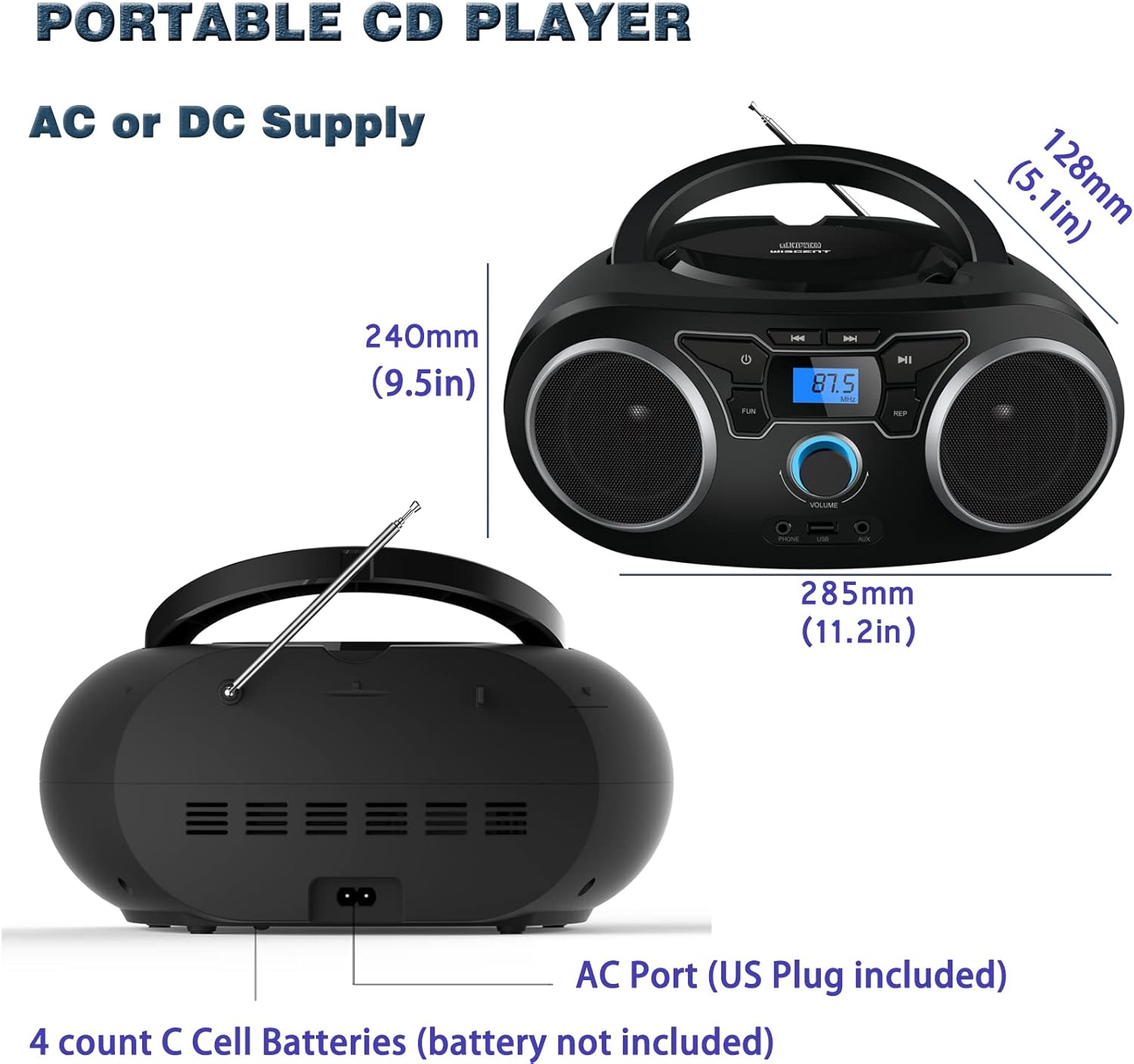
Выява: Задняя частка view of the boombox, highlighting the AC power port and the battery compartment for 4 C-sized batteries.
Інструкцыя па эксплуатацыі
Агульны кантроль
The unit features a digital LCD screen and various control buttons and knobs. The main volume control is a rotary knob on the front. A remote control is also included for convenient operation.

Выява: зверху ўніз view of the boombox, showing the CD compartment, control buttons, and volume knob.
1. Прайграванне кампакт-дыска
- Адкрыйце вечка адсека для кампакт-дыскаў, размешчанага ў верхняй частцы прылады.
- Place a CD (CD, CD-R, CD-RW, MP3-CD) onto the spindle with the label side facing up.
- Зачыніце вечка аддзялення для CD.
- Націсніце РЭЖЫМ , каб выбраць рэжым кампакт-дыска.
- Націсніце ПРАЙГРАЦЬ/Паўза кнопку, каб пачаць прайграванне.
- Выкарыстоўвайце ПРАПУСЦІЦЬ/ПОШУК кнопкі для перамяшчэння паміж трэкамі.
- The Паўтор button allows for repeating a single track or all tracks.
- The ПРАГРАМА function allows you to create a custom playback order for tracks.
The boombox supports MP3 and WMA audio formats on compatible discs.
2. Работа FM-радыё
- Для аптымальнага прыёму выцягніце тэлескапічную антэну.
- Націсніце РЭЖЫМ кнопку, каб выбраць рэжым FM-радыё.
- Каб аўтаматычна сканаваць і захоўваць станцыі, націсніце і ўтрымлівайце СКАНІРАВАЦЬ button. The unit will automatically search for and store up to 30 FM stations.
- Каб наладзіць уручную, выкарыстоўвайце ЦЮНІНГ ручка альбо ПРАПУСЦІЦЬ/ПОШУК buttons to find desired frequencies.
- Выкарыстоўвайце ПРАДУСТАЎКА кнопкі для навігацыі па захаваных станцыях.
Video: A user demonstrating the FM radio tuning function on the WIITHINK Portable CD Boombox WTB771, showing the digital display changing frequencies.
3. Злучэнне Bluetooth
- Націсніце РЭЖЫМ button to select Bluetooth mode. The display will indicate "BT" and the unit will enter pairing mode.
- On your Bluetooth-enabled device (e.g., smartphone, tablet), search for available devices and select "WTB771".
- Пасля спалучэння вы можаце перадаваць аўдыё па бесправадной сувязі з вашай прылады на бумбокс.
Відэа: Кароткая падрыхтоўкаview demonstrating Bluetooth connectivity, showing a smartphone wirelessly connected to the boombox.
4. Прайграванне з USB
- Устаўце USB-назапашвальнік з MP3 files у порт USB на пярэдняй панэлі прылады.
- Націсніце РЭЖЫМ кнопка для выбару рэжыму USB.
- Прылада аўтаматычна распазнае і пачне прайграваць MP3 files з USB-дыска.
- Use the playback controls (PLAY/PAUSE, SKIP/SEARCH) to manage your music.
5. Увод AUX
- Connect an external audio device (e.g., MP3 player, laptop) to the AUX input jack on the front of the unit using the provided 3.5mm AUX cable.
- Націсніце РЭЖЫМ кнопку, каб выбраць рэжым AUX.
- Audio from the connected device will now play through the boombox speakers. Control playback from your external device.
Controls and Ports Overview
| Асаблівасць | Апісанне |
|---|---|
| Кнопка харчавання | Уключае/выключае прыладу. |
| Кнопка MODE | Switches between CD, FM, Bluetooth, USB, and AUX modes. |
| Ручка гучнасці | Adjusts the audio output level (up to 32 levels). |
| Кнопка PLAY/PAUSE | Starts or pauses playback in CD, USB, and Bluetooth modes. |
| Кнопкі ПРАПУСЦІЦЬ/ПОШУК | Navigates tracks in CD/USB mode; tunes frequencies in FM mode. |
| Кнопка REPEAT | Repeats current track or all tracks in CD/USB mode. |
| Кнопка ПРАГРАМА | Sets a custom playback order for CD/USB tracks. |
| FM-антэна | Тэлескапічная антэна для прыёму FM-радыё. |
| Порт USB | Падключае USB-флэшкі для прайгравання MP3. |
| Уваходны раз'ём AUX | 3.5-мм уваход для падлучэння знешніх аўдыёпрылад. |
| Раз'ём для навушнікаў | Выхад 3.5 мм для прыватнага праслухоўвання. |
| Пульт дыстанцыйнага кіравання | Provides wireless control over all functions. |

Image: Close-up of the front panel, showing the USB port, AUX input, and headphone jack.
Тэхнічнае абслугоўванне
- Працірайце прыладу мяккай сухой тканінай. Не выкарыстоўвайце абразіўныя ачышчальнікі або растваральнікі.
- Keep the CD compartment clean and free of dust.
- Пазбягайце ўздзеяння на прыладу экстрэмальных тэмператур, вільготнасці або прамых сонечных прамянёў.
- When not in use for extended periods, remove batteries and unplug the AC power cable.
Ліквідацыю непаладак
| праблема | Рашэнне |
|---|---|
| Няма сілы |
|
| Без гуку |
|
| CD Skipping/Not Playing |
|
| Слабы прыём FM-сігналу |
|
| Праблемы спалучэння Bluetooth |
|
Тэхнічныя характарыстыкі
- мадэль: WTB771
- Памеры прадукту: 7 х 10 х 4.8 цалі (17.8 х 25.4 х 12.2 см)
- Вага прадмета: 2.64 фунта (1.2 кг)
- Выходная магутнасць: 2 х 2 Вт RMS
- Падключэнне: Дапаможны, Bluetooth, USB
- Тып дынаміка: Убудаваны
- крыніца харчавання: AC (220V/50Hz, 110V/60Hz) or 4 x C batteries (not included)
- Падтрымліваюцца тыпы дыскаў: CD, CD-R, CD-RW, MP3-CD
- Падтрымліваюцца аўдыяфарматы: MP3, WMA
- FM Radio Presets: Да 30 станцый
Гарантыя і падтрымка
WIITHINK offers an 18-month after-sales service for this product. For any inquiries or technical support, please contact WIITHINK customer service through your purchase platform. Lifetime technical support is provided.
For further assistance, you may refer to the "Your Orders" section on Amazon, locate your order, and contact "WIITHINK Direct".

Image: Graphic illustrating WIITHINK's customer support, including 18-month replacement and lifetime technical support.