
Ctronics CTIPC-285C-Z4B
Кіраўніцтва карыстальніка для вулічнай камеры бяспекі Ctronics з 5-кратным аптычным зумам Wi-Fi
Model: CTIPC-285C-Z4B
1. Уводзіны
Thank you for choosing the Ctronics 5X Optical Zoom WiFi Outdoor Security Camera. This manual provides detailed instructions for the installation, operation, and maintenance of your camera. Please read this manual thoroughly before use to ensure proper functionality and safety. This camera is designed for outdoor surveillance, offering advanced features such as 5X optical zoom, human detection, auto-tracking, color night vision, and two-way audio.

Малюнак 1.1: Ctronics 5X Optical Zoom WiFi Outdoor Security Camera. This image shows the main unit of the camera with its dual antennas and lens array.
2. Інфармацыя па бяспецы
Please observe the following safety precautions to prevent damage to the product or injury to yourself and others:
- Ensure the power supply is stable and matches the camera's voltagпатрабаванні да электроннай напругі (12 вольт).
- Do not expose the camera to extreme temperatures or humidity beyond its operating range.
- Avoid direct exposure of the lens to strong light sources, which may damage the sensor.
- Не спрабуйце разбіраць або мадыфікаваць камеру. Звяртайцеся па ўсё абслугоўванне да кваліфікаванага персаналу.
- Трымайце камеру і яе аксэсуары ў месцах, недаступных для дзяцей.
- Ensure proper mounting to prevent the camera from falling.
3. Змесціва ўпакоўкі
Please check the package contents upon opening. If any items are missing or damaged, contact your retailer or Ctronics support.
- Ctronics 5X Optical Zoom WiFi Outdoor Security Camera
- Адаптар сілкавання
- Мантажныя шрубы і дзюбелі
- Waterproof Kit for Network Cable (if applicable)
- Кароткае кіраўніцтва
4. Настройка
4.1 Фізічная ўстаноўка
- Выберыце месца: Выберыце падыходнае месца на адкрытым паветры з празрыстым view of the area you wish to monitor. Ensure the location has access to a power outlet.
- Мантаж: Use the provided mounting template (if included) to mark drill holes on the wall or ceiling. Drill the holes, insert wall plugs, and secure the camera bracket using the screws.
- Падключэнне сілкавання: Connect the power adapter to the camera's power input and plug it into a power outlet.
4.2 Сеткавае падключэнне
The camera supports 2.4GHz Wi-Fi networks.
- Спампаваць прыкладанне: Download the "Ctronics" app from your smartphone's app store (iOS/Android). For PC users, download the HiP2P software for MAC/Windows.
- Першапачатковая ўстаноўка: Выконвайце інструкцыі ў дадатку, каб дадаць камеру. Звычайна гэта патрабуе сканавання QR-кода на камеры або ўручную ўводу яе ідэнтыфікатара.
- Канфігурацыя Wi-Fi: Connect the camera to your 2.4GHz Wi-Fi network through the app.

Малюнак 4.1: Broad Compatibility. This image illustrates the camera's compatibility with various devices and operating systems, including iOS, Android, Windows, and Mac OS, through the Ctronics Pro app and HiP2P Client software.
4.3 Micro SD Card Installation (Optional)
The camera supports a micro SD card up to 64GB for local storage of recordings.
- Locate the SD card slot on the camera (refer to the camera diagram in the quick start guide).
- Carefully insert the micro SD card into the slot until it clicks into place.
- Format the SD card via the camera's settings in the Ctronics app for optimal performance.
5. Кіраванне камерай
5.1 Панарамаванне, нахіл і маштабаванне (PTZ)
The camera features motorized pan (355° horizontally) and tilt (90° vertically) functions, along with 5X optical zoom.
- кантроль: Use the Ctronics app to remotely control the camera's pan and tilt movements by swiping on the live view экран.
- аптычны зум: Pinch-to-zoom on the live view to activate the 5X optical zoom. The camera will auto-focus for clear detailed images.
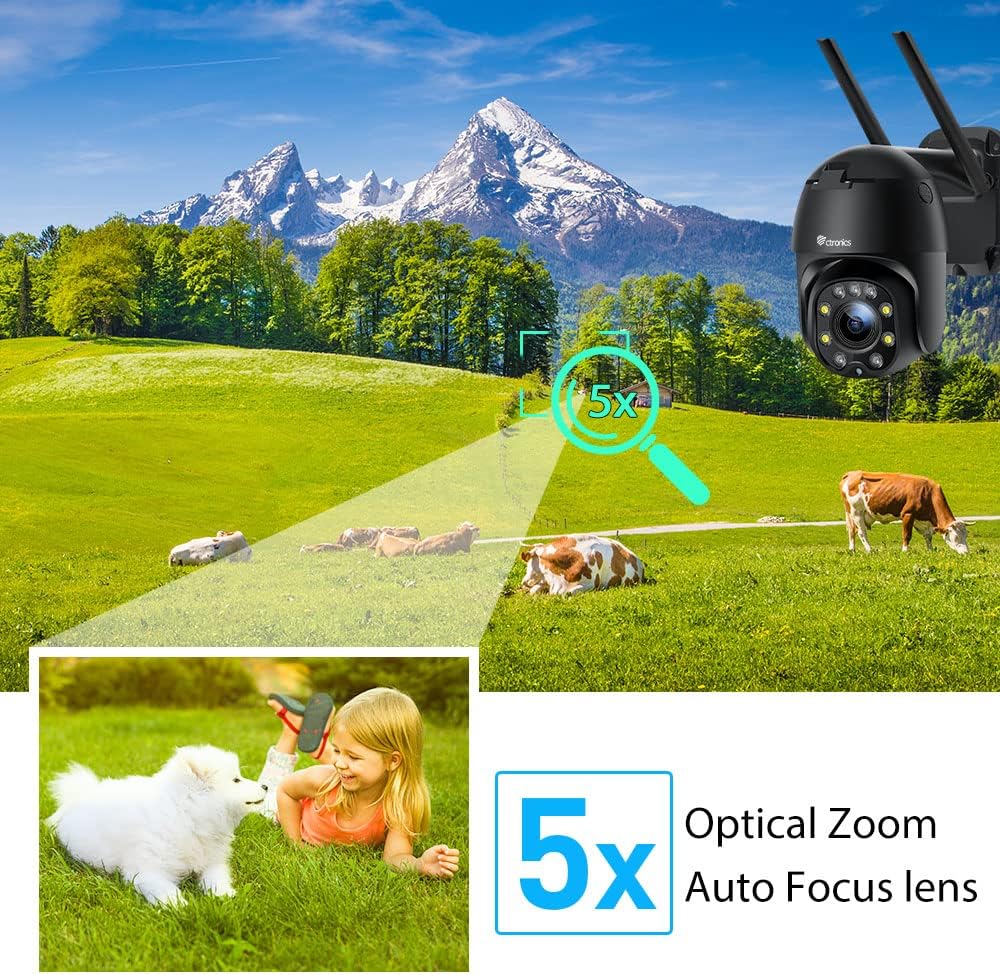
Малюнак 5.1: 5X Optical Zoom. This image demonstrates the camera's 5X optical zoom capability, allowing for detailed viewing of distant objects with auto-focus functionality.
5.2 Human Detection and Auto-Tracking
The camera utilizes AI algorithms to distinguish human movement from other triggers, reducing false alarms by up to 95%.
- Выяўленне: When a human is detected, the camera will automatically track their movement within its field of view.
- Абвесткі: You will receive instant notifications via the app, FTP, or email.
- Запіс: Detected events are recorded to the installed SD card.

Малюнак 5.2: Human Detection. This image illustrates how the camera's human detection feature accurately identifies people while ignoring non-human movements like pets, significantly reducing false alarms.

Малюнак 5.3: Auto Tracking. This image demonstrates the camera's auto-tracking capability, showing how it follows a detected subject's movement within its 355° horizontal and 90° vertical range.
5.3 HD 1080P & Night Vision
The camera provides 1920x1080P resolution for clear images and offers two night vision modes.
- Каляровы начны бачанне: With 4 spotlights and 5 infrared lights, the camera can display vivid color images in total darkness up to 25 meters.
- Інфрачырвонае начное бачанне: Standard black and white infrared vision is also available.

Малюнак 5.4: Color Night Vision. This image illustrates the camera's ability to provide full-color video surveillance even in low-light or nighttime conditions.
5.4 Двухбаковае аўдыё
З дапамогай убудаванага мікрафона і дынаміка можна мець зносіны з наведвальнікамі або адпужваць зламыснікаў.
- Real-time Conversation: Use the Ctronics app to engage in real-time conversations.
- Зніжэнне шуму: The camera features ambient noise reduction technology for clearer sound quality.

Малюнак 5.5: Two-Way Audio. This image depicts the camera's two-way audio functionality, allowing users to communicate with individuals near the camera via their smartphone.
5.5 Аддалены доступ
View жывы footage and recordings from anywhere at any time using the Ctronics app or HiP2P software.
- Ensure your camera is connected to the internet.
- Log in to your Ctronics app or HiP2P software account to access your camera feed.
6. Тэхнічнае абслугоўванне
Рэгулярнае тэхнічнае абслугоўванне забяспечвае даўгавечнасць і аптымальную працу вашай камеры.
- Уборка: Акуратна працярыце аб'ектыў і корпус камеры мяккай губкайamp тканіна. Не выкарыстоўвайце агрэсіўныя хімікаты або абразіўныя ачышчальнікі.
- Абнаўленні прашыўкі: Check the Ctronics app periodically for available firmware updates. Keeping the firmware updated ensures you have the latest features and security enhancements.
- Цыкл харчавання: If the camera experiences minor issues, try power cycling it by unplugging and replugging the power adapter.
7. Выпраўленне непаладак
У гэтым раздзеле разглядаюцца распаўсюджаныя праблемы, з якімі вы можаце сутыкнуцца.
| праблема | Магчымая прычына | Рашэнне |
|---|---|---|
| Камера ў аўтаномным рэжыме | Няма харчавання; адключаны Wi-Fi; праблема з маршрутызатарам | Check power connection; Reconnect Wi-Fi in app; Restart router |
| Дрэнная якасць выявы | Dirty lens; Network bandwidth; Low light | Clean lens; Check internet speed; Ensure sufficient lighting or use night vision |
| Ілжывая трывога | Sensitivity too high; Non-human movement | Adjust detection sensitivity in app; Ensure human detection is enabled |
| SD-карта не запісвае | SD card full/corrupted; Not formatted; Incorrect settings | Format SD card in app; Check recording settings; Replace SD card if faulty |
8. Тэхнічныя характарыстыкі
Detailed technical specifications for the Ctronics CTIPC-285C-Z4B camera:
| Асаблівасць | Спецыфікацыя |
|---|---|
| Нумар мадэлі | CTIPC-285C-Z4B |
| Памеры (Д х Ш х У) | 11 х 17 х 30 см |
| Вага | 940 грамаў |
| Матэрыял | Акрыланітрылбутадыенстырол (АБС) |
| Тып харчавання | Электрычны кабель |
| тtage | 12 вольт |
| Энергаспажыванне | 6 ват |
| дазвол | 1920x1080P |
| Аптычны зум | 5X |
| Pan Range | 355° |
| Дыяпазон нахілу | 90° |
| Дыстанцыя начнога бачання | Прыбл. 25 метраў |
| Рэйтынг воданепранікальнасці | IP66 |
| Тып карты памяці | Micro SD |
| Максімальная ёмістасць памяці | 64 ГБ |
| Сумяшчальныя прылады | Smartphone (iOS/Android), PC (MAC/Windows) |
9. Гарантыя і падтрымка
Ctronics products come with a standard warranty. For specific warranty terms and conditions, please refer to the warranty card included with your product or visit the official Ctronics website. If you encounter any issues not covered in this manual or require further assistance, please contact Ctronics customer support:
- Webсайт: www.ctronics.com
- электронная пошта: Звярніцеся да ўпакоўкі прадукту або webсайт для падтрымкі па электроннай пошце.
- тэлефон: Звярніцеся да ўпакоўкі прадукту або webсайт з нумарам тэлефона падтрымкі.
Please have your model number (CTIPC-285C-Z4B) and purchase information ready when contacting support.