
1. Важная інфармацыя па бяспецы
Before operating the Zipro Nix Rower, please read and understand all instructions in this manual. Keep this manual for future reference.
- Пракансультуйцеся з урачом перад пачаткам любой праграмы практыкаванняў.
- Перад кожным выкарыстаннем пераканайцеся, што ўсе дэталі правільна сабраны і зацягнуты.
- Place the rower on a flat, stable surface. Ensure adequate clear space around the equipment (at least 0.6 meters).
- Трымайце дзяцей і хатніх жывёл далей ад абсталявання падчас працы.
- Не перавышайце максімальную вагу карыстальніка 120 кг (264 фунтаў).
- Апранайце адпаведную вопратку і абутак для заняткаў спортам.
- Калі вы адчуваеце боль, галавакружэнне або дыхавіцу, неадкладна спыніце фізічныя практыкаванні і звярніцеся да лекара.
- Regularly inspect the rower for wear and tear, especially cables, straps, and moving parts. Do not use if damaged.
2. Змесціва ўпакоўкі
Carefully unpack the carton and verify all parts are present and undamaged. If any parts are missing or damaged, contact customer support immediately.
- Main Rower Frame (pre-assembled components)
- Seat and Rail Assembly
- Падстаўкі для ног
- Руль
- Кампутарная кансоль
- Камплект скобяных вырабаў (балты, шайбы, гайкі, інструменты)
- Кіраўніцтва карыстальніка
3. Зборка і ўстаноўка
Follow these steps to assemble your Zipro Nix Rower. It is recommended to have two people for assembly.
- Распакуйце кампаненты: Lay out all parts on a clean, flat surface. Refer to the parts diagram in the included manual for identification.
- Прымацаваць стабілізатары: Замацуйце пярэднія і заднія стабілізатары да асноўнай рамы з дапамогай прадугледжаных нітаў і шайб. Пераканайцеся, што яны шчыльна замацаваны для ўстойлівасці.
- Усталяваць рэйку сядзення: Attach the seat rail to the main unit. Ensure the seat carriage slides smoothly along the rail.
- Mount Footrests: Secure the footrests to the main frame. Ensure the adjustable straps are correctly positioned.
- Падключэнне руля: Attach the handlebar to the pulling mechanism. Verify the strap or chain is securely connected.
- Install Computer Console: Mount the computer console onto its designated bracket. Connect any necessary sensor cables from the main unit to the console. Insert batteries if required.
- Канчатковая праверка: Double-check all bolts and connections to ensure they are secure. Test the seat movement and handlebar pull for smooth operation.

Малюнак 3.1: The Zipro Nix Rower with its approximate dimensions: Length 183 cm, Width 46 cm, Height 48 cm. These dimensions are important for planning the placement of the rower in your home.
4. Інструкцыя па эксплуатацыі
4.1. Рэгуляванне супраціву
The Zipro Nix Rower features an 8-level magnetic resistance system. To adjust the resistance, locate the rotary knob on the main unit, typically near the footrests. Turn the knob clockwise to increase resistance (levels 1-8) and counter-clockwise to decrease it. Start with a lower resistance level and gradually increase as your fitness improves.

Малюнак 4.1: Буйны план view of the adjustable footrests and the 8-level resistance control knob on the Zipro Nix Rower.
4.2. Using the Computer Console
The easy-to-use LCD computer console displays various workout data to help you monitor your progress.
Малюнак 4.2: The LCD computer display of the Zipro Nix Rower, showing icons for Time, Calories, Speed, and Pulse, along with numerical readouts.
- Уключэнне/выключэнне харчавання: The console typically powers on automatically when you begin rowing or press any button. It will power off after a period of inactivity.
- Функцыі: The display cycles through or allows selection of the following metrics:
- ЧАС: Працягласць вашай трэніроўкі.
- COUNT (Strokes): Агульная колькасць выкананых удараў.
- КАЛОРЫІ: Estimated calories burned during the workout.
- ХУТКАСЦЬ: Бягучая хуткасць веславання.
- ІМПУЛЬС: Heart rate (if a compatible heart rate monitor is used and connected).
- Скінуць: Press and hold the button (usually marked 'MODE' or 'RESET') to clear all current workout data.
4.3. Правільная тэхніка веславання
Каб максімальна павялічыць эфектыўнасць і пазбегнуць траўмаў, падтрымлівайце правільную тэхніку:
- Злоў: Пачніце з сагнутымі каленамі, выцягнутымі наперад рукамі і прамой спіной.
- дыск: Push off with your legs, then lean back slightly, and finally pull the handlebar towards your abdomen.
- Фініш: Legs are extended, body leans back slightly, and handlebar is at your abdomen.
- Аднаўленне: Выцягніце рукі наперад, затым нахіліцеся наперад і, нарэшце, сагніце калені, каб вярнуцца ў становішча захопу.

Малюнак 4.3: The ergonomically designed seat of the Zipro Nix Rower, providing comfort during extended workouts.
5. Тэхнічнае абслугоўванне і захоўванне
5.1. Уборка
Wipe down the rower after each use with a damp cloth to remove sweat and dust. Do not use abrasive cleaners or solvents, as they may damage the finish or electronic components.
5.2. Змазка
The magnetic resistance system is largely maintenance-free. However, periodically check the seat rail for any debris and wipe it clean. If the seat movement becomes less smooth, a small amount of silicone-based lubricant can be applied to the rail, but avoid oil-based lubricants.
5.3. Захоўванне
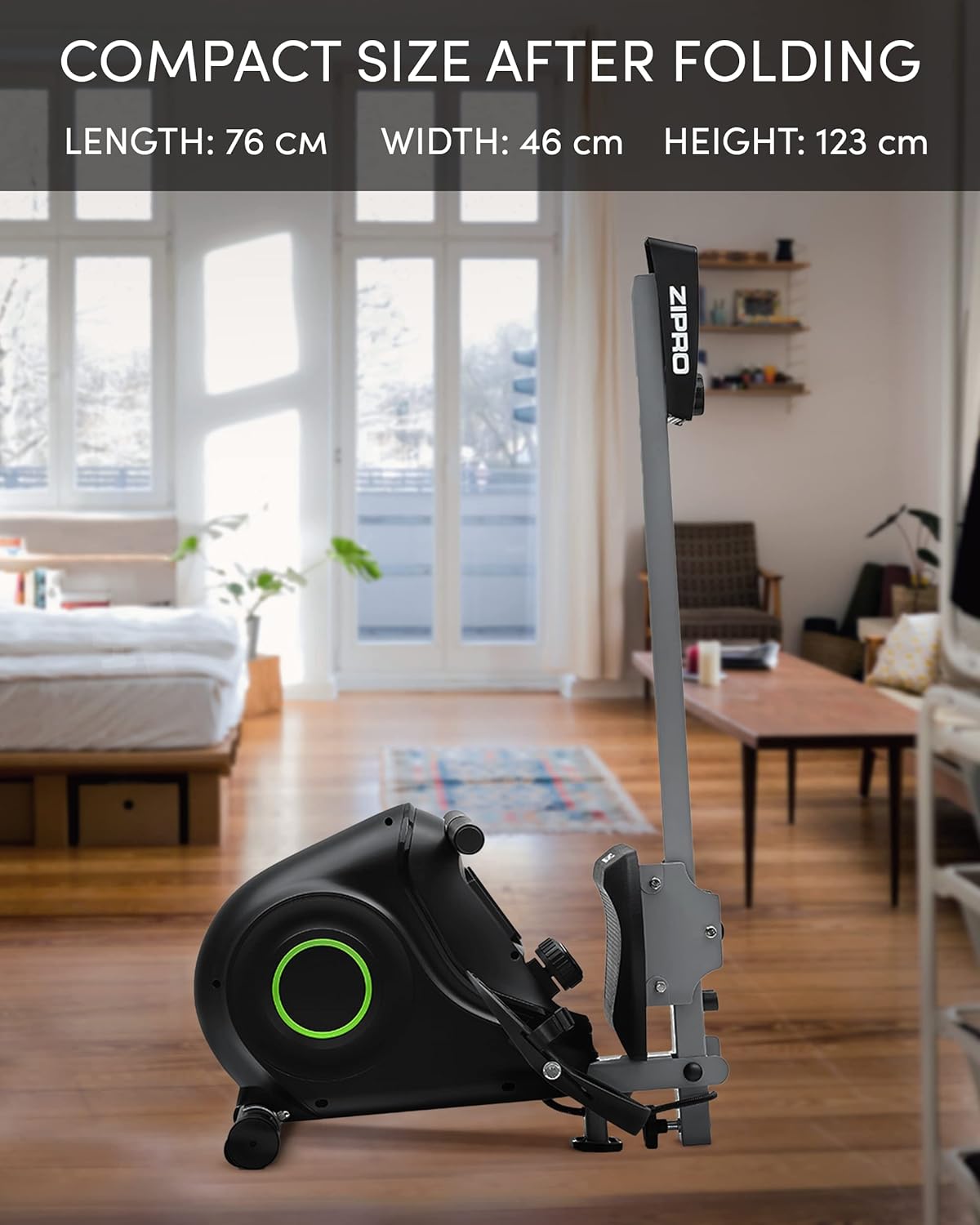
The Zipro Nix Rower is designed to be foldable for compact storage, saving space when not in use.
- складаны: Follow the instructions in your assembly manual for folding the rower into its vertical position. This typically involves releasing a locking pin or knob and folding the rail upwards.
- Транспарт: Utilize the integrated transport wheels located on the rear stabilizer to easily move the rower. Tilt the rower onto its wheels and push it to your desired storage location.

Малюнак 5.1: The Zipro Nix Rower in its compact, folded position, ideal for space-saving storage.

Малюнак 5.2: Буйны план view of the transport wheels on the Zipro Nix Rower, facilitating easy relocation of the unit.
6. Выпраўленне непаладак
If you encounter issues with your Zipro Nix Rower, refer to the following common problems and solutions:
| праблема | Магчымая прычына | Рашэнне |
|---|---|---|
| No display on computer console | Batteries are dead or incorrectly installed. Loose sensor cable connection. | Replace batteries. Check battery orientation. Ensure sensor cable is securely plugged into the console. |
| Resistance feels inconsistent or too low/high | Resistance knob not set correctly. Internal magnetic mechanism issue. | Adjust the resistance knob to a different level. If problem persists, contact customer support. |
| Seat does not slide smoothly | Debris on the rail. Rail or wheels need lubrication. | Clean the seat rail and wheels. Apply a small amount of silicone-based lubricant to the rail. |
| Незвычайныя гукі падчас працы | Loose bolts or components. Internal friction. | Check and tighten all visible bolts. If noise persists, discontinue use and contact customer support. |
7. Тэхнічныя характарыстыкі
Detailed technical specifications for the Zipro Nix Rower:
| Асаблівасць | Спецыфікацыя |
|---|---|
| Нумар мадэлі | 6299217 |
| Марка | ЗІПРО |
| Механізм супраціву | Магнітныя |
| Ўзроўні супраціву | 8 |
| Тып дысплея | ВК |
| Displayed Metrics | Time, Strokes (Count), Calories, Speed, Pulse |
| Матэрыял каркаса | Вугляродзістай сталі |
| Максімальная вага карыстальніка | 120 кілаграмаў (264 фунта) |
| Памеры прадукту (Д х Ш х У) | 183 х 46 х 48 см (72 х 18.1 х 18.9 цалі) |
| Памеры ў складзеным выглядзе (Д х Ш х У) | Прыблізна 76 х 46 х 123 см (30 х 18.1 х 48.4 цалі) |
| Вага прадмета | 27 кілаграмаў (59.5 фунта) |
| Крыніца харчавання (кансоль) | Харчаванне ад батарэі |
| Асаблівасці | Adjustable foot strap, Foldable design, Transport wheels |
8. Гарантыя і падтрымка
Каб атрымаць інфармацыю пра гарантыю, звярніцеся да гарантыйнага талона, які пастаўляецца з вашым прадуктам, або наведайце афіцыйны сайт ZIPRO. website. If you require technical assistance, replacement parts, or have any questions not covered in this manual, please contact ZIPRO customer support through their official channels.
Калі ласка, падрыхтуйце нумар мадэлі (6299217) і пацвярджэнне пакупкі перад зваротам у службу падтрымкі.