
1. Уводзіны
Дзякуй за пакупкуasing the QFX E-B3 Bluetooth Professional High-Power Speaker. This manual provides essential information for the safe and efficient operation of your speaker. Please read it thoroughly before use and retain it for future reference.
The QFX E-B3 is designed to deliver powerful audio with features including Bluetooth connectivity, FM radio, USB/SD card playback, LED party lights, and a 250W power amplifier. It also supports True Wireless System (TWS) for stereo pairing with another compatible speaker.
2. Інфармацыя па бяспецы
- Крыніца харчавання: Connect the speaker only to the specified power supply as indicated on the unit.
- Вентыляцыя: Забяспечце належную вентыляцыю вакол дынаміка. Не блакуйце вентыляцыйныя адтуліны.
- Вада і вільгаць: This speaker is not waterproof. Do not expose it to rain, moisture, or any liquids to prevent electric shock or fire.
- Цяпло: Трымайце дынамік далей ад крыніц цяпла, такіх як радыятары, абагравальнікі, пліты або іншыя прыборы, якія выпрацоўваюць цяпло.
- Уборка: Unplug the speaker from the power outlet before cleaning. Use a dry cloth for cleaning. Do not use liquid cleaners or aerosol cleaners.
- Абслугоўванне: Не спрабуйце самастойна абслугоўваць гэты прадукт. Звярніцеся да ўсіх абслугоўванняў кваліфікаванага абслуговага персаналу.
- Размяшчэнне: Пастаўце дынамік на ўстойлівую, роўную паверхню, каб ён не ўпаў.
3. Змесціва ўпакоўкі
Праверце наяўнасць усіх прадметаў у камплекце:
- QFX E-B3 High-Power Speaker
- Мікрафон
- Пульт дыстанцыйнага кіравання
- Кабель сілкавання пераменнага току
- Кіраўніцтва карыстальніка (гэты дакумент)
4. Прадукт скончыўсяview
The QFX E-B3 speaker features dual 15-inch woofers and a 1-inch tweeter, protected by a metal grill. It includes integrated handles and wheels for portability.

Малюнак 4.1: Спераду view of the QFX E-B3 Speaker.
Элементы кіравання і парты на задняй панэлі
The rear panel houses all input/output connections and control knobs.
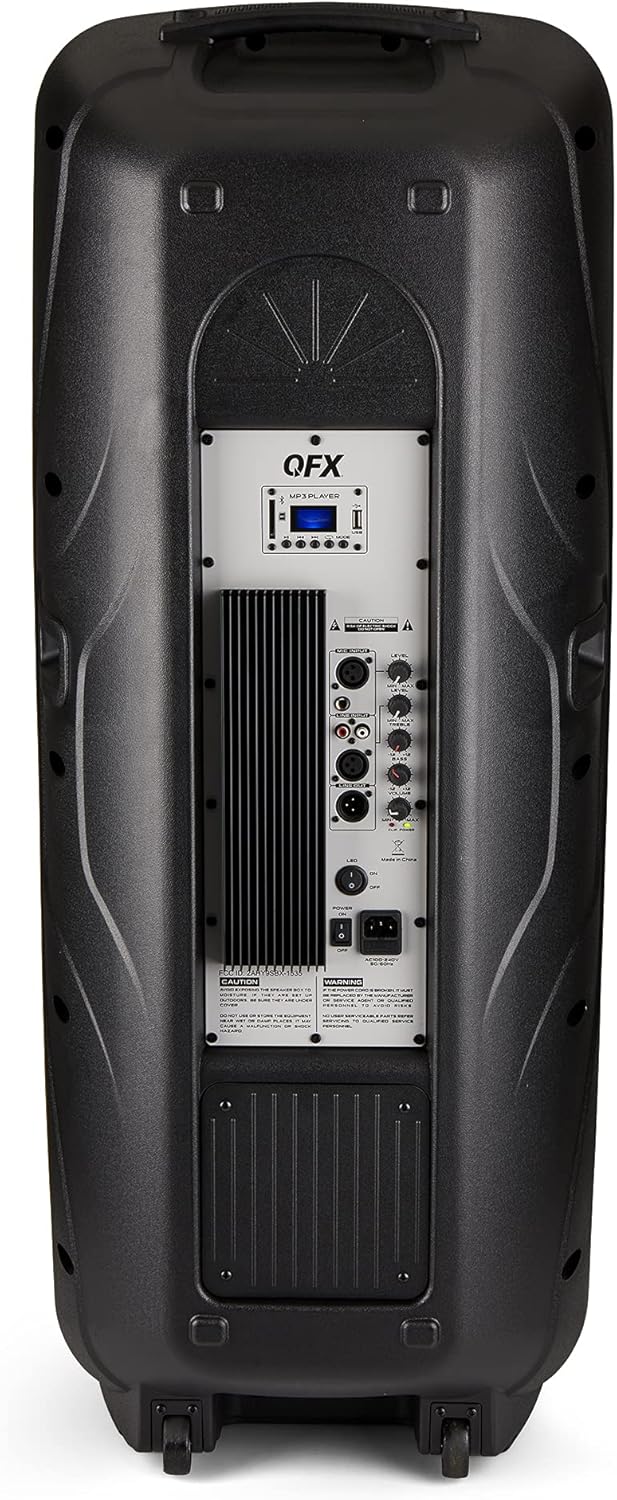
Figure 4.2: Rear panel with controls and ports.
- Выключальнік сілкавання: Уключае/выключае дынамік.
- Уваход пераменнага току: Connects the AC power cable.
- USB/SD Card Ports: Для прайгравання аўдыё fileз USB-назапашвальнікаў або SD-карт.
- Экран дысплея: Паказвае бягучы рэжым і інфармацыю пра трэк.
- Кнопка рэжыму: Switches between input modes (Bluetooth, FM, USB, SD, RCA).
- Кнопка прайгравання/паўзы: Кіруе прайграваннем праз USB/SD/Bluetooth.
- Кнопкі папярэдняга/наступнага трэка: Навігацыя па трэках або FM-станцыях.
- Галоўная ручка гучнасці: Рэгулюе агульную гучнасць.
- Bass/Treble Control Knobs: Adjusts low and high frequencies.
- Мікрафонны ўваход XLR: Connects a wired microphone.
- Microphone Volume/Echo Knobs: Adjusts microphone volume and echo effect.
- Уваход RCA (Л/П): Connects external audio devices via RCA cables.
- XLR Line Input/Output: For connecting to other audio equipment.
5. Настройка
Пачатковае размяшчэнне
Place the speaker on a stable, flat surface. For optimal sound, position it in a central location within the listening area. The integrated wheels and handle allow for easy transport.

Figure 5.1: Speaker being moved with handle and wheels.
Падключэнне сілкавання
- Пераканайцеся, што выключальнік сілкавання дынаміка знаходзіцца ў становішчы ВЫКЛ.
- Connect the AC power cable to the AC input on the rear panel of the speaker.
- Падключыце другі канец кабеля харчавання пераменнага току да звычайнай разеткі.
- Flip the power switch to the ON position. The display screen will illuminate.
6. Інструкцыя па эксплуатацыі
Спалучэнне Bluetooth
- Turn on the QFX E-B3 speaker.
- Націсніце РЭЖЫМ button on the speaker or remote control until "BLUE" appears on the display screen, indicating Bluetooth mode.
- Уключыце Bluetooth на мабільнай прыладзе (смартфоне, планшэце і г.д.).
- Пошук available Bluetooth devices and select "QFX E-B3" from the list.
- Once paired, the speaker will emit a confirmation sound. You can now play audio from your device through the speaker.
True Wireless System (TWS) Pairing
TWS allows two QFX E-B3 speakers to connect wirelessly for a stereo sound experience. This feature works only in Bluetooth mode.
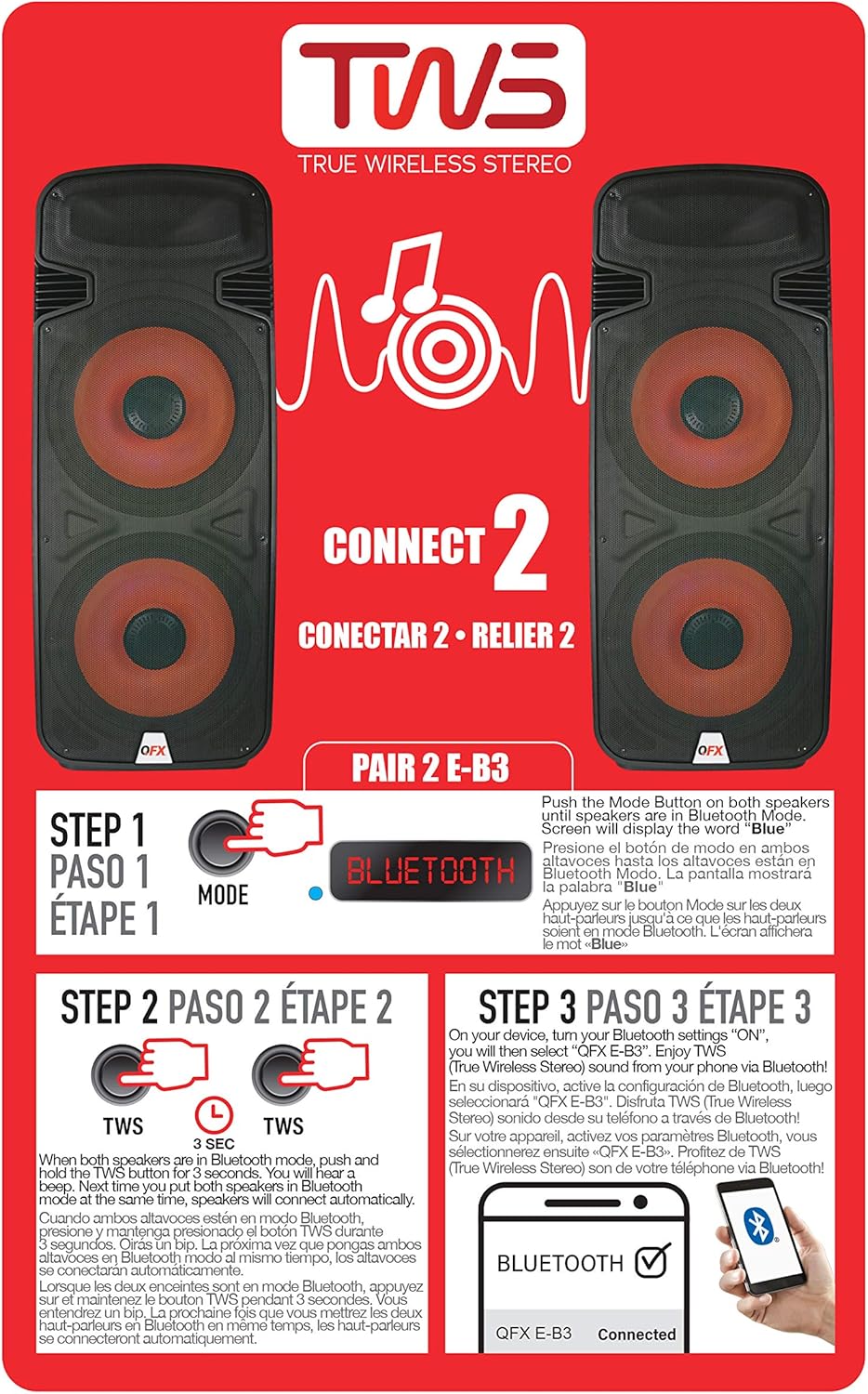
Figure 6.1: TWS Pairing Instructions.
- Ensure both QFX E-B3 speakers are powered on and in Bluetooth mode. The display on both speakers should show "BLUE".
- На адным з дынамікаў (гэта будзе ваш асноўны дынамік) націсніце і ўтрымлівайце TWS button for approximately 3 seconds. The speakers will attempt to connect to each other.
- Once successfully paired, you will hear a confirmation sound, and the display on the primary speaker will show "BLUE" while the secondary speaker will show "BLUE" as well.
- On your Bluetooth-enabled device, search for and select "QFX E-B3". The two speakers will now play audio in stereo.
Праца FM-радыё
- Націсніце РЭЖЫМ button to switch to FM radio mode. The display will show the FM frequency.
- Націсніце і ўтрымлівайце Прайграванне/Паўза button to initiate an automatic scan for FM stations. The speaker will save all found stations.
- Выкарыстоўвайце Папярэдні/наступны трэк buttons to navigate through the saved FM stations.
Прайграванне USB/SD карты
- Устаўце флэш-назапашвальнік USB або SD-карту (з сумяшчальным аўдыё files) into the respective port on the rear panel.
- The speaker will automatically switch to USB/SD mode and begin playing the audio fileс. Калі не, націсніце кнопку РЭЖЫМ кнопку, каб выбраць рэжым USB або SD.
- Выкарыстоўвайце Прайграванне/Паўза і Папярэдні/наступны трэк кнопкі для кіравання прайграваннем.
Мікрафонны ўваход
- Connect a microphone to the XLR Microphone Input on the rear panel.
- Adjust the Microphone Volume and Echo knobs to achieve the desired sound.
Уваход RCA
- Connect an external audio source (e.g., CD player, mixer) to the RCA Input (L/R) ports using appropriate RCA cables.
- Націсніце РЭЖЫМ button to select RCA input mode.
- Adjust the master volume on the speaker and the volume on your external audio source.
Святлодыёдныя ліхтары для вечарынак
The speaker features integrated LED party lights that activate automatically when the speaker is powered on. There are no specific controls for the LED lights mentioned; they are designed to enhance the audio experience.
7. Тэхнічнае абслугоўванне
Уборка
- Заўсёды адключайце дынамік ад сеткі перад чысткай.
- Выкарыстоўвайце мяккую, сухую тканіну для працірання вонкавых паверхняў дынаміка.
- Не выкарыстоўвайце абразіўныя ачышчальнікі, воск або растваральнікі, бо яны могуць пашкодзіць пакрыццё.
- Трымайце вентыляцыйныя адтуліны чыстымі ад пылу і смецця.
Захоўванне
When not in use for extended periods, store the speaker in a cool, dry place, away from direct sunlight and extreme temperatures. Cover the speaker to protect it from dust.
8. Выпраўленне непаладак
If you encounter issues with your QFX E-B3 speaker, refer to the following common problems and solutions:
| праблема | Магчымая прычына | Рашэнне |
|---|---|---|
| Няма ўлады | Power cable not connected; Power outlet not active; Speaker power switch off. | Ensure AC cable is securely connected to speaker and outlet. Check if outlet is working. Turn speaker power switch ON. |
| Няма гуку | Volume too low; Incorrect input mode selected; Audio source not playing. | Increase master volume. Press MODE button to select correct input. Ensure audio source is playing and its volume is up. |
| Bluetooth не падключаецца | Speaker not in Bluetooth mode; Device Bluetooth off; Speaker already paired to another device; Device too far. | Ensure speaker is in Bluetooth mode ("BLUE" on display). Turn on device Bluetooth. Disconnect from other devices. Move device closer to speaker (within 30 feet). |
| Спалучэнне TWS не атрымалася | Speakers not in Bluetooth mode; TWS button not held long enough. | Ensure both speakers are in Bluetooth mode. Press and hold the TWS button on one speaker for 3 seconds. |
| Прайграванне з USB/SD не працуе | Няправільны рэжым; несумяшчальны file format; Corrupted USB/SD card. | Press MODE to select USB/SD. Ensure audio files are in a compatible format (e.g., MP3). Try a different USB/SD card. |
9. Тэхнічныя характарыстыкі
| Асаблівасць | Спецыфікацыя |
|---|---|
| Марка | QFX |
| Нумар мадэлі | E-B3 |
| Максімальная выхадная магутнасць дынаміка | 250 ват |
| Тэхналогія падлучэння | USB, Bluetooth |
| Рэжым выхаду гуку | Стэрэа |
| Тып мацавання | Plug Mount, Wheel Mount |
| Тып дынаміка | Woofer (Dual 15 Inches) |
| Тып кантролера | Пульт дыстанцыйнага кіравання |
| Колер | Party LED |
| Воданепранікальны | Хлусня |
| Метад кантролю | Дыстанцыйнае |
| Дыяметр НЧ-дынаміка | 15 цалі |
| Колькасць аўдыёканалаў | 2.0 |
| Бесправадныя тэхналогіі | Bluetooth |
| Пратакол злучэння | Bluetooth |
| Крыніца харчавання | Правадная электрычная |
| Тып аўдыё драйвера | Дынамічны драйвер |
| Памер аўдыё драйвера | 15 цалі |
| Памеры прадмета (Д х Ш х У) | 16.77" Г x 13.98" Ш x 23.74" У |
| Вага прадмета | 13.2 фунта |
| Сумяшчальныя прылады | Ноўтбук, MP3-плэер, смартфон, планшэт, тэлевізар |
| UPC | 606540039618 |
10. Інфармацыя аб гарантыі
This product is covered by a limited warranty. For specific details regarding warranty coverage and terms, please refer to the warranty information provided at the point of purchase or contact QFX customer support directly. The warranty is typically per contract with the retailer.
11. Падтрымка
For technical assistance, troubleshooting beyond this manual, or inquiries about your QFX E-B3 speaker, please contact QFX customer support or your retailer. Contact information can usually be found on the manufacturer's webна сайце або ў чэку аб куплі.