
1. Уводзіны
This user manual provides essential information for the safe and efficient operation of your Redmi Smart LED TV X55. Please read this manual thoroughly before using the product and retain it for future reference.
The Redmi Smart LED TV X55 offers a 55-inch 4K Ultra HD display, powered by Android TV, and features advanced audio and visual technologies for an immersive entertainment experience.
2. Важная інфармацыя па бяспецы
Заўсёды выконвайце асноўныя меры бяспекі пры выкарыстанні гэтага вырабу, каб знізіць рызыку пажару, паражэння электрычным токам і траўмаў.
- Не падвяргайце тэлевізар уздзеянню дажджу або вільгаці.
- Не адчыняйце тэлевізарasinг; звяртайцеся да кваліфікаванага персаналу па ўсё абслугоўванне.
- Забяспечце належную вентыляцыю вакол тэлевізара.
- Use only the power cord and accessories supplied by the manufacturer.
- Трымайце тэлевізар далей ад прамых сонечных прамянёў, крыніц цяпла і моцных магнітных палёў.
- Clean the TV with a soft, dry cloth. Do not use liquid or aerosol cleaners.
3. Змесціва ўпакоўкі
Пасля распакавання пераканайцеся, што ўсе пералічаныя ніжэй прадметы наяўныя і знаходзяцца ў добрым стане:
- 1 x Redmi Smart LED TV X55
- 2 х падстаўкі для стала
- 1 х пульт дыстанцыйнага кіравання
- 4 шрубы для зборкі падстаўкі
- 1 х Кіраўніцтва карыстальніка (гэты дакумент)
- 1 х кабель харчавання
4. Прадукт скончыўсяview
The Redmi Smart LED TV X55 is designed to deliver a premium viewing and audio experience. Below are its key features and components.
4.1. Visual Features
Experience stunning clarity and vibrant colors with the 55-inch 4K LED panel. Advanced technologies enhance your viewING:
- 4K святлодыёдная панэль: Delivers ultra-high-definition resolution for sharp images.
- Dolby Vision і HDR10: Provides superior contrast, brightness, and color depth.
- HLG (Hybrid Log-Gamma): Supports broadcast HDR content.
- Рэалістычны паток і рухавік Vivid Picture: Enhances motion smoothness and picture quality.
- MEMC (ацэнка руху, кампенсацыя руху): Reduces motion blur for fast-paced scenes.

Малюнак 1: Спераду view of the Redmi Smart LED TV X55.

Малюнак 2: Закончанаview of key visual features including Dolby Vision, 4K HDR, and Vivid Picture Engine.
4.2. Аўдыёфункцыі
Immerse yourself in rich, powerful sound with the integrated audio system:
- 30W Output Speakers: Delivers clear and robust sound.
- Dolby Audio: Provides enhanced sound quality for movies and music.
- DTS Virtual:X: Стварае шматмернае гукавое ўражанне.
- Dolby Atmos Pass-through via eARC: Allows for advanced audio formats to be sent to compatible sound systems.
- DTS-HD: High-definition audio decoding for a cinematic sound.
4.3. Smart Features & Performance
The Redmi Smart LED TV X55 runs on Android TV 10, offering a user-friendly interface and access to a vast ecosystem of apps.
- Андроід ТБ 10: Provides a smooth and intuitive smart TV experience.
- PatchWall 4 з інтэграцыяй IMDb: A curated content platform with smart recommendations and IMDb ratings.
- Quad Core Processor: Ensures seamless performance and quick app loading.
- 2GB RAM + 16GB Storage: Ample memory and storage for apps and system operations.
- Built-in Wi-Fi (2x2 Dual Band) & Chromecast: Easy wireless connectivity and content casting from mobile devices.
- Ok Google: Voice control for searching content, controlling smart home devices, and more.
- Аўтаматычны рэжым нізкай затрымкі (ALLM): Optimizes settings for gaming, reducing input lag.
- Miracast: Wireless display mirroring from compatible devices.
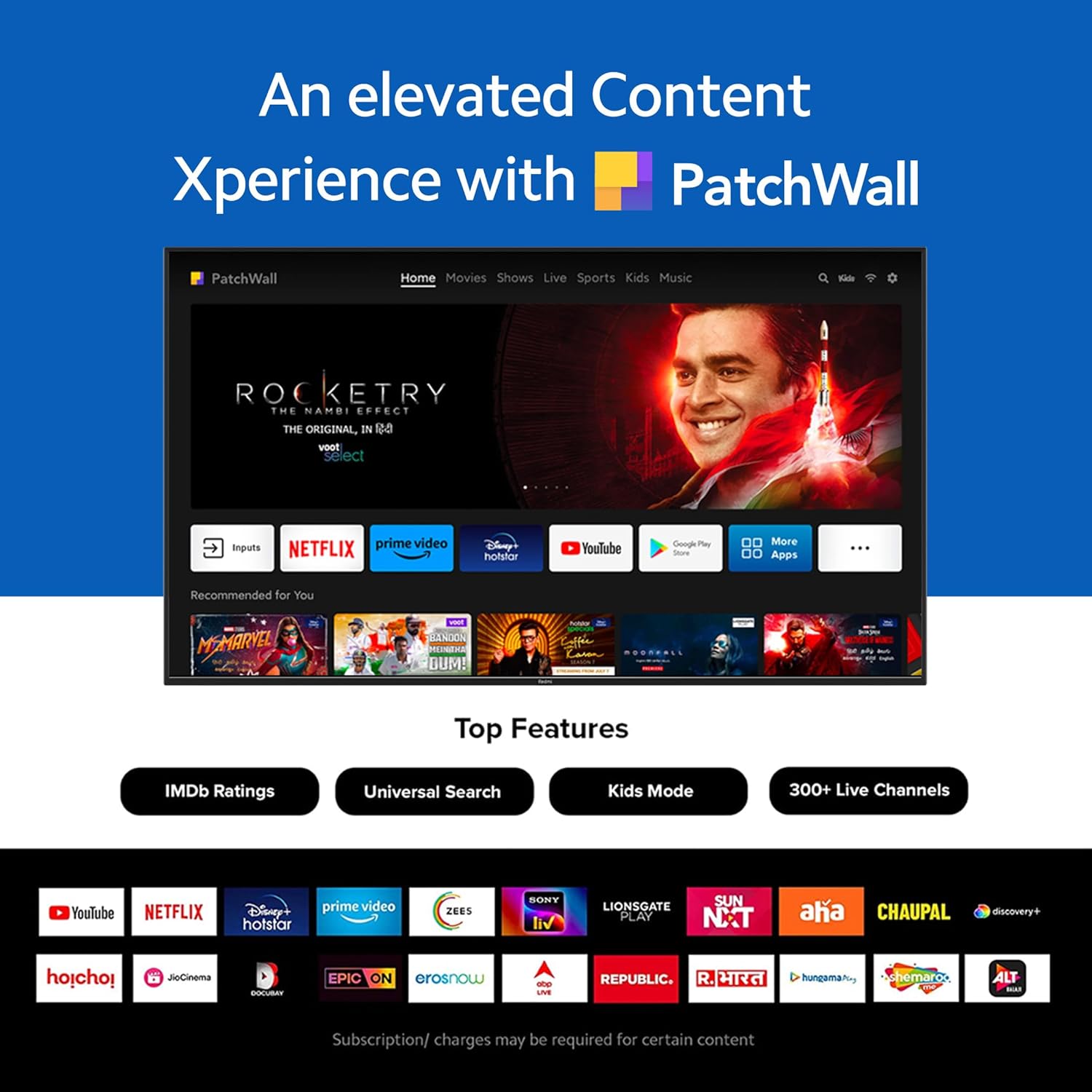
Figure 3: The PatchWall interface displaying various streaming apps and content.

Figure 4: Details on the TV's performance, including 2GB RAM, 16GB Storage, and Quad-core A55 processor.

Figure 5: Android TV 10 interface with Google Play, Ok Google, and Chromecast built-in.
4.4. Сувязь
The TV offers multiple connectivity options for various devices:
- HDMI 2.1: Multiple ports for high-definition audio and video input, supporting eARC.
- USB 2.0: Для падключэння знешніх назапашвальнікаў.
- Ethernet: Правадное сеткавае падключэнне.
- Аптычны порт: Лічбавы аўдыё выхад.
- Аўдыяпорт 3.5 мм: Для навушнікаў або знешніх дынамікаў.
- Bluetooth 5.0 with BLE: Wireless connectivity for audio devices and accessories.

Малюнак 6: Задняя частка view of the Redmi Smart TV X55 highlighting various input/output ports.

Figure 7: Close-up of the TV's ports, including HDMI 2.1, USB 2.0, Ethernet, Optical, and Headphone Jack.
5. Кіраўніцтва па наладцы
5.1. Фізічная ўстаноўка
Your Redmi Smart LED TV X55 can be installed on a table stand or wall-mounted.
- Усталёўка настольнай падстаўкі: Attach the two provided table stand bases to the bottom of the TV using the included screws. Ensure the TV is placed on a stable, flat surface.
- Ўстаноўка насценнага мацавання: For wall mounting, use a compatible VESA wall mount kit (sold separately). Follow the instructions provided with the wall mount kit and ensure professional installation for safety.

Figure 8: Dimensions of the Redmi Smart TV X55 for planning installation.
5.2. Пачатковае ўключэнне і падключэнне да сеткі
- Падключыце кабель сілкавання да тэлевізара і разеткі.
- Націсніце кнопку харчавання на пульце дыстанцыйнага кіравання або тэлевізары.
- Follow the on-screen instructions to select your language, country, and connect to your Wi-Fi network or plug in an Ethernet cable.
- Sign in with your Google account to access Android TV features and the Play Store.
5.3. Setting Up Alexa Control
You can control your Redmi TV hands-free with Alexa devices. Follow these steps to set up Alexa:
Video 1: Instructions on how to set up Alexa control for your Redmi Smart TV.
To enable advanced settings for Alexa control, refer to the following video guide:
Video 2: Guide to enabling advanced settings on Redmi TV for Alexa control.
6. Інструкцыя па эксплуатацыі
6.1. Пульт дыстанцыйнага кіравання
The sleek remote control provides quick access to essential functions:
- Хуткае абуджэнне: Уключыце тэлевізар менш чым за 5 секунд.
- Хуткае адключэнне гуку: Double-tap the volume down button to mute.
- Хуткія налады: Long press the PatchWall button to enter the quick settings menu.

Figure 9: The sleek remote control for the Redmi Smart TV X55, highlighting quick access features.
6.2. Navigating the Smart TV Interface
Use the remote's directional pad and OK button to navigate through the Android TV and PatchWall interfaces. Access apps, settings, and content recommendations easily.
6.3. Выкарыстанне галасавога кіравання
Press the dedicated voice assistant button on your remote and speak commands to control your TV, search for content, or interact with connected smart home devices via Ok Google or Alexa.
6.4. App Usage and Casting
The TV supports popular streaming services like Prime Video, Netflix, Disney+ Hotstar, YouTube, and Apple TV. You can also cast content from your mobile devices using Chromecast built-in or Miracast.
7. Тэхнічнае абслугоўванне
- Уборка: Gently wipe the screen and TV body with a soft, dry, lint-free cloth. Do not use abrasive cleaners or solvents.
- Абнаўленні праграмнага забеспячэння: Ensure your TV's software is up to date for optimal performance and security. Navigate to Settings > Device Preferences > About > System update to check for updates.
- Упраўленне харчаваннем: Адключайце тэлевізар ад сеткі падчас навальніцы або калі ён не будзе выкарыстоўвацца працяглы час.
8. Выпраўленне непаладак
If you encounter issues with your Redmi Smart LED TV X55, refer to the following common problems and solutions:
| праблема | Магчымае рашэнне |
|---|---|
| Няма ўлады | Праверце, ці надзейна падключаны кабель харчавання і ці працуе разетка. Паспрабуйце іншую разетку. |
| Няма выявы, але гук ёсць | Ensure the correct input source is selected. Check HDMI cable connections. |
| Няма гуку, але выява ёсць | Check volume levels and mute status. Verify audio output settings (e.g., internal speakers, external soundbar). |
| Пульт дыстанцыйнага кіравання не працуе | Replace batteries. Ensure no obstructions between the remote and the TV. Re-pair the remote if necessary. |
| Праблемы з падключэннем да сеткі | Restart your router and modem. Check Wi-Fi password. Try connecting via Ethernet. |
9. Тэхнічныя характарыстыкі
Detailed technical specifications for the Redmi Smart LED TV X55:
| Асаблівасць | Спецыфікацыя |
|---|---|
| Марка | Redmi |
| Назва мадэлі | X55 |
| Памер экрана | 55 цалі |
| Тэхналогія адлюстравання | LED-LCD |
| дазвол | 3840 x 2160 пікселяў (4K) |
| Частата абнаўлення | 60 Гц |
| Аперацыйная сістэма | Android TV 10 |
| Працэсар | Чатырох'ядравы A55 |
| АЗП | 2 ГБ |
| Захоўванне | 16 ГБ |
| Аўдыёвыхад | 30 ват |
| Тэхналогія падлучэння | HDMI, USB, Wi-Fi (2x2 Dual Band), Ethernet, Bluetooth 5.0 |
| Парты HDMI | 3 (HDMI 2.1, сумяшчальны з eARC) |
| Парты USB | 2 (USB 2.0) |
| Viewing кут | 178 градусаў |
| Суадносіны бакоў | 16:9 |
| Вага прадмета | 15 кг 300 г |
| Тып мацавання | Wall Mount; Table Mount |
10. Гарантыя і падтрымка
Your Redmi Smart LED TV X55 comes with a standard brand warranty. For specific warranty terms, duration, and service procedures, please refer to the warranty card included in your package or visit the official Redmi support webсайт.

Figure 10: Information regarding Mi Extended Warranty, offering benefits like zero documentation, genuine spare parts, cashless repairs, authorized service centers, and on-site support.
For installation services, Amazon will coordinate with the brand within 48 hours of delivery. Scheduled delivery options are available in select cities. Installation charges may apply.