
1. Уводзіны
This manual provides detailed instructions for the installation, setup, and operation of your BSTUOKEY 2.4G WiFi Access Control System. This system features a 125Khz EM card reader, touch keypad, IP67 waterproof rating, and Tuya Mobile APP remote access with a doorbell function. Please read this manual thoroughly before use to ensure proper functionality and safety.
2. Асаблівасці прадукту
- Падключэнне Wi-Fi 2.4G: Enables remote control and management via Tuya App.
- Множныя рэжымы доступу: Supports Smartphone (Tuya App), 125Khz EM Card, and PIN code.
- Высокая ёмістасць карыстальнікаў: 1000 hardware users (988 common, 2 panic, 10 visitor) and 100 APP users.
- Трывалая канструкцыя: Zinc Alloy anti-vandal case with IP67 waterproof rating.
- Touch Keypad with Backlight: Easy to use in various lighting conditions, with automatic off after 20 seconds.
- Integrated Doorbell Function: Capacitive doorbell button for visitor notification.
- Палепшаная бяспека: Built-in Light Dependent Resistor (LDR) for anti-tamper, Wiegand 26~44bits, 56bits, 58 bits input & output.
- Выход рэле: Compatible with various lock types including strike lock, magnetic lock, electric mortise lock, electric gate lock, and bolt lock.
- Кіраванне карыстальнікамі: Add/delete users and check opening records via Tuya App.

Image: Key features of the access control system, highlighting user capacity, Tuya App support, read range, and IP66 waterproof rating.
3. Прадукт скончыўсяview
Familiarize yourself with the components of your access control system.

Выява: спераду view of the access control keypad with key components labeled, including the indicator light, touch keyboard, card area, metal case, and doorbell button.
- Светлавы індыкатар: Displays status (e.g., red for locked, green for unlocked, flashing for programming).
- Сэнсарная клавіятура: Used for entering PIN codes.
- Плошча карты: For presenting 125Khz EM cards.
- Металічны корпус: Provides durability and anti-vandal protection.
- Кнопка дзвярнога званка: Activates the doorbell function.
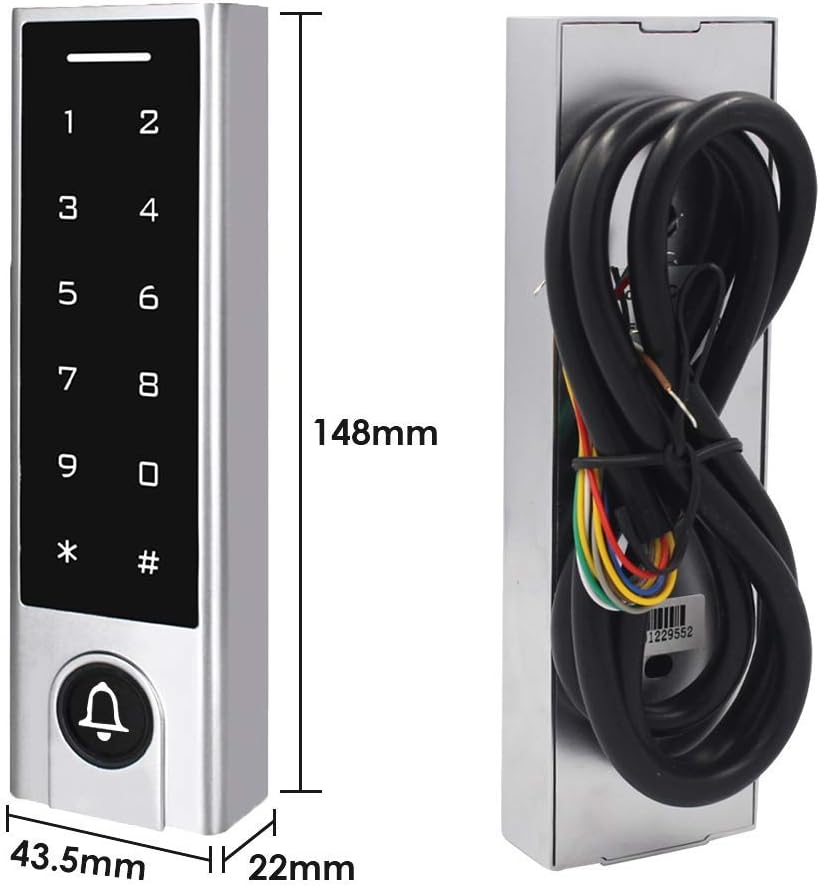
Image: Technical drawing showing the dimensions of the access control keypad: 148mm (height), 43.5mm (width), and 22mm (depth).
4. Кіраўніцтва па ўстаноўцы
Proper installation is crucial for the system's performance and security. It is recommended to have this installed by a qualified professional.
- Месца мантажу: Choose a suitable location near the door, ensuring it is within WiFi range for app functionality. The IP67 rating allows for outdoor installation, but avoid direct, prolonged exposure to extreme weather if possible.
- Бяспечнае мацаванне: Securely mount the keypad to the wall or door frame using appropriate screws and anchors.
- Праводка: Connect the access control unit to your power supply (12-18V DC) and the electric lock according to the wiring diagram provided. Ensure all connections are secure and insulated.
- Door Sensor (Optional): If using a door contact sensor, connect it to the designated terminals.
- Exit Button (Optional): Connect an exit button if required for internal door release.
- Падключэнне дзвярнога званка: Connect the external doorbell unit to the appropriate terminals on the access control system.
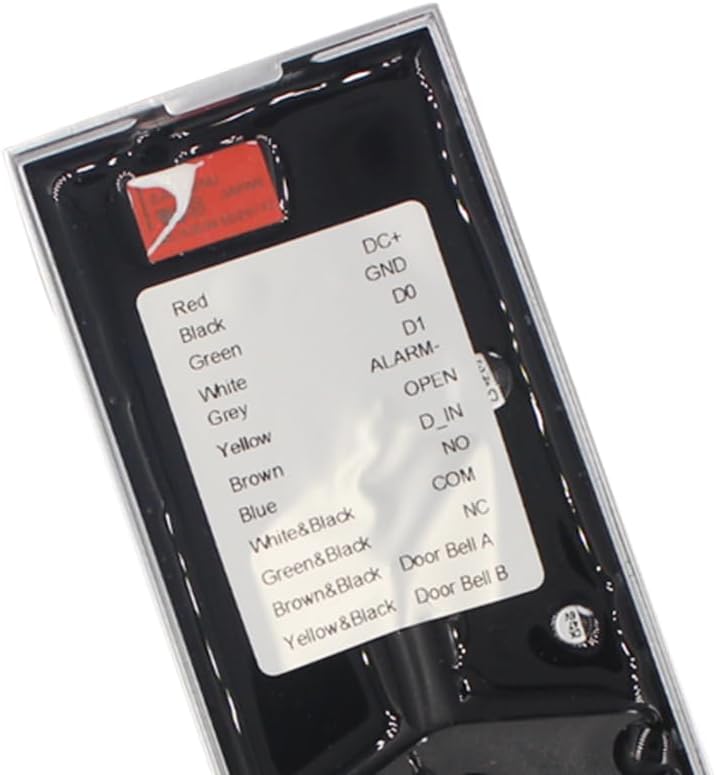
Выява: Падрабязная view of the wiring terminals on the back of the access control keypad, indicating connections for power, data, alarm, lock control, and doorbell.

Image: Comprehensive wiring diagram illustrating how to connect the access controller to a power supply, exit button, electric bolt locks (NO and NC), and an external doorbell.
5. Налада і канфігурацыя
5.1 Інтэграцыя з праграмай Tuya
The system integrates with the Tuya App for remote control and advanced user management.
- Спампаваць прыкладанне: Download the Tuya Smart App from your mobile device's app store (iOS and Android compatible).
- Рэгістрацыя/Уваход: Create an account or log in to your existing Tuya account.
- Дадаць прыладу: Follow the in-app instructions to add your access control system. Ensure your device is in pairing mode (refer to the device's indicator light or sound prompts).
- Падключыцеся да WiFi: Connect the device to your 2.4G WiFi network. No separate gateway is required.
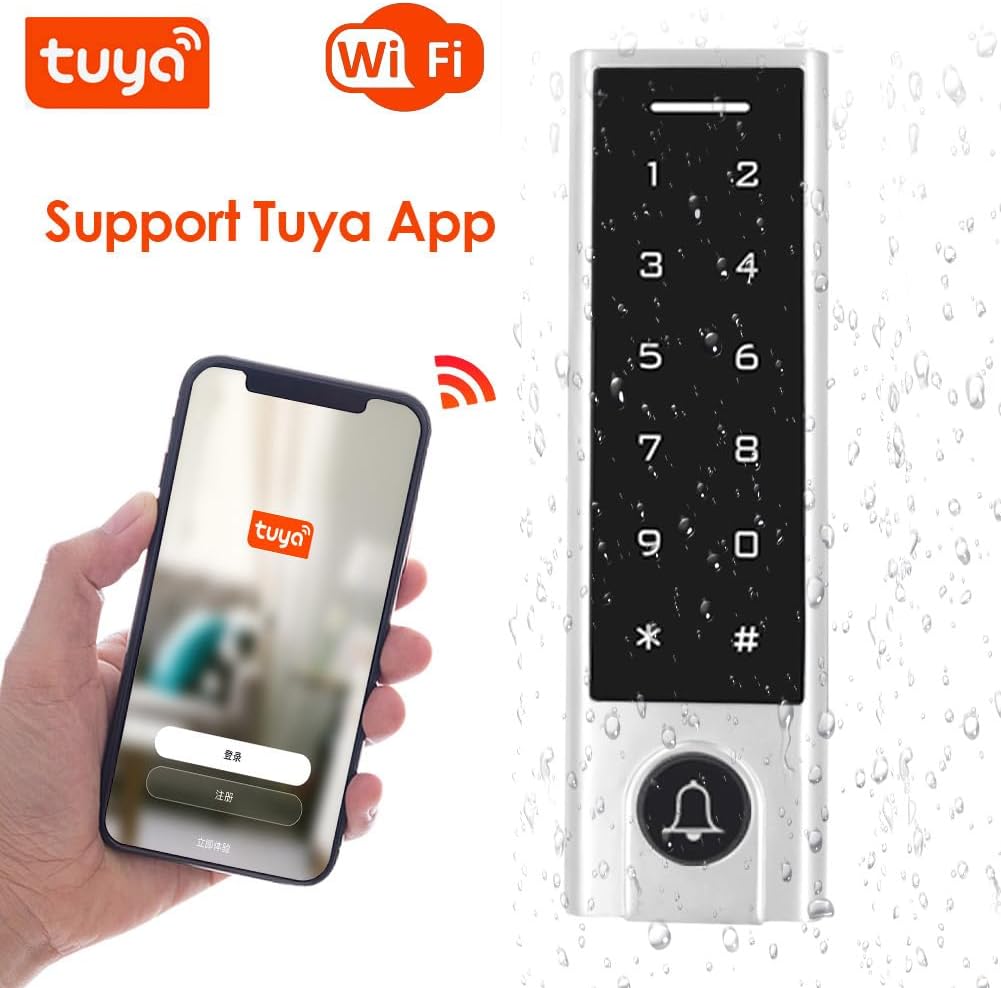
Image: The access control keypad shown alongside a smartphone running the Tuya App, demonstrating its WiFi connectivity and app support.
5.2 User Management via Tuya App
The Tuya App allows for easy addition and deletion of users, as well as viewзапісы доступу.
Video: Demonstrates how to use the Tuya App to unlock the door, generate dynamic passwords, and add/delete user cards. The video shows the keypad interacting with the app and the lock mechanism.
Adding/Deleting Users (Cards/PINs)
You can manage user access directly through the Tuya App.

Image: Visual representation of adding and deleting users through the mobile application.
- Open the Tuya App and select your access control device.
- Navigate to the 'User Management' or 'Card Management' section.
- To add a user card, select 'Add Card' and follow the prompts to present the 125Khz EM card to the keypad's card area.
- To add a PIN, select 'Add PIN' and enter the desired 6-digit code.
- To delete a user, select the user from the list and choose the delete option.

Image: The access control keypad shown with a 'Master Card' and a flowchart illustrating the process for adding or deleting users.
Viewing Opening Records
The Tuya App allows you to view a history of door opening events.

Image: A smartphone screen displaying a chronological list of door opening records, accessible through the Tuya App.
6. Інструкцыя па эксплуатацыі
The access control system offers multiple ways to unlock the door.

Image: Illustrates the three primary access modes: unlocking via smartphone app, entering a PIN on the keypad, and using an RFID card.
6.1 Unlocking via Tuya App
You can remotely unlock the door using the Tuya App from anywhere with WiFi access.
- Адкрыйце прыкладанне Tuya на вашым смартфоне.
- Select your access control device.
- Tap the 'Unlock' button or icon within the app interface. The door will unlock for a set duration (configurable in app settings).

Image: A visual explanation of how the door controller communicates via WiFi, allowing remote operation through the Tuya mobile app.
6.2 Unlocking via PIN Code
To unlock the door using a PIN code:
- Wake up the keypad by touching it.
- Enter your registered 6-digit PIN code.
- Press the '#' key to confirm. The indicator light will turn green, and the door will unlock.
6.3 Unlocking via EM Card
To unlock the door using a 125Khz EM card:
- Present your registered 125Khz EM card to the card area on the keypad.
- The indicator light will turn green, and the door will unlock.
6.4 Функцыя дзвярнога званка
Press the doorbell button on the keypad to activate the connected doorbell unit.
7. Тэхнічнае абслугоўванне
Regular maintenance ensures the longevity and optimal performance of your access control system.
- Уборка: Працярыце паверхню клавіятуры мяккай губкайamp тканінай. Пазбягайце абразіўных ачышчальнікаў або растваральнікаў, якія могуць пашкодзіць пакрыццё або электроніку.
- Праверце злучэнні: Перыядычна правярайце ўсе злучэнні правадоў, каб пераканацца ў іх надзейнасці і адсутнасці карозіі.
- Абнаўленні праграмнага забеспячэння: Keep the Tuya App updated to the latest version for new features and security enhancements.
- Ахова навакольнага асяроддзя: While IP67 rated, protecting the unit from extreme physical impact or prolonged submersion is recommended.
8. Выпраўленне непаладак
If you encounter issues with your access control system, refer to the following common problems and solutions:
| праблема | Магчымая прычына | Рашэнне |
|---|---|---|
| Клавіятура не адказвае | No power; loose connection; keypad malfunction. | Check power supply and wiring. Ensure 12-18V DC. Contact support if issue persists. |
| Door not unlocking with PIN/Card | Incorrect PIN; unregistered card; lock mechanism issue; wiring problem. | Verify PIN. Ensure card is registered via Tuya App. Check lock wiring and functionality. |
| Tuya App cannot connect to device | Device not in pairing mode; incorrect WiFi password; 5G WiFi network; poor signal. | Ensure device is in pairing mode. Verify WiFi password. Connect to a 2.4G WiFi network. Improve WiFi signal strength. |
| Дзвярны званок не звоніць | Doorbell unit not connected; faulty wiring; doorbell unit malfunction. | Check doorbell unit connection and wiring. Test the doorbell unit separately if possible. |
| Keypad beeps constantly after rain | Пранікненне вады, нягледзячы на клас абароны IP67. | Allow unit to dry completely. Ensure proper sealing during installation. Consider additional weather protection. If issue persists, contact support. |
9. Тэхнічныя характарыстыкі
| Атрыбут | Дэталь |
|---|---|
| Марка | BSTUOKEY |
| Нумар мадэлі | 621f8437 |
| Крыніца харчавання | DC (12-18 Volts) |
| Тэхналогія падлучэння | Wireless (2.4G WiFi) |
| Сумяшчальныя прылады | Смартфон (дадатак Tuya) |
| Тып ўстаноўкі | Бесправадная зрабі сам |
| Тып абвесткі | Уваход |
| Вага прадмета | 0.4 кілаграма (14.1 унцыі) |
| Метад кантролю | Дакранацца |
| Ёмістасць карыстальніка | 1000 (Hardware), 100 (App) |
| Тып карты | 125Khz RFID EM Card |
| Рэйтынг воданепранікальнасці | IP67 |
| Памеры | 148 x 43.5 x 22 мм (прыбл. 5.83 x 1.71 x 0.87 цалі) |
10. Гарантыя і падтрымка
Your BSTUOKEY Access Control System comes with a standard manufacturer's warranty. For specific warranty details, please refer to the documentation included with your purchase or contact the seller directly.
For technical support, troubleshooting assistance, or inquiries about replacement parts, please contact BSTUOKEY customer service through the platform where you purchased the product.