
1. Прадукт скончыўсяview
The FEONAL 10 inch Tablet Case is designed to provide comprehensive protection and enhanced functionality for your compatible 10-inch tablet. Crafted from high-grade thermoplastic polycarbonate, anti-skidding silicone, and premium fabric exterior, this case offers durability and a comfortable hand feeling. It features an ultra-lightweight design, drop protection, and impact resistance to safeguard your device from daily wear and tear.
Key features include elevated screen bezel edges for additional protection, precise cutouts for easy access to ports and controls, and a built-in adjustable back clip for versatile viewныя вуглы.

Figure 1: FEONAL 10 inch Tablet Case with tablet in stand position.
2. Сумяшчальнасць
This tablet case is specifically designed for 10-inch and 10.1-inch tablets. It is compatible with models such as FEONAL K105, Dragon Touch K10, MEIZE Tablet, Lectrus 10.1, Victbing 10, Hoozo 10, and Winsing 10. Please verify your tablet's dimensions and port locations to ensure proper fit and functionality.
3. Інструкцыі па ўсталёўцы
- Распакуйце корпус: Carefully remove the tablet case from its packaging.
- Prepare Your Tablet: Ensure your tablet is clean and free of dust or debris before insertion.
- Insert the Tablet: Gently slide your 10-inch tablet into the case, ensuring all edges are securely seated within the protective frame. Align the tablet with the case's cutouts for the camera, ports, and buttons.
- Secure the Magnetic Closure: Close the front cover of the case. The magnetic closure will help keep the case securely shut when not in use.

Figure 2: Magnetic closure and precise cutouts for tablet access.
4. Інструкцыя па эксплуатацыі
4.1 Using the Stand Function
The case features a built-in adjustable back clip that allows you to prop up your tablet for hands-free viewing. To activate the stand function, simply fold the back cover along the designated lines and secure it using the integrated clip. This provides a comfortable viewing angle, ideal for watching videos, reading, or video calls.

Figure 3: Utilizing the adjustable stand for comfortable viewінж.
4.2 Accessing Ports and Buttons
The case is designed with precise cutouts to ensure full access to your tablet's touch screen, side buttons, charging port, headset jack, and camera without needing to remove the case. Verify that all ports and buttons align correctly after installation.
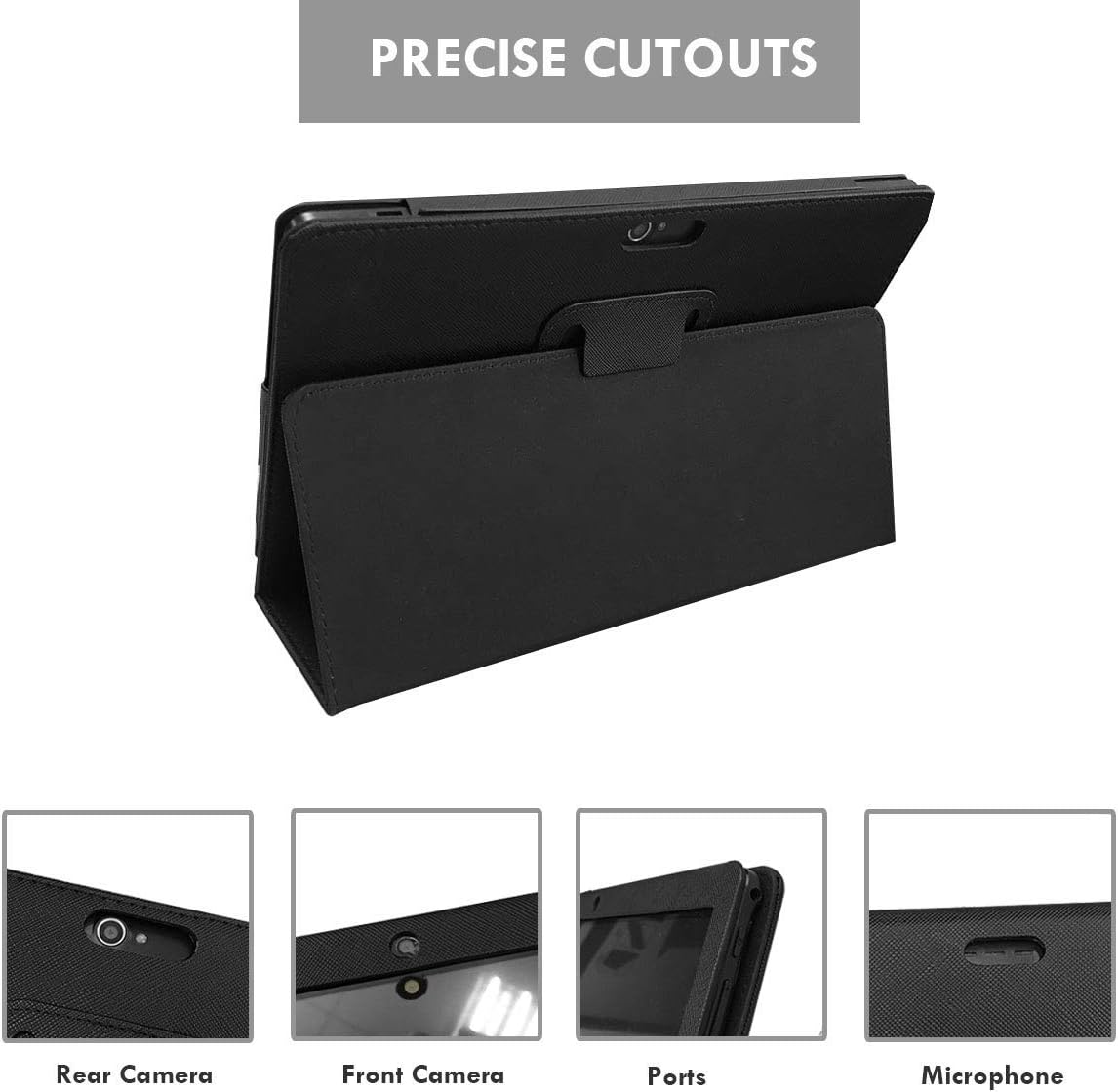
Малюнак 4: падрабязна view of precise cutouts for tablet features.
5. Тэхнічнае абслугоўванне
- Уборка: To clean the case, gently wipe it with a soft, damp тканінай. Пазбягайце выкарыстання агрэсіўных хімічных рэчываў або абразіўных ачышчальнікаў, бо яны могуць пашкодзіць матэрыял.
- захоўванне: When not in use, store the case in a cool, dry place away from direct sunlight and extreme temperatures to preserve its material integrity.
- Апрацоўка: While the case offers drop and impact protection, avoid unnecessary drops or impacts to prolong the life of both the case and your tablet.
6. Выпраўленне непаладак
- Tablet Does Not Fit Properly:
Ensure your tablet is a 10-inch or 10.1-inch model and is listed as compatible. If your tablet is a different size or model, the case may not fit correctly. Double-check the model number of your tablet against the compatible devices list.
- Ports or Buttons Are Obstructed:
While the case features precise cutouts, some tablet models may have slight variations in port or camera placement. If a port or button is obstructed, carefully re-seat the tablet within the case, ensuring it is aligned correctly. If the issue persists, the case may not be fully compatible with your specific tablet model's port layout. Refer to the compatibility section and your tablet's specifications.
- Case Does Not Stay Closed:
The case uses a magnetic closure. Ensure no foreign objects are preventing the cover from closing completely. If the magnetic closure appears weak, inspect for any damage to the magnets within the case.
7. Тэхнічныя характарыстыкі
| Марка | ФЕАНАЛ |
| Сумяшчальныя прылады | Tablets (10 inch, 10.1 inch) |
| Формаў-фактар | Справа |
| Матэрыял | Leather, Polycarbonate, Silicone |
| Max. Compatible Device Size | 10.1 цалі |
| Дадатковыя магчымасці | Screen Protector (built-in), Adjustable Stand |
| Памеры прадмета (Д х Ш х У) | 9.6 х 6.9 х 0.7 цалі |
| Вага прадмета | 0.2 кілаграма |
| UPC | 770456529546, 770456529560 |
| ASIN | B08YN5BLZW |
8. Гарантыя і падтрымка
8.1 Інфармацыя аб гарантыі
Specific warranty details for this product are not provided in the available information. Please refer to the product packaging or contact the manufacturer directly for warranty terms and conditions.
8.2 Падтрымка кліентаў
For any questions, concerns, or assistance with your FEONAL 10 inch Tablet Case, please contact FEONAL customer support. You can typically find contact information on the manufacturer's official webна сайце або праз прадаўца, дзе быў набыты тавар.
Visit the official FEONAL Store for more information: FEONAL Store on Amazon