
1. Уводзіны
Дзякуй за пакупкуasing the Trevi CMP 588 DAB Portable Stereo System. This manual provides essential information for the safe and correct operation of your device. Please read it thoroughly before use and retain it for future reference.
The Trevi CMP 588 DAB is a versatile portable stereo system featuring DAB/DAB+ and FM radio with RDS, a CD/MP3 player, USB input, AUX-in, Bluetooth connectivity, and a headphone jack, all designed for an enhanced audio experience.
2. Інфармацыя па бяспецы
- Крыніца харчавання: Выкарыстоўвайце толькі пазначаны адаптар сілкавання або батарэйкі. Пераканайцеся, што гучнасцьtagе адпавядае патрабаванням агрэгата.
- Вада і вільгаць: Do not expose the unit to rain, moisture, or immerse it in water. Avoid placing objects filled with liquids, such as vases, on the unit.
- Вентыляцыя: Забяспечце належную вентыляцыю. Не блакуйце вентыляцыйныя адтуліны.
- Цяпло: Трымайце прыладу далей ад крыніц цяпла, такіх як радыятары, абагравальнікі, пліты або іншыя прыборы (у тым ліку ampLifiers), якія вырабляюць цяпло.
- Уборка: Перад чысткай адключыце прыладу ад разеткі. Выкарыстоўвайце мяккую сухую тканіну. Не выкарыстоўвайце вадкія або аэразольныя ачышчальнікі.
- Абслугоўванне: Не спрабуйце самастойна абслугоўваць гэты прадукт. Звярніцеся да ўсіх абслугоўванняў кваліфікаванага абслуговага персаналу.
- Прайгравальнік кампакт-дыскаў: Ніколі не глядзіце прама ў лазерны прамень.
3. Змесціва ўпакоўкі
Праверце наяўнасць і спраўнасць усіх прадметаў:
- Trevi CMP 588 DAB Portable Stereo System
- Кабель сілкавання пераменнага току
- Пульт дыстанцыйнага кіравання
- Кіраўніцтва карыстальніка (гэты дакумент)
4. Асаблівасці прадукту
- DAB/DAB+ and FM Radio with RDS
- High Readability Dot Matrix Display
- CD Player (supports CD-DA, MP3)
- USB Input for MP3 Playback
- AUX-in for external audio devices
- Злучэнне Bluetooth
- Раз'ём для навушнікаў
- Партатыўны дызайн з ручкай для пераноскі
- Пульт дыстанцыйнага кіравання ў камплекце
5. Элементы кіравання і сувязі

Малюнак 1: Спераду view of the Trevi CMP 588 DAB, showing speakers, display, and main controls.
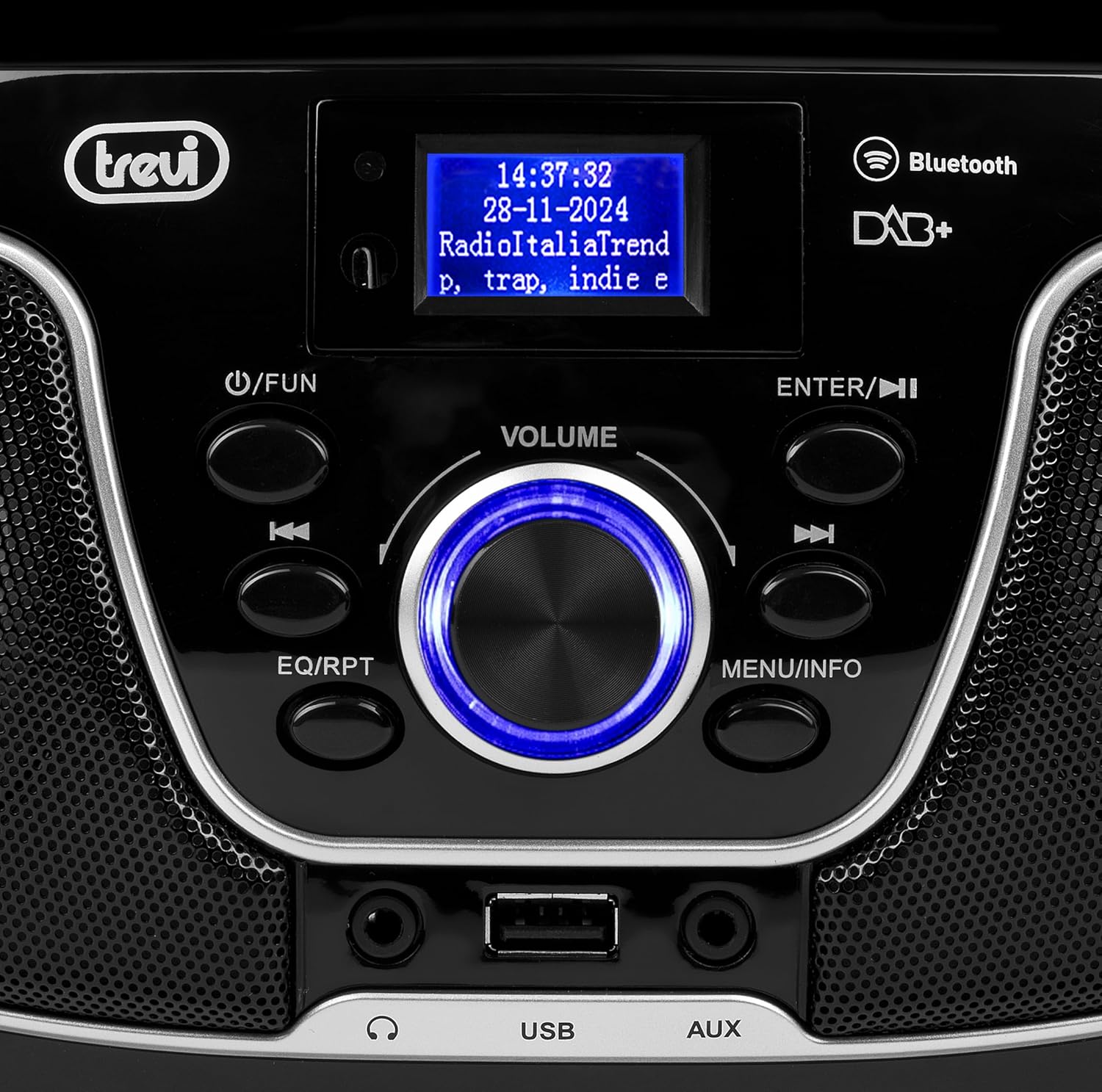
Малюнак 2: падрабязна view of the control panel, including power, function, volume knob, and navigation buttons.
Элементы кіравання на пярэдняй панэлі:
- POWER / FUN button: Press to turn on/off, press to switch functions (CD/USB/DAB/FM/Bluetooth/AUX).
- Рэгулятар гучнасці: Rotate to adjust volume. Press to confirm selections.
- ENTER / ►►I button: Confirm selection / Skip to next track/station.
- I▼▼ / EQ/RPT button: Skip to previous track/station / Equalizer settings / Repeat mode.
- MENU / INFO button: Access menu / Display information.
- Порт USB: Падключыце USB-назапашвальнікі для прайгравання MP3.
- Раз'ём AUX-in: Падключыце знешнія гукавыя прылады.
- Раз'ём для навушнікаў: Падключыце навушнікі для асабістага праслухоўвання.

Малюнак 3: Задняя частка view of the Trevi CMP 588 DAB, showing the power input and telescopic antenna.
Злучэнне задняй панэлі:
- Улада пераменнага току: Падключыце кабель сілкавання пераменнага току, які ўваходзіць у камплект.
- Тэлескапічная антэна: Выцягніце для аптымальнага прыёму радыё.

Figure 4: Remote control for the Trevi CMP 588 DAB, showing various function buttons.
Функцыі дыстанцыйнага кіравання:
- ЧАКАННЕ: Уключэнне/выключэнне харчавання.
- ФУНКЦЫЯ: Switch between modes (CD, USB, DAB, FM, Bluetooth, AUX).
- МУК: Уключыць/выключыць гук.
- RPT: Рэжым паўторнага прайгравання.
- СКАНІРАВАЦЬ: Auto scan for radio stations.
- F+/CH+, F-/CH-: Navigate folders/channels.
- EQ: Налады эквалайзера.
- PLAY/PAUSE (►II): Прайграванне/прыпыненне прайгравання.
- PREV/TUN- (▼▼): Previous track/tune down.
- NEXT/TUN+ (►►): Next track/tune up.
- СТОП (■): Спыніць прайграванне.
- МЕНЮ: Меню доступу.
- ІНФА: Адлюстраванне інфармацыі.
- ПРОГРАМА: Program tracks/stations.
- ГУЧ+ / ГУЧ-: Адрэгулюйце гучнасць.
6. Настройка
6.1 Падключэнне харчавання
- Магутнасць пераменнага току: Connect the supplied AC power cable to the AC power input on the rear of the unit, then plug the other end into a wall outlet.
- Battery Operation (Optional): For portable use, insert 6 x C-size batteries (not included) into the battery compartment on the bottom of the unit. Ensure correct polarity.
6.2 Першапачатковае ўключэнне
Націсніце POWER / FUN кнопку на прыладзе або ЧАКАННЕ button on the remote control to turn on the system. The display will light up.
6.3 Setting Up the Antenna
For optimal radio reception, fully extend the telescopic antenna located at the rear of the unit. Adjust its position for the best signal.
7. Інструкцыя па эксплуатацыі
7.1 Праца з радыё DAB/DAB+
- Націсніце POWER / FUN button repeatedly until "DAB" mode is selected.
- The unit will automatically scan for available DAB/DAB+ stations on first use. To perform a manual scan, press the МЕНЮ button, navigate to "Full Scan" and press УВОД.
- Пасля завяршэння сканавання выкарыстоўвайце ▼▼ or ►► buttons to browse through the available stations. Press УВОД выбраць станцыю.
- Націсніце ІНФА button to cycle through different information displays (e.g., program type, signal strength, time).
Праца з радыё 7.2 FM
- Націсніце POWER / FUN button repeatedly until "FM" mode is selected.
- To auto-scan and store stations, press the СКАНІРАВАЦЬ button on the remote. The unit will scan and save strong signals.
- Каб наладзіць уручную, націсніце і ўтрымлівайце ▼▼ or ►► buttons to search for the next available station. Press briefly to fine-tune the frequency.
- The RDS function will display station information (if available).
7.3 Прайграванне кампакт-дыскаў/MP3

Малюнак 5: Верх view of the Trevi CMP 588 DAB with the CD compartment open, ready for disc insertion.
- Адкрыйце вечка адсека для кампакт-дыскаў.
- Place a CD (CD-DA or MP3 CD) onto the spindle with the label side facing up.
- Зачыніце вечка аддзялення для CD.
- Націсніце POWER / FUN некалькі разоў кнопку, пакуль не будзе выбраны рэжым «CD».
- The unit will read the disc. Press PLAY/PAUSE (►II) каб пачаць прайграванне.
- Выкарыстоўвайце ▼▼ or ►► to skip tracks. Press and hold to fast forward/rewind.
- Прэса СТОП (■) каб спыніць прайграванне.
7.4 Прайграванне з USB
- Устаўце USB-назапашвальнік з MP3 files у порт USB.
- Націсніце POWER / FUN button repeatedly until "USB" mode is selected.
- Прылада аўтаматычна распазнае і пачне прайграваць MP3 files.
- Выкарыстоўвайце ▼▼ or ►► прапускаць трэкі.
7.5 Bluetooth Pairing and Playback
- Націсніце POWER / FUN button repeatedly until "Bluetooth" mode is selected. The display will show "BT" or "PAIRING".
- Уключыце Bluetooth на мабільнай прыладзе (смартфоне, планшэце і г.д.).
- Пошук available devices and select "TREVI CMP 588 DAB" from the list.
- Once paired, you can play audio from your device through the stereo system.
- Use the controls on your mobile device or the stereo system to manage playback.
7.6 Праца з дапаможным уваходам AUX
- Connect an external audio device (e.g., MP3 player, smartphone) to the AUX-in jack using a 3.5mm audio cable (not included).
- Націсніце POWER / FUN некалькі разоў кнопку, пакуль не будзе абраны рэжым «AUX».
- Play audio from your connected device. The volume can be controlled via both the stereo system and the external device.
8. Тэхнічнае абслугоўванне
8.1 Чыстка прылады
Працярыце знешнія паверхні прылады мяккай сухой тканінай. Не выкарыстоўвайце абразіўныя ачышчальнікі, воск або растваральнікі, бо яны могуць пашкодзіць пакрыццё. Перад чысткай пераканайцеся, што прылада адключана ад сеткі.
8.2 Сыход за лінзамі CD
If the CD player experiences reading errors, the lens may be dirty. Use a commercially available CD lens cleaner to clean the lens. Do not touch the lens with your fingers.
8.3 Захоўванне
If the unit will not be used for an extended period, remove the batteries (if applicable) and unplug the power cable. Store the unit in a cool, dry place away from direct sunlight and extreme temperatures.
9. Выпраўленне непаладак
| праблема | Магчымая прычына | Рашэнне |
|---|---|---|
| Няма ўлады | Сеткавы кабель не падключаны; батарэйкі разраджаныя або няправільна ўстаўленыя. | Check power cable connection; Replace batteries or ensure correct polarity. |
| Няма гуку | Занадта нізкі гук; уключана функцыя адключэння гуку; выбрана няправільная крыніца. | Increase volume; Deactivate mute; Select correct function (CD, USB, DAB, FM, BT, AUX). |
| Дрэнны прыём радыё | Antenna not extended or positioned incorrectly; Weak signal area. | Цалкам высуньце і адрэгулюйце тэлескапічную антэну; паспрабуйце перанесці прыладу ў іншае месца. |
| CD/USB не прайграваецца | Disc dirty/scratched; Incorrect file format on USB; USB drive not properly inserted. | Clean or replace disc; Ensure MP3 format for USB; Reinsert USB drive. |
| Спалучэнне Bluetooth не атрымалася | Device too far; Bluetooth not enabled on source device; Unit not in pairing mode. | Move devices closer; Enable Bluetooth on source device; Ensure unit is in Bluetooth mode and searching. |
10. Тэхнічныя характарыстыкі
- мадэль: CM 588 DAB
- Крыніца харчавання: AC 230V ~ 50Hz or 6 x C-size batteries (not included)
- Спажываная магутнасць: 15 ват
- Тып дынаміка: Stereo (2 speakers)
- Падключэнне: Bluetooth, USB, AUX-уваход
- Падтрымліваюцца аўдыяфарматы: Аўдыё на кампакт-дысках (CD-DA), MP3
- Радыёчастоты: DAB/DAB+, FM з RDS
- Памеры (Д х Ш х У): 50 х 50 х 28 см (прыблізна)
- Вага: 1.5 кілаграмы (прыблізна)
- колер: Чорны
11. Гарантыя і падтрымка
This product is covered by a standard manufacturer's warranty. Please refer to the warranty card included in your package for specific terms and conditions, including the warranty period and coverage details.
For technical support, service, or warranty claims, please contact your retailer or the official Trevi customer service. Contact information can typically be found on the Trevi webсайце або ва ўпакоўцы прадукту.
Please retain your proof of purchase (receipt) for any warranty-related inquiries.