
1. Прадукт скончыўсяview
The TRUDIN Digital Kitchen Scale is designed for precise measurement of ingredients in cooking and baking. Featuring a durable 304 stainless steel platform and a clear LCD display, it offers accurate readings up to 33 lbs (15 kg) with 1g/0.1oz increments. Its compact design and multiple unit conversion capabilities make it an essential tool for any kitchen.
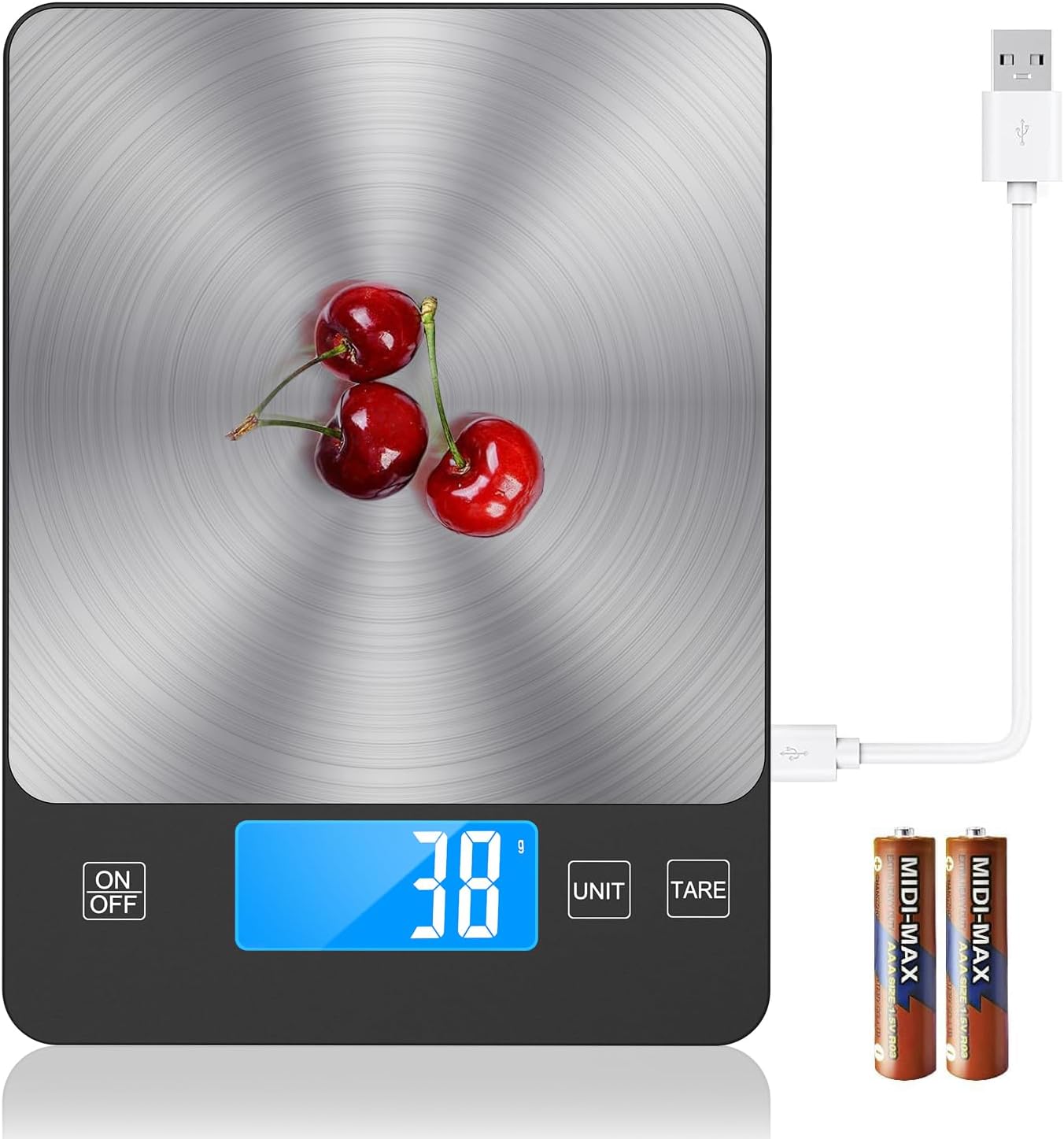
The TRUDIN Digital Kitchen Scale features a sleek stainless steel surface and a clear LCD display, designed for precise measurements in cooking and baking.
2. Змесціва ўпакоўкі
Калі ласка, пераканайцеся, што ўсе прадметы прысутнічаюць у камплекце:
- Digital Kitchen Scale (x1)
- Кабель USB (x1)
- Батарэі AAA (x2)
3. Настройка
3.1 Уключэнне вагі
The TRUDIN Digital Kitchen Scale offers two power methods: USB charging and AAA battery power.
- USB-зарадка: Connect the provided USB cable to the scale's charging port and a compatible USB power source. The scale has a built-in rechargeable battery.
- Магутнасць батарэі: Open the battery compartment on the underside of the scale and insert two AAA batteries, ensuring correct polarity (+/-).

The scale supports two power methods: a built-in rechargeable battery via USB cable and two AAA batteries. Ensure batteries are inserted correctly or connect the USB cable for charging.
3.2 Пачатковае размяшчэнне
Place the scale on a hard, flat, and stable surface to ensure accurate measurements. Uneven surfaces can lead to inaccurate readings.
4. Інструкцыя па эксплуатацыі
4.1 Уключэнне/выключэнне
- Press the "ON/OFF" button to turn the scale on.
- Press and hold the "ON/OFF" button to turn the scale off. The scale will automatically turn off after 120 seconds of inactivity to conserve energy.
4.2 Пераўтварэнне адзінак
The scale can convert between five units of measurement.
- Press the "UNIT" button to cycle through the available units: grams (g), kilograms (kg), pounds:ounces (lb:oz), ounces (oz), and milliliters (ml).

The scale allows easy conversion between grams (g), kilograms (kg), pounds:ounces (lb:oz), fluid ounces (fl'oz), and milliliters (ml) using the 'UNIT' button.
4.3 Функцыя тары
The Tare function allows you to subtract the weight of a container or previous ingredients, enabling you to measure only the net weight of new items.
- Пастаўце пусты кантэйнер на шалі.
- Press the "TARE" button. The display will reset to zero.
- Add the ingredients you wish to weigh into the container. The display will show only the weight of the added ingredients.

To measure the net weight of ingredients, place an empty container on the scale, press the 'TARE' button to reset the display to zero, then add your ingredients.
4.4 Дакладнасць вымярэнняў
This digital food scale provides precise weight graduation accurate to 1g (0.1oz). The measuring range is from 0.1oz (3g) to 33 lbs (15kg).

The scale provides precise measurements, accurate to 1 gram or 0.1 ounce, essential for baking and cooking.
5. Тэхнічнае абслугоўванне
5.1 Ачыстка
To clean the scale, wipe the surface with a slightly damp cloth. Do not immerse the scale in water or use abrasive cleaning agents, as this may damage the electronic components.
5.2 Захоўванне
Store the scale in a cool, dry place away from extreme temperatures and humidity. Its slim design allows for easy storage in drawers or cabinets.
6. Выпраўленне непаладак
Агульныя праблемы і рашэнні:
- "Lo" or Low Battery Indicator: If the display shows "Lo", the batteries are low. Replace the AAA batteries or recharge the built-in battery via the USB cable.
- "O-Ld" or Overload Indicator: This indicates that the weight on the scale exceeds its maximum capacity (33 lbs / 15 kg). Remove the excess weight immediately to prevent damage to the scale.
- Няправільныя паказанні: Ensure the scale is placed on a flat, stable, and level surface. Avoid placing it near strong electromagnetic fields or vibrating equipment. If issues persist, try turning the scale off and on again.
- Шкала не ўключаецца: Check if the batteries are inserted correctly and have sufficient charge. If using USB power, ensure the cable is properly connected and the power source is active.
7. Тэхнічныя характарыстыкі
| Асаблівасць | Дэталь |
|---|---|
| Марка | ТРУДЗІН |
| Нумар мадэлі | 001 |
| Абмежаванне вагі | 33 фунтаў (15 кг) |
| Дакладнасць счытвання | 1 г / 0.1 унцый |
| Матэрыял | Нержавеючая сталь |
| Тып дысплея | ВК |
| Памеры прадукту | 9 х 6.3 х 0.7 цалі |
| Вага прадмета | 9.6 унцыі |
| Крыніца харчавання | 2 AAA batteries (included) / USB Charging |
| Асаблівасць | Tare Function, Unit Conversion |
8. Гарантыя і падтрымка
TRUDIN provides lifetime after-sales service for this product. We take full responsibility for any loss or damage of the product during transportation and for defects in materials and workmanship.
For any questions, concerns, or support needs, please contact TRUDIN customer service through the platform where you purchased the product or refer to the contact information provided with your purchase documentation.